Social Wall
  Feed Analytics


Staring at an empty compose box is the hardest part of running a business account on X (Twitter).
You know you should be posting. You just don’t know what, so you end up sharing another link or saying nothing for a week.
The fix isn’t inspiration. It’s having a short list of formats you can rotate through without thinking about it.
When I first started using X (Twitter) for business, figuring out what kinds of X posts truly made a difference was a real challenge, especially with all the noise and constant updates.
At Smash Balloon, we’ve seen firsthand how strategic social media content can transform a business, and we’ve helped countless brands maximize their presence on social media platforms.
In this article, I’ll break down nine types of X posts that actually work so you can start growing your business today.
Quick Answer: The types of X posts that work for business are threads, product teasers, giveaways, polls, customer testimonials, quote posts, media mentions, limited-time offers, user-generated content, native video, replies, and product placement posts.
Threads pull the most engagement of any format, often several times a single post, because X (Twitter) rewards the time people spend reading. Start with two or three types, post them consistently, then double down on whichever earns replies.
In This Article:
What Types of X posts Work Best for X (Twitter)?
Here are the 12 formats worth rotating through. None of them need a big announcement or a content calendar, and most take under five minutes to write.
1. Product Teaser X post
A teaser gives people a reason to pay attention before you have anything to sell them.
The mistake is doing it once. One post saying “something’s coming” gets ignored. A run of three or four, each revealing a bit more, builds an actual audience for launch day.
Drip the details. Show a detail shot first, then a feature, then the date.
They build product excitement and establish strong brand awareness at the same time.
How can you make product teaser X posts more effective? You can reveal a series of teasers that provide new information with each post.
Pro-tip: The next time you’re about to launch a new product, you can post about it on X (Twitter) for your followers to see.
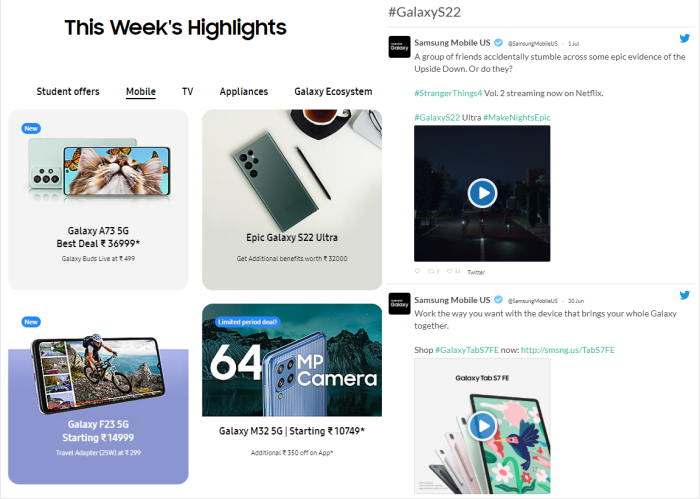
And if you want to expose it to more targeted traffic, you can even display an X (Twitter) hashtag feed on your website’s sidebar!
This way, your website visitors will know more about it when they check out your website.
With the help of Smash Balloon X (Twitter) Feed Pro and a specific branded hashtag, we created a product teaser feed in under 5 minutes!
Want to learn how to do it for your own brand? Check out this step-by-step tutorial on how you can easily embed an X (Twitter) hashtag feed on your WordPress.
2. Viral Giveaway X posts
Another type of X post that can help you generate more sales for your business is a viral giveaway X post. After all, 1/3 of contest participants are open to receiving more details about your brand.
The more they’re open to engaging with you, the more likely they are to trust you and do business with you over time.
What can you do to increase your giveaway X post’s conversions?
Make it as easy as possible to join.
Take Domino’s Pizza’s giveaway X post, for example.
To enter the giveaway, the user just needs to repost for a chance to win the prize. This giveaway X post is short, simple, and super effective, with over 8,400 reposts in total.
Pro-tip: If you’re a newbie at creating giveaways, don’t worry. You can use RafflePress, the best WordPress giveaway plugin for creating viral contests.
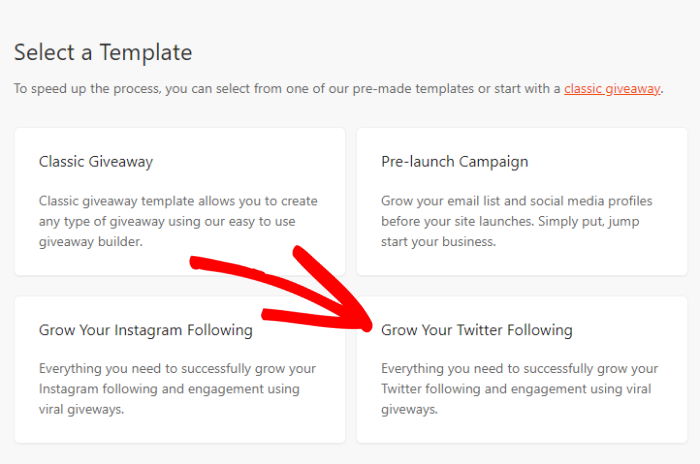
To create a viral giveaway with just a few clicks, use its drag-and-drop giveaway builder. Then, choose the “Grow Your X (Twitter) Following” giveaway template from RafflePress:
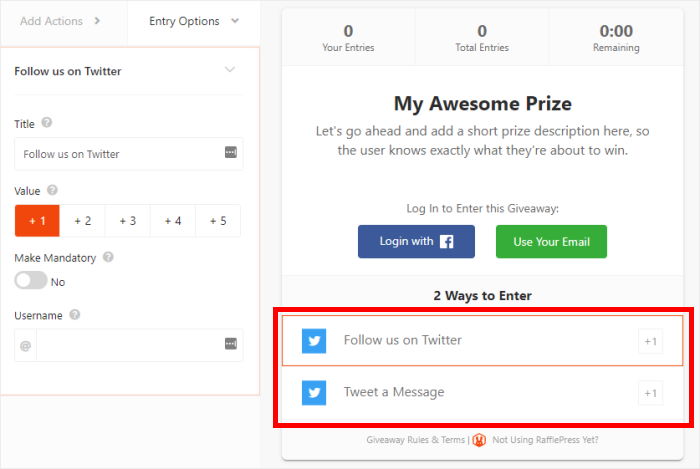
Even better, this X (Twitter) giveaway template automatically adds the option for users to follow you and post a message to enter your contest — no need for you to spend lots of time in adding them!
Want more giveaway ideas? Check out this ultimate guide on creating viral X (Twitter) giveaways to boost your brand’s growth.
3. Product Placement X posts
People who follow a business account have already decided they’re interested. They don’t need convincing; they need reminding.
The trick is not asking for the sale directly. Give them a choice between two products, and you’re starting a conversation instead of running an ad.
In the example below, Starbucks does this type of X post best with their product placement X post.
By promoting their seasonal drinks in their X posts, Starbucks encourages their existing users to buy from them.
Instead of asking them directly to make a purchase, Starbucks offered 2 drink options to give their followers more control over what they wanted to buy.
Pro-tip: In addition to promoting your products to your followers, why not promote them to your website visitors as well?
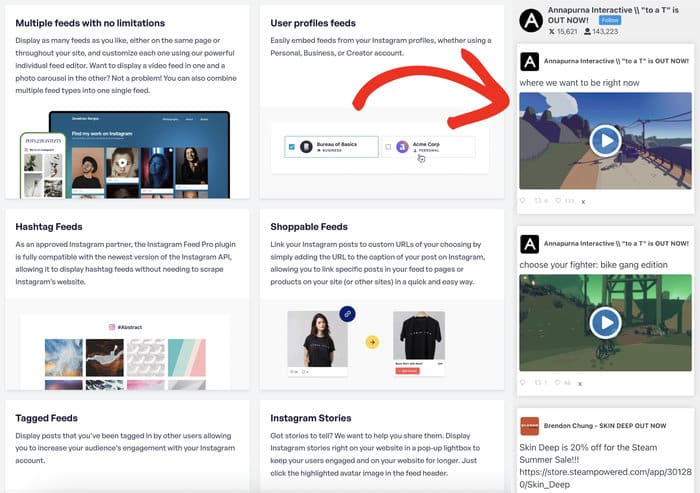
By using Smash Balloon X (Twitter) Feed Pro, you can easily show an X (Twitter) feed of your existing products on your sidebar area.
Here’s an example of a widget displayed on a website’s sidebar. And the best part? It took us under 5 minutes to make this visually appealing widget.
Not tech-savvy? Not a problem!
Check out this full tutorial on how you can easily add an X (Twitter) widget to your WordPress website so you can promote your products to a wider audience today.
4. Limited-Time Promotion X posts
Holding a special sale in-store or online? Make sure to let your followers know by posting about it!
After all, 52% of users follow a brand on X (Twitter) because they want to get notified of upcoming sales and promotions.
To generate more sales, Wendy’s posted a limited-time promotional X post for their followers on X (Twitter). In partnership with a food delivery service, Wendy’s is offering $30 off for a special order.
Since their offer will expire soon, more users are likely to get the discount so they won’t miss out. This is exactly what FOMO (fear of missing out) marketing is all about.
Use FOMO to boost your sales and grow your business by checking out these effective FOMO marketing examples in this article.
5. Threads
If you only add one format from this list, make it this one. Threads consistently out-earn single posts on X (Twitter), often by several times, because the algorithm rewards how long someone spends on your content, and a thread holds attention far longer than one post can.
A thread works best at four to eight posts. Any shorter, and it should have been a single post. Any longer and people drop off halfway.
Three thread shapes that work for business:
- The breakdown. “We increased trial signups 40% last quarter. Here’s exactly what we changed.” Then one change per post.
- The story. A customer’s problem, what you did, what happened. Same structure as a testimonial, with room to breathe.
- The teardown. Walk through something in your industry that’s done well, or badly, and say why.
Two things make a thread land. The first post has to work completely on its own, because most people will only ever see that one. And the last post should tell readers what to do next, whether that’s following you, replying, or clicking through.
Pro-tip: Your best threads shouldn’t live only on X (Twitter). Embed your X (Twitter) feed on a relevant page of your site, and the whole thread stays in front of readers who never saw it in the timeline.
6. Customer Testimonial X posts
Your customers are already saying good things about you. Most businesses just never look.
Check your mentions once a week and repost the good ones. It costs you nothing, it tells the customer you noticed, and it puts someone else’s praise on your timeline instead of your own.
Plus, it’s a great way to boost customer conversion. 97% of shoppers say reviews influence buying decisions, after all.
At the same time, you’re letting your existing customers know that you appreciate their feedback. This means people will be more open to reaching out to your brand online.
Looking for more details on how to use these mentions on your site? Check out this helpful article on creating powerful testimonial pages for your business.
Pro-tip: Want to show reviews from Google reviews, Yelp, Tripadvisor on your site? This next post on the best ways to embed review widgets on WordPress can help you.
7. Media Mentions
Press coverage has a short shelf life unless you do something with it. A mention in a publication your audience reads is worth reposting and worth keeping visible long after the article stops getting traffic.
This works best when you add context. Say what the piece got right, or what it means for your customers, rather than just sharing the link.
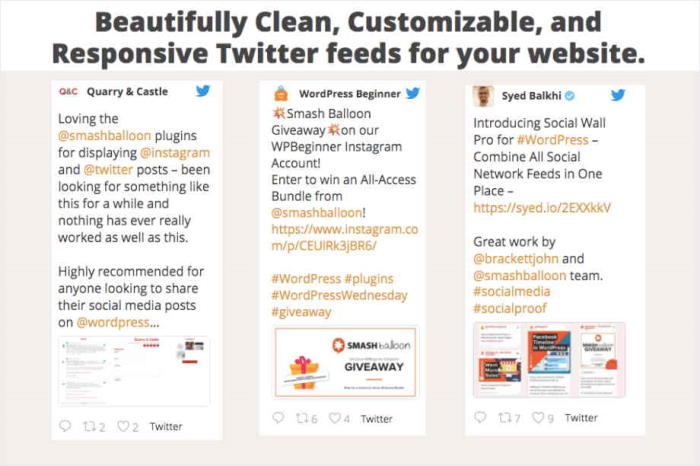
It’s especially great if you’re associated with thought leaders in your industry, like this example of Syed Balkhi featuring Smash Balloon on X (Twitter).
Pro-tip: Already reposted media mentions on your X (Twitter) timeline?
Why not go the extra mile and display an interactive media mentions timeline on your own website? With the help of a newbie-friendly plugin like X (Twitter) Feed Pro, we recreated Smash Balloon’s mentions timeline below:
This isn’t the only type of social proof that can help you increase your profits.
For more types of social proof that can help skyrocket your sales, check out this full post.
Your best posts deserve more than 20 minutes
Posts disappear from the timeline fast. Put your best ones on your website, where visitors already trust you.
Get Smash Balloon X (Twitter) Feed Pro8. User Engagement X posts
Customers want to be heard. And they want to be listened to and responded to — fast!
40% of shoppers expect brands to reply within the first hour of reaching out on social media.
That’s why responding to user X posts is an effective way to encourage brand loyalty, increase X (Twitter) engagement, and increase sales over the long run.
In managing your X (Twitter) account, spend a few minutes each day monitoring your timeline for customer feedback so you can promptly address it.
Doing this lets your existing and potential customers know that you’re a transparent business worthy of their trust.
And this type of X post isn’t limited to negative feedback only. You can also use this to reply to positive customer comments on X (Twitter), just like what WPBeginner did in this example below:
9. Share Relevant User-Generated Content
What do top brands like Starbucks, PlayStation, and GoPro have in common on X (Twitter)?
They all share user-generated content (UGC) on their own timelines.
And with shoppers saying that UGC is almost 10 times more effective in influencing their buying behavior than influencer content, reposting UGC can help your business grow more.
Good news: this type of X post is actually easy to curate.
Just encourage your customers to submit them to you so you can share them on your timeline with proper credit to the original content owner, just like what GoPro did below:
10. X (Twitter) Polls
The great thing about an active social media platform like X (Twitter) is you don’t need to go very far just to get valuable opinions from your target audience.
With the built-in polling feature, you can ask your followers about their product preferences and get results in just a few hours!
This is a win-win situation for you and your followers: you get information about their product preferences, and your followers feel more included in helping you generate ideas to help improve your business.
Pro-tip: Want more users to respond to your X (Twitter) polls?
You can embed your X (Twitter) feed on your WordPress so your website visitors can see your questions and respond to them in a timely manner.
Here’s the full tutorial on how you can add a custom X (Twitter) feed to your website.
Ready to upgrade your X (Twitter) marketing campaigns? Get Smash Balloon X (Twitter) Feed Pro today!
11. Quote Posts
A quote post is where you share someone else’s post with your own commentary on top. It’s the easiest type on this list to produce, because someone else already wrote the hard part.
Use them for industry news your audience cares about, a customer’s post you want to amplify, or a take you disagree with and can argue against politely.
The rule that separates a good quote post from a pointless one: add something. “This.” or “Great thread” contributes nothing and gets no reach. Your commentary needs to be worth reading on its own, so explain why it matters to your specific audience.
This works especially well for smaller accounts. Quoting a larger account in your industry puts your take in front of people already interested in the topic.
Aim for three or four a week. More than that and your timeline turns into other people’s content.
12. Native Video Posts
X (Twitter) now handles video far better than it did a few years ago, and video uploaded straight to X (Twitter) outperforms a link to a video hosted elsewhere. The platform has no reason to send people away from the app.
What works for business:
- A 30-second product demo. One feature, one problem it solves.
- A customer saying something good on camera. Even phone footage beats a written quote.
- A short behind-the-scenes clip. How something is made, packed, or fixed.
Two practical notes. Add captions, because most people watch on mute. And keep it vertical or square, since almost everyone is on a phone.
You don’t need production value. A clear phone video with good audio does the job better than something that looks like an ad.
Types of X posts for Business: Common Questions
How often should a business post on X (Twitter)?
Three to five posts a day is the range most businesses land on. Past eight, returns drop off sharply. If that sounds like a lot, remember that replies and quote posts count, and both take under a minute.
How long should a business X post be?
Short posts in the 70 to 100 character range work best for quick takes. Promotional posts do better around 120 to 150 characters, and educational content can run to 250. Beyond that, engagement falls away, which is what threads are for.
Which type of X post gets the most engagement?
Threads, by a clear margin. They hold attention for longer, and X (Twitter)’s algorithm rewards time spent on a post. Video is second.
How many hashtags should a business use on X (Twitter)?
One or two, and only if they genuinely fit. Stuffing posts with hashtags reads as spam now. Broad industry tags people actually search beat niche ones nobody does.
Do I need X Premium to grow a business account on X (Twitter)?
No, but it helps with reach and lets you write longer posts. Most small businesses do fine without it. Consistency matters more than any subscription.
What should I post if I have nothing to announce?
That’s what most of this list is for. Polls, replies, quote posts and user-generated content all need nothing new from you. Announcements are the smallest part of a working X (Twitter) presence.
Start Turning Your X posts Into Traffic and Sales
When I first tried to use X (Twitter) to grow a business, I had the same problem most people do: I could write decent X posts, but they disappeared fast.
It felt like shouting into a busy street and hoping the right people happened to walk by. Yikes.
What changed things for me was not just what I posted, but where those X posts showed up.
That’s why at Smash Balloon, I like to connect these proven X post types with X (Twitter) Feed Pro.
It lets you bring your best X (Twitter) content onto your website, where visitors already trust you and are ready to take action.
For real business growth, here’s what I suggest you do next:
- Pick 2–3 X post types from this list and start posting them regularly.
- Get started with Smash Balloon X (Twitter) Feed Pro here to embed focused feeds (like testimonials, product promos, or hashtag campaigns) on your key pages.
- Watch which X post styles get the most clicks, replies, and traffic back to your site, then do more of what works.
Think of X (Twitter) as the conversation and your website as the home base.
When you connect the two with X (Twitter) Feed Pro, your X posts don’t just get likes. They help you get leads and customers.
Not sure how to set up the right feeds for your business?
Ask me in the comments below. I’ve seen many different setups, and I can share what usually works best for your kind of site.
Interested in more X (Twitter) marketing tips? You may want to check out this next post on the best X (Twitter) widget examples you can embed on your website.
Finally, if you enjoyed this article, feel free to follow us on X (Twitter) and Facebook for more social media marketing tutorials and tips to help your business succeed online.