Social Wall
  Feed Analytics

You’re posting consistently. Showing up on Instagram, LinkedIn, maybe TikTok.
You open GA4, look at your traffic sources, and social media is responsible for maybe 2% of your sessions. Sometimes less.
That’s not a failure on your part. It’s partly by design. Every major social platform has a financial incentive to keep people scrolling, which means their algorithms work against content that sends people somewhere else.
External links get suppressed. Reach drops. You did everything right. The needle didn’t move.
I’ve worked with enough small business owners and content creators to know this is one of the most common frustrations in digital marketing. The social presence is real. The website traffic from it is almost invisible.
What I’ve noticed when looking at businesses that actually do drive consistent referral clicks: they’re not posting more. They’re treating social as a discovery layer with deliberate off-ramps to their site, not just a broadcast channel. That distinction is basically the whole thing.
Here’s what actually works, and why most of the generic advice doesn’t get you there.
In This Article
- Does Social Media Actually Drive Website Traffic?
- Why Most Social Media Activity Doesn't Become Website Traffic
- The Platforms That Actually Drive Traffic
- What Actually Works: 7 Ways to Drive Social Traffic to Your Site
- 1. Give People a Real Reason to Click
- 2. Match the Destination to What You Posted
- 3. Use Short-Form Video to Tease Content That Lives on Your Site
- 4. Pin Your Best Traffic-Driving Posts
- 5. Write Captions That Create a Gap Your Site Resolves
- 6. Be Specific in Your CTAs
- 7. Repurpose Your Best Site Content Into Social-Native Formats
- The Reverse Strategy: Bring Your Social Content to Your Site
- How to Know If Your Social Strategy Is Actually Working
- FAQ on Building Organic Social Media Presence
- Start Driving Real Traffic From Social Now
Does Social Media Actually Drive Website Traffic?
Yes, but only if you build for it. According to Statista, social media accounts for roughly 3 to 5% of website traffic on average across industries, though this varies significantly by platform, content type, and how deliberately you’ve designed your posts for off-platform clicks. Some brands see 15% or more. Others post daily and get almost nothing from social referrals. The difference is strategy, not volume.
You can grow your following and see near-zero referral traffic at the same time. Plenty of businesses do. The rest of this article is about not being one of them.
Why Most Social Media Activity Doesn’t Become Website Traffic
Three things are working against you, and understanding them is the first step to fixing them.
The platform incentive problem. Social platforms make money from attention. Sending people to your website is literally the opposite of what they’re built for.
Algorithms on Instagram, TikTok, LinkedIn, and Facebook all deprioritize content that includes external links. A post with a link in the caption gets less reach than the same post without one. Instagram doesn’t allow clickable links in captions at all. These platforms are built to keep people there, full stop.
The attention problem. Even when you include a link, most social content doesn’t give people a compelling reason to click it.
“New blog post” or “check the link in bio” aren’t reasons to stop scrolling. They assume the reader is already motivated. Usually they aren’t. The post itself has to make them want more.
The friction problem. One extra click is often one too many if the destination isn’t obvious.
If someone sees “link in bio,” goes to your profile, finds a Linktree, and has to decide which link to click, you’ve already lost most of them. Every step between “interested” and “actually on your site” costs you people who were initially willing to go.
The Platforms That Actually Drive Traffic
Not all platforms are equal on referral traffic. Here’s an honest breakdown of what each one actually does for site clicks, and who each platform makes sense for.
| Platform | Referral Potential | How Links Work | Best For |
|---|---|---|---|
| High | Direct link on every pin | Visual content, product discovery, recipes, DIY | |
| YouTube | High | Descriptions, cards, end screens | Tutorials, demos, long-form educational content |
| High volume | Post captions, groups, events | Local business, 35-plus audience, community content | |
| Medium-high | Post captions (with reach penalty) | B2B, professional services, thought leadership | |
| Medium | Bio link only | Visual brands, lifestyle, product-focused content | |
| TikTok | Low-medium | Bio link only | Awareness and top-of-funnel reach |
Pinterest consistently shows the highest conversion rate of any social platform for referral clicks.
It’s built around discovery, with direct links baked into every pin. People on Pinterest are in a completely different mindset than they are on Instagram or TikTok. They’re actively looking for things to save and click through to. If your content is visual and your audience is there, it’s often the most reliable referral source you have.
YouTube is a long-game referral channel.
Unlike most platforms, YouTube actively supports external links in descriptions, end screens, and cards. A video that explains a topic and points to a deeper resource on your site can send traffic for months or years after you publish it. For tutorials and how-to content especially, YouTube compounds where Instagram does not.
Instagram is limited but workable.
Without clickable links in captions, the bio link is your only exit point. A link-in-bio tool helps, but the structural constraint is real regardless. For a broader look at how to actually use the platform for business results, this guide on using Instagram for business is worth reading alongside this one.
LinkedIn is consistently underused for B2B. Organic reach is still decent, decision-makers are active, and content linking to useful long-form resources tends to perform well. If your audience is professional, LinkedIn is worth prioritizing.
TikTok is one of the fastest-growing referral channels right now, but direct click-through rates are still low because links only live in your bio, not in posts.
Worth building, and these TikTok marketing tips can help you get started, but don’t expect the referral numbers to match the follower count anytime soon.
Facebook still drives more raw social referral volume than most platforms, particularly for local businesses, community-focused content, and audiences over 35.
Organic reach has declined but hasn’t disappeared. Groups and event pages in particular can still generate consistent clicks.
What Actually Works: 7 Ways to Drive Social Traffic to Your Site
Before getting into the tactics, here’s what the businesses doing this well have in common:
- They treat every post as either a reach play or a click play, never both at once
- They match the landing destination to exactly what the post promised
- They use short-form video to raise a question and their site to answer it
- They track referral sessions in GA4 and adjust based on what’s actually converting
- They give people a concrete reason to click, not just a direction
Here are the specific tactics that move the number in GA4.
1. Give People a Real Reason to Click
“Check the link in bio” tells people where to go. It doesn’t tell them why they’d want to. That’s the whole problem. The post has to open a gap that only your site can close. If the post fully answers the question, there’s nothing left to click for.
Compare these two approaches.
- Weak: “New post on growing your Instagram following, link in bio.”
- Stronger: “I looked at 200 small business Instagram accounts. The ones getting real website traffic from it all did three specific things. None of them are what you’d expect. All three are at the link.”
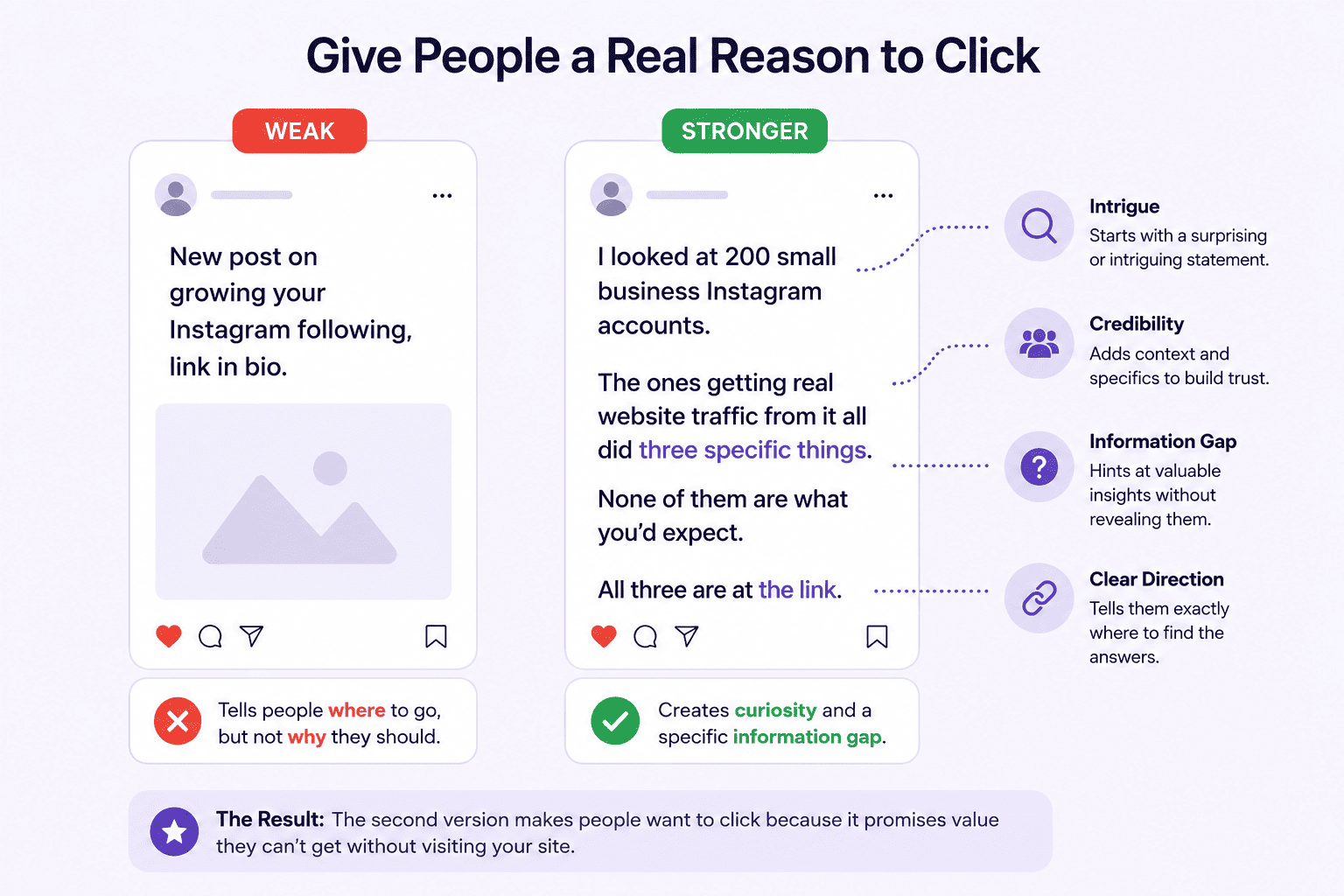
The second version creates a specific information gap. The reader doesn’t know what the three things are, and they want to. That’s what makes someone leave the platform.
2. Match the Destination to What You Posted
Sending someone from a specific Instagram post about, say, email subject lines to your homepage is one of the fastest ways to lose the click you just earned.
The visit should feel like the post was the preview and your page is where the full thing lives. If the post is about a specific topic, the link needs to go to a page that covers exactly that topic, not your general blog or your front page.
This is why building a small library of targeted landing pages or pillar posts for your most-posted topics pays off over time. Each one becomes a destination you can point social traffic toward repeatedly, without sending people to start over at your homepage every time.
3. Use Short-Form Video to Tease Content That Lives on Your Site
Short-form video is the best awareness format right now, but it’s a terrible place to deliver your full argument. Use it to raise the question, show the problem, or set up the tension. Put the answer on your site. The video is the hook. Your page is the payoff.
This works especially well for tutorials, data-driven breakdowns, and anything that needs more than 60 seconds to land properly.
A 45-second TikTok that shows the before-state of a problem and cuts off right before the solution, with a “full breakdown at the link” CTA, converts better than a video that tries to deliver everything and leaves nothing to click for.
You’re not withholding information. You’re giving someone a reason to keep going.
4. Pin Your Best Traffic-Driving Posts
On Instagram and LinkedIn, pinned posts stay at the top of your profile and keep working long after they were published. Most people pin their most-liked posts. Pin the ones that actually send people somewhere instead.
Pull up your GA4 referral data, find which posts drove the most site visits, and if those posts are still on your profile, pin them. Update the link when the destination changes.
A high-performing traffic post that’s been sitting in your feed for three months, buried under newer content, is doing almost nothing. Pinned, it’s your permanent referral engine for anyone who lands on your profile.
5. Write Captions That Create a Gap Your Site Resolves
The post stops mid-argument. Your site continues it. This is a structural approach, not just a CTA trick. The caption builds a case, surfaces a tension, or introduces a concept, and then stops right before the resolution. Your site is where the resolution lives.
The format works especially well for data-driven content and counterintuitive takes.
“Most social media advice tells you to post every day. The data from the accounts I tracked suggests something different. What I found is at the link.”
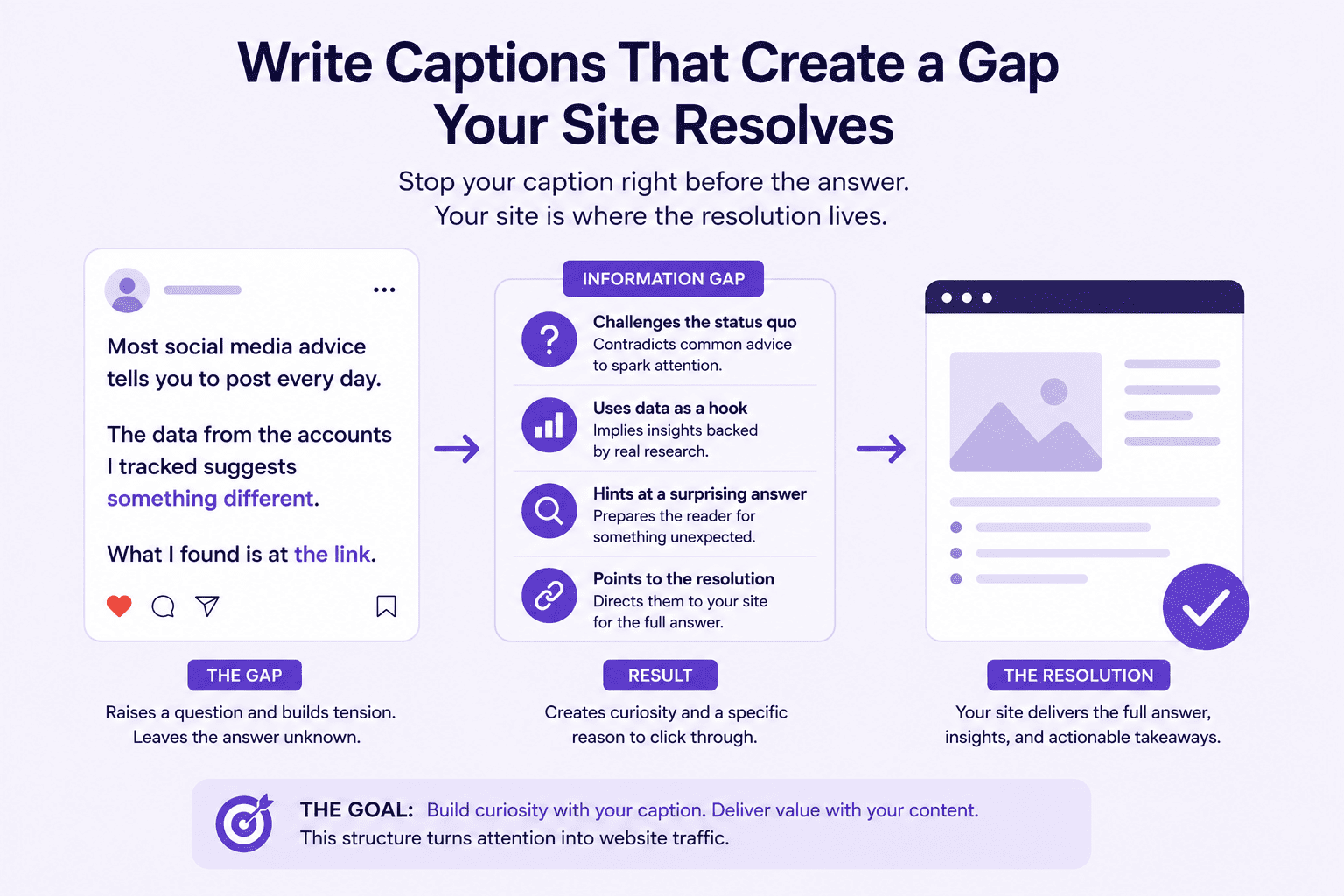
That works because it gives you a specific thing to go find out. It’s not just “read more.” It’s “I have the answer and it’s not what you think.” Give people something to be curious about.
6. Be Specific in Your CTAs
“Read the full breakdown at [URL]” outperforms “check the link in bio” because it tells people what they’re getting before they click. Vague CTAs make people weigh whether it’s worth the effort.
Specific ones make the payoff obvious before they commit to the click.
Instead of “link in bio,” try: “The exact 3-step process is at the link in bio.”
Instead of “new post,” try: “Wrote about the one thing that actually changed our referral traffic numbers, with the GA4 screenshots to prove it.”
The more specific the promise, the more likely someone is to follow through.
And always make the CTA match what’s actually on the other side. For a broader look at what moves the needle, the guide on how to improve your social media marketing covers the full picture.
7. Repurpose Your Best Site Content Into Social-Native Formats
Your existing articles, guides, and resources are a content bank you’re probably underusing.
A 2,000-word article can become five LinkedIn posts, three Instagram carousels, a YouTube explainer, and a short TikTok series, with each one pointing back to the original.
You’re not creating more work. You’re distributing what you already built to new audiences on platforms where they already spend time.
The most traffic-driving social content is often a direct excerpt or visual adaptation of something that already performed well on your site.
If an article drove strong organic traffic or got shared a lot, that’s your signal. Chop it up, reformat it for each platform, and route the new audience back to the source.
For ideas on how to connect this to a broader content approach, this piece on social media marketing tips for small business is worth bookmarking.
Turn your website visitors into Instagram followers automatically
Smash Balloon Instagram Feed Pro adds a live, self-updating Instagram feed to your WordPress site in under 5 minutes. Every post you publish on Instagram shows up on your site without you touching WordPress. Backed by a 14-day money-back guarantee.
The Reverse Strategy: Bring Your Social Content to Your Site
Most of this article is about getting people from social to your website. But there’s a parallel move worth making: bring your social content to your site so it keeps working even when people aren’t clicking through from a post.
Right now, your website traffic and your social following are two separate audiences that rarely overlap. Someone can visit your site every week and never know you post on Instagram daily. That gap is costing you followers, and it’s costing you the trust signals that come from a visibly active social presence.
That’s where Smash Balloon Instagram Feed Pro comes in.
It pulls your Instagram content directly onto your WordPress site as a live, auto-updating feed. Every time you post, your site updates automatically.
Visitors see your most recent content, your engagement, and your visual presence without leaving your page. Smash Balloon helps website owners turn real social content into trust signals that increase credibility and conversions. A live Instagram feed on your site is one of the most practical ways to do exactly that.
Setup takes under 5 minutes, no coding required, and the visual customizer lets you match the feed to your site’s design before you publish anything.
You can get step-by-step instructions in this guide on how to embed your Instagram on your website.
For the full picture of connecting all your social channels to your site, this guide on how to integrate social media into your website covers it all.
How to Know If Your Social Strategy Is Actually Working
The metric most people track is follower count. The metric that tells you whether social is actually driving business results is referral sessions.
In GA4, go to Reports, then Acquisition, then Traffic Acquisition, and filter by session source.
Social referrals show up there, broken down by platform. If that number is under 1% of your total sessions and your following is substantial, your content isn’t creating enough reasons to click away.
A healthy target for brands actively posting on two or three platforms is somewhere in the 5 to 10% range, though this varies by industry and audience.
UTM parameters are the most reliable tool for bio links.
Adding ?utm_source=instagram&utm_medium=social&utm_campaign=bio to any URL you put in your bio tells you exactly how many sessions came from Instagram specifically, rather than lumping everything under “social.”
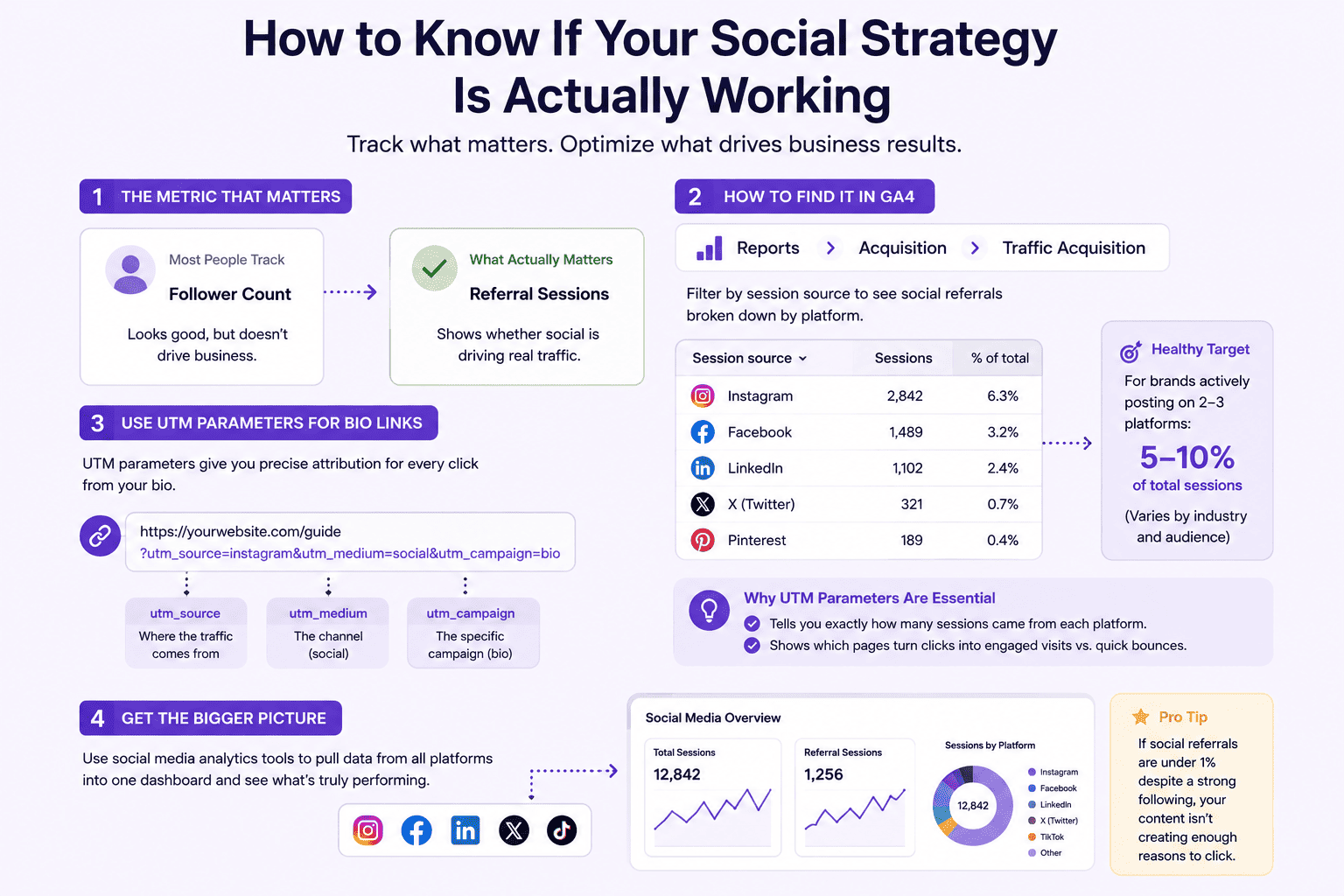
It also tells you which destination pages are turning clicks into real engaged visits versus quick bounces. If you want a broader view of what’s performing across all platforms, social media analytics tools can pull everything into one dashboard.
Platform-native analytics show click-through rate on individual posts. Low impressions with high CTR means the content resonates with the people who do see it. The fix is distribution.
High impressions with low CTR is a different problem: people are seeing it but something in the post itself isn’t making them want to click. That’s a CTA and content gap issue, not a reach issue.
The relationship between social media and SEO is also worth understanding here, because referral traffic isn’t the only way social contributes to your search visibility.
FAQ on Building Organic Social Media Presence
Which social media platform drives the most website traffic?
By raw volume, Facebook tends to send the most social referral traffic globally, particularly for B2C brands and local businesses. Pinterest consistently delivers the highest conversion rate, meaning clicks from Pinterest turn into actual engaged visitors more often than clicks from anywhere else. The right answer for your business depends on where your audience actually is and what kind of content you publish.
Why doesn’t Instagram drive much website traffic?
There are no clickable links in Instagram captions, which makes the bio link the only practical exit point from the platform. Every step between a post and your site loses people, and most users won’t navigate from a post to your profile to your bio link before moving on. Instagram made that choice deliberately. Your content isn’t the issue. It can still work as a referral source, but it requires more intentional architecture than platforms where links live inside the content itself.
How do I track social media traffic in Google Analytics?
In GA4, go to Reports, then Acquisition, then Traffic Acquisition and look for “Session source.” Filter for your social platforms. For more precise data, add UTM parameters to any link you share on social: utm_source=instagram, utm_medium=social, and a campaign name you’ll recognize. This is more reliable than GA4’s automatic attribution, which sometimes misclassifies social traffic as direct.
Should I add links to every social media post?
No. Posts with external links tend to get lower reach because algorithms deprioritize content that sends people off-platform. The better approach: publish most posts without links to maximize reach, then post a smaller number of high-intent pieces designed specifically to drive clicks, with a real reason to follow through. TikTok and Instagram also have specific link restrictions, so what’s possible varies by platform.
How long does it take to see website traffic from social media?
A single change, like a more specific CTA or pinning your best traffic-driving post, can show up in GA4 within a week. Building a consistent referral flow typically takes 2 to 3 months. You’re essentially training your audience to expect something on the other side of the click, and that takes repetition before it becomes habit.
Start Driving Real Traffic From Social Now
The businesses consistently getting referral clicks from social aren’t posting more than everyone else.
They’ve built their content strategy around giving people reasons to click, matching the destination to the post, and checking GA4 to see what’s actually working.
I’ve seen how these strategies, applied consistently, can move a social referral number from 1% to 8% or more within a quarter.
Once you’ve built the outbound side, it’s worth flipping the equation.
Your website visitors shouldn’t have to go looking for your Instagram to see that you’re active. That’s precisely where Smash Balloon Instagram Feed Pro shines.
It pulls your Instagram feed directly onto your WordPress site, updates automatically every time you post, and turns your existing web traffic into social followers without any extra work on your end.
Here’s what I suggest:
- Pick one platform and run the 7 tactics above for 30 days, tracking referral sessions in GA4 each week
- Add UTM parameters to every link you put in your bio so you know exactly what’s converting
- Pin the post that drives the most clicks and update it whenever the destination changes
- Get Smash Balloon Instagram Feed Pro so your site shows your social presence to every visitor who lands there
Have questions about driving traffic from social or getting Smash Balloon set up on your site? Drop them in the comments below.