Social Wall
  Feed Analytics


Want to add your X (Twitter) feed to WordPress for free?
With Smash Balloon Custom X (Twitter) Feeds, you can display your X (Twitter) timeline on your website using a plugin that’s 100% free, forever.
This user-friendly tool lets you share your X posts, boost engagement, and keep your site looking lively without spending a cent.
Finding a reliable, high-quality X (Twitter) feed plugin for free can seem almost impossible.
Back when I first tried adding X (Twitter) feeds to my own site, I discovered that Smash Balloon’s free plugin made the whole process simple, fast, and accessible to everyone.
With years of experience at Smash Balloon helping WordPress users connect their sites to social media, I’ll walk you through exactly how to get the Custom X (Twitter) Feeds plugin for free, what you can do with it, and how to get started right away.
In this article, you’ll learn the step-by-step process to install and use Smash Balloon Custom X (Twitter) Feeds for free so you can easily embed beautiful X (Twitter) feeds on your site, even if you’re totally new to WordPress or plugins!
Short answer: Yes, Custom X (Twitter) Feeds is free. You can get a live X (Twitter) feed on your site in about five minutes, no credit card needed. The free version covers one account and text X posts, which is plenty to get going. When you want photos, videos, multiple accounts, or hashtag feeds, that’s what X (Twitter) Feed Pro is for.
In This Article
- How Do I Get a Free X (Twitter) Feed Plugin?
- What's Smash Balloon Custom X (Twitter) Feeds?
- Free vs Pro: Feature Comparison Table
- Lite Custom X (Twitter) Feeds Features
- Is Smash Balloon Custom X (Twitter) Feeds (Lite Version) Free?
- Smash Balloon Custom X (Twitter) Feeds — Free vs Pro
- How Do I Get Smash Balloon Custom X (Twitter) Feeds For Free?
- How Do I Install Smash Balloon Custom X (Twitter) Feeds Free Version?
- Top Articles on Showing Social Media Feeds for Free
How Do I Get a Free X (Twitter) Feed Plugin?
Smash Balloon Custom Twitter Feeds—a Tweets Widget or X Feed Widget—is 100% free forever. Here’s how to get it:
Quick setup (5 minutes):
- Go to WordPress Dashboard → Plugins → Add New
- Search “Custom Twitter Feeds”
- Click “Install Now” → “Activate”
- Connect your X (Twitter) account
- Embed feed on any page
What you get for free:
- ✅ Display X posts from 1 public X (Twitter) account
- ✅ Customizable design (colors, width, height, header)
- ✅ Mobile responsive feeds
- ✅ SEO-friendly (search engines can crawl your X posts)
- ✅ Fast loading with smart caching
- ✅ GDPR compliant
- ✅ Works offline (shows X posts even if X (Twitter) is down)
- ✅ No coding required
- ✅ Forever free – no trial period, no credit card
Free version limitations:
- Only 1 X (Twitter) account (Pro: unlimited accounts)
- User timeline only (Pro: hashtags, searches, lists, mentions)
- No photos/videos/GIFs in feed (Pro: full media support)
- Basic customization (Pro: advanced templates and layouts)
When to upgrade to X (Twitter) Feed Pro ($49/year):
- Need multiple X (Twitter) accounts in one feed
- Want to show photos, videos, and GIFs
- Need hashtag or search feeds
- Want masonry gallery or carousel layouts
- Require priority support
Download link: Search “Custom Twitter Feeds” in the WordPress plugin directory or visit the WordPress.org plugin page
What’s Smash Balloon Custom X (Twitter) Feeds?
Smash Balloon Custom X (Twitter) Feeds (X Feed Widget) is the free version of X (Twitter) Feed Pro, the best X (Twitter) feed plugin for WordPress.
As the #1 highest-rated X (Twitter) feed plugin, it helps you create, customize, and display completely customizable, responsive, and search engine crawlable X (Twitter) feeds on your website.
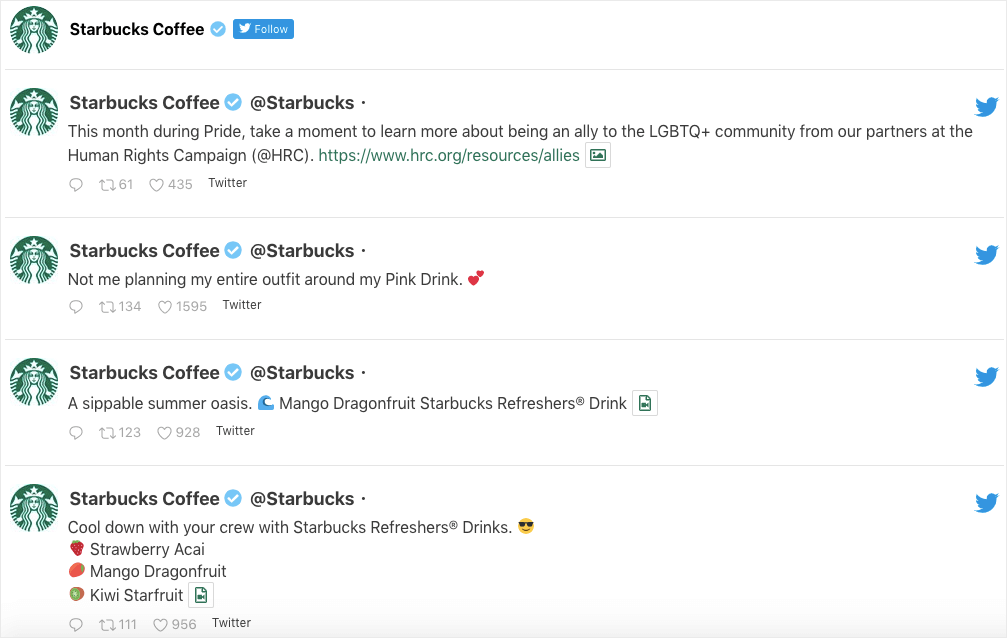
This X (Twitter) feed plugin is so newbie-friendly that it’ll only take you less than 5 minutes to add your X (Twitter) feeds to your website. And the best part? No coding needed!
Want to personalize your X (Twitter) feeds even if you don’t have any design experience? No worries.
With just a few clicks, you can easily customize how your X (Twitter) user timeline feed looks using the visual customizer.
You don’t even need to hire an expensive developer to do this for you — you can control your X (Twitter) feed’s design and content even if you’re a WordPress newbie.
Bonus: If you’re using Elementor for your site, you can also use the free Custom X (Twitter) Feeds plugin to add your X (Twitter) feeds to your Elementor website.
Who it’s for:
- Bloggers wanting to show their latest X posts
- Small businesses building social proof
- Personal brands showcasing X (Twitter) activity
- Anyone wanting to integrate X (Twitter) without coding
Key differentiator: Unlike other free X (Twitter) plugins that are “freemium” trials, Custom X (Twitter) Feeds is genuinely free forever with no hidden costs or forced upgrades.
User base: 100,000+ active installations with a 4.8/5 star rating
Setup time: Under 5 minutes from installation to live feed on your site
Free vs Pro: Feature Comparison Table
| Feature | Free (Custom X (Twitter) Feeds) | Pro – Basic Plan (X (Twitter) Feed Pro) |
|---|---|---|
| Price | $0 forever | $49/year (normally $98, currently 50% off) |
| Websites | 1 website | 1 website (Plus: $99 for 5 sites, Elite: $149 for 10 sites) |
| Feed types | User timeline only | User timeline, hashtags, searches, lists, mentions, favorites |
| Media display | Text-only X posts | Photos, videos, GIFs with lightbox popup |
| Customization | Basic (colors, size, header) | Advanced (templates, layouts, filters) |
| Layout options | Standard grid | Grid, masonry, carousel, list |
| X post moderation | No | Yes (show/hide specific X posts) |
| Multiple feeds | Create multiple, display separately | Combine multiple into one feed |
| X post replies | Not included | Show “in reply to” X posts |
| X (Twitter) Cards | Not supported | Full X (Twitter) Card support |
| Load more X posts | Manual | Auto-load on scroll |
| Support | Community forum | Priority email support |
| Updates | Standard | Priority access to new features |
Decision guide:
- Stick with Free if: You have 1 X (Twitter) account, only need basic text X posts, and don’t mind limited customization
- Upgrade to Pro if: You want photos/videos, need multiple accounts, want advanced layouts, or need priority support
Lite Custom X (Twitter) Feeds Features
As the free version of X (Twitter) Feed Pro, Custom X (Twitter) Feeds (X Feed Widget) helps awesome business owners like you integrate X (Twitter) into your website.
By adding your user timeline X posts to your site, you can reach more people and boost your sales via X (Twitter) marketing, so you can grow your business and take it to the top!
Even better, Custom X (Twitter) Feeds also makes your feeds automatically responsive. Meaning, your X posts look great on both mobile and desktop devices — with no extra effort on your part.
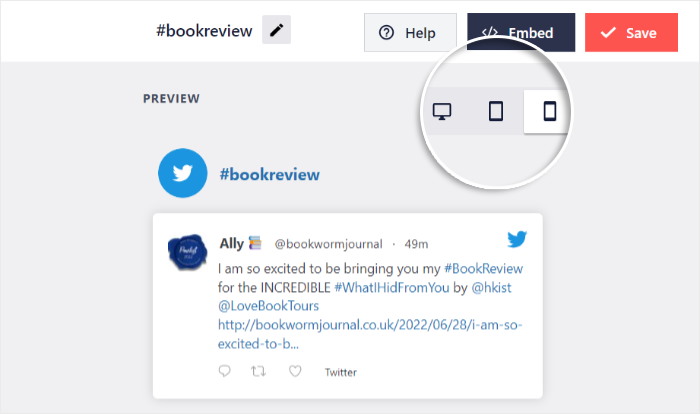
With this version of Custom X (Twitter) Feeds (forever free), you get access to cool features that help you:
- Create an X (Twitter) feed from 1 public X (Twitter) account for absolutely free
- Customize and control your feed’s design (width, height, color, font, header, and more!) just by checking or unchecking options
- Embed your X (Twitter) feed on your site in less than 5 minutes
- Improve your SEO as the plugin adds search engine crawlable content directly to your site
- Optimize your page speed since the plugin efficiently requests data, so your X (Twitter) feeds load super fast
- Comply with GDPR regulations as the plugin automatically integrates with many of the popular GDPR cookie consent plugins
- Show your X (Twitter) feeds on your site, even if X (Twitter)’s temporarily down
- Get help in the Custom X (Twitter) Feeds support forum for free
Is Smash Balloon Custom X (Twitter) Feeds (Lite Version) Free?
Yes, if you’re using Smash Balloon Custom X (Twitter) Feeds to add X (Twitter) feeds to your website, it’s 100% free.
Or if you want to unlock ADDED features so you can display X (Twitter) photos, videos, gifs, and more, you can upgrade your account to get Smash Balloon’s X (Twitter) Feed Pro.
That said, how does the lite version compare to the premium version in terms of features?
Smash Balloon Custom X (Twitter) Feeds — Free vs Pro
While the free version of Custom X (Twitter) Feeds has lots of features, they’re fairly limited and basic.
If you want advanced features that’ll help you dominate X (Twitter) marketing, you can upgrade to Smash Balloon X (Twitter) Feed Pro.
The premium version of the best X (Twitter) feed plugin has advanced features that let you:
- Display photos, videos, and gifs and view them in a popup lightbox directly on your site (with support for 3rd party services such as YouTube, Vimeo, Vine, and SoundCloud)
- Include X post replies (in reply to X posts) in your feed
- Showcase X (Twitter) cards in your website
- Choose from professionally-made X (Twitter) templates so you can easily build your X (Twitter) feed in seconds
- Embed X posts from multiple users in the same X (Twitter) feed
- Show tons of X posts at once in an X (Twitter) masonry gallery
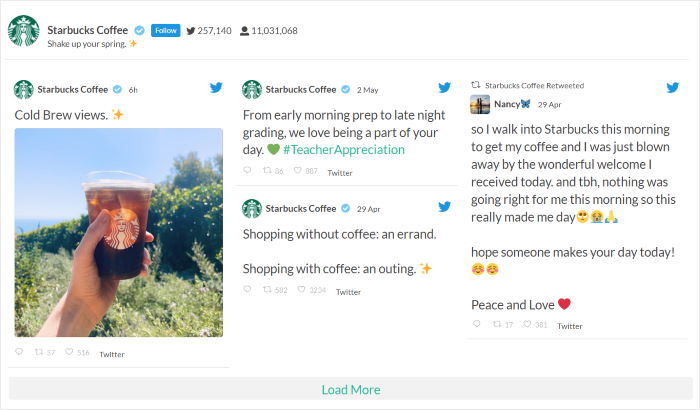
- Autoload more X posts when scrolling to the bottom of the feed
- Display your X (Twitter) feed horizontally in an X (Twitter) carousel layout
- Combine multiple X (Twitter) feeds into one
- Show multiple X (Twitter) feeds or aggregate X (Twitter) feeds from different user timelines
- Allow filtering of X (Twitter) user timelines include/exclude any/all keywords
- Moderate the X posts you show with just a few clicks
- Automatically update your X (Twitter) feeds up to 12 times per day so you can effortlessly display up-to-date X (Twitter) content to your site visitors
- Get priority customer support
- And a whole lot more!
Upgrade to X (Twitter) Feed Pro now to unlock access to advanced features that can help you grow your business faster using X (Twitter).
How Do I Get Smash Balloon Custom X (Twitter) Feeds For Free?
Awesome news! It’s super simple to get the lite version of Smash Balloon Custom X (Twitter) Feeds — at no cost to you.
How? You just need to go ahead and download the Custom Twitter Feeds – A Tweets Widget or X Feed Widget plugin. Then, simply activate it on your website.
Let’s talk about the step-by-step instructions on how you can do this below.
How Do I Install Smash Balloon Custom X (Twitter) Feeds Free Version?
First things first, make sure that you’re using WordPress.org, not WordPress.com, for your website.
If you’d like to know the difference between the two, check out this helpful post on WordPress.com vs WordPress.org today.
Once you’ve confirmed that you’re using WordPress.org for your site, follow the steps below so you can install and activate the free version of Custom X (Twitter) Feeds.
1. Install Custom X (Twitter) Feeds for Free
To get started, visit your WordPress dashboard first. Then from the left-hand sidebar area, navigate to the Plugins » Add New menu.
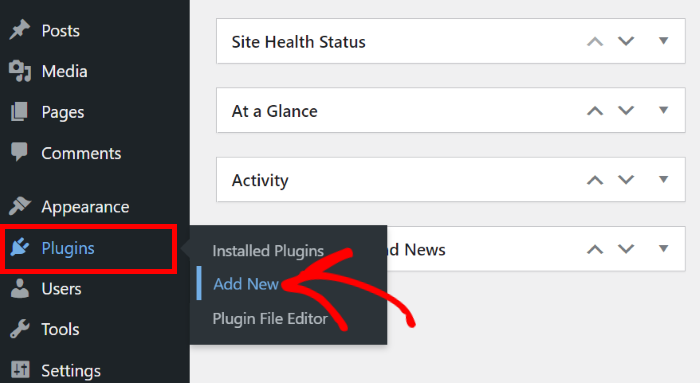
You’ll be directed to the “Add Plugins” page where you can install new WordPress plugins on your website.
In the right-hand corner, you’ll see the search box. To continue, simply type Custom Twitter Feeds here.
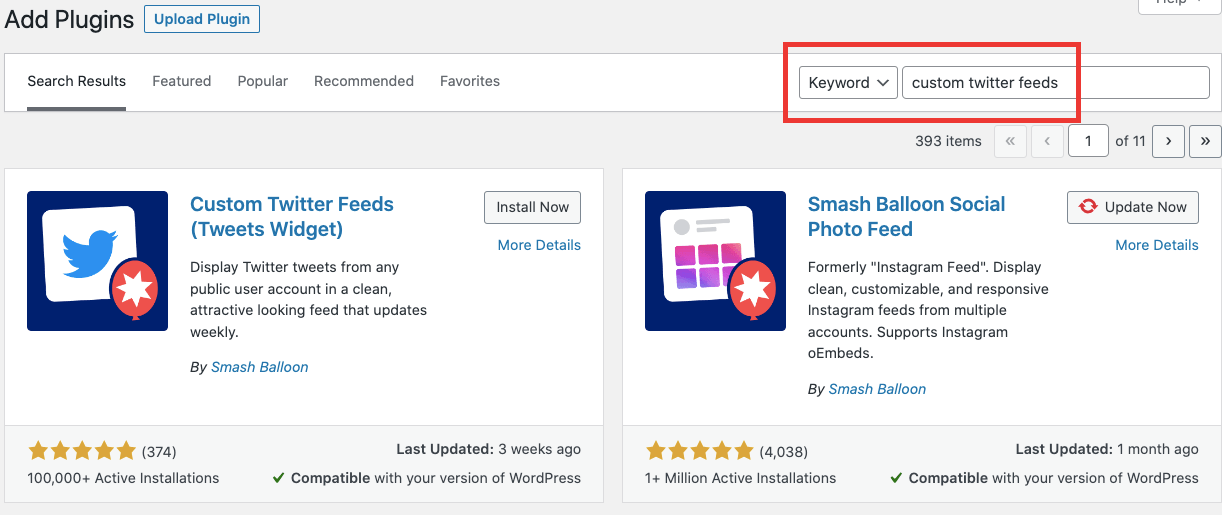
See the plugin called “Custom Twitter Feeds – A Tweets Widget or X Feed Widget”? Click on the Install Now button next to it.
This is the free version of the Smash Balloon X (Twitter) Feed Pro plugin, remember?
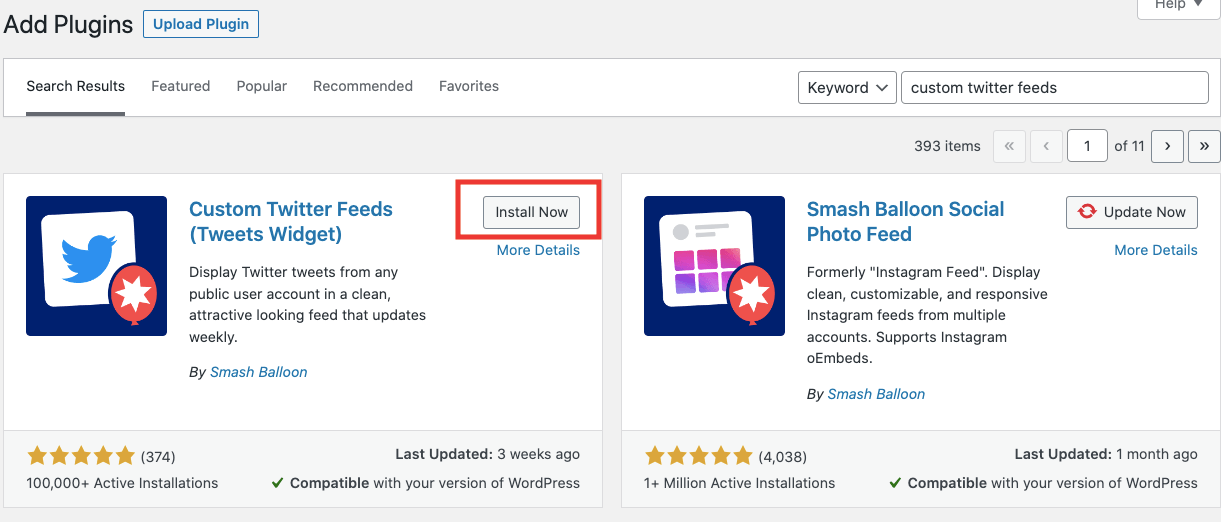
Once you’ve installed the plugin, you need to activate it next. To get the free version of the Custom X (Twitter) Feeds plugin, click the large Activate button.
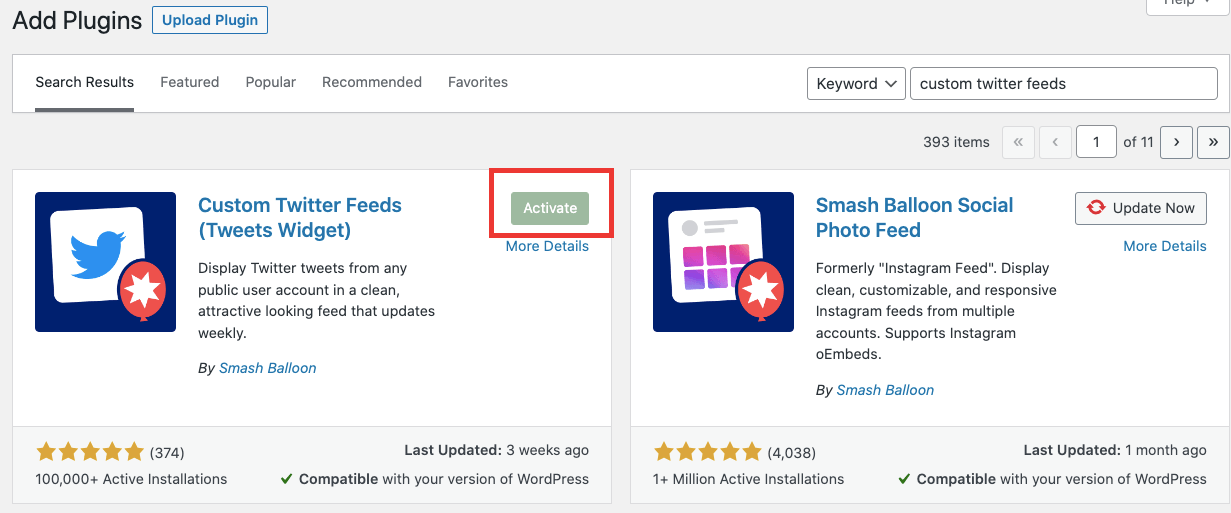
We can then move to step 2 and use this plugin to create a new X (Twitter) feed.
Step 2: Create an X (Twitter) Feed
Now that you’ve installed and activated the plugin, you can easily create engaging new X (Twitter) feeds for your website.
First, navigate to the X (Twitter) Feed » All Feeds menu from your WordPress dashboard.
On this page, click on the Add New button at the top.
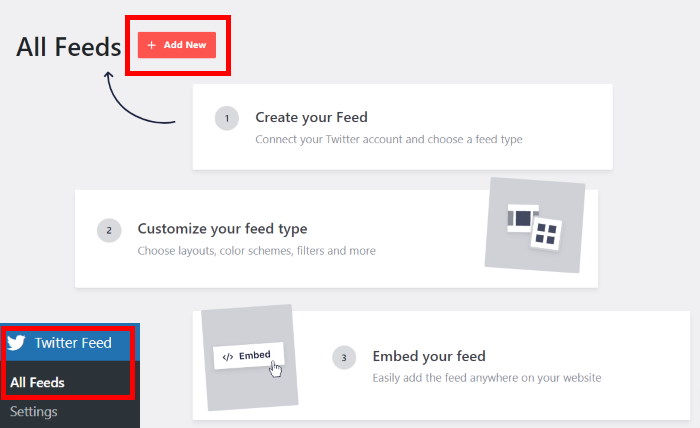
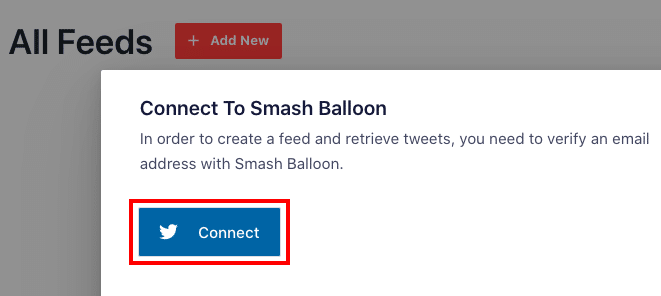
Next, you can simply follow the on-screen instructions to verify your email by connecting to Smash Balloon. This will help you create and retrieve X posts for your feed later.
Simply click on Connect here to continue creating your X (Twitter) feed.
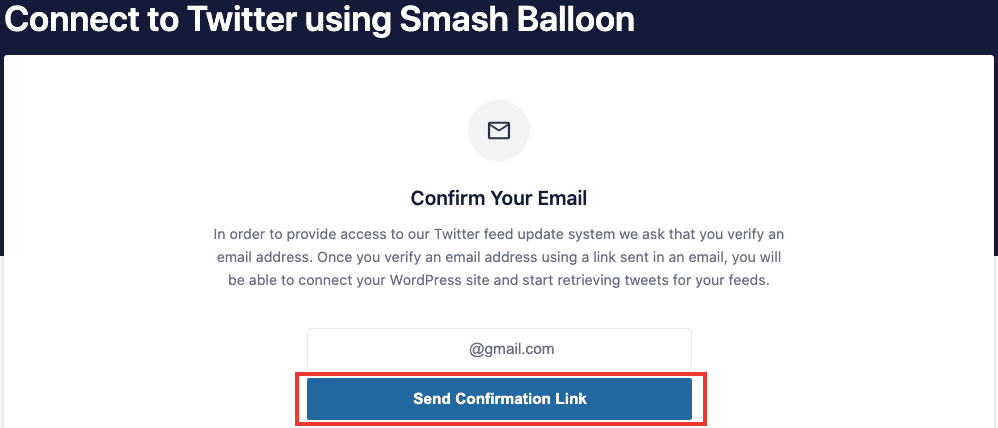
Now, you just need to confirm your email address with Smash Balloon so you can start retrieving X posts for your feeds. Make sure you’ve entered the right email address, then click on Send Confirmation Link.
Once that’s done, check your email and open the verification message from Smash Balloon’s Custom X (Twitter) Feeds.
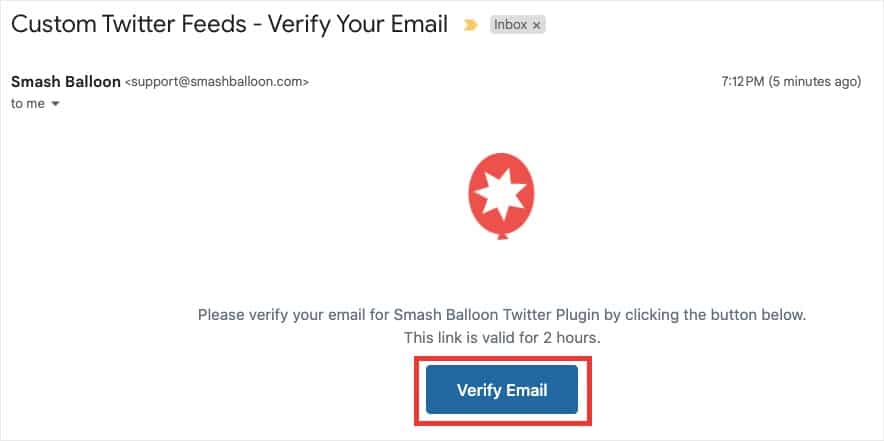
Simply click the Verify Email button, and you are now ready to start creating your X (Twitter) feed!
To create your first X (Twitter) feed, navigate back to the X (Twitter) Feed » All Feeds menu from your WordPress dashboard and click on All Feeds.
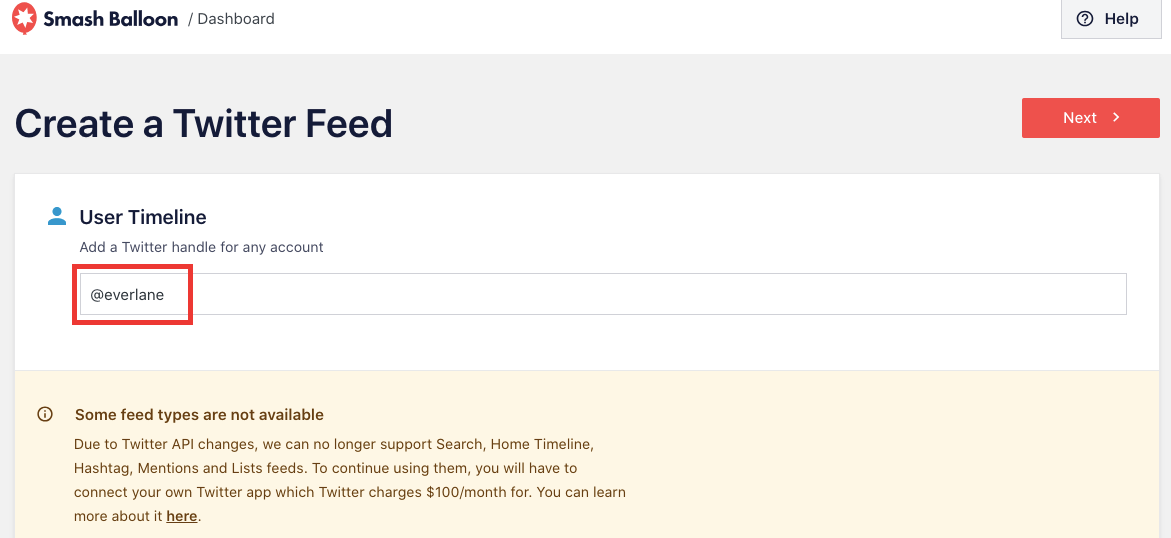
With the free version of Custom X (Twitter) Feeds, you can easily display a user timeline feed from 1 public X (Twitter) account for absolutely free.
You just need to enter the X (Twitter) user’s handle and click on Next to continue.
Finally, your new X (Twitter) feed will be open in the live feed editor. From here, you can use the options on the left to set your feed size, color scheme, number of X posts, header design, and much more.
Plus, you can use the live preview on the right to track all your changes.
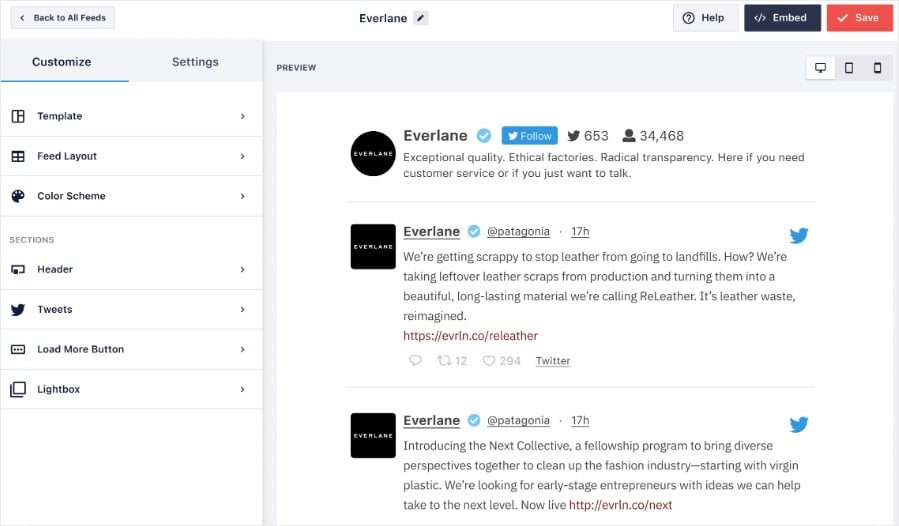
And once you’re happy with how your feed looks, you can click on Save to confirm the changes.
Then, click on Embed to start embedding your X (Twitter) feed directly from the live feed editor.
And that’s it, folks! You’ve now connected the free version of the best X (Twitter) feed plugin for WordPress to your X (Twitter) account.
Show photos, videos, and more than one account in your feed
The free plugin is perfect for a single timeline of text X posts. Smash Balloon X (Twitter) Feed Pro adds media, hashtag and search feeds, and multiple accounts, all backed by a 14 day money back guarantee.
Get X (Twitter) Feed ProNow, you can use it to create, customize, and embed engaging X (Twitter) feeds on your website. Why? So you can use the power of social proof to boost your followers and get more sales in no time.
Brand new to Smash Balloon and want to dominate X (Twitter) marketing?
Get started with X (Twitter) Feed Pro today!
Frequently Asked Questions
Is Smash Balloon Custom Twitter Feeds really free?
Yes. It’s free to download and use, with no credit card and no trial that quietly expires. You connect one public X (Twitter) account and show its timeline on your site. If you want more later, you can move up to Twitter Feed Pro, but nothing pushes you to.
Can I use a free Twitter feed with Elementor?
Yes. The free version of the Custom Twitter Feed plugin works with Elementor, so you can place your X (Twitter) feed right into an Elementor page without touching any code. On top of Elementor, it works perfectly with the biggest page builders out there.
Do I need to know how to code to add a Twitter feed to WordPress?
No. With the Custom Twitter Feeds plugin you install it, connect your account, customize with a few clicks, and embed the feed. Most people have one live in under five minutes.
What does Twitter Feed Pro add over the free version?
Twitter Feed Pro is for sites that have outgrown a single text feed. It adds photos, videos, and GIFs, lets you combine multiple accounts into one feed, and unlocks hashtag, search, list, and mention feeds. You also get layouts like masonry and carousel, and even more design options.
Top Articles on Showing Social Media Feeds for Free
- How to Get Smash Balloon TikTok Feeds Plugin (FREE)
- How to Get Smash Balloon Instagram Feed Plugin for Free
- How to Embed a FREE Google Review Widget on Your Site
If you’d like to know how to embed engaging X (Twitter) feeds on your site, check out this post on how to add X (Twitter) feeds to WordPress today.
Interested in increasing your X (Twitter) followers? Here’s how you can get more X (Twitter) followers.