Social Wall
  Feed Analytics

Is your best social proof sitting on third-party websites? It’s more common than you’d think.
Most business owners already have stronger proof in their Instagram feed, their tagged customer photos, and the reviews people emailed them months ago.
I’ve worked at Smash Balloon helping thousands of businesses put their own content on their sites, and I see this pattern over and over.
The problem is almost never that you don’t have enough social proof. It’s that the proof you own and control never makes it onto your site. But here’s the good news: you don’t need to create anything new or hire a developer to fix it.
So let’s sort out what counts as first-party social proof versus third-party, why owning your trust signals beats renting them, and how to put your own posts and reviews on your WordPress site without writing code.
- What Is First-Party Social Proof? (The Simple Answer)
- First-Party vs Third-Party Social Proof: Which Should You Show?
- The Real Problem Isn't Collecting Proof, It's Displaying It
- How to Display the Social Posts You Already Publish
- How to Collect AND Display Your Brand's Reviews
- Where to Put First-Party Social Proof on Your Site
- First-Party Social Proof Examples That Build Trust
- Start Displaying Your Own Social Proof Now
What Is First-Party Social Proof? (The Simple Answer)
First-party social proof is any trust signal you own and control, shown on a property you own, like your website.
That includes your own Instagram and Facebook posts, the photos customers tag you in, the reviews you collect by email or form, plus your testimonials and case studies.
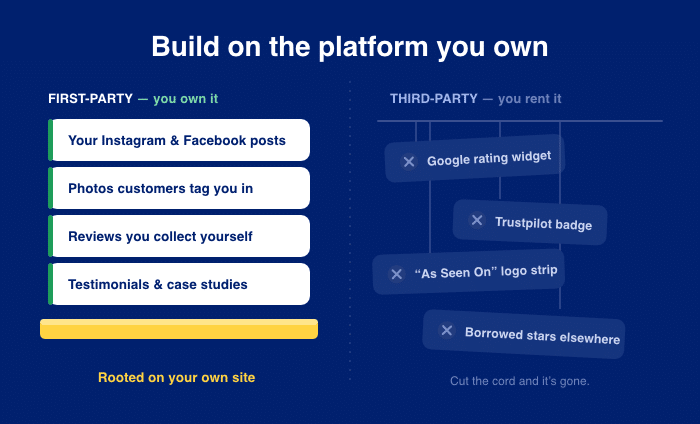
Third-party social proof is the kind you rent from outside platforms. Think of a Google rating widget, a Trustpilot badge, or an “As Seen On” logo strip. The platform owns the data, and you borrow a slice of it.
Here is the simple split between first-party and third-party social proof:
| First-party (you own it) | Third-party (you rent it) |
|---|---|
| Your Instagram and Facebook posts | Google rating widget |
| Photos customers tag you in | Trustpilot badge |
| Reviews you collect by email or form | “As Seen On” logo strip |
| Testimonials and case studies | Borrowed star ratings from outside sites |
Does owning your proof make it weaker than a Google rating?
No. GatherUp notes that first-party reviews shown on a property you own “bestow the same social proof that reviews on sites like Google or Facebook provide.” The trust is just as real when it sits on your site.
If you sell to other businesses, the same idea holds. LinkedIn maps reviews, testimonials, and case studies as first-party formats you can publish and control yourself.
So you don’t have to choose between owning your proof and looking credible. You get both.
Now look back at that left column. Most of those signals are already piling up in your inbox and your feed right now.
First-Party vs Third-Party Social Proof: Which Should You Show?
Show both. The real question is whose website your trust gets built on.
Third-party proof isn’t bad. It’s just borrowed. You don’t control the layout, you can’t stop it from disappearing, and every click sends your visitor to someone else’s platform.
Picture a shopper on your pricing page, ready to buy. She taps your Trustpilot badge to read a few reviews.
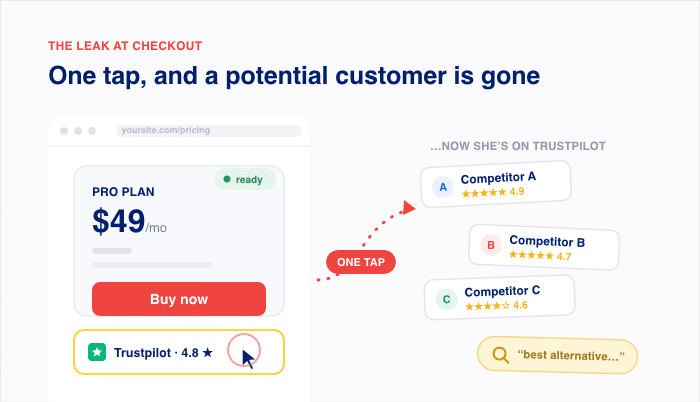
Now she’s on Trustpilot, not your site, where it’s easy to keep browsing other options and comparing competitors. You did everything right, but the click pulled her away at the worst moment.
First-party proof works the other way. It lives on your page, looks the way you want, and keeps visitors right where they can buy.
Here’s the contrast that matters:
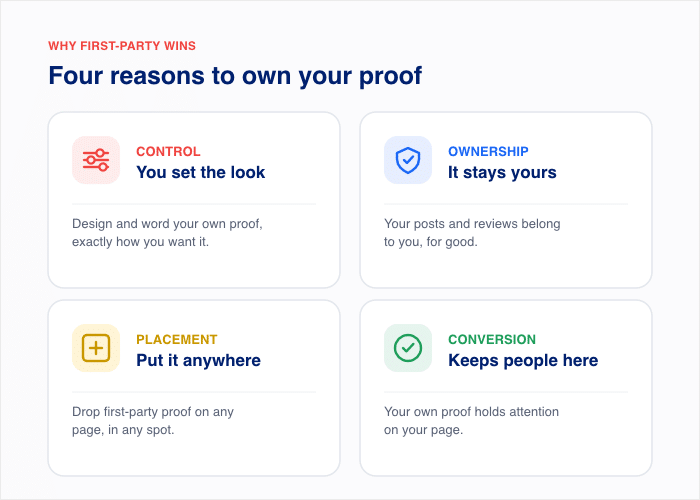
- Control: You set the design and wording of your own proof. With a third-party badge, the platform decides how it looks.
- Ownership: Your posts and reviews stay yours. A rented widget can change or vanish if the outside service does.
- Placement: You drop first-party proof anywhere on your site. Third-party badges sit where the widget allows.
- Conversion: Your own proof keeps people on your page. A clickable Google or Trustpilot rating can send them off to keep browsing other options.
This doesn’t mean you drop third-party reviews. Google and Trustpilot still carry weight, and they each fit different goals.
The numbers explain why this choice matters at all. 95% of customers read online reviews before buying, according to Mailchimp. So the question was never whether to show reviews. It’s whose website those reviews build trust on.
Expert Tip: To learn more about the review platforms, read our guide on Google Reviews vs Trustpilot: Which Is Better for Your Business?.
The Real Problem Isn’t Collecting Proof, It’s Displaying It
Here’s what most “how to get more reviews” advice gets wrong. You don’t have a collection problem. You have a display problem.
Across setup tickets at Smash Balloon, I see the same thing again and again. Businesses already own plenty of first-party proof.
Their own posts, the photos customers tag them in, and the reviews people sent by email or contact form. But their live site shows none of it. It shows a third-party badge instead.
So the proof is real. It’s just sitting where buyers never see it.
Do you have any of these sitting unused right now?
- Your own Instagram or Facebook posts showing your work, your team, or happy customers
- Photos customers tagged you in that you liked but never reposted
- Reviews people emailed you or left in a contact form reply
- Testimonials sitting in a folder, a spreadsheet, or an old thank-you note
- Case studies or results you mentioned once and then forgot about
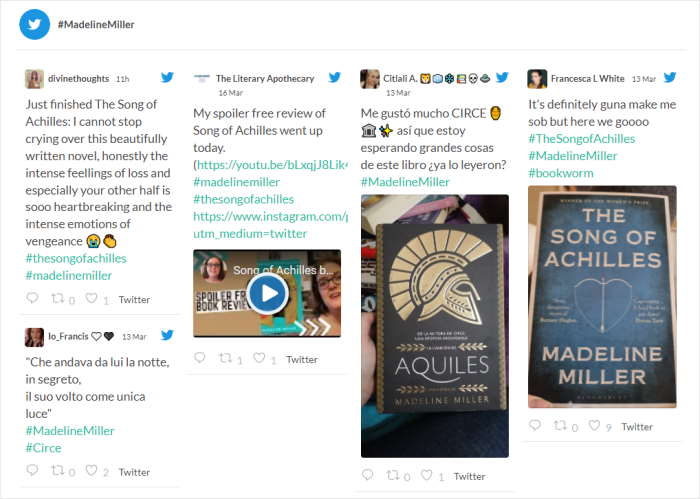
If you checked even two of those, you already own more trust signals than your homepage shows.
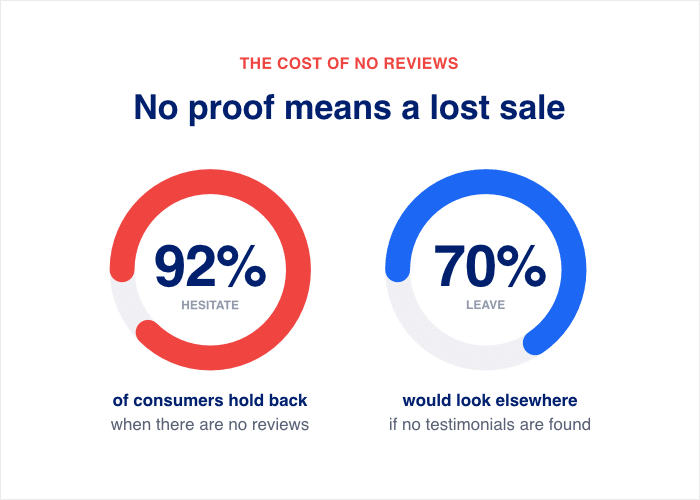
This matters because buyers can’t be convinced by proof they can’t see. 92% of consumers hesitate to buy when no customer reviews are visible, according to WiserNotify. A glowing review in your inbox does nothing for the shopper on your pricing page.
How to Display the Social Posts You Already Publish
Social proof isn’t just the feedback people leave on review websites. It’s also what other people post about your brand on social media.
When customers share photos, reviews, and posts about you, that’s the trust signal worth showing.
If you’re already posting on Instagram, getting tagged in customer photos, or collecting reviews on Google, that’s proof you can pull straight onto your site.
Smash Balloon is what does the pulling. It’s a set of WordPress plugins that takes what’s already happening on your social and review platforms and puts it on the page where buyers actually decide.

Using Smash Balloon, you can embed social media content from the biggest platforms out there: Facebook, YouTube, Instagram, X/Twitter, and TikTok.
For example, one of our customers wanted to show Instagram posts where happy customers had tagged their brand. So they pulled those tagged posts onto their homepage with Smash Balloon Instagram Feed.
Here’s how you can do that for your brand, from start to finish:
- Install the Plugin: Go to Plugins » Add New, then add and activate Smash Balloon Instagram Feed. It’s built for WordPress, so it works with your existing theme.
- Connect the Source: Click “Connect,” link the Instagram account, and choose the Tagged Posts as the source. This tells the plugin which posts to pull in.
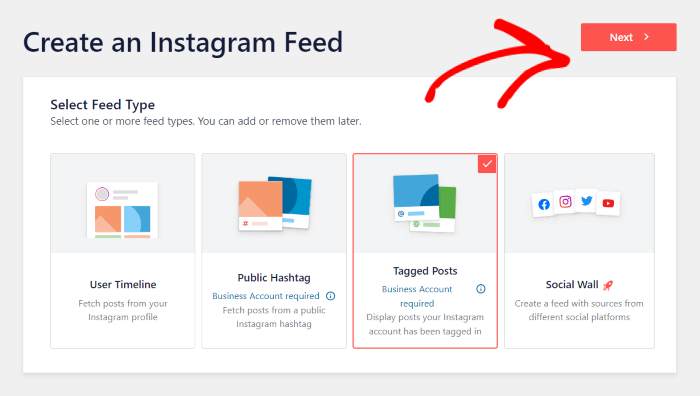
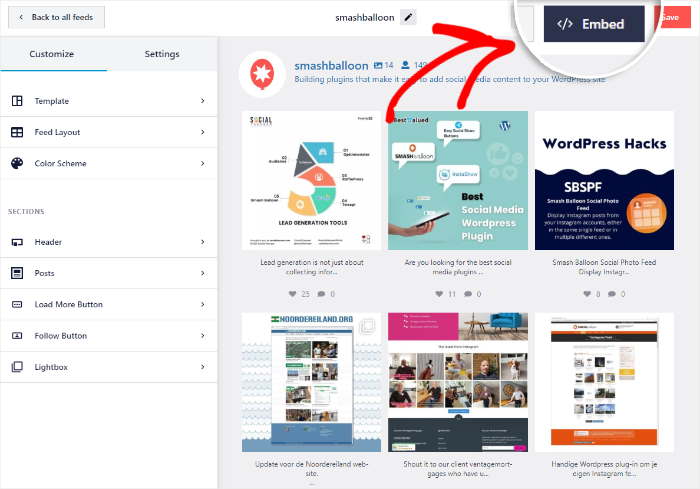
- Customize the Design: Import a theme and template, then use the live customizer to edit the header, layout, color scheme, buttons, post style, and more.
- Embed the Feed: Open the page where you want the proof, in their case the homepage. Add the Smash Balloon block in the WordPress editor, or paste the feed shortcode. No coding required.
Want a real example? Fabletics asks customers to post photos wearing its clothes with the #MyFabletics hashtag.
Then the brand pulls those Instagram posts onto its website so shoppers see real people in the products before they buy.

Your customers are already posting social proof for you on platforms like Instagram. You just connect, embed, and let their words work for you.
Expert Tip: Want to see how to add social media posts to your site with screenshots and detailed instructions? Check out our tutorial on adding social media feeds to your site here.
How to Collect AND Display Your Brand’s Reviews
What if you could gather reviews straight from customers instead of waiting on Google? You can, and the reviews you collect this way are yours to keep and show.
Here is the mechanism. With Reviews Feed Pro by Smash Balloon, you create a Review Collection that gathers reviews directly on your site, then displays them as owned proof you fully control.
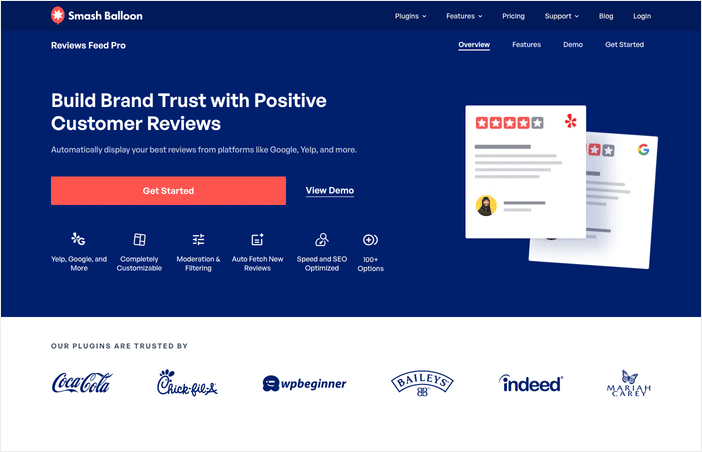
No outside platform sits between you and your customers. You can just follow these three steps to set it up.
Step 1: Set up the review form. Reviews Feed Pro connects with WPForms and Formidable Forms, two popular WordPress form plugins.
Build a short form that asks for a name, a star rating, and a few words. This gives customers an easy way to leave feedback right on your site.
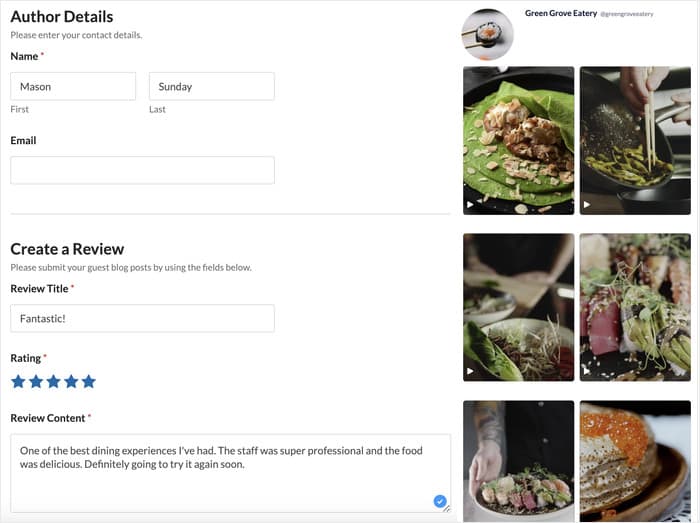
Step 2: Let the reviews come in. Share the form link in your thank-you emails, on your contact page, or after a sale. Each submission lands in your Review Collection inside WordPress. You own every review from the moment it arrives.
Step 3: Display them with Reviews Feed Pro. Create a review collection, customize it in the live editor, click embed, and then add it to a page, sidebar, or footer. You decide which reviews show and how they look.
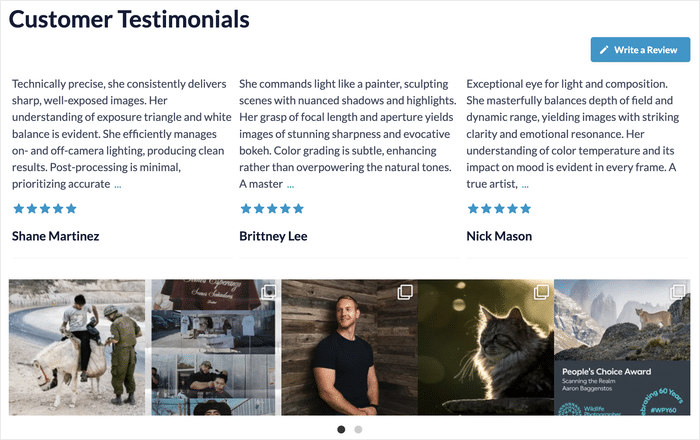
Reviews Feed Pro doesn’t stop at your own reviews, either. It also pulls in ratings from the highly trusted platforms your customers already use, like Google, Yelp, TripAdvisor, Trustpilot, and Facebook.
You embed those reviews on your site too, so every trust signal sits in one place where buyers can see it.
Take Beardbrand. The company gathers customer reviews and shows them right on its product pages so shoppers can read real feedback before they add to cart.
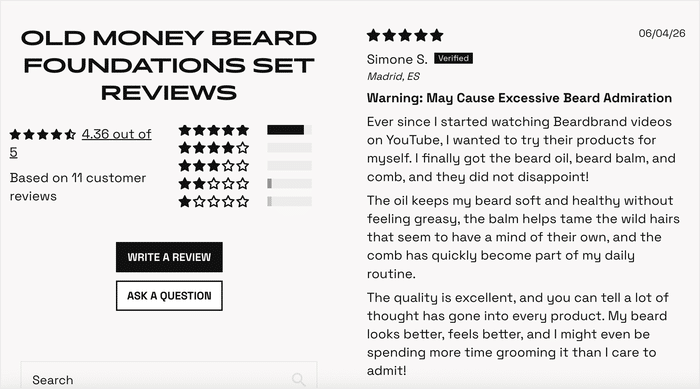
The result is a steady stream of social proof the brand owns outright, not a rented widget that could change tomorrow.
Even if you’re just getting started, you can have this live today. You set up one form, collect your first review, and display it the same afternoon.
Own Every Review Instead of Renting It
Reviews Feed Pro collects reviews through a form on your own site, then displays them alongside ratings pulled from Google, Yelp, and Trustpilot.
Start Collecting ReviewsWhere to Put First-Party Social Proof on Your Site
You have your feeds set up, so where should they go? Placement decides whether buyers see your proof at the moment they hesitate.
The trick is matching each spot to what the visitor is thinking right then. Here are the high-trust places to drop your owned posts and reviews:
- Homepage, above the fold. This is the first thing visitors see. A row of real customer posts here tells new arrivals that other people already trust you.
- Product and service pages. Shoppers compare options on these pages. Reviews of that exact product answer their doubts while they decide.
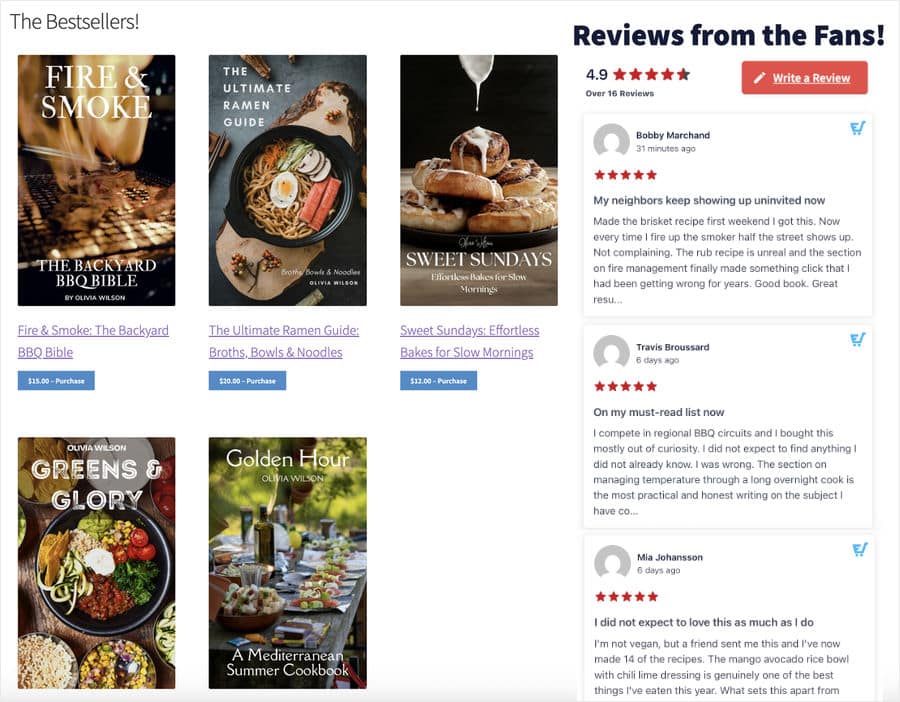
- Near your checkout or “Buy” button. This is where last-second hesitation happens. A few star ratings here calm the nerves right before someone clicks to pay.
- Landing pages. These pages have one job, like a signup or a sale. Proof keeps visitors focused instead of bouncing to think it over.
- A dedicated testimonials page. Some buyers want to read more before they commit. One page full of your reviews gives them a place to dig in.
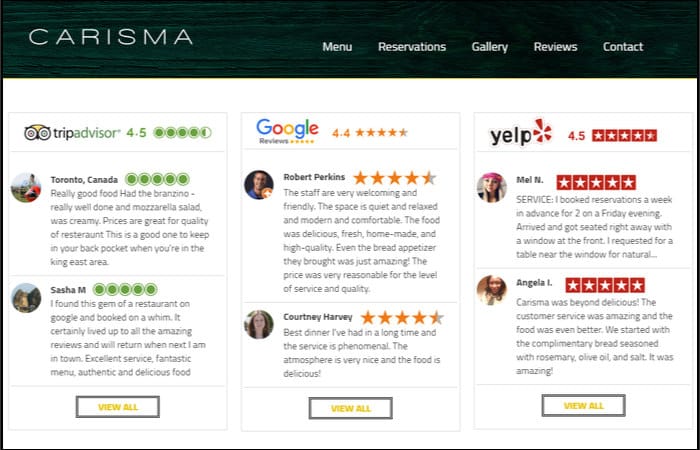
The payoff is real when you place proof well. Consistent social proof can increase revenue by up to 62% per customer, according to DataPins.
One retailer proves the point: The Very Group lifted its conversion rate by more than 15% just by placing social proof carefully.
You don’t need proof on every page at once. Start with your homepage and your top product page, then add more spots as you go.
First-Party Social Proof Examples That Build Trust
Want to see what this looks like in practice? Sometimes the fastest way to act is to copy a setup that already works.
Below are four examples of businesses showing proof they own. Each one maps to a format you can build on your own WordPress site.
1. A skincare brand embedding its live Instagram feed of customer tags. Glossier asks customers to post photos using its products, then pulls those tagged Instagram posts onto its site. Shoppers see real people with real results before they buy.
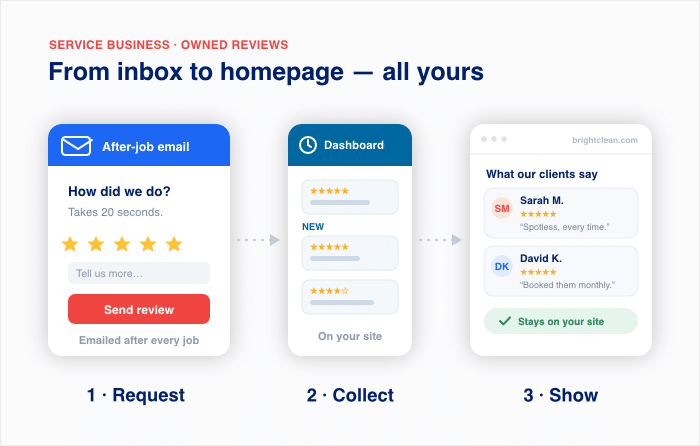
2. A service business showing form-collected reviews on its homepage. Picture a local cleaning company that emails a short review form after every job. Each rating lands in its WordPress dashboard, and the best ones sit right on the homepage.
3. A B2B company displaying case studies and testimonials. HubSpot publishes customer case studies that name the company, the problem, and the result. It pairs them with short client testimonials pulled from places like LinkedIn.
4. A Social Wall combining multiple networks for a launch. For a product launch or event, a brand can blend posts from Instagram, Facebook, and X into one feed using Social Wall Pro.
Visitors see buzz from every platform in a single place, in real time. This works because the proof feels alive, like a room full of people talking about you at once.
Notice the pattern across all four. Each business takes content it already owns and puts it where buyers can see it.
The good news is you can copy any of these today with content you already have.
Frequently Asked Questions
What counts as first-party social proof versus third-party?
First-party social proof is any trust signal you own and control, like reviews collected on your own site, customer testimonials, and Instagram posts you display yourself. Third-party social proof lives on someone else’s platform, like a Google rating or a Trustpilot badge you pull in from outside. According to GatherUp, first-party reviews on a property you own give the same social proof as Google or Facebook.
I already have Instagram posts and emailed reviews. How do I get them on my site?
You already have first-party social proof, so the only step left is displaying it on your WordPress site. Use a Smash Balloon feed plugin to connect Instagram and show post where your customers have tagged you, and use Reviews Feed Pro to display the reviews customers sent you.
Is displaying my own reviews as trustworthy as a Google rating?
According to GatherUp, first-party reviews on a site you own can have the same benefit as social proof as third-party platforms. You also control these reviews fully, so they can never disappear when an outside platform changes its rules.
How do I collect reviews directly instead of relying on Google or Trustpilot?
You can collect reviews directly using Reviews Feed Pro by Smash Balloon, which connects with WPForms and Formidable Forms. Build a short form that asks for a name, a star rating, and a few words, then share the link in your thank-you emails or on your contact page. Each submission lands on your WordPress site and stays there from the moment it arrives.
Start Displaying Your Own Social Proof Now
Here is the one takeaway: you already own first-party social proof. Your Instagram posts, your tagged customer photos, and the reviews people sent you all count. The only thing missing is putting them on your site.
So where do you start? Work through this short checklist with content you already have:
- Gather your existing proof. Round up your best Instagram posts, tagged photos, and the reviews customers already sent you.
- Pick your top two pages. Choose your homepage and your strongest product page as the first spots to show proof.
- Display social media posts. Use Social Wall Pro or other Smash Balloon plugins to display posts from happy customers.
- Collect and show reviews. Set up a short form, then display real ratings with Reviews Feed Pro so every star stays yours.
- Place proof near the decision. Drop a few reviews next to your “Buy” button where last-second doubt happens.
The good news is you can start today with content you already have. Pick your strongest need and act on it now.
Ready to own your trust signals instead of renting them? Get Reviews Feed Pro and put your own reviews on your site this afternoon.