Social Wall
  Feed Analytics

If you’ve ever asked a happy customer for a Google review and gotten a “Sure, I’ll do it later,” only to never hear from them again, you already know the frustration.
According to Brightlocal’s Local Consumer Review Survey, 83% of consumers use Google to evaluate local businesses.
But most businesses still rely on the occasional in-person ask and hope for the best.
The problem isn’t that customers won’t leave a review. It’s that most businesses ask at the wrong moment, with no easy way for the customer to follow through.
Working at Smash Balloon, I’ve helped businesses go from a handful of reviews to hundreds, and the difference is almost always the same: a repeatable system that any business owner can use.
These 11 methods cover when to ask, how to make it easy for customers to follow through, and how to build a process that keeps reviews coming in each month.
- How to Get More Google Reviews: The Short Answer
- Why Google Reviews Matter More Than You Think
- 11 Proven Ways to Get More Google Reviews
- 1. Ask Right After a Positive Moment, Not at Checkout
- 2. Send a Direct Google Review Link via Email or SMS
- 3. Create a Google Review Shortlink (Do This Today)
- 4. Display Your Existing Reviews on Your Website
- 5. Train Your Team to Ask in Person
- 6. Add a Review Request to Order Confirmation Emails
- 7. Use QR Codes in Physical Locations
- 8. Respond to Every Single Review, Positive and Negative
- 9. Make It Part of Your B2B Client Onboarding
- 10. Follow Up After a Support Ticket Is Resolved
- 11. Add a Google Review CTA to Your Email Signature
- Does Google Actually Allow You to Ask Customers for Reviews?
- Star Rating or Review Count: What Matters More for Local SEO?
- Start Getting More Google Reviews Today
How to Get More Google Reviews: The Short Answer
The fastest way to get more Google reviews is to ask at the right moment, right after a positive experience, when the feeling is fresh.
Most businesses skip this step entirely, and that’s why their review count stays flat for months. Here’s what actually moves the needle:
- Ask Immediately After A Win: A completed project, a solved problem, a happy customer interaction. That’s your window.
- Send A Direct Review Link: Don’t make customers hunt for your Google Business Profile. Remove every extra click.
- Follow Up Once: A single reminder doubles response rates for most businesses without annoying anyone.
- Make It Part Of Your Process: A one-off ask gets you one review. A repeatable system gets you 50.
- Stack A Few Methods Together: Email, SMS, QR codes, and on-site prompts work better in combination than alone.
This is just a handful of strategies from the full guide below. The businesses that consistently rack up hundreds of reviews aren’t doing one thing.
They’re running a simple, repeatable system that combines different methods. Keep reading for the exact steps behind each one.
Why Google Reviews Matter More Than You Think
Google uses reviews as a ranking signal when deciding which businesses appear in the local map pack.
More reviews, combined with stronger ratings, tell Google that your business is active, credible, and worth showing to searchers.
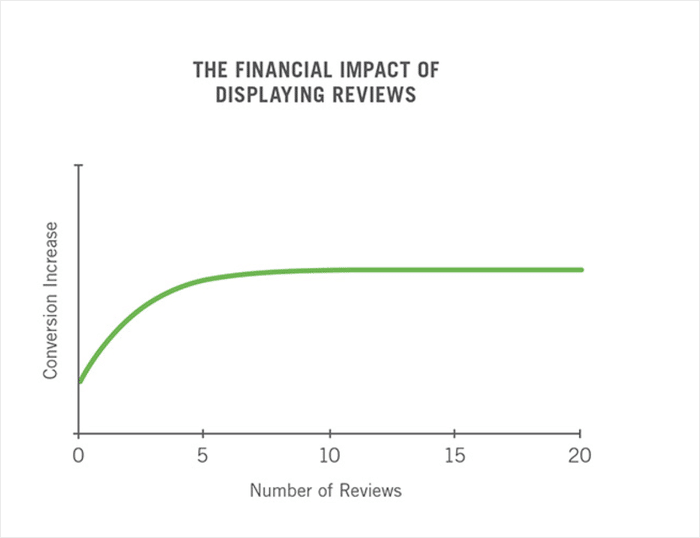
If a competitor in your area has 20 reviews and you have 5, that gap shows up in the rankings as well as conversions.
Recency can matter just as much as volume. A business with 200 reviews from three years ago and nothing since sends a quiet signal that something may have changed.
Consistent new reviews tell Google your business is still active and still earning customer trust month after month.
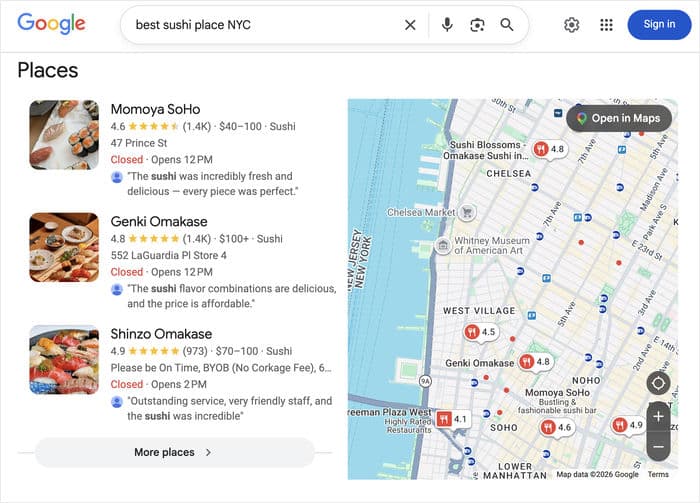
Star rating and review count both matter, but the relationship isn’t a simple formula. Google hasn’t published a specific target for how many reviews you need or how fast you need to collect them.
What the pattern consistently shows is this: a steady stream of recent, real reviews from actual customers beats a high rating built on a thin handful of old ones.
Expert Tip: To learn about how reviews can help your business, check out our full list of the important social proof statistics you need to know.
11 Proven Ways to Get More Google Reviews
You don’t need all 11 of these instantly to see results. As a start, you can pick 4-5 that fit your business, and build them into your routine today.
After that, you can start tweaking the system and introducing more of these methods.
1. Ask Right After a Positive Moment, Not at Checkout
Most businesses ask for a review at checkout, but that’s the worst possible moment. Your customer’s mind is already on the invoice, the drive home, and what’s next on their list.
The better trigger is the emotional high right after a compliment, a completed delivery, or a visible “this is exactly what I needed” moment.
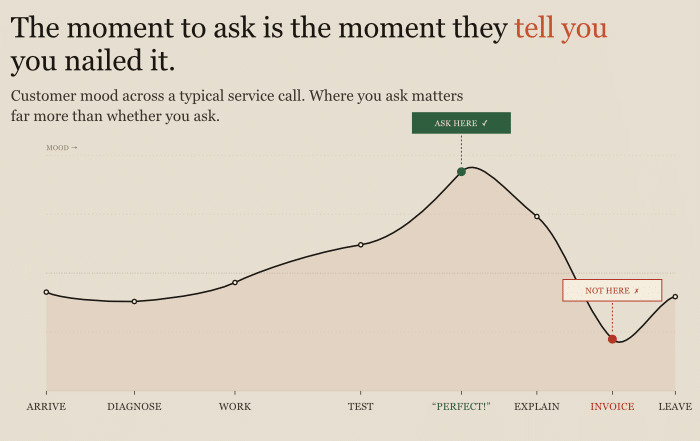
Imagine a plumber who waits until the homeowner says, “This looks perfect, exactly what I needed,” then responds, “That’s great to hear. Would you mind leaving us a quick Google review? It would mean a lot to us.”
But if that same plumber asked for a review while handing over the invoice, there’s a much lower chance of getting a review.
The difference isn’t the words. It’s the timing. Don’t worry about feeling pushy. You’re just meeting the customer where their enthusiasm already is.
2. Send a Direct Google Review Link via Email or SMS
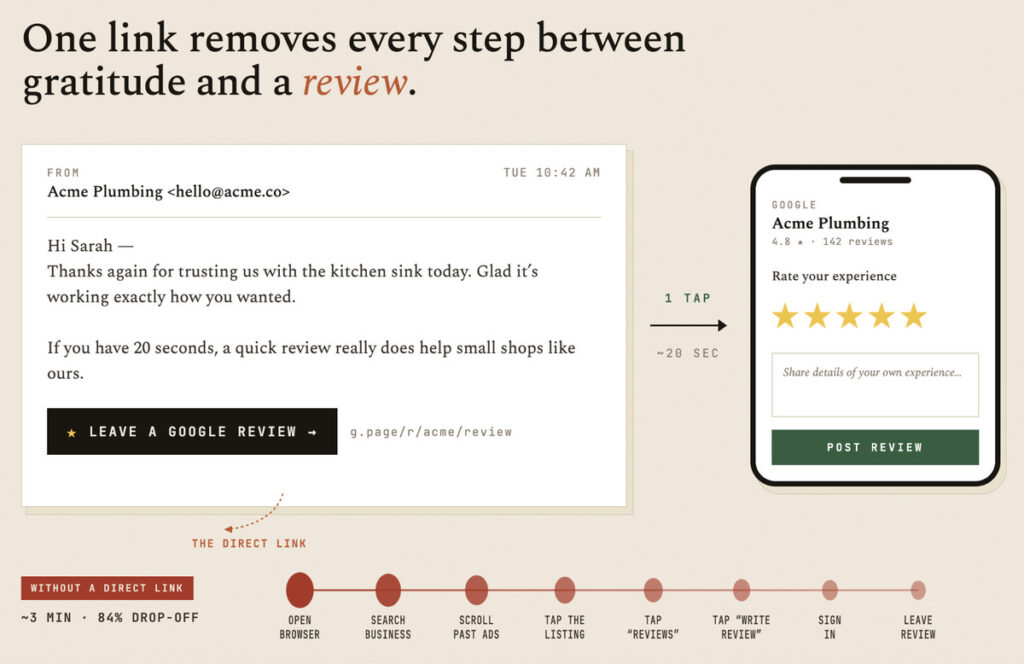
The biggest reason customers don’t follow through isn’t unwillingness. It’s friction.
If they have to search for your business, click through to your profile, and figure out where to write a review, most won’t bother.
A direct link that opens the review dialog removes all of that. You can email a client after a service and show the direct review link so they leave a review in seconds.
Plus, you can even use SMS, since the open rates for texts are significantly higher than email, which means more of your messages actually get seen.
(Tip #3 below shows you exactly how to generate that link in under two minutes.)
Even if only 1 in 5 people respond, that’s a steady stream of new reviews every single month.
3. Create a Google Review Shortlink (Do This Today)
Your Google Business Profile already generates a direct review link for you. You don’t need a third-party tool or a developer to create it.
Here’s how to find yours in under two minutes:
- Go to your Google Business Profile dashboard.
- Select Read Reviews and click on “Ask for reviews” in the menu.
- Copy the link Google generates.
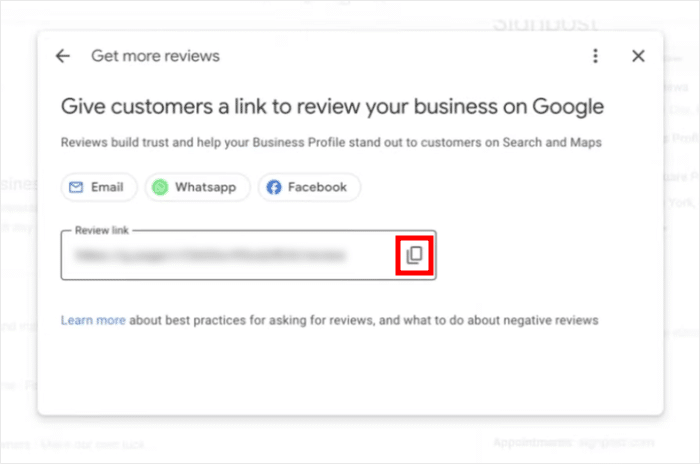
From there, you can shorten it with a free tool like Bitly to make it cleaner for SMS, QR codes, and email footers. Bookmark this link. You’ll use it in at least four of the tips below.
4. Display Your Existing Reviews on Your Website
When visitors see real customer reviews directly on your website, two things happen.
They trust you faster, and they see that leaving a review is something your customers actually do. Social proof creates more social proof.
Smash Balloon’s Reviews Feed Pro makes this practical for WordPress sites.
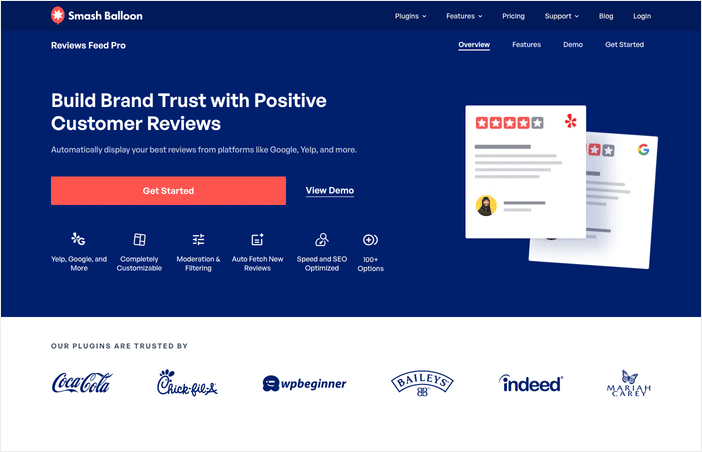
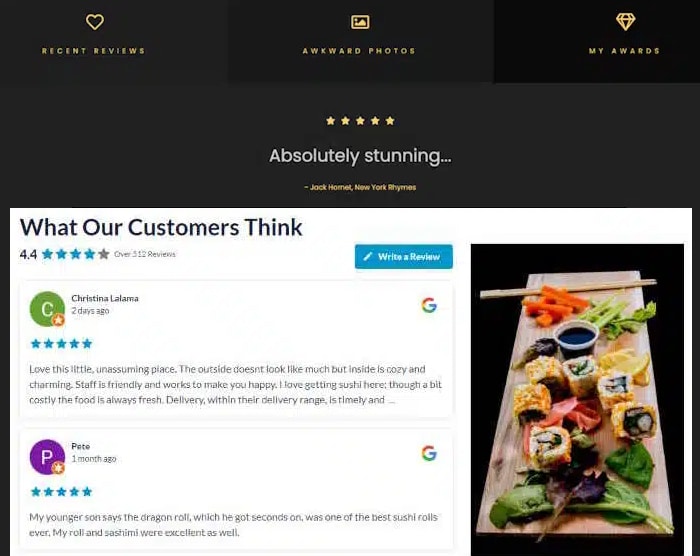
It connects to your Google reviews, pulls them in automatically, and lets you choose which ones to display: no manual copying, and no outdated screenshots.
Go through the quick setup, and you can show the reviews in an eye-catching feed that automatically updates.
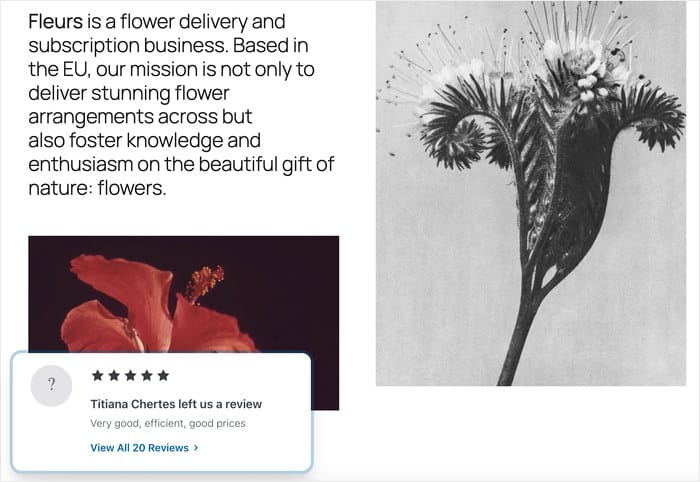
For even more social proof, you can display your latest reviews as popups on your website.
That way, you can show visitors that people are actively checking out your products right now and are happy with your brand.
A roofing contractor in Austin added a reviews feed to their homepage and contact page. Now, the website visitors can check reviews without leaving the website (and getting distracted by competitors).
That’s the social proof loop working exactly as it should.
If you’ve been wondering how to get started, check out this guide on how to show your Google reviews on your WordPress website.
5. Train Your Team to Ask in Person
Staff ask inconsistently because no one has given them a script or a defined trigger moment. Fix both, and the ask becomes automatic.
Give your team a two-sentence script they can use word for word:
“If you’re happy with how everything turned out, we’d really appreciate a Google review. It only takes about a minute, and it helps our small business a lot.”
For best results, you can tie that script to a specific workflow moment, like we mentioned in tip #1. That way, it happens every time, not just when someone remembers.
6. Add a Review Request to Order Confirmation Emails
Order confirmation emails are the most-opened emails your business sends.
Your customer just completed a purchase and is in a receptive, positive mindset, so that window is worth using.
Keep the ask to a single P.S. line with the direct review link. An e-commerce candle brand added, “Loving your order? Leave us a quick Google review here” as a P.S. in their shipping confirmation email and saw their review count triple within 60 days.
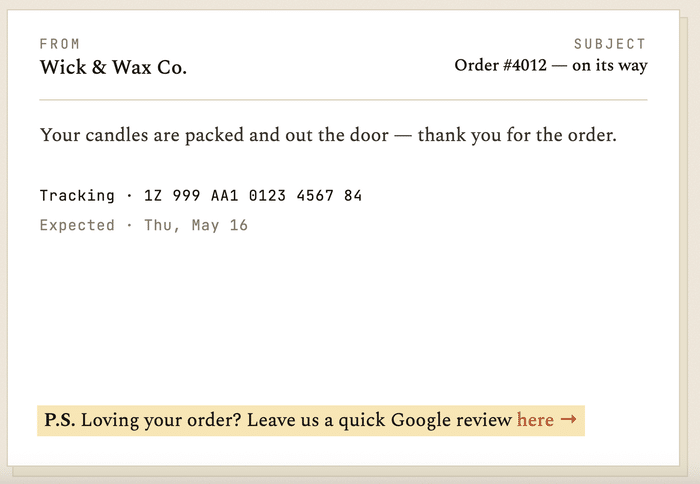
A full CTA block will feel like marketing, but a brief P.S. line feels like a human note, and that’s exactly what gets clicks.
7. Use QR Codes in Physical Locations
A QR code buried on a receipt gets ignored. Placed at the moment of peak experience, it gets scanned.
High-impact placements include table tents at restaurants, counter cards at retail checkout, packaging inserts, and thank-you cards tucked inside deliveries.
One coffee shop prints a QR code on their to-go cup sleeve with the line “Loved your coffee? Tell Google.” next to a star icon, right where customers look while they wait.
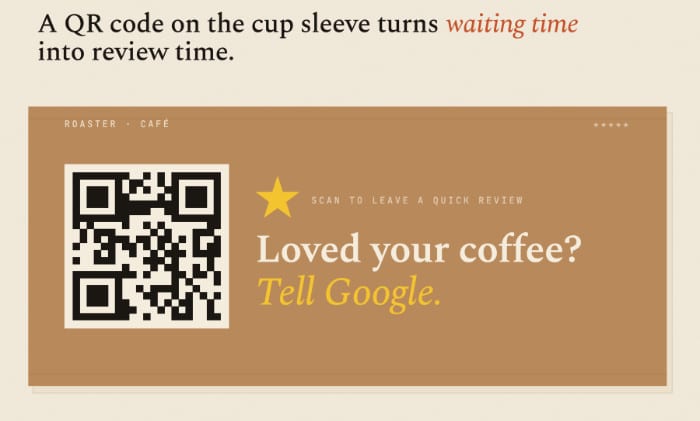
Link every QR code to the short link you created in tip #3 so all your traffic stays consistent and easy to track.
Even a handwritten card with a QR code taped to it is enough to get started.
8. Respond to Every Single Review, Positive and Negative
According to HubSpot, people are 1.7x more likely to visit your business if you respond to negative reviews.
Responding signals to both Google and potential customers that your business is active and accountable.
For positive reviews, write a short personal response using the reviewer’s name and one specific detail from what they said. Skip the copy-pasted “Thanks for the five stars!”
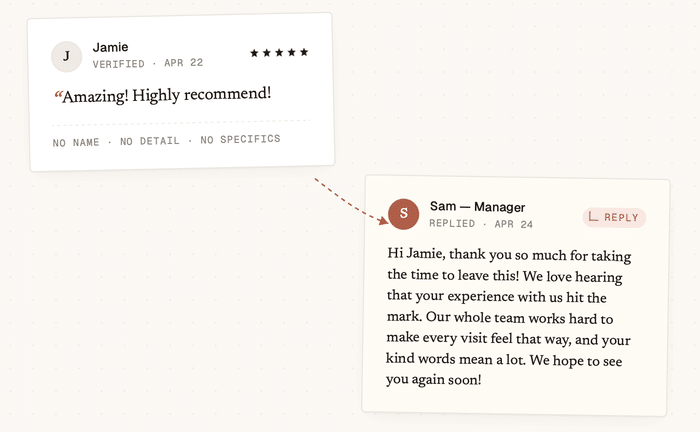
On the other hand, for negative reviews, acknowledge the frustration, apologize without admitting liability, and offer to resolve it offline with a phone number or email.
A dental office that responds to every one-star review with “We’re sorry to hear this. Please call us at [number] so we can make it right” has already turned two negative reviews into updated four-star and five-star reviews simply by following through.
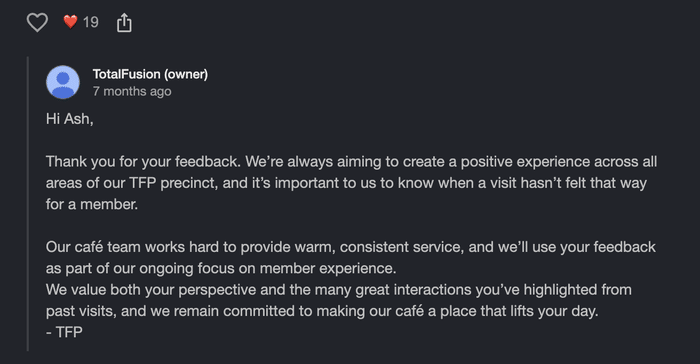
The good news is, responding to a full week of reviews usually takes less than 10 minutes.
Expert Tip: To learn the best response for each situation, check out our in-depth guide on how to respond to negative reviews.
9. Make It Part of Your B2B Client Onboarding
Most tips in this list naturally fit consumer-facing businesses. This one is for you if your clients are other businesses.
The right moment to ask in B2B isn’t at contract signing. It’s after the first successful deliverable or during the 30-day check-in call, when the client has already seen what you can do.
For example, your B2B marketing agency can send a “30-day check-in” email after each client’s first campaign goes live.
After summarizing the results, you can follow up with “If you’re happy with how things are going, we’d love a Google review from you,” and the direct link.
10. Follow Up After a Support Ticket Is Resolved
A resolved support issue is one of the highest-trust moments in any customer relationship. The person went from frustrated to helped, and almost no business uses that moment to ask for a review.
The ask works best in the automated “ticket closed” email or a same-day follow-up message:
“Your issue has been resolved. If our team was helpful, we’d appreciate a quick Google review here.”
A SaaS company that added that single line to their automated ticket-resolved notification saw a measurable uptick in Google reviews within the first 30 days, with no additional outreach required. T
This trigger costs nothing extra to set up and is consistently one of the most underused review opportunities in any business.
11. Add a Google Review CTA to Your Email Signature
This is the lowest-effort method on the list. Set it up once and it works indefinitely, with no active effort from you.
Add one line below your signature block: “Happy with our service? Leave us a Google review” with the shortlink from tip #3.
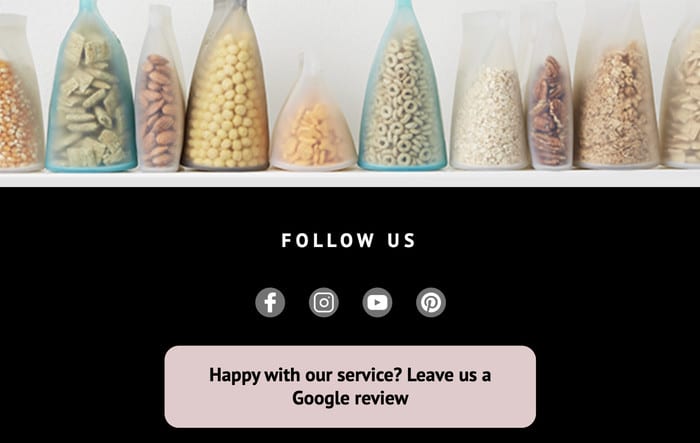
Every attorney at one law firm includes the review link in their email signature, and it generates a steady drip of new reviews each month from routine client and referral emails.
This is a slow way of collecting reviews, not a spike tactic. But unlike most tactics, it keeps working in the background without needing any extra work.
Does Google Actually Allow You to Ask Customers for Reviews?
Yes, Google not only allows businesses to ask customers for reviews, it actively encourages it. There is nothing in Google’s guidelines that penalizes you for asking.
The concern most business owners have is understandable, but the ask itself is completely fine.
What Google does prohibit is a short list, and it’s worth knowing clearly:
- Offering incentives for reviews. Discounts, free items, gift cards, or any reward in exchange for a review violates Google’s policy.
- Buying reviews from third-party services. Paying for reviews, whether through a freelancer or a service, is against Google’s terms and can result in your Business Profile being suspended.
- Review-gating. This means screening customers before asking, so only happy ones get the review link while unhappy ones get filtered out. Google prohibits this because it manipulates the accuracy of your rating.
As long as you ask every customer and offer nothing in return, you are fully within Google’s guidelines.
You can ask consistently, you can ask repeatedly across different touchpoints, and you can make it easy with a direct link. None of that crosses any line.
Star Rating or Review Count: What Matters More for Local SEO?
This is one of the most common questions business owners ask, and the honest answer is: both matter, but they matter for different things.
- Review count determines visibility:
Google needs enough review signals to trust that your business is legitimate and active. A business with 5 reviews gives Google very little data to work with compared to one with 150.
More reviews, especially recent ones, tell Google that real customers are consistently choosing your business. That signal directly influences whether you show up in the local pack at all.
- Star rating determines click-through rate:
Once you appear in local search results, your star average shapes whether someone clicks on your listing or your competitor’s.
According to research, the purchase likelihood is highest when your rating is between 4.0 and 4.7 stars.
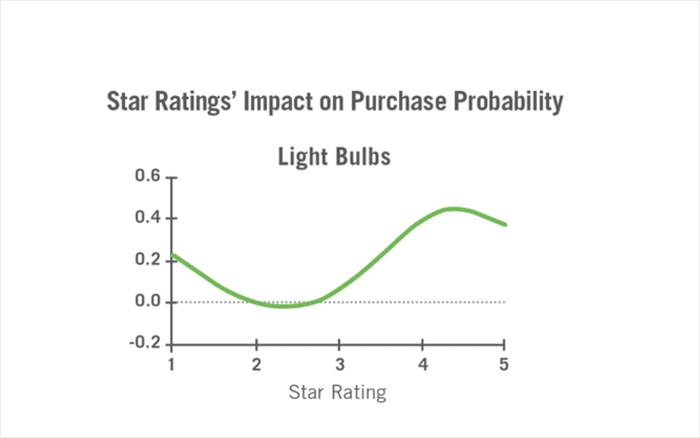
Google has not published a benchmark for how many reviews you need or how fast you should collect them.
But the pattern across local SEO case studies is consistent: recent reviews from verified customers carry more weight than a high rating built on old or sparse reviews.
Frequently Asked Questions
How long does it take for a Google review to appear?
Most Google reviews show up within a few minutes of being submitted. That said, Google’s spam filter can delay or hold reviews, sometimes for days. If a customer tells you they left a review but you can’t find it, you can ask them to check the “Reviews” tab in their Google Business Profile account to confirm it published.
Can I remove a Google review I don’t agree with?
You cannot delete a review yourself, even if it’s unfair or inaccurate. Your only option is to flag it for Google to evaluate using the “Report review” option in your Business Profile. Google decides whether it violates policy, and removal is not guaranteed, which is why responding publicly is always the more reliable move.
How many reviews do I need to rank in the local pack?
Google has not published a specific number, and anyone who gives you a firm threshold is guessing. What the evidence consistently shows is that more reviews, especially recent ones, give Google stronger signals of legitimacy. Focus on building a steady stream rather than hitting a target count.
Can I ask for reviews on social media?
Yes, and it works well. Posting your Google review shortlink directly in a social media post or story is fully compliant with Google’s guidelines. Keep the ask simple, include the direct link so followers can act on it immediately, and post it more than once since most followers won’t see every post.
Start Getting More Google Reviews Today
The gap between a 15-review business and a 200-review business isn’t luck or better customers. It’s a system.
Here are your first 3 steps. Do these before you close this tab:
- Go to your Google Business Profile and generate your review shortlink right now.
- Send it to the last five customers who said something positive via text or email, today.
- Add it to your email signature before you close this tab.
Those three steps cost you less than 10 minutes and will produce results faster than anything else on this list.
And once those reviews start coming in, make them work harder for you.
Smash Balloon’s Reviews Feed Pro pulls your Google reviews directly onto your WordPress site, so every visitor sees the social proof that earns you even more reviews.
You’ve already done the hard part. You’ve earned those reviews. Now it’s time to build the system that lets them keep coming.