Social Wall
  Feed Analytics

Plenty of guests who book direct find you on Airbnb first. They like what other guests said, then go looking for your own website to book without the service fee.
When they get there, those reviews usually aren’t. Your listing has the proof, and your booking page has the calendar, and guests have to put the two together themselves.
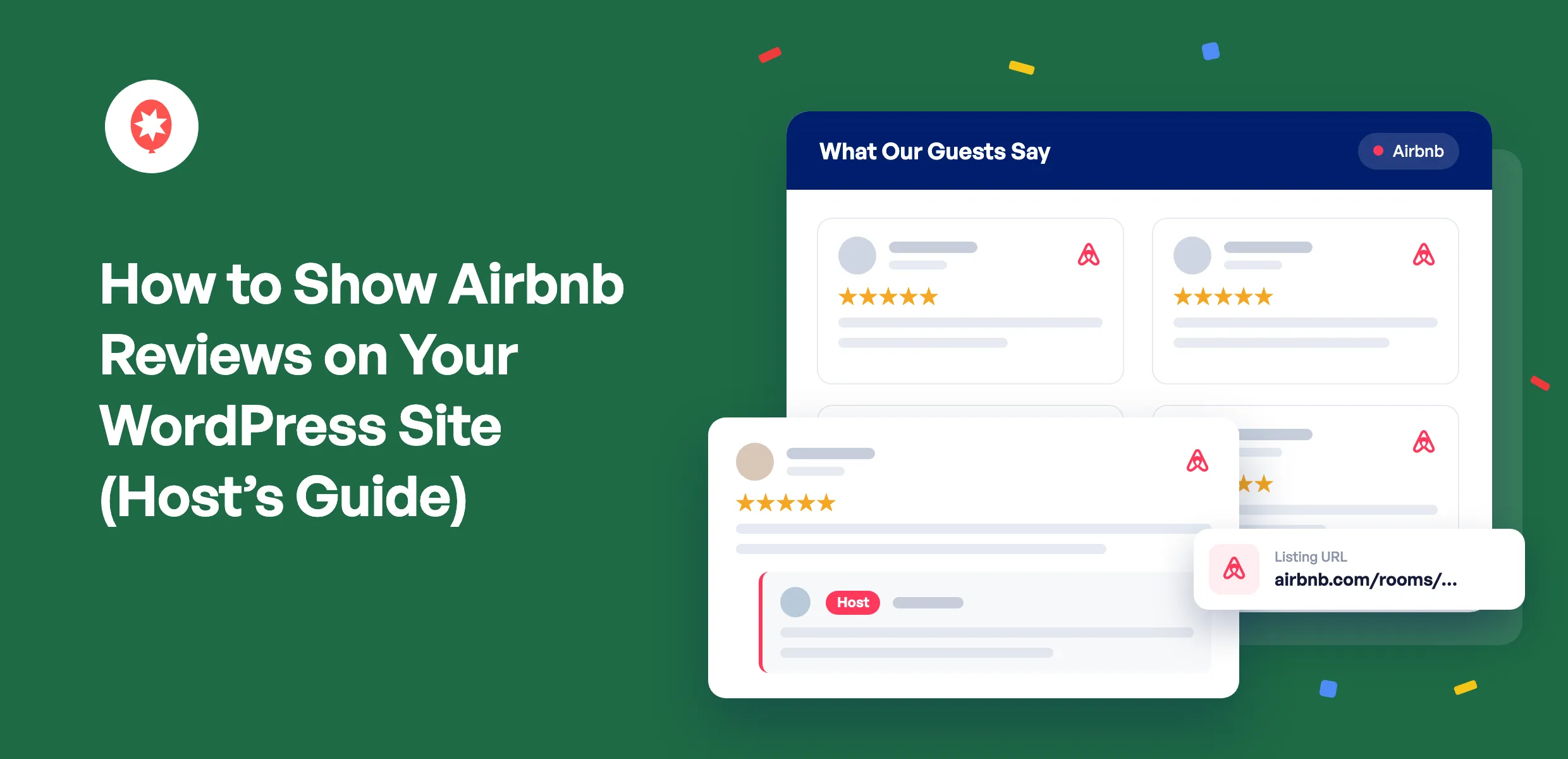
The fix is to show your Airbnb reviews on your WordPress site, right next to where people book. I write Smash Balloon’s product guides, and for this one I set up a real Airbnb listing on a test WordPress site from scratch. Going from pasting the listing link to having reviews in a feed took me about 5 minutes, with no Airbnb login and no code.
How Do I Show Airbnb Reviews on My WordPress Site?
To show Airbnb reviews on your WordPress site, install Smash Balloon Reviews Feed Pro with an Elite license, add Airbnb as a review source, and paste your listing’s URL. Your guest reviews load into a feed you can style and place on any page with a block, a shortcode, or the Elementor widget. You don’t need an Airbnb account, an API key, or a developer.
Smash Balloon Reviews Feed Pro is a WordPress plugin that pulls reviews from Airbnb, Google, Booking.com, Tripadvisor, and 7 other platforms onto your own site and keeps them updated. Here’s exactly how I set it up.
What Are the Ways to Add Airbnb Reviews to Your Website?
There are three realistic ways to do this, and they’re not equally good for a host.
| Copy reviews by hand | Hosted review widget | Smash Balloon Reviews Feed Pro ⭐ Recommended | |
|---|---|---|---|
| Do new reviews show up on their own? | ❌ No, you paste every new one yourself | ✅ Yes, from the widget company’s servers | ✅ Yes, it checks your listing twice a day by default |
| Do your replies as host come through? | ⚠️ Only if you copy those too | ⚠️ Depends on the tool | ✅ Yes, under each review you answered, with a Host label |
| Does it match your site’s design? | ✅ Yes, it’s your own text | ⚠️ Styled by the widget’s templates | ✅ Yes, it uses your theme’s fonts and spacing |
| What if the source has a bad day? | ✅ Nothing changes | ❌ The widget can go blank | ✅ Saved reviews keep showing from your own site |
| Can Booking.com and Google reviews sit in the same feed? | ⚠️ Only by hand | ⚠️ Often a separate widget per platform | ✅ Yes, one feed with a badge on each card |
| Best for | A single quote on your homepage | Sites that aren’t on WordPress | WordPress hosts who take direct bookings |
If you only want one standout quote on your About page, copying it over is fine. If your site isn’t built on WordPress, a hosted widget is the realistic route. If you run your booking site on WordPress and want your reviews to keep themselves current, the plugin is the one I’d pick, and it’s what the rest of this guide uses.
What Should You Keep From an Airbnb Review?
Not every widget brings the whole review across, so here’s what I’d look for. These are the parts a guest actually uses to decide.
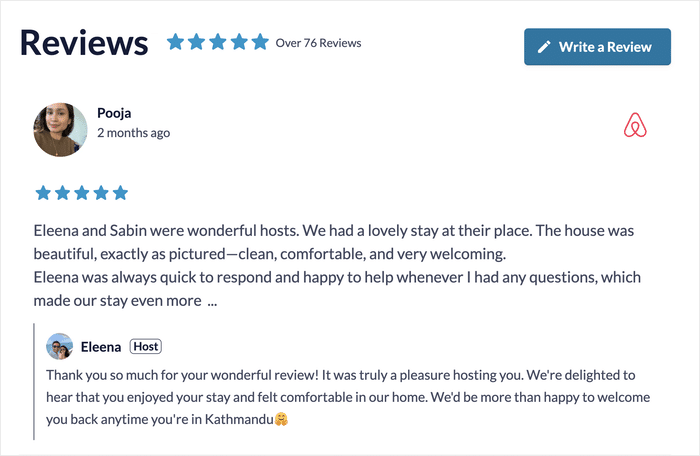
- The guest’s name and photo. A real face next to a review reads very differently from an anonymous quote.
- The star rating as the guest left it. Airbnb uses 5 stars, so there’s nothing to convert.
- Your reply as host. This is the part most widgets skip, and it’s the part that shows a guest who they’d be dealing with.
- A badge showing it came from Airbnb. Visitors trust a review more when they can see where it was written.
Reviews Feed Pro keeps all four. Where you’ve replied to a guest on Airbnb, your response appears under their review with a Host label. Where you didn’t reply, the review shows on its own.
How to Embed Airbnb Reviews on WordPress, Step by Step
Here’s the short version before the details:
- Airbnb reviews are part of the Elite plan of Smash Balloon Reviews Feed Pro.
- All you need is your listing’s public URL or its numeric listing ID.
- The first batch of reviews arrives right away, and older ones fill in after that.
- You can place the feed with the WordPress block editor, a shortcode, or Elementor.
- Create a new reviews feed
- Choose Airbnb as your source
- Paste your Airbnb listing URL
- Pick a template and customize the feed
- Filter which reviews show
- Embed the feed on your booking page
Step 1: Create a New Reviews Feed
With Reviews Feed Pro installed and your Elite license activated, go to Reviews Feed » All Feeds in your WordPress dashboard and click Add New. Then click Add Source.
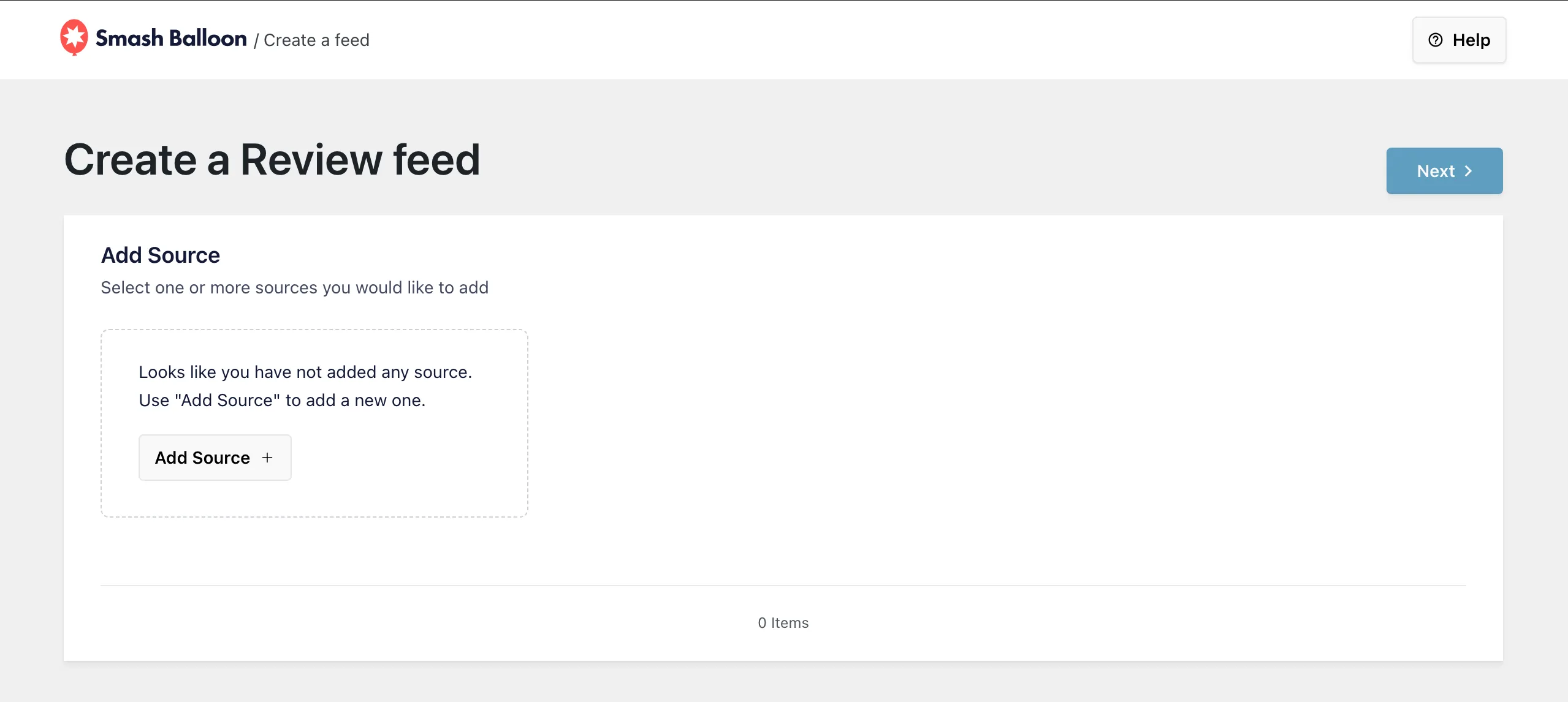
Every source you connect gets saved, so if you add more listings or platforms later, they’ll be waiting on this screen.
Step 2: Choose Airbnb as Your Source
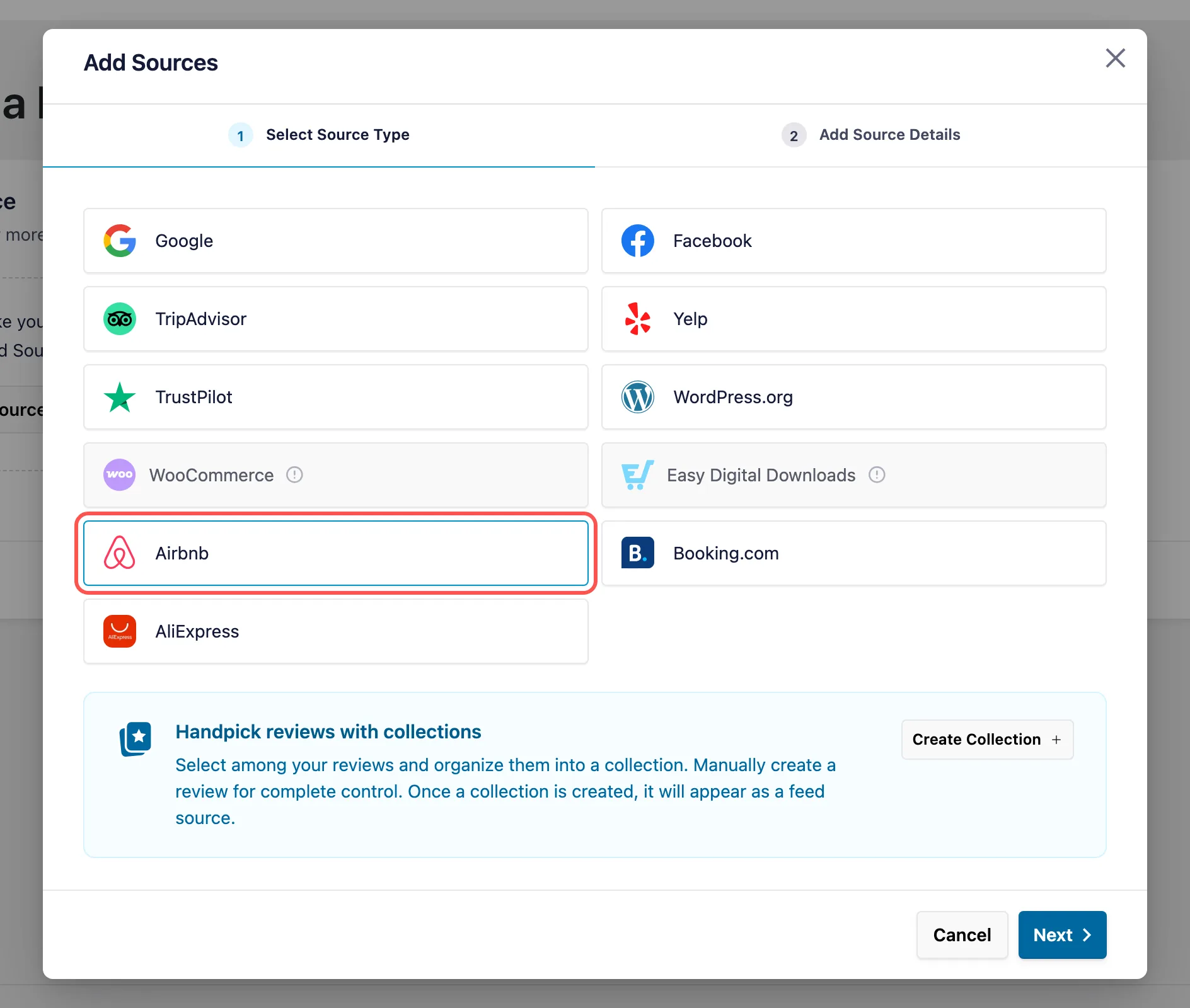
In the Add Sources window, click Airbnb and then Next. Booking.com, Tripadvisor, and Google are on the same list, which matters later if you want them in one feed.
Step 3: Paste Your Airbnb Listing URL
Open your listing on Airbnb and copy the address from your browser. It looks like airbnb.com/rooms/ followed by a long number. Paste it into the Listing URL field and click Finish.
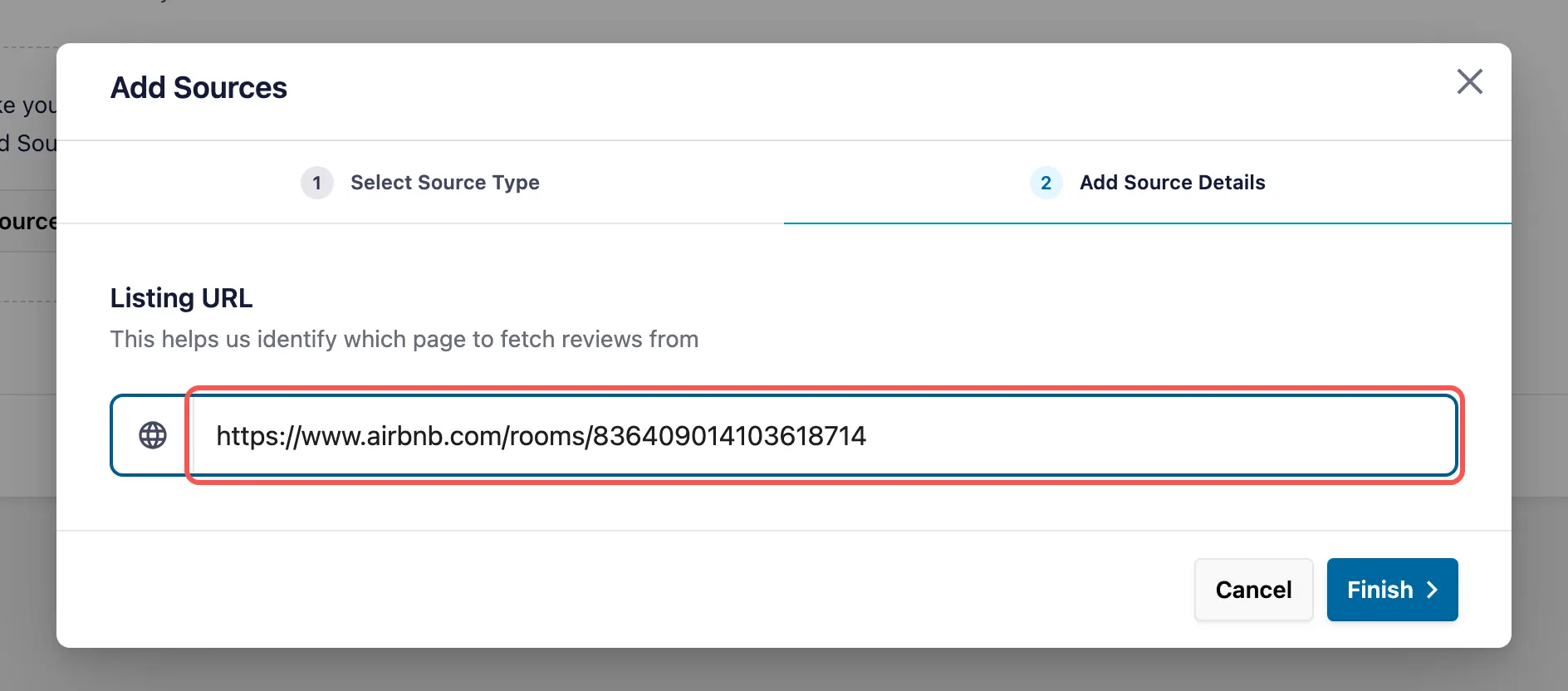
Worried about finding the right link? You don’t need to tidy it up. The plugin reads the listing number straight out of the URL, so the extra bits Airbnb adds after a question mark don’t matter, and links from Airbnb’s other country sites like airbnb.co.uk work too. You can also paste just the listing number.
This step is why there’s no API key or Airbnb login involved. Your listing’s public page is all Reviews Feed Pro needs.
Step 4: Pick a Template and Customize the Feed
Select your new Airbnb source, click Next, and choose a template. The default works well for most rental sites. Your guest reviews then load into the live customizer, where you can change the layout, header, colors, and how many reviews show at once.
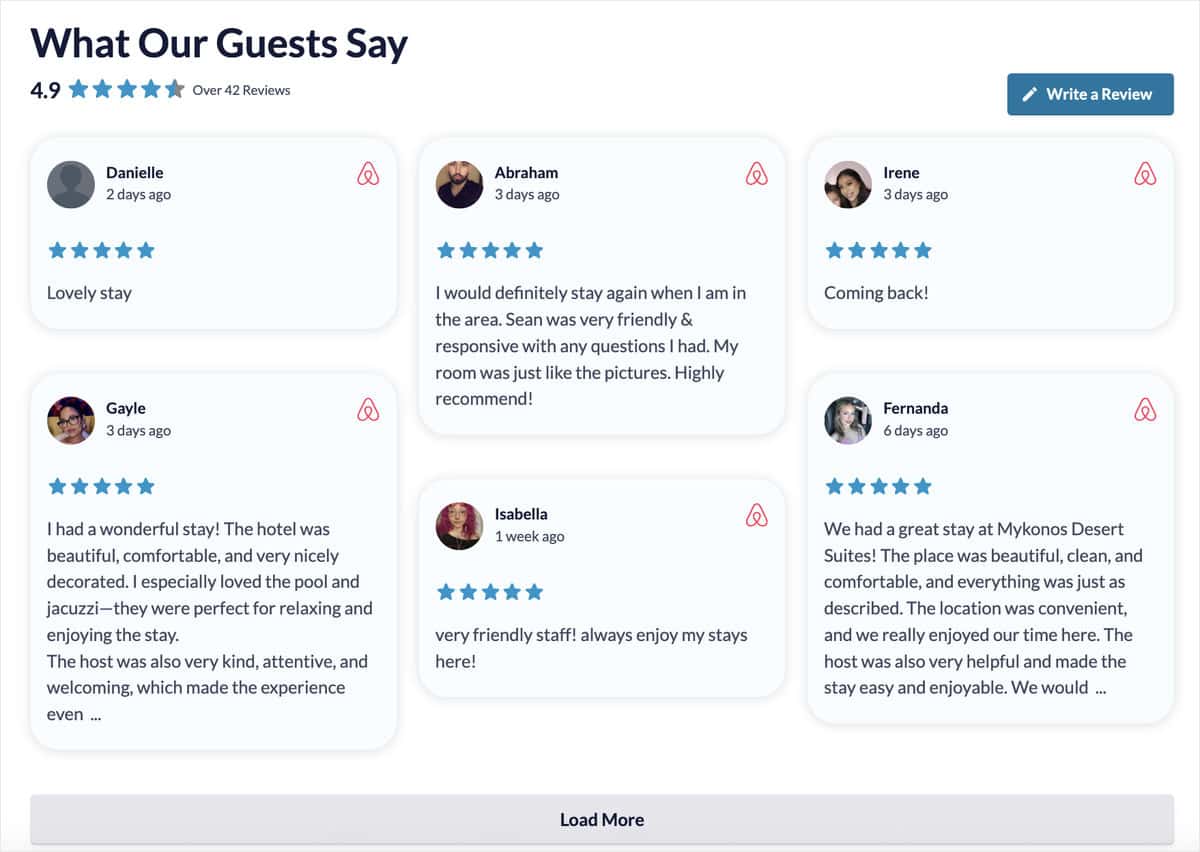
Personally, I like the masonry layout for rentals. Guests write anything from “Coming back!” to a full paragraph about the pool, and masonry lets the short and long ones sit together without big gaps.
Step 5: Filter Which Reviews Show
Open the filter settings to choose which reviews make it onto the page. You can set a minimum star rating, include or leave out reviews that mention certain words, and hide any single review in one click with visual moderation.
I’d start with a 4-star minimum. Your feed then leads with the stays that went well, while Airbnb still shows the full picture on your listing.
Step 6: Embed the Feed on Your Booking Page
Click Save, then Embed in the top right. You can copy the feed’s shortcode, add it with the Reviews Feed block in the block editor, or drag in the Elementor widget if you build pages with Elementor.
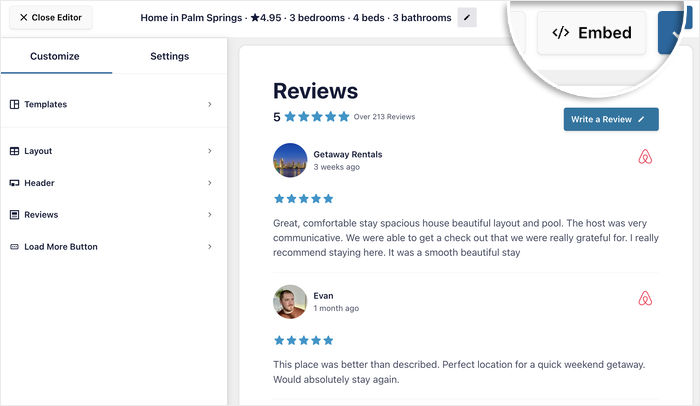
Your first batch of reviews shows up straight away, and older reviews keep filling in over the next while. Visit the page on your site to see them live, host replies and all.
Put your Airbnb reviews on your booking page
Paste your listing URL and your guest reviews, host replies included, show up on your own site. Airbnb comes with Reviews Feed Pro Elite, alongside Booking.com and Tripadvisor.
See Reviews Feed Pro EliteWhere Should Airbnb Reviews Go on a Direct-Booking Site?
Placement matters more than people expect. A feed tucked onto a Testimonials page that nobody clicks does very little. Put your reviews where a guest is actually making up their mind.
- Your booking or availability page. This is where someone decides whether to commit, so it’s the single most useful spot.
- Your rates page. A strong review next to a price makes the price feel fair.
- Your homepage. Visitors who found you on Airbnb recognize the reviews and know they’re in the right place.
- Landing pages behind ads. If you’re paying for traffic, send it to a page that already has proof on it.
You can also turn on Review Alerts, small popups that show a review while someone browses. Airbnb reviews appear in them just like any other source, so a guest checking your dates sees a 5-star stay without scrolling back up.
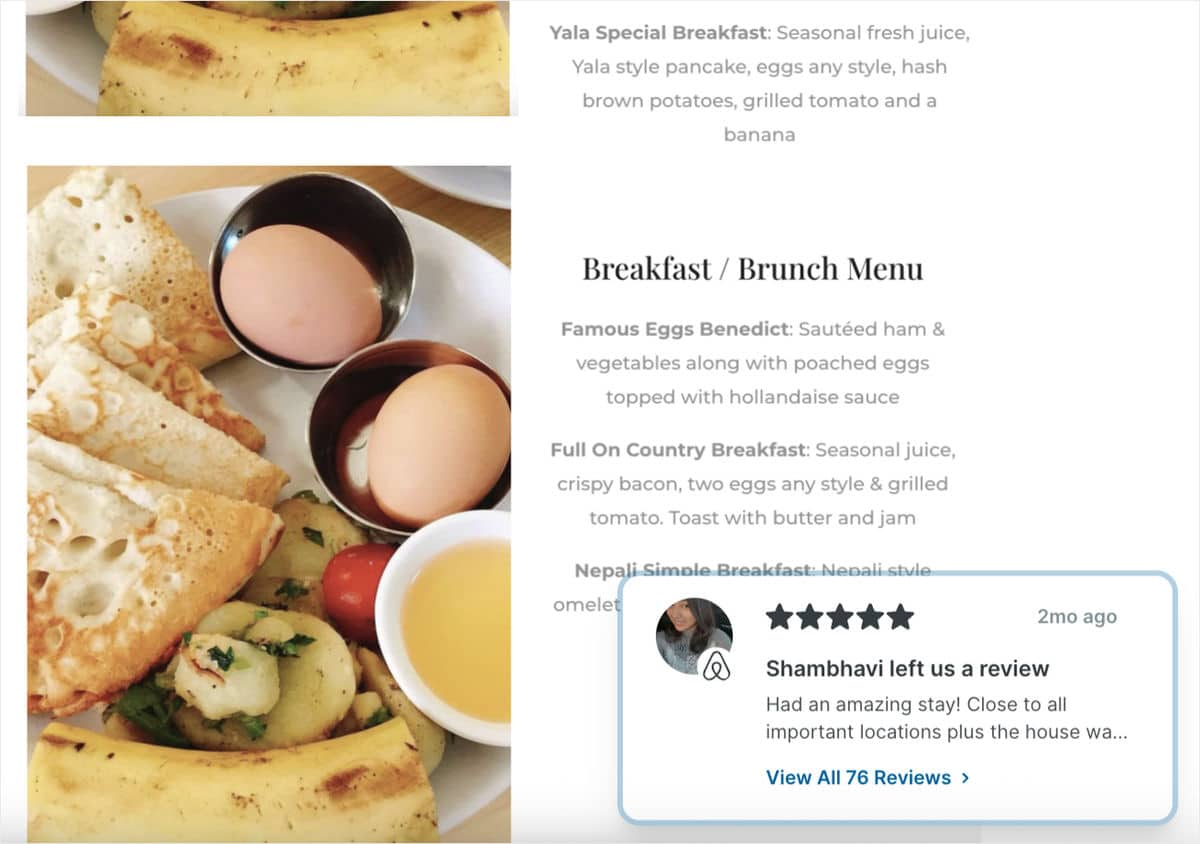
If you want more ideas, our guide on how to increase direct bookings covers what else to put on these pages.
Can You Show Airbnb Reviews Next to Booking.com and Google Reviews?
Yes, and for a lot of hosts this is the best part. Many rentals are listed on more than one platform, and guests often trust a place more when they see several sites agreeing.
Smash Balloon Reviews Feed Pro lets you put Airbnb, Booking.com, Google, Tripadvisor, and more in a single feed. Each card carries a small badge for the platform it came from, so nobody has to guess.
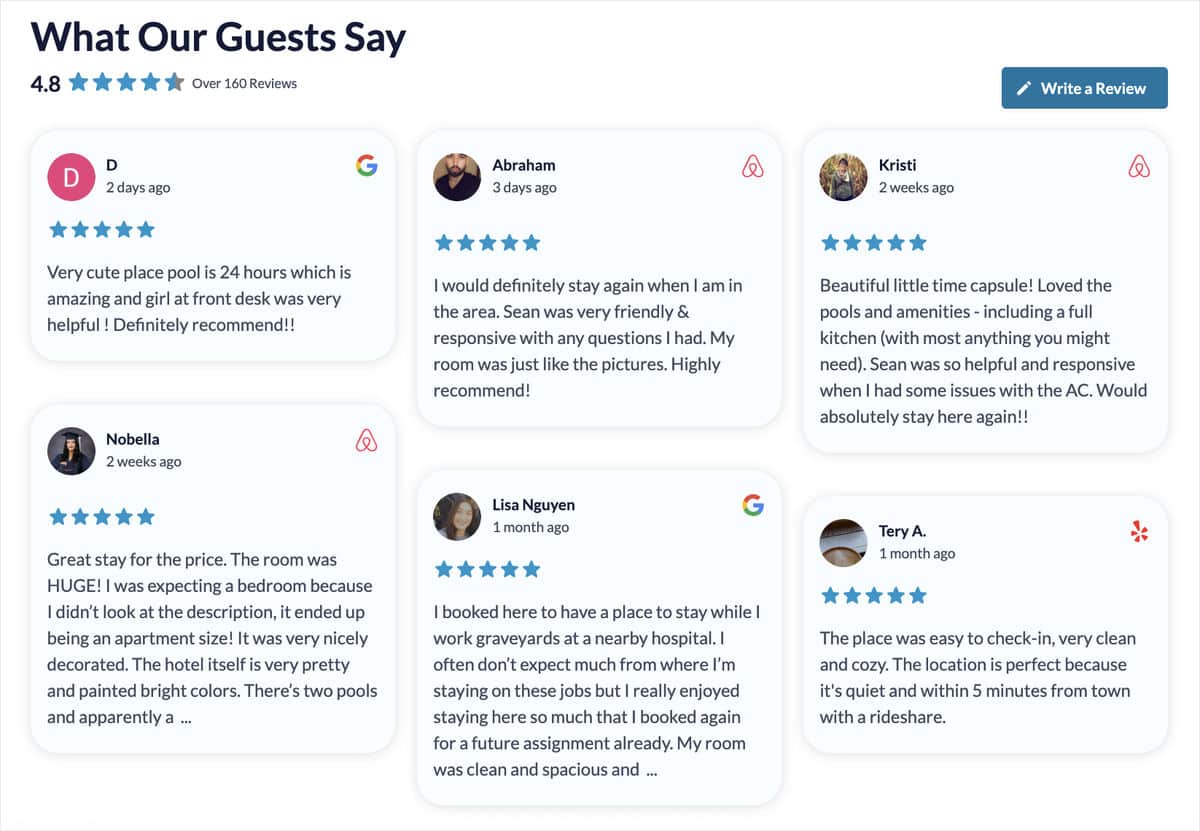
Running several rentals? Add each listing as its own source. You can give every property its own feed on its own page, or combine them on your homepage. Our post on showing reviews from multiple platforms in one feed walks through the mixed setup.
Why Use a WordPress Plugin Instead of a Hosted Widget?
You’ll find a handful of hosted widget tools that do something similar. They work, and they’re a reasonable choice if your site isn’t on WordPress. If it is, a few differences start to matter once a booking page depends on your reviews.
Your reviews keep showing on a bad day. Smash Balloon Reviews Feed Pro saves your reviews on your own site, so if the source is slow or unreachable, the feed keeps displaying what it already has. A hosted widget loads from the provider’s servers, so when they have trouble, that part of your page can go empty. Smash Balloon’s downtime prevention is built for exactly this.
It looks like part of your site. The feed uses your theme’s fonts and spacing instead of loading someone else’s design inside your page.
One flat yearly price. Reviews Feed Pro Elite is $149 for your first year and covers up to 10 sites, which helps if you run a separate website for each property.
Not sure about trusting a plugin with your site? More than 1.75 million people use Smash Balloon plugins, and our social proof statistics roundup explains why that kind of proof moves people. If you want the wider comparison, here’s how Smash Balloon stacks up against the alternatives.
Smash Balloon helps website owners turn real social content into trust signals that increase credibility and conversions. For a host, that means your guest reviews help on your own booking page, not just on Airbnb.
Frequently Asked Questions
Do I need an Airbnb account or API key to show my reviews?
No. Smash Balloon Reviews Feed Pro reads your reviews from your listing’s public Airbnb page, so you only need the listing URL or its numeric ID. There’s nothing to set up on Airbnb’s side and no credentials to find.
Can I show Airbnb Experience reviews?
No, Reviews Feed Pro works with Airbnb stays, the listings with a /rooms/ address. Experience reviews aren’t supported as a source right now, so add your stay listings and use manual review upload if you want to feature an Experience review.
How often do new Airbnb reviews appear on my site?
Reviews Feed Pro checks your listing for new reviews twice a day by default. When a guest leaves a review on Airbnb, it shows up in your feed on its own within about 12 hours, with no need to open the plugin.
Can I hide a negative Airbnb review from my website?
Yes. You can set a minimum star rating, filter by words, or hide any individual review in one click. The review stays on Airbnb as it is. This only changes what appears on your own site.
Can I show reviews from more than one Airbnb listing?
Yes. Add each listing as its own source, then show each one in its own feed or combine them in a single feed. Each review keeps its Airbnb badge either way.
Can I add Airbnb reviews to WordPress without a plugin?
Yes, but neither option keeps itself current. You can copy reviews into your page by hand, or paste a hosted widget’s embed code into a Custom HTML block. Copied reviews never update, and a hosted widget loads from another company’s servers, so a plugin is the option that both updates on its own and keeps showing saved reviews from your own site.
Start Showing Your Airbnb Reviews Now
Your guests have already done the hard part by writing great reviews. Right now those reviews only help you on Airbnb, while your own booking page goes without them.
Putting them on your site takes one listing URL and about 5 minutes. After that, new reviews arrive on their own, your replies come along with them, and you can stop copying anything across by hand.
- No Airbnb login or API key
- Your host replies shown under each review
- Airbnb, Booking.com, Google, and Tripadvisor in one feed
- New reviews added twice a day without you touching it
Let your guest reviews take the booking
Reviews Feed Pro Elite is $149 for your first year and covers Airbnb, Booking.com, Tripadvisor, Google and more on up to 10 sites. Try it with your own listing, backed by a 14-day money-back guarantee.
Get Reviews Feed Pro Elite