Social Wall
  Feed Analytics


Search “is a social media feed worth it” and you’ll get Reddit threads debating whether social media is worth your time at all, plus a few pages explaining the feed you scroll inside the Instagram app.
Neither is the question. The question is whether a feed earns the slot it takes up on your homepage or your product page.
If you’ve stalled on that decision, it’s usually for one of two reasons: you’ve heard feeds slow sites down, or you suspect it’s decoration that looks modern and sells nothing.
We’ll answer both. We’ve watched how feeds perform on real business sites for years, and the same pattern keeps showing up. The people who decided against feeds were nearly always picturing one specific type of feed and judging every other type by it.
So we’ll go through the five feed types: which one fits your situation, which page it belongs on, and the honest answer for whether it’s worth it.
In this Article:
Is a Social Media Feed Worth It? The Short Answer
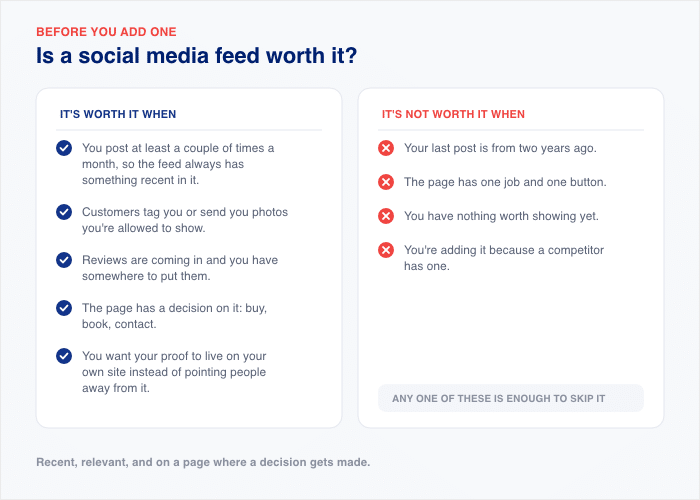
A social media feed is worth it when it changes a decision someone is already making on that page. If a visitor is weighing up whether to buy, book, or get in touch, real posts and real customer photos give them something to weigh it against. If nothing on the page asks them to decide anything, the feed is dead weight.
It’s worth it when:
- You post at least a couple of times a month, so the feed always has something recent in it.
- Customers tag you or send you photos you’re allowed to show.
- Reviews are coming in and you have somewhere to put them.
- The page has a decision on it: buy, book, contact.
- You want your proof to live on your own site instead of pointing people away from it.
It’s not worth it when:
- Your last post is from two years ago.
- The page has one job and one button.
- You have nothing worth showing yet.
- You’re adding it because a competitor has one.
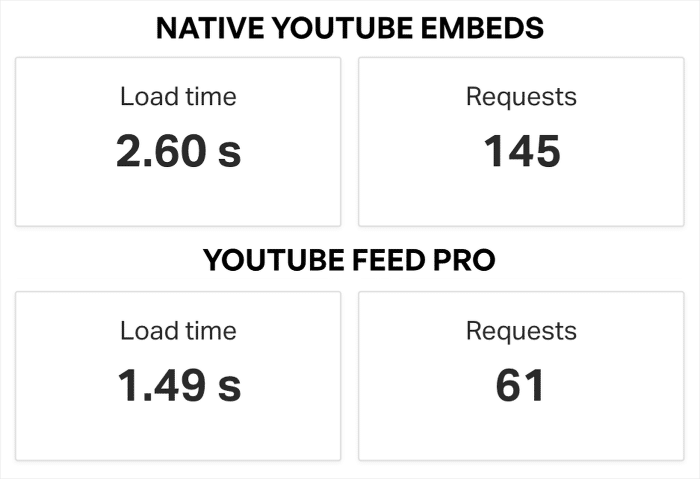
On speed: a feed does cost something, so the question is how you add it, not whether you can. We measured both ways on the same page.
Raw platform embeds came in at 8.4 MB, and a plugin feed showing the same posts came in at 1.1 MB.
And it’s not just social photo or post feeds either. Even embedding a YouTube feed with a plugin like YouTube Feed Pro can be lighter than manually embedding videos.
Pro Tip: To learn more, check out our guide on whether or not social media feeds will slow down your website.
The Question Everyone Else Is Answering
“Is social media worth it” and “is a feed on my website worth it” are two different questions, and they have different answers.
The first one is about your posting time: whether the hours you spend making content pay you back. The second is about a slot on a page you already own.
You can decide Instagram isn’t worth your posting time and still want a review feed sitting next to your checkout button. One choice doesn’t settle the other. This post is about the second question.
A “Feed” Isn’t One Thing — It’s Five Different Tools
Most people who decided a feed wasn’t worth it were picturing one thing: a grid of their own Instagram posts sitting on the homepage. That’s one option out of five, and it’s the one with the most conditions attached.
Here’s what each type actually does and where it belongs.
| Feed type | What it actually does | Where it belongs | Best if… |
|---|---|---|---|
| Live post feed | Shows the business is active and current | Homepage, footer | You post weekly-ish |
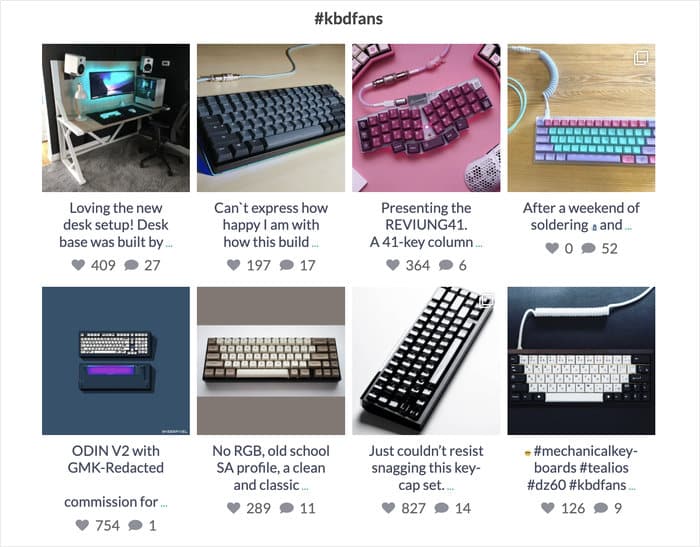
| Hashtag / customer photo feed | Answers “does this look like that in real life” | Product pages | Customers tag you |
| Mentions feed | Shows other people vouching for you, not you vouching for you | About page, dedicated proof page | You get tagged more than you post |
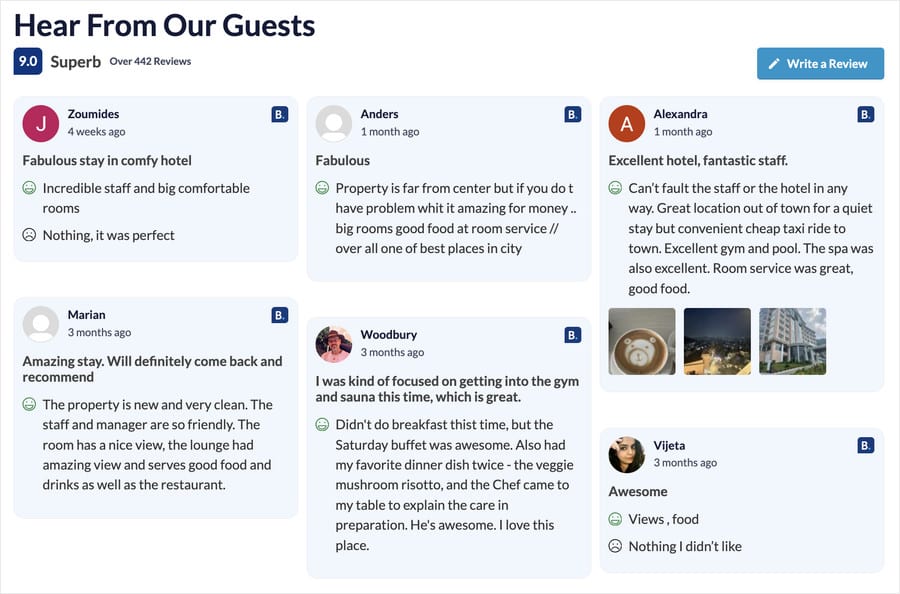
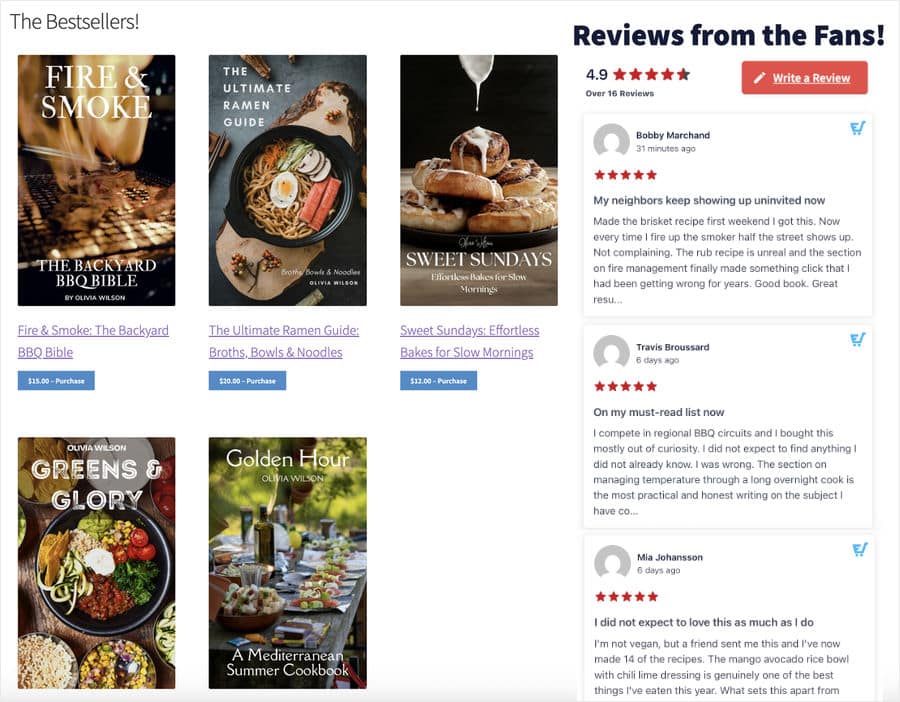
| Review feed | Answers “can I trust these people” | Near checkout, pricing, contact | You collect reviews anywhere |
| Shoppable feed | Turns a photo into a path to the product page | Homepage, category pages | You sell products with visuals |
Look at the “Best if” column again. Only feeds of your profile depend on how often you post.
That’s the part most people miss. Review feeds, hashtag feeds, and mentions feeds fill themselves. Your customers do the posting, so the feed stays current whether you touched Instagram this month or not.
If you’ve talked yourself out of a feed because you don’t post enough, you talked yourself out of the wrong one.
For live feeds, the test is simple. If a visitor lands on your page today, will the newest item in the feed be less than about 30 days old? If yes, a live feed works fine. If no, pick a type that fills itself.
Now, that 30-day test is a much lower bar than the numbers you’ve probably read. Buffer’s data puts the sweet spot for growing on Instagram at 3 to 5 posts a week, and per-post engagement tends to fall off once you go above ten posts a week.
Those numbers are about growing an audience on the platform. Keeping a feed on your own site looking current is a different job with a much lower cost of entry. Don’t judge one by the other.
Pro Tip: Four of those five rows are covered by the Smash Balloon Instagram Feed Pro plugin. And the review row is handled by Smash Balloon Reviews Feed Pro.
A Feed Earns Its Space When It Changes a Decision
A feed is worth it when it answers the doubt a visitor already has on that page. Not when it looks modern. Not when it lifts your engagement numbers. Those are platform metrics, and they measure something happening somewhere else.
Every page on your site has a question hanging over it. The feed either answers that question or it doesn’t.
On a product page, the doubt is “Does it actually look like the studio shot?”

A feed of customer photos answers it, because nobody lights a photo of their new sofa the way your photographer did. That gap is exactly what the visitor wants to see.
Near checkout, the doubt shifts. It stops being about the product and starts being about you: Is this a real business that ships things to real people?
A review feed sitting beside the button answers that at the moment it’s being asked.
On a homepage, the doubt is simpler still. “Is this place still open?” A live feed with something recent in it settles that in about two seconds, which is roughly how long a first-time visitor gives you.
Match the feed to the doubt, and placement takes care of itself:
- Product page → customer photo or hashtag feed
- Checkout, cart, or pricing page → review feed
- Homepage → live feed
- About page → mentions feed
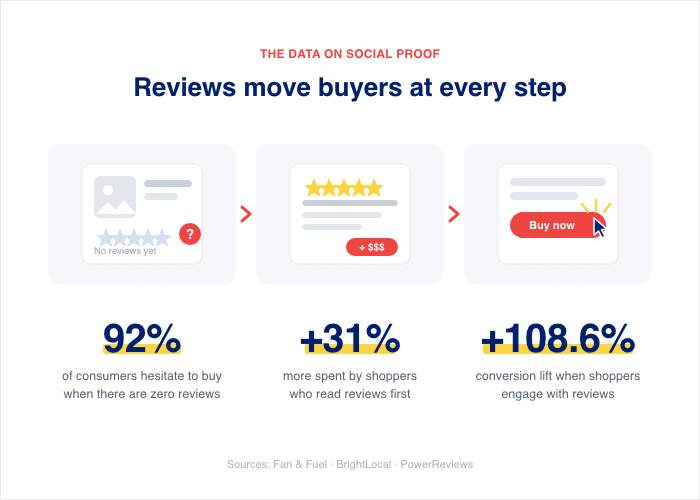
The reason this works is that people look for proof whether you offer it or not. PowerReviews found that 95% of customers read online reviews before buying.
And Fan & Fuel found that 92% of buyers hesitate when there are no reviews visible at all. If your page doesn’t show proof, the visitor opens a new tab and goes looking for it.
That’s the case for owning your proof rather than borrowing it. A third-party trust badge sends someone to another company’s site at the exact moment they were about to buy, and you have no say in what they find there.
Pro Tip: Your own posts and customer photos do the same job without moving them off the page. We’ve made the full argument in our post on first-party proof.
When a Feed Isn’t Worth It
Most posts on this topic stop at the pros. Here are the four cases where the honest answer is no, and we’d rather you hear them now than after you’ve spent a Saturday on it.
You’ve Stopped Posting
A live feed with a top post from 2023 is worse than no feed at all. It puts a public timestamp on your business, and the timestamp says “abandoned.”
If you’re wondering what a feed looks like six months from now if you stop posting, that’s the answer: it keeps working exactly as designed, and what it broadcasts is that nobody is home.
You Don’t Have Content Worth Showing Yet
Four posts, all of them with logo graphics and quotes on colored backgrounds.
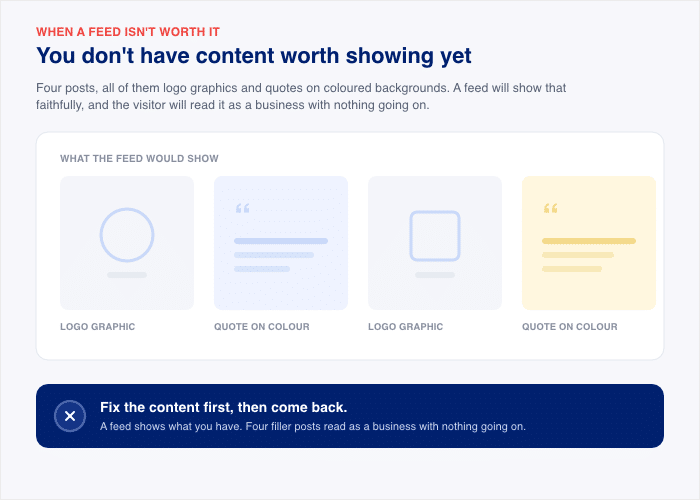
A feed will show that faithfully, and the visitor will read it as a business with nothing going on. Fix the content first, then come back.
You’re Adding It Because a Competitor Has One
Nothing on your page is being decided differently, so there’s nothing to measure, so nobody ever checks whether it works. It becomes furniture, and furniture is what you’re paying for in page weight.
One honest exception. If the first or third case is you, a review feed is often still worth adding. Reviews accumulate whether or not you post, so the feed fills itself from customers who are already leaving feedback on Google or Yelp.
That’s the difference between a feed that depends on your habits and one that doesn’t.
Pro Tip: Want to start posting but don’t know where to start? We’ve got a detailed guide on building a social media presence for small businesses.
What a Feed That’s Working Actually Looks Like
Four brands doing this well, and the feed type each one is using.
- Glossier: mentions feed. Glossier pulls posts where customers tagged the brand, rather than posts the brand made. That’s the difference between showing your own marketing and showing other people’s opinions, and visitors read the second one as evidence.
- Fabletics: hashtag feed. Fabletics collects customer photos under the #MyFabletics hashtag and pulls them onto the site. The job is fit. Activewear is hard to buy from a model shot, so photos of real customers in the same leggings answer the question the studio image can’t.

- Tarte Cosmetics: customer photo feed on product pages. Tarte puts customer content on individual product pages instead of parking it all on the homepage. Foundation and lipstick look different on every skin tone, so the photos sit exactly where the doubt is.
- Beardbrand: review feed on product pages. Beardbrand shows collected reviews next to the products they’re about. The visitor doesn’t have to open a new tab to check whether the beard oil is any good, which is the whole point of keeping proof on your own site.
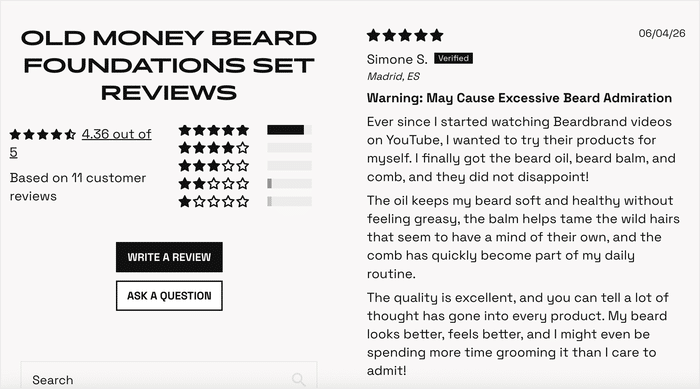
Notice how all four are showing content their customers made, not content the brand made. The feed stays full without anyone at the company posting on a schedule.
You’ve Decided It’s Worth It — What Next
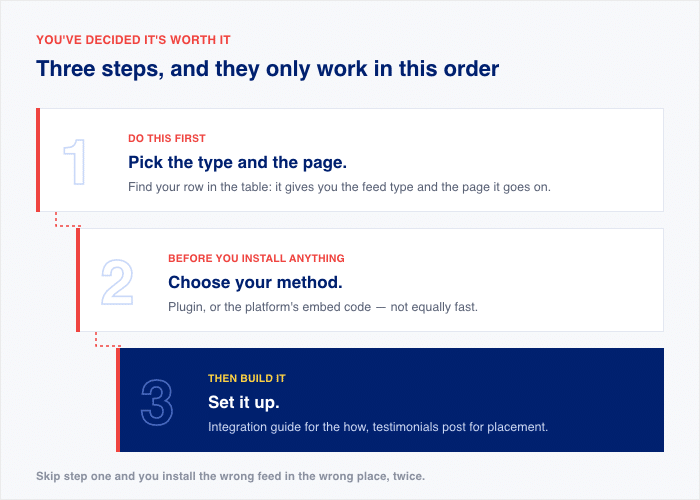
Three steps, in order.
- Pick the type and the page. Go back to the table and find the row that matches your situation. That gives you the feed type and the page it belongs on. Do this first, because the answer changes what you set up.
- Choose your method. You can use a plugin or paste in the embed code from the platform. The two are not equally fast, and we ran the numbers on both in our post on plugins versus manual embeds. Read that one before you install anything.
- Set it up. Our Instagram integration guide walks through the how for each feed type, and the testimonials post covers placement in more detail if you’re not sure where on the page it should sit.
The Bottom Line
A feed is worth it when it answers a doubt the visitor already has on the page it sits on. That’s the whole test.
The reason so many people conclude a feed isn’t worth it is that they were picturing the wrong type. They imagined a live feed they’d have to keep fed, decided they don’t post enough, and stopped there.
Meanwhile, the feeds that fill themselves, reviews, hashtags, and mentions, were sitting right there.
That said, the four cases in the “not worth it” list are real. If you’ve stopped posting entirely, or the page has one job, adding a feed won’t fix either problem.
If you’re ready to start, Instagram Feed Pro covers hashtags, mentions, live, and shoppable feeds in one plugin.
Landed on the “I don’t post enough” or “I’ve stopped posting” camp? Then Reviews Feed Pro is your pick, since it fills itself from reviews customers are already leaving.
The All Access Bundle gets you both, along with the best social feed plugins for X/Twitter, YouTube, Facebook, and TikTok, and Social Wall Pro to combine them into a single feed.