Social Wall
  Feed Analytics

Where should your social media feed go?
If you’ve ever built a feed, gotten it working, and then quietly dropped it into the footer, you’re in good company.
Most people end up there for the same reason: the footer widget area is the one region you can edit without opening a page builder. It’s not a decision so much as a default.
But most placement guides miss something. You probably have more than one feed. An Instagram feed, a reviews feed, maybe a TikTok feed for the shop.
Suddenly this isn’t about picking one spot. It’s about allocating three feeds across four positions, and nobody tells you how.
I’ve seen this same footer pile-up over and over helping site owners at Smash Balloon. So I went looking for real data on where people look on a page, and paired it with what I’ve seen in my experience.
This guide gives you an honest trade-off for all four positions, homepage, blog post, sidebar, and footer, instead of a list of vague benefits. You’ll see how to use your own feed data to decide which one has earned the best spot on your site.
- [Quick Answer] Where Should You Put Your Social Media Feed?
- Your Social Feeds Aren't Doing the Same Job
- Where People on Your Website Actually Look
- The Four Positions for Your Social Feeds
- Which of Your Feeds Has Earned the Homepage?
- Common Questions About Feed Placement
- Start Placing Your Feeds on Purpose
[Quick Answer] Where Should You Put Your Social Media Feed?
Put your strongest social feed on the homepage, above the fold. Nielsen Norman Group’s 2018 eyetracking study found 57% of viewing time happens above the fold.
A blog post feed sits lower but reaches readers who already scroll with intent. A sidebar stays visible on every page. A footer is where feeds land when nobody decided.
Here’s the honest trade-off for each spot:
| Position | What it buys you | What it costs you | Best-suited feed |
|---|---|---|---|
| Homepage | Top-of-page attention from cold visitors | Competes with your main offer | Your most visual feed |
| Blog post | Warm readers who scroll with intent | Reach limited to that post | Reviews and testimonials |
| Sidebar | Persistent presence across pages | Cramped, and usually gone on mobile | A small Instagram or X feed |
| Footer | Sitewide reach, easy to edit | Thin end of the attention curve | A feed whose job is just to exist |
One thing to keep in mind before you read on. You don’t have to pick just one social feed to add to your website.
Your Social Feeds Aren’t Doing the Same Job
Think about what you actually built. An Instagram feed, a reviews feed, maybe a Facebook or TikTok feed for the shop. They’re all “social feeds,” so it’s easy to treat them as one thing that needs one home.
They’re not one thing. Each one does a different job, and the job is what decides where it belongs.
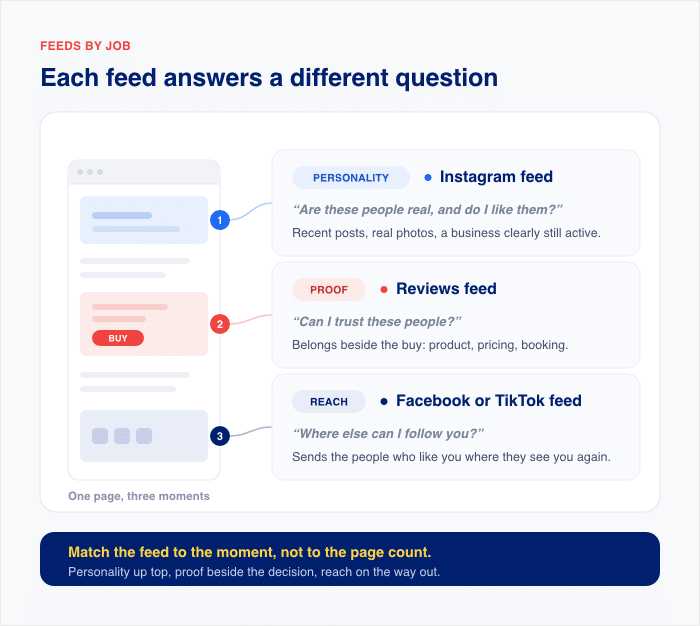
- A reviews feed is proof. Its whole purpose is to answer “can I trust these people” at the moment someone is deciding to buy. That means it belongs next to the decision: a product page, a pricing page, a booking form.
- An Instagram feed is personality. Recent posts, real photos, a business that’s clearly still active. It answers “are these people real and do I like them,” which is a question visitors ask early, before they’re ready to buy anything.
- A Facebook or TikTok feed is usually reach. You’re not trying to convert anyone with it. You want the people who already like you to follow you somewhere they’ll see you again.
Here’s why that matters. Most placement guides assume you have one feed and one decision, so they hand you a list of spots ranked by nothing in particular.
But you’re not picking a winner. You’re handing out four positions to feeds that want different things from them.
| Feed type | The job it’s doing | The question it answers | Where it earns its place |
|---|---|---|---|
| Reviews | Proof | Can I trust these people? | A product page, or a post making the case |
| Personality and recency | Are these people real, and do I like them? | Homepage, where visitors are still deciding | |
| Reach and community | Where else can I keep up with you? | Somewhere persistent: sidebar, footer | |
| TikTok | Reach and personality | What are these people actually like? | Homepage or a post, depending on the audience |
| YouTube | Depth | Can you show me how this works? | Inside a blog post or a help page |
| Twitter/X | Recency | Are these people still active? | Sidebar, where a live feed pays off |
As you can see, “where should my feed go” doesn’t have a simple answer. The question is which feed has earned which spot, and that depends on what each one is there to do.
Where People on Your Website Actually Look
Before you hand out those four slots, it helps to know where eyes actually go on a page.
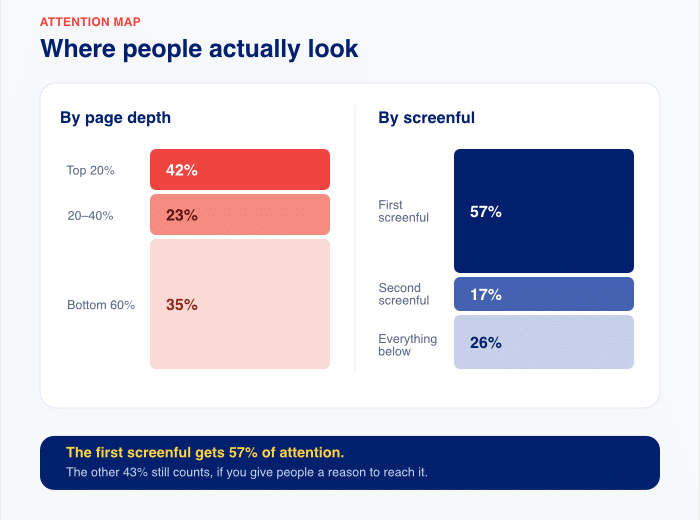
Nielsen Norman Group ran an eyetracking study in 2018 with 120 participants. Here’s what they measured:
- 57% of viewing time happens above the fold
- 74% happens in the top two screenfuls
- Over 42% lands in the top 20% of a page, and over 65% in the top 40%
- The second screenful gets around 17%
- Everything past that splits the remaining 26%
Their 2010 study put the above-the-fold figure at 80%, so people scroll more now, not less.
One thing to keep in mind before you act on those numbers. This was desktop eyetracking across general websites, not a study about social feeds. Read it as a pattern in how people look at pages, not a rule about where feeds belong.
Now the part nobody else mentions. If 57% of viewing time is above the fold, then 43% is below it. Below-the-fold placement isn’t dead.
It just means a feed down there needs to give someone a reason to keep scrolling, and that reason has to come from the content above it.
Destination Feeds vs. Ambient Feeds
There’s a second way to think about position, and it has nothing to do with height on the page.
A feed on a page is a destination. Someone clicked a link, landed on that page, and your feed is part of what they came to see. Your homepage feed and your blog post feed both work this way.
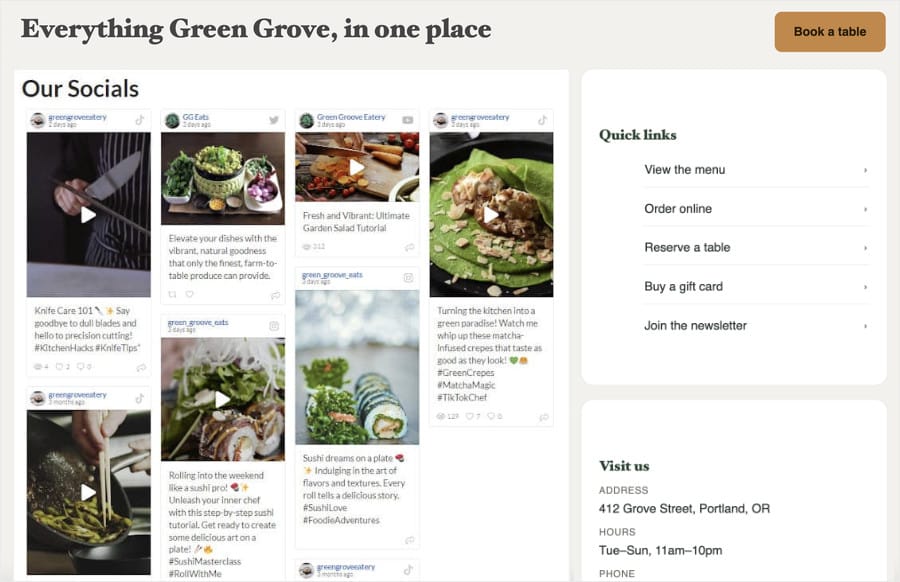
Meanwhile, a feed in a widget area is ambient. It sits in the template, so it shows up on every page at once, and it never asks for attention.
It’s working passively, picking up followers from people who were already going to scroll past it.
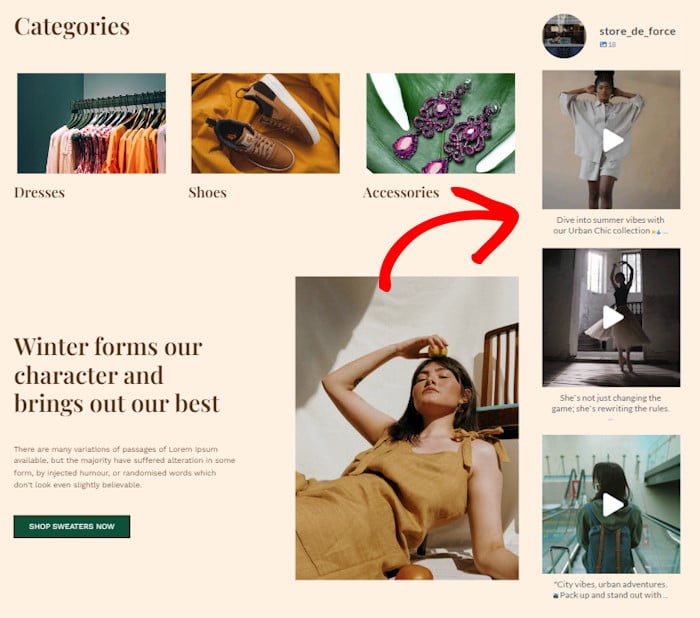
That distinction explains something I get asked about often. The same feed can perform well in one spot and flop in another, and the content didn’t change at all. Only the job changed.
It also does the sorting work from the last section. A destination feed is one you allocated on purpose to a specific page. An ambient feed is one that just appears everywhere, which is what happened to all three of your feeds in the footer.
The Four Positions for Your Social Feeds
Here are your four slots, with an honest trade-off for each one. Read all four, not just the one you think you need.
Homepage
The homepage is usually the strongest position on your site, and it’s not really about the page. Over 42% of viewing time lands in the top 20% of any page, so the top of your homepage gets that density on the page more people land on than any other.
The cost is who’s looking. Homepage traffic is mostly cold, so people don’t know you yet. A feed here does introduction work, not conversion work.

Best suited to: your most visual feed, the one that shows a stranger what you do in three seconds.
Blog Post
A feed inside a blog post sits lower on the page, and that’s fine. This is where the 43% below the fold pays off. Readers who got to paragraph nine arrived with intent and are already scrolling.
Below-the-fold placement needs a reason for people to keep going. In a blog post, the article itself is that reason.
Best suited to: reviews and testimonials that back up what the article just told someone.
Sidebar
The sidebar is your clearest ambient spot. It sits in the template, so it shows on every page that uses that template. Over weeks it collects more impressions than any single page can.
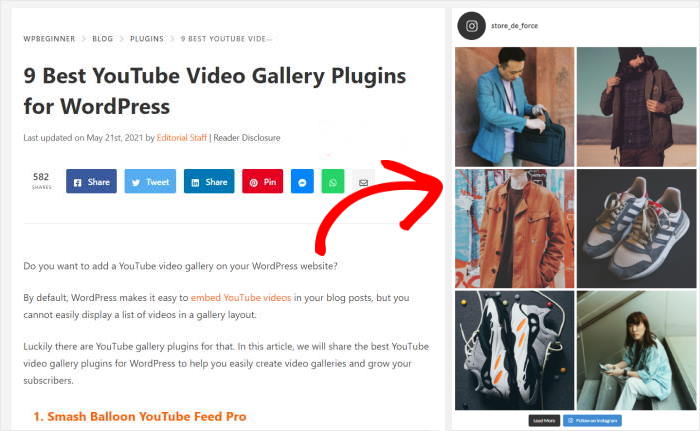
The cost is that it’s narrow and easy to ignore. It’s also frequently gone on mobile. Most responsive themes either drop the sidebar below the content or hide it, so treat this as a desktop placement.
Best suited to: a small, tidy Instagram or X feed that stays out of the way.
Footer
The footer deserves a fair hearing before the critique. It spans the full width of the page, so it takes a wider layout than a sidebar ever could. It’s ambient and sitewide, and for a feed whose job is simply to exist, that’s genuinely the right home.
It also lands in the thin end of the attention curve. Everything past the second screenful splits that remaining 26% of viewing time, and your footer is the last thing in that stretch.
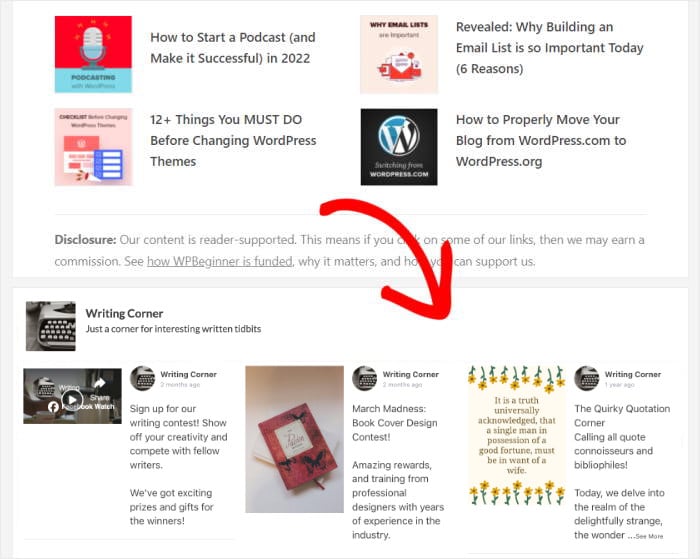
Best suited to: a feed whose job is to exist rather than convert, and most sites only have one of those.
You’ve now got a reasonable guess for each of the four spots. The next question is whether those guesses hold up on your site.
Stop guessing which feed belongs on your homepage
Feed Analytics shows you views, clicks, and profile visits for every feed you place, so your best performer earns your best position. Backed by a 14-day money-back guarantee.
See What My Feeds Are DoingWhich of Your Feeds Has Earned the Homepage?
You now have a reasoned guess for each slot. Your most visual feed goes on the homepage, reviews go in the post, something small and tidy goes in the sidebar.
A guess isn’t an answer. Nothing you’ve read here, on this page or anywhere else, can tell you whether that guess held up on your site.
Your own numbers can.
Tip: Use Feed Analytics to Check Your Placements
Feed Analytics is built into Smash Balloon’s plugins, and it tracks three things for every feed you’ve placed:
- Views — how many times people actually saw the feed
- Clicks — how many times they interacted with a post in it
- Profile visits — how many people clicked through to your social profile
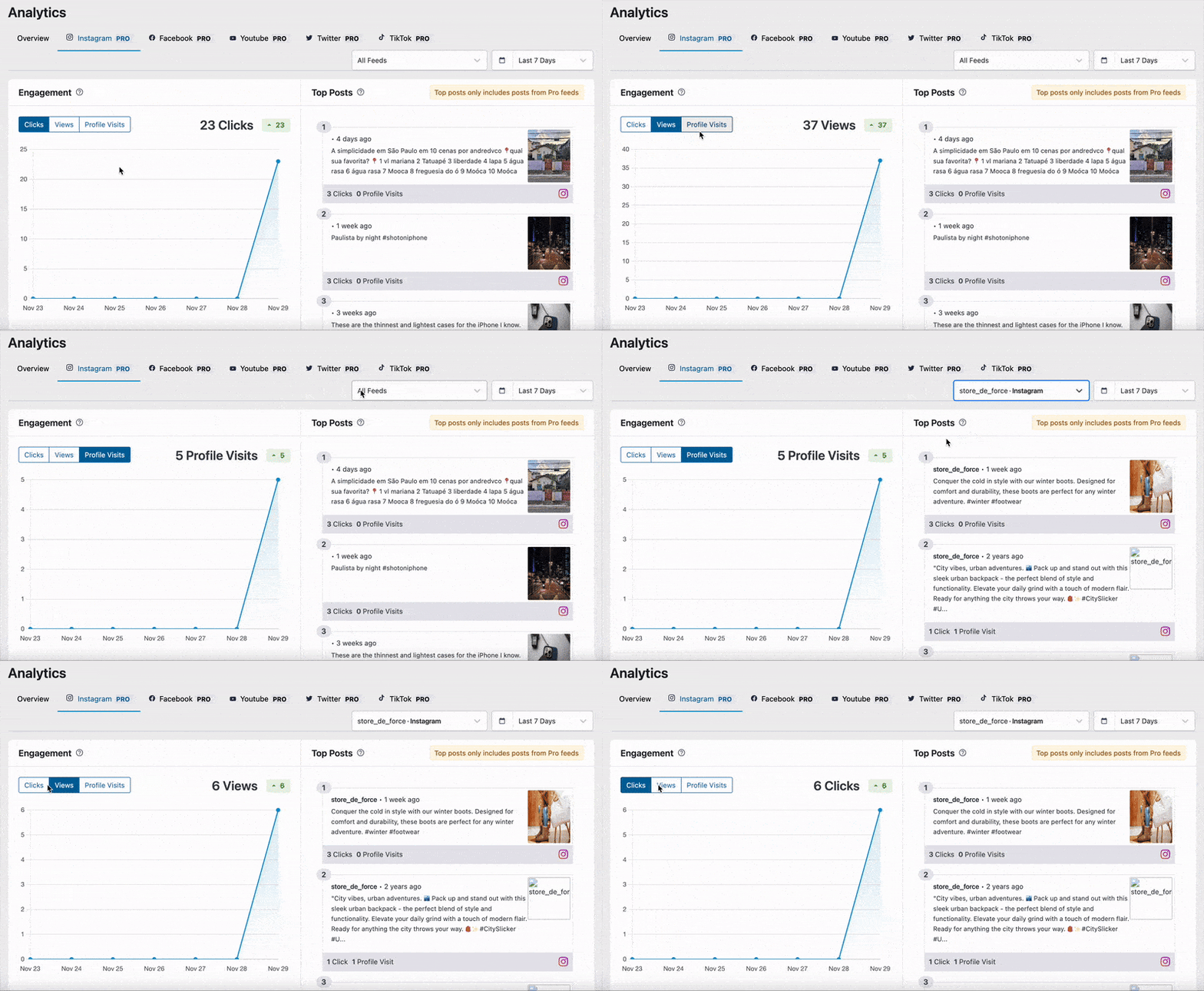
You can filter by feed and by timeframe, so you can compare one placement against another. Admin views are excluded, which means your own dashboard visits don’t pollute the numbers.
Here’s how to read what you see.
Reading one placement. High views with flat clicks means the feed is visible and being ignored. Low views means nobody scrolls that far.
Be careful with that first diagnosis. A gap between views and clicks narrows the problem to placement or content, but it doesn’t settle which one.
The honest test is simple. If that same feed gets clicks somewhere else on your site, the placement is wrong. If it’s flat everywhere you’ve put it, the posts are the problem.
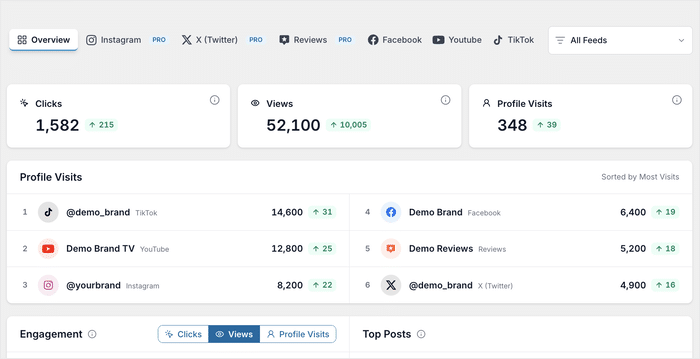
Reading across feeds. This is where having three feeds pays off. The per-feed filter turns “is this placement working” into “which of my feeds has earned the best spot.”
Profile visits is the metric that answers it. The feed sending the most people to your actual profile is doing the hardest job on your site, so it deserves the highest-attention position.
Feed Analytics ships in All Access, which covers every Smash Balloon plugin.
For a full walkthrough of every metric on the screen, you can check out our complete guide on how to read your feed analytics dashboard.
Common Questions About Feed Placement
Should the same feed appear in more than one place?
Yes, as long as each placement has a different job. A destination placement asks for attention on one page. An ambient placement in your sidebar or footer sits quietly on every page. That’s two jobs, not one feed shown twice.
I have three feeds and four spots. Which gets the homepage?
The feed with the most profile visits. That’s the one already convincing people to go look at you properly, so give it your highest-attention position. Check the number in Feed Analytics before you move anything, then compare the rest the same way.
Where should the feed go on mobile?
Your sidebar mostly vanishes on mobile, so a sidebar feed either drops below your content or hides completely. The eyetracking data above is desktop only, so don’t apply that ordering to phones. On mobile your theme’s stacking order decides what people see first. Check your homepage on a phone before you commit.
Start Placing Your Feeds on Purpose
Every feed you’ve built is already somewhere. The question was never whether to place them, it’s whether the position each one landed in is the position it deserves.
You now have a way to answer that. Each of the four spots has a real trade-off, your feeds are each doing a different job, and the numbers on your own site tell you which pairing is working. The feed sending the most people to your profile has earned your best position. The one nobody clicks is in the wrong place, doing the wrong job, or both.
That’s twenty minutes of moving blocks around, and you’ll know within a week whether you got it right.
All Access gives you every Smash Balloon feed plugin, so you can build the reviews feed, the Instagram feed, and the rest, plus Feed Analytics to see which one is sending the most people to your profile and deserves the homepage.