Social Wall
  Feed Analytics

Here’s a situation I hear a lot in marketing: you post beautiful food photos every week, reply to comments, and watch your follower count climb.
Still, your tables aren’t filling the way your feed suggests they should. It’s a frustrating gap, and you’re not imagining it.
The problem is that most of that interest never turns into a reservation. Diners tap through your feed, feel hungry, then get pulled away by a text or another account.
The path from “that looks amazing” to “table for two on Friday” is longer and leakier than you think.
My work at Smash Balloon, helping thousands of businesses put their social content to work, has shown me where this falls apart. Spoiler: it’s usually not your content.
Most “post better Reels” articles skip the missing half, so that’s what I’ll walk through here: the moment a diner leaves Instagram, Googles you, and lands on a website that looks dead next to your feed.
You’ll learn the content mix that fills tables, how to collect customer photos that convert, and how to close the loop so interested browsers actually book.
In this Article:
- The Short Answer: Fill the Gap Between Instagram and Your Website
- The Content Mix That Actually Fills Tables
- What to Post (With a Real Example for Each Type)
- The Instagram-to-Reservation Funnel (Where It Breaks)
- Put Your Instagram Feed on Your Website (The Missing Half)
- 5 Restaurant Posts to Keep on Rotation
- Start Turning Instagram Into Reservations Today
The Short Answer: Fill the Gap Between Instagram and Your Website
TL;DR: Post food, kitchen, and customer photos instead of promos, send your bio link straight to a booking page instead of your homepage, and show your live Instagram feed on your website so it looks as active as your feed does.
That gap between interested people and actual reservations is real, and the numbers back it up.
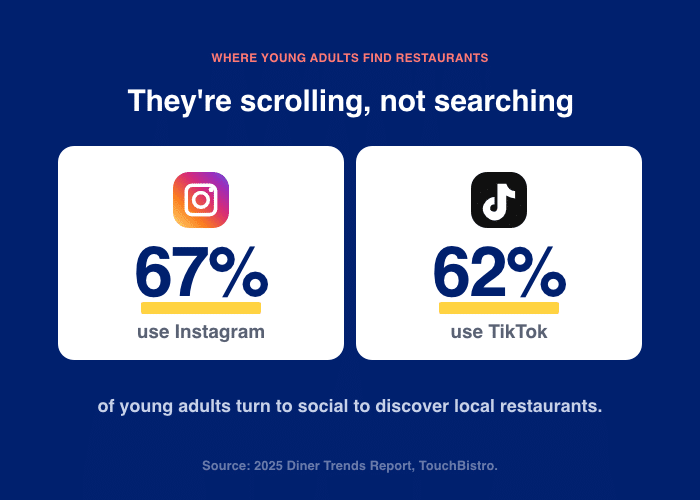
67% of young adults use social media to find local restaurants, according to the 2025 Diner Trends Report from TouchBistro, so the interest is there.
You get more reservations from Instagram by doing two things most restaurants skip.
- First, post the content diners actually want: food, behind-the-scenes moments, and real customer photos.
- Second, put that same feed on your website, so it closes the booking decision when someone Googles you.
That second step is the missing half. It pays off, too. Restaurants reported an average 9.9% increase in B2C revenue as a direct result of social media strategies in 2024 (Deloitte Digital).
It’s no longer just something to do on the side. Marketing your restaurant on social media can be an important source of revenue.
Here’s the whole play:
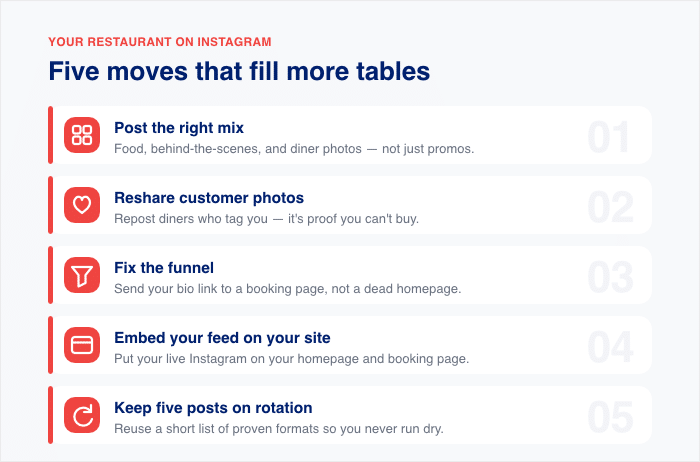
- Post the right mix. Balance food, behind-the-scenes, and customer photos instead of endless promos.
- Collect customer photos (UGC). Reshare diner posts that tag you, since they act as proof.
- Fix the funnel. Send your bio link to a page where people can actually book, not a dead homepage.
- Embed your feed on your site. Show your live Instagram on your homepage and reservations page.
- Keep five posts on rotation. Reuse a short list of proven formats so you never run dry.
Do these in order, and the gap closes. The good news is you can start on step one today.
The Content Mix That Actually Fills Tables
Are you posting too many “come visit us” specials?
That’s the most common mistake I see. Restaurants fill their feed with promos, discounts, and “book now” reminders. Diners scroll right past them, because that’s not what they came for.
People open Instagram to feel hungry and curious, not to read an ad. When your posts sell too hard, they lose the very interest that brings customers in. The fix is to change your mix, not your effort.
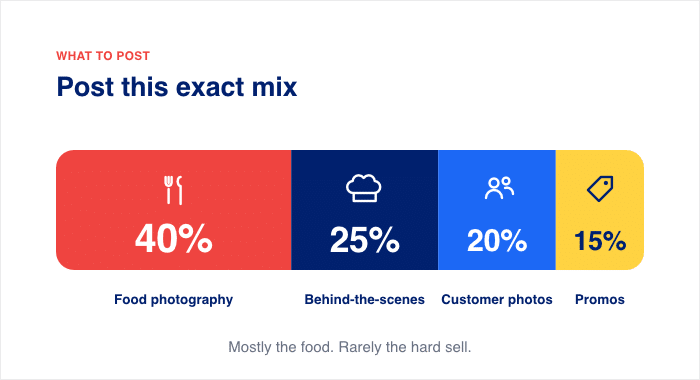
Here’s the split that works:
| Content Type | Share of Posts |
|---|---|
| Food photography | 40% |
| Behind-the-scenes | 25% |
| Community and customer photos (UGC) | 20% |
| Promotions | 15% |
Notice how small the promo slice is. Promotional posts tell people to come in. Food and behind-the-scenes posts make them want to. That difference is what fills tables.
The numbers support it, too. 56% of people are more likely to choose a restaurant after seeing positive images (ElectroIQ). Your plates and your kitchen do the selling for you.
Don’t worry if your current mix looks nothing like this. Shifting it takes days, not months. Start by swapping your next promo post for a close-up of your best dish.
What to Post (With a Real Example for Each Type)
Not sure what actually belongs on your feed?
You know you should post more, but “post food” is vague advice. Below are the four post types that pull diners in, with a real example and a quick what-works, what-doesn’t list for each. You’re probably already doing some of this, which is good news.
Food Photography That Makes People Hungry
Your dishes are your best salespeople, so shoot them right.
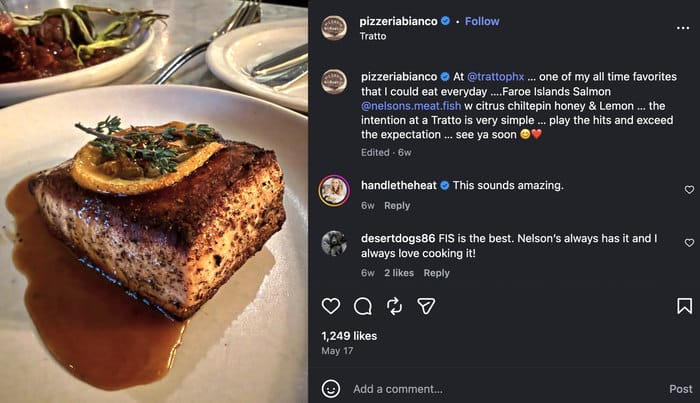
Take Pizzeria Bianco in Phoenix. Owner Chris Bianco built a national reputation partly on simple, close-up shots of blistered crust and fresh basil, no fancy props needed.
There’s no need for smooth marketing blurbs since the food does the talking.
Here’s what works:
- Hero dishes shot at a 45-degree angle or a straight overhead flat-lay
- Close-up textures on premium ingredients, like a runny yolk or melting cheese
- Natural, warm light near a window
Here’s what doesn’t:
- Wide dining-room shots that show empty tables
- Posed group photos of the staff
- Plain text posts announcing “Open today”
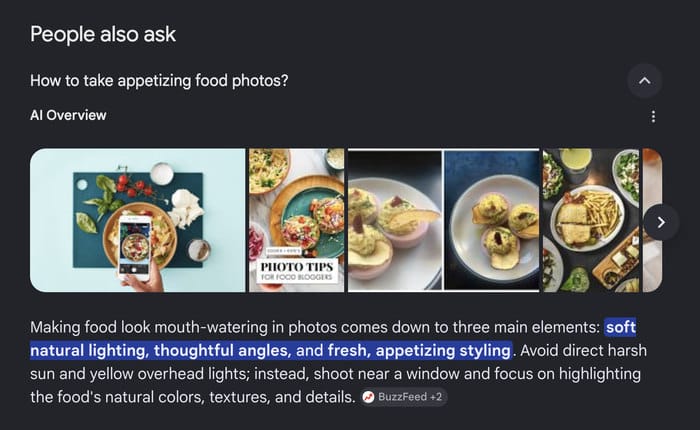
Google’s own People Also Ask results point to natural lighting, minimal backgrounds, and creative angles for a reason. But here’s the principle most owners miss: consistency beats quality.
Use the same editing treatment and the same color temperature on every post, so your feed looks like one restaurant, not fifty random snapshots.
Behind-the-Scenes Reels
Diners choose a restaurant for the experience, not just the plate.
Transformation content wins here every time. Show raw ingredients turning into a finished dish, and people stop scrolling to watch. That “before and after” moment is the hook.
You can see a good example of that with Juniper and Ivy. Instead of telling people why they should come to their restaurant, they simply show the effort they’re putting in to bring the food to their plate.
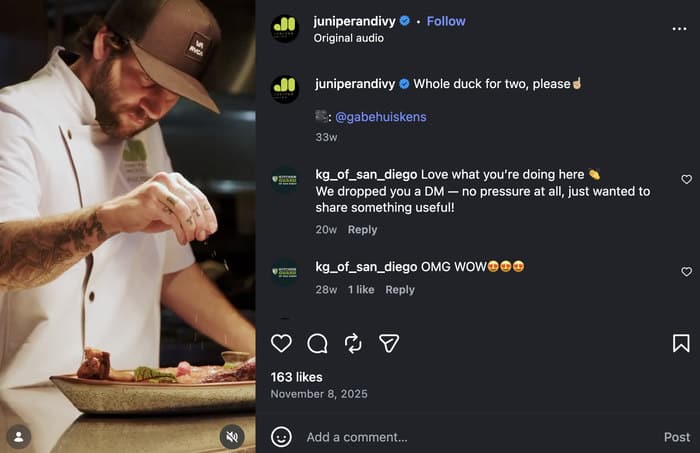
You don’t have to stick to the food preparation either. Showcasing some behind-the-scenes clips of your staff can make dedicated fans feel a little closer to your restaurant.
In fact, here are three Reels you can film this week:
- Morning prep, like dough being stretched or vegetables getting chopped
- A plating technique, filmed close and slow
- The kitchen hustle during a busy dinner service
“With that, we don’t use organic Instagram as a tactic for broad reach, but rather a platform to engage with lower-funnel megafans, execute our brand voice and share promotions only when necessary.”
– Nicole Rogers, Director of Marketing at The Crack Shack
And don’t forget to add a geotag and trending audio to each one. Adding these can boost post visibility by nearly 80% (Custom Neon), so a good clip reaches far more local diners.
To get even more people checking out your reels, you can bookmark our detailed guide on getting more views on Instagram Reels here.
Reposting Customer Photos (UGC)
Your customers’ photos sell harder than your own. Customer photos drive roughly 2x higher conversion than branded content, so every tagged post is free marketing you should be reusing.
A great example of a brand leveraging this is Cafe Gratitude. This plant-based restaurant chain has been encouraging guests to share their experiences on social media using specific hashtags.
As a result, they have a collection of social proof that’ll bring even more customers to their restaurant.
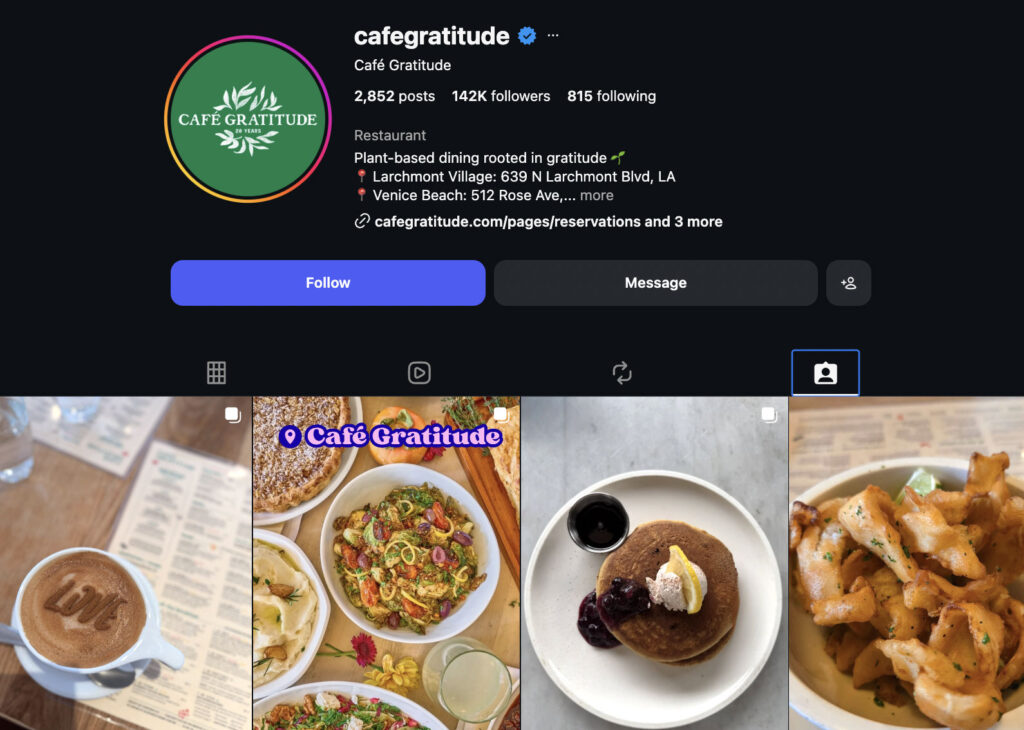
Here’s how to collect more of them:
- Put a small printed card on each table asking guests to tag your handle.
- Reply to a happy diner’s Story with a quick mention of your account.
- Offer a small incentive, like a free dessert for the best photo of the month.
One firm rule: always credit the photographer when you reshare. It’s polite, and it encourages the next guest to tag you too.
Even if you’re just getting started, your regulars are probably already tagging you. You just need to start collecting and resharing what they post.
Expert Tip: Want to get even more out of the brand mentions on Instagram? Check out this guide on displaying these mentions on your website as an Instagram feed.
Use FOMO for Last-Minute Bookings
Urgency can be a great way to convince people to take the next step and book a reservation.
Even a quick line like “We have 6 seats left tonight at 7pm” beats a glossy promo that people might skim past. It feels real, and it tells people to act now.
You can see a great demonstration of this by Moxies USA, where they start a caption by directly letting people know the seats are limited.
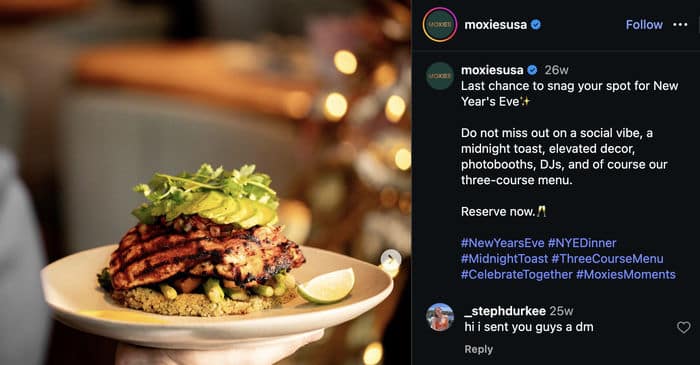
Once they have your attention with that opening, they can go on and explain why this experience is worth getting.
It’s especially great for big days like New Year’s Eve because you’re catching people right when they’re deciding where to eat.
And it doesn’t end there, either. You can find them using FOMO in a lot of interesting ways, like telling people it could be their last chance to try out a specific menu.
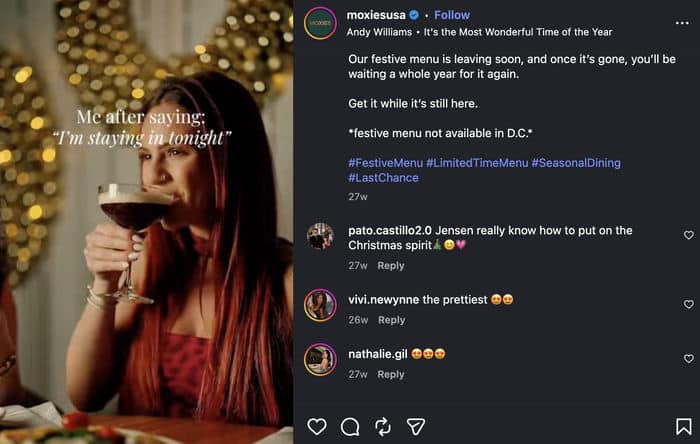
Even something like a seasonal menu change can be used to create a feeling of urgency and get more reservations.
Important: Don’t forget to make it easy to book. Add a reservation link directly to your bio or a Story as a sticker. That way, you can make sure people don’t get lost and lose that sense of urgency.
With just these types of posts, you’re ready to get started with a solid Instagram marketing strategy that works well together. Since these four work together, you can mix them up and have a variety of content flowing.
The Instagram-to-Reservation Funnel (Where It Breaks)
Ever wonder why a viral post brings likes but no bookings?
The answer is in the funnel. Every reservation that starts on Instagram follows the same path. Miss one step, and the whole chain snaps.
Here’s the full path a diner takes:
- They see your post. A great dish or Reel stops their scroll.
- They visit your profile. Curiosity sends them to your bio.
- They tap your bio link. This is the one clickable link Instagram gives you.
- They land on a page. Ideally, one where they can book a table.
- They reserve. They pick a date, a time, and a party size.
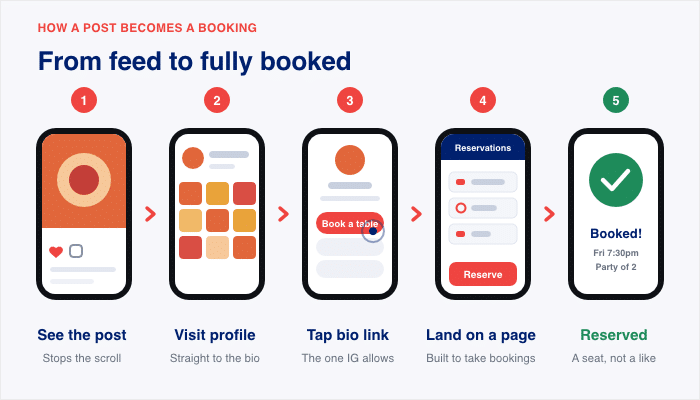
Most restaurants nail steps one and two. They post good content and grow their following. Then they stop, and the chain breaks at step three.
Here is the exact failure point. Your bio link points to your homepage, not a booking page. A hungry diner taps it, lands on a busy homepage, and has to hunt for how to reserve. Most give up before they find it.
So fix your bio with three simple rules:
- One clear call to action. Tell people exactly what to do, like “Book your table below.”
- One link. Send every tap to the same place, so no one gets confused.
- Point it at a reservation page. Not your homepage, not your menu, the booking page.
What if you don’t have a reservation page yet? You don’t need an expensive booking platform to make one. A simple form on your site does the job.
With WPForms, you can build a reservation form in about five minutes. Ask for four things only:
- Name
- Party size
- Preferred date and time
- Phone number
Then link your Instagram bio straight to that form. Now your followers book in a few taps, without calling or fighting a clunky system. Every profile visit gets a real path to a table.
Don’t worry. You don’t need a fancy booking platform to fix this. A clean bio link and a short form close the gap that costs you customers.
Check out this WPForms guide on creating booking and reservation forms for a detailed guide.
Put Your Instagram Feed on Your Website (The Missing Half)
Here’s the moment that decides your booking.
Someone Googles “best Italian restaurant [city].” They find you and click through to your website, ready to reserve. What they see next makes or breaks it.
If your site looks dead next to your busy feed, they hesitate. Old photos and a stale page make people wonder if you’re even open. So they close the tab and book the place that felt alive.
Now picture the opposite. They land on your homepage and see your live feed right there: the fresh shots of the food, the candlelit dining room, all fetched from an Instagram page. The decision gets easy, and they book.
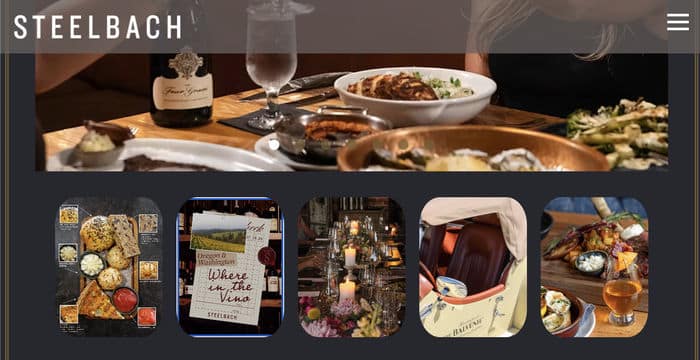
That live feed is the missing half. You embed your real Instagram posts on your homepage or reservations page, and the social proof does the closing.
The tool for this is Instagram Feed Pro from Smash Balloon. It puts your feed on your WordPress site and keeps it working for you.
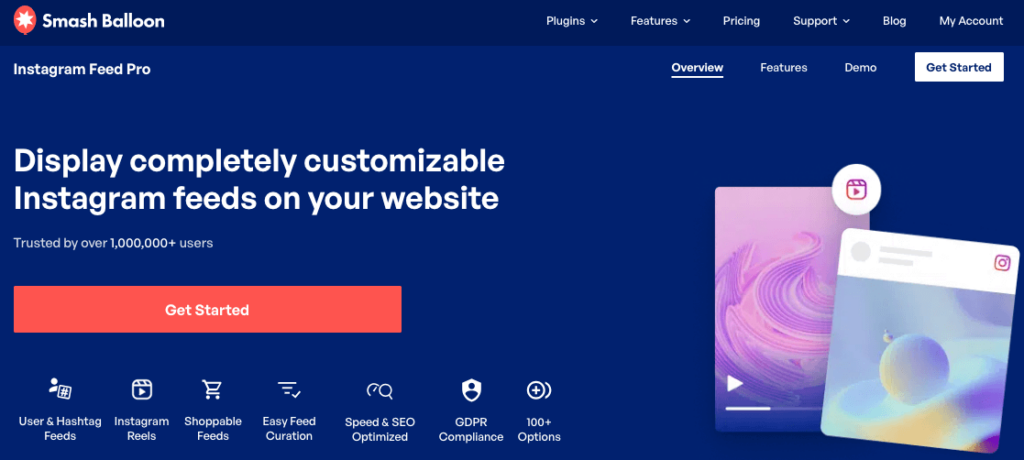
Here’s why it fits a restaurant:
- It updates automatically. Every time you post, your website refreshes too. Your site always shows your current menu and atmosphere, with no manual work.
- It shows tagged photos. You can display the customer photos and hashtag posts people tag you in. That ties back to the UGC point from earlier, and remember, customer photos drive roughly 2x higher conversion than branded content.
You can have this live before lunch service. Here’s the setup, start to finish:
- Install the plugin from Plugins » Add New.
- Connect your Instagram account.
- Choose a theme and template, then tweak the design in the live editor.
- Use the handy WordPress block to add the feed into your homepage or reservations page.
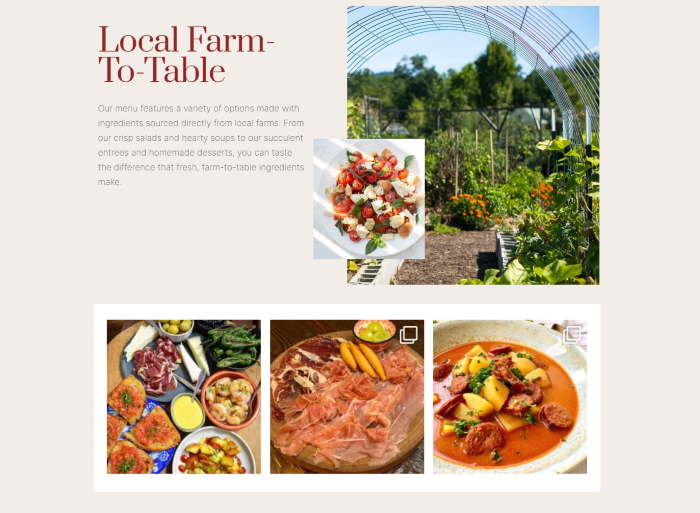
That’s under five minutes of work. For a full walkthrough, see How to Display Your Instagram on Your Website.
Even if you’ve never touched a plugin, don’t worry. You can have your live feed running before your first table sits down.
Make Your Website Look as Alive as Your Feed
Instagram Feed Pro puts your live posts and tagged diner photos on your homepage or reservations page, and refreshes every time you post.
Show My Live Feed5 Restaurant Posts to Keep on Rotation
Stuck on what to post this week?
Every restaurant hits a blank week now and then. When ideas run dry, you need a simple schedule you can fall back on. This isn’t your whole strategy. It’s the floor any restaurant can hit without a photographer or agency.
| Day | Post type | Why it works |
|---|---|---|
| Mon | Hero dish of the week | Starts the week with your best salesperson and sets the craving early. |
| Wed | Behind-the-scenes prep Reel | Shows the human side and stops the scroll with a transformation moment. |
| Fri | Customer photo repost with credit | Free social proof, and customer photos drive roughly 2x higher conversion than branded content. |
| Fri evening | Weekend availability Story | Catches diners deciding where to eat and adds urgency with a booking link. |
| Anytime | Seasonal special or new menu item | Gives regulars a fresh reason to come back and try something new. |
Run this cadence, and you always have something to post. Then layer your bigger ideas on top when inspiration strikes.
Don’t worry if you can only manage a few of these at first. Even a couple of posts a week keeps your feed alive and your tables in mind.
Frequently Asked Questions
Why aren’t my Instagram followers becoming reservations?
In a lot of cases, your followers aren’t booking because your content lives only on Instagram, with no clear path to a table. The break usually happens at your bio link, which points to a busy homepage instead of a booking page. Fix the link and add your live feed to your website, and the gap starts to close.
Should my bio link go to my homepage?
No, your bio link should go straight to a reservation page, not your homepage. Instagram gives you one clickable link, so send every tap to the place where people can book. A homepage makes hungry diners hunt for the reservation button, and most give up first.
How do I get customers to tag me and legally reuse their photos?
Ask guests to tag your handle with a small printed card on each table, and reply to their Stories with a quick mention. Always credit the photographer when you reshare, which is both polite and good encouragement for the next guest. For extra protection, ask for permission before you repost, so your reuse stays clean.
Does an embedded Instagram feed update automatically?
Yes, an embedded feed built with Instagram Feed Pro auto-syncs, so your website refreshes every time you post to Instagram. You never touch the site again, yet it always shows your current dishes and atmosphere. That keeps your page looking as alive as your feed.
How often should a restaurant post?
Aim for a few posts a week using a simple rotation you can keep up with, like a hero dish, a behind-the-scenes Reel, and a customer repost. Consistency matters more than volume, so a steady couple of posts beats a big burst that fizzles out. Even a light schedule keeps your feed active and your tables top of mind.
Start Turning Instagram Into Reservations Today
Ready to turn all those likes into booked tables?
Here’s the one takeaway: posting well on Instagram is only half the job. Closing the loop on your own website is what turns interest into a reservation. Great content earns attention, but your site is where the diner decides.
Here’s the full play in a few lines:
- Post a simple mix. Food photos, behind-the-scenes Reels, customer reposts, and last-minute Stories.
- Fix your bio link. Point it at a booking page, not your homepage.
- Embed your live feed. Show your real Instagram posts and tagged diner photos right on your website.
- Collect UGC on purpose. Ask for tags, credit the photographer, and reshare.
Want to go further? A couple of tools help you catch diners you’d otherwise lose. With OptinMonster, you can capture emails from return diners and event-goers, so you can invite them back for the next special.
Don’t worry if you can only do one thing this week. Start with the missing half, and the rest gets easier.
The fastest win is putting your feed where it closes the sale: your website. Instagram Feed Pro makes it happen in minutes, and it keeps your site as fresh as your feed.
Start displaying your feed today »