Social Wall
  Feed Analytics

Want more guests to book direct instead of through Booking.com?
Every booking that comes through a site like Booking.com or Expedia costs you roughly 18% in commission. Some argue that’s fair value, since winning the same guest through paid ads often costs more.
Either way, the point stands: buying direct bookings is expensive. That’s a problem when your budget looks like the boutique operator’s on r/askhotels last year: “close to nun.”
So this guide skips ads completely. It’s about a change you make once, on a page you already own, using reviews your guests have already written.
I work at Smash Balloon helping businesses put their reviews to work, and this is the gap I run into most: hundreds of guest reviews sitting on a booking platform, and none of them anywhere on the hotel’s own site.
Other posts tell you to “show your reviews” and stop there. I’ll show you the exact page, the exact placement, and what your booking site contract really says about it.
In this Article:
- The Short Answer
- The 18% Who Start on Booking.com and Book With You Anyway
- Awards Prove You're Real. Guest Reviews Prove They'll Like It.
- Where the Reviews Actually Go
- How to Put Your Booking.com, TripAdvisor, and Airbnb Reviews on Your Site
- Won't a Wall of Five-Star Reviews Look Fake?
- Frequently Asked Questions
- Start Showing Your Guest Reviews Today
The Short Answer
If you want more direct bookings without spending a dollar on ads, do this:
- Put a live guest review feed on the last page you control before the booking handoff. Pull it from the site your traveler already uses, like Booking.com or TripAdvisor.
- Use guest reviews, not just awards. SiteMinder’s Changing Traveller Report 2026 found that booking sites overtook search engines as the number one starting point for hotel discovery, a first in the report’s history. Your guest formed an opinion on Booking.com before they ever reached your site. Showing that same proof on your own page keeps the decision with you.
- It costs you nothing per booking. Discounts, loyalty perks, and paid comparison listings take a cut of every single reservation, forever. A review feed costs you nothing after setup.
The rest of this guide shows you where the proof goes, how to display it, and what your Booking.com contract says about using their name.
The 18% Who Start on Booking.com and Book With You Anyway
There is a group of travelers who find you on Booking.com, read about you there, and then deliberately go looking for your own website to book instead. They are not hypothetical, and they are not rare.
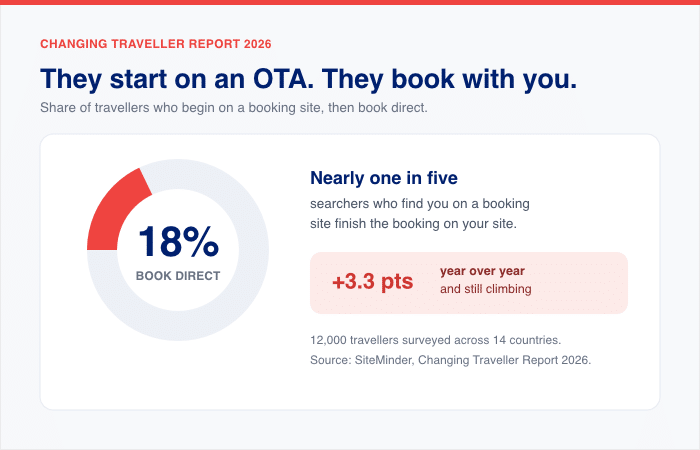
SiteMinder’s Changing Traveller Report 2026, which surveyed 12,000 travellers across 14 countries, found that 18% of people who begin their search on a booking site end up booking directly with the hotel. That figure was up 3.3 percentage points on the year before.
Nearly one in five. Growing. And every one of them lands on your site already knowing who you are.
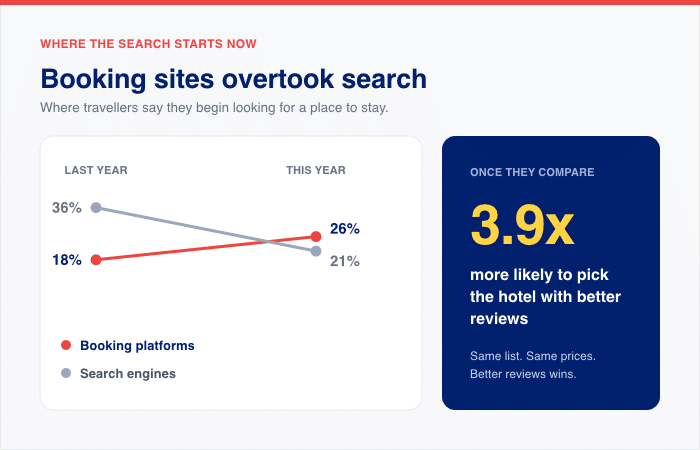
The same report explains why that journey starts where it does. For the first time since SiteMinder began running it, booking sites have overtaken search engines as the number one place people start looking for a hotel.
Twenty-six percent say they’ll begin on a platform like Booking.com, up from 18% the year before, while search engines fell to 21% from 36%.
And once they’re reading you there, the score is what moves them. In a study run by TrustYou with NYU’s Tisch Center using simulated booking engines, travelers were 3.9 times more likely to choose the hotel with better reviews, even when it cost more.
Try this with your own hotel
Open a fresh browser tab and search your hotel’s name and city. Just the name, the way a guest would type it.
When I did this across a set of independent hotels, the pattern was consistent enough to be worth your ten seconds. One property with more than 1,300 Google reviews returned nine results, and its own website was not among them.
The page belonged to Expedia, Orbitz, Booking.com, a guidebook, a travel trade publication, and an events directory. Another hotel’s site appeared eighth, below three separate Hotels.com pages, a tourism board, a campervan site, and an airline.
This is not a failure on anyone’s part. Those platforms spend enormous sums on exactly this, and an independent hotel with one marketing person is not going to outbid them for its own name.
It just means the route to your front door usually runs through somebody else’s page first.
What that does to the guest who arrives
By the time someone reaches your site, they have already read about you. They have seen your score, some of your reviews, probably a few photographs, and they have compared you against two or three other properties in the same list.
They arrive fluent in one particular format: a score out of ten with a word attached, a guest name, a date, a line about what was good and what was not.
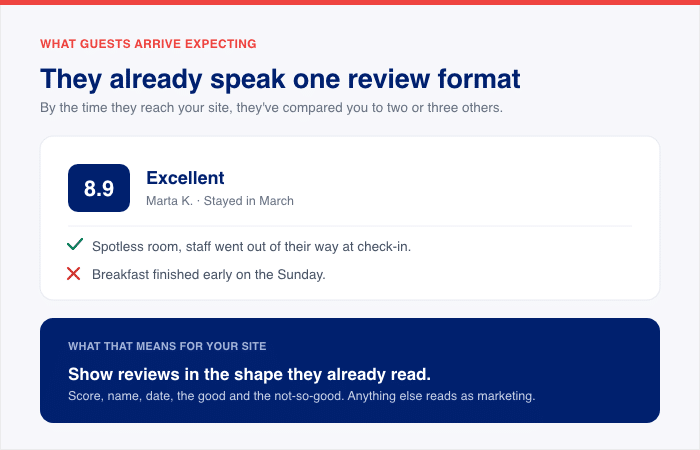
Then they land on your site to decide whether to book with you instead, and that whole layer disappears.
Most hotel websites offer them rooms, rates, photographs, and a date picker. All necessary. None of it is the thing they were just using to make up their mind.
The traveler who was three clicks from a decision has to either trust the site without the evidence they had been relying on, or open the platform again to check.
Opening the platform again is the expensive outcome, because that page has your competitors on it.
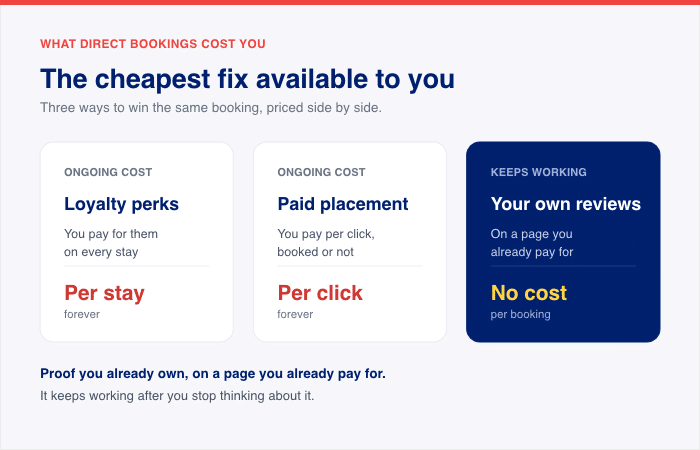
The cheapest fix available to you
You do not need new reviews for this. They already exist, hundreds of them in most cases, written by people who stayed with you and posted on the platform the guest was just reading.
The only thing separating them from your booking page is that nobody has moved them across.
That makes it unusual. Most ways of winning a direct booking cost you something every time one lands. Drop your rate to undercut the platform, and you have given away the margin you were trying to protect.
Add loyalty perks, and you pay for them on every stay. Bid for placement on a comparison site, and you pay per click, whether anyone books or not.
Putting proof you already own onto a page you already pay for costs nothing per booking, and it keeps working after you stop thinking about it.
The rest of this guide is about where it goes and how to get it there.
Awards Prove You’re Real. Guest Reviews Prove They’ll Like It.
Your badges are doing a job. It just isn’t the whole job.
A AAA Four Diamond rating is awarded by an inspector against a published standard. A Relais & Châteaux mark takes years and an invitation. These are not decorative. They tell a traveler what category of property this is and what baseline to expect, and they were earned.
What they cannot tell anyone is whether this particular stay will suit this particular trip. That answer only exists in the heads of people who have already slept in the bed.
The two kinds of proof measure different things
Official ratings are assigned against fixed, measurable criteria. Guest scores are the aggregate of what people felt afterward.
Researchers who compared the two directly found they weigh things differently: official star ratings turned out to undervalue attributes like gym access, while overvaluing things like spa facilities, relative to what guests actually care about.
Neither measure is wrong. They are answering different questions.
Both reach a real audience, too. In European consumer data, more than half of people say online customer reviews and ratings influence their accommodation booking. Two in five say official star ratings influence them. For about one in three, star ratings play no part at all.
So keep the badges. They are working on two travelers in five. The point is what is happening with everybody else.
Where the eye actually goes
Researchers have run this with eye-tracking rather than surveys, watching where attention lands when people evaluate a hotel listing. Numerical guest ratings drew more attention than the hotel’s star rating.
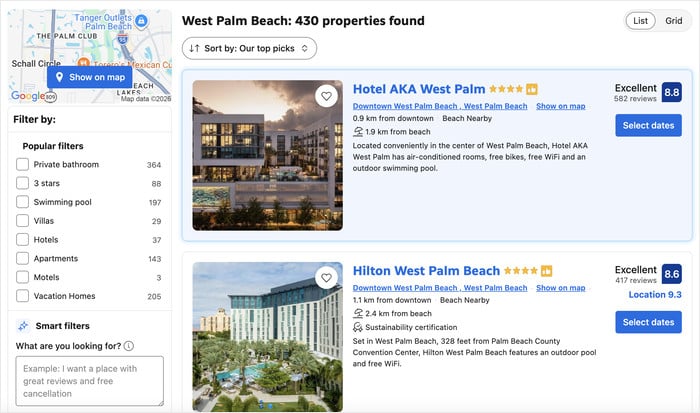
Picture your guest with three tabs open: your hotel, plus two others in the same neighborhood. All three are legitimate, all three carry badges. The badge is a tiebreaker that does not break the tie.
What breaks it is a guest writing that the beds were genuinely comfortable, or that the front desk held their luggage for four hours after checkout. That is the detail nobody can award you.
Why a score needs the reviews behind it
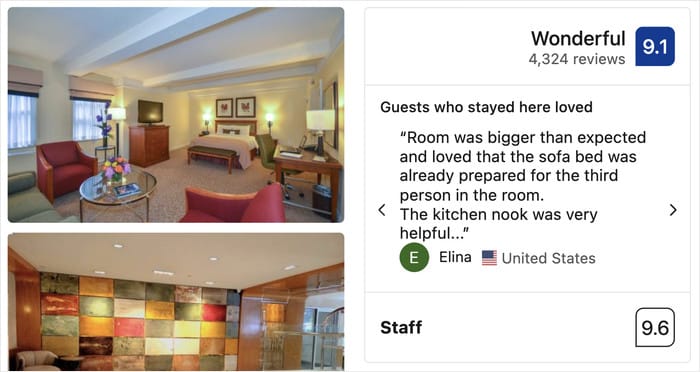
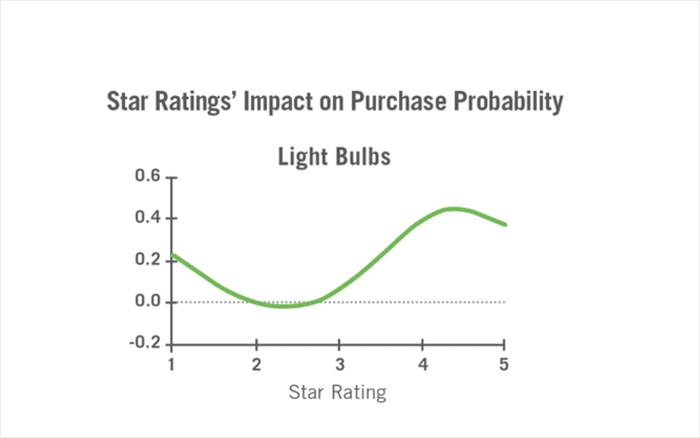
One thing worth knowing: when a hotel’s score is good, research shows that how far people trust it depends on how many reviews sit behind it. The same 9.1 reads differently with twelve reviews than with nine hundred, which is why this guide is about a feed rather than a badge.
Where the Reviews Actually Go
“Put reviews on your booking page” is useless advice if you don’t own your booking page. That is the objection that stops most operators before they start.
Independent hotels handle the booking step in roughly three ways. Some send the guest off to a separate site run by their booking engine.
Some keep a rooms and rates page on their own domain and hand off at the last moment. Some have the date widget embedded directly on the page. Yours is one of these three, and which one you have changes where the proof goes.
So there is no single right answer. There is one rule that covers all three.
Place the feed on the last page you control before the handoff.
| Your booking setup | Where the feed goes | Why |
|---|---|---|
| Booking engine redirects off your site (ResNexus, Cloudbeds, SynXis, and similar) | Your rooms and rates page, directly above the “Book Now” button that sends them away | It’s your final word before the guest leaves your site |
| Booking page on your own domain | Directly beneath the date picker | The guest reads it while choosing dates, not before |
| Date widget embedded on the page | Beside the widget, or immediately below it | Proof and price sit in the same glance |
One thing to check before you settle for the first row. Some booking engines offer branded or embedded booking pages, which means you may control more of that flow than you think. Ask your provider whether you can embed their engine on your own domain.
Your Homepage Is Not a Substitute
This swap is easy to make without noticing, and it quietly wastes the work. You add a good-looking review feed to the homepage, then wonder why nothing changes.
The homepage is where guests arrive. The rates page is where they decide.
By the time someone reaches your rooms and rates, they’ve stopped browsing and started deciding. Proof sitting back on the homepage isn’t in front of them anymore. Put it where the decision is happening.
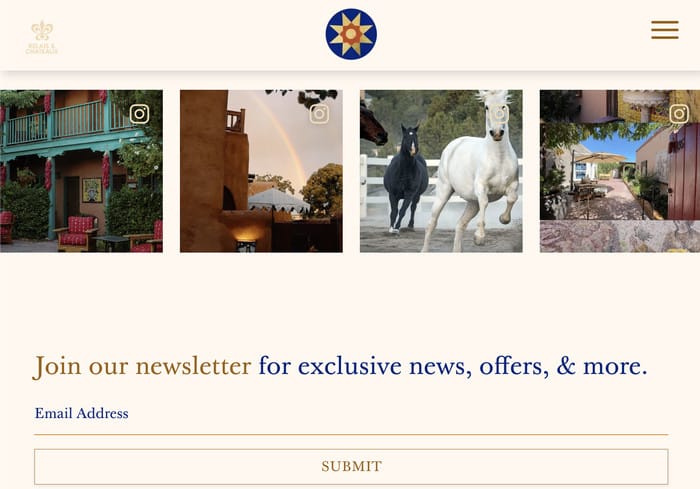
On the other hand, an Instagram feed of the property does real work up there, where guests are still deciding whether they like the look of the place.
Check It on Your Phone
Do this before you call the job done. A block that sits neatly beside your date picker on a desktop can get pushed three screens down on a phone.
Open your rates page on your own phone and scroll the way a guest would. If you reach the booking button before you reach a single guest review, the placement isn’t working yet.
Move the feed above the button on mobile, or choose a spot that stacks correctly on a narrow screen. Most themes let you set a different order for mobile without touching the desktop layout.
How to Put Your Booking.com, TripAdvisor, and Airbnb Reviews on Your Site
The usual first attempt at this is a testimonials page. You pick five good reviews, type them in, and the page looks great for about a month. No platform name, no link, nothing a guest can go and verify. Then nobody touches it again.
A year later the newest quote on there is dated last November, and a stale quote does worse than fail to persuade. It puts a date stamp on your property and tells guests nobody has looked at this page in a while.
Updating a testimonials page is nobody’s job at a 30-room hotel, so it happens once and never again. Static proof ages. A live feed doesn’t.
That’s what Smash Balloon Reviews Feed Pro does.
It pulls reviews from the platforms your guests are already using, including Booking.com, TripAdvisor, Airbnb, Google, and Yelp. Once it’s connected, the feed keeps itself updated.
Here’s the setup, start to finish.
- Install and activate the plugin on your existing WordPress site. No new site, no migration, no developer.
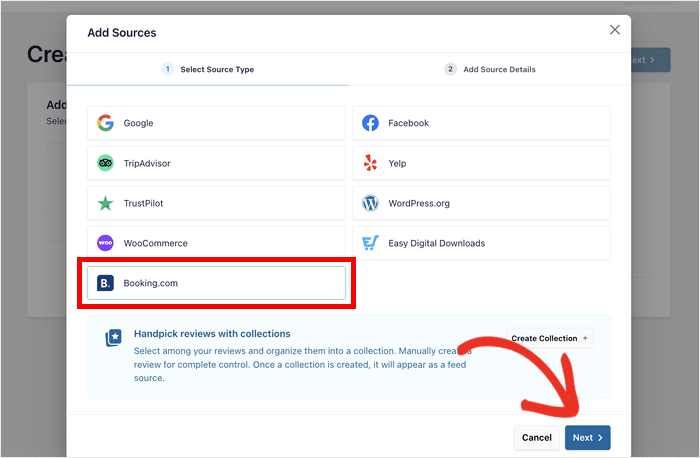
- Create a feed. Head to Reviews Feed » All Feeds, click Add New, then Add Source, and pick the Booking.com tile.
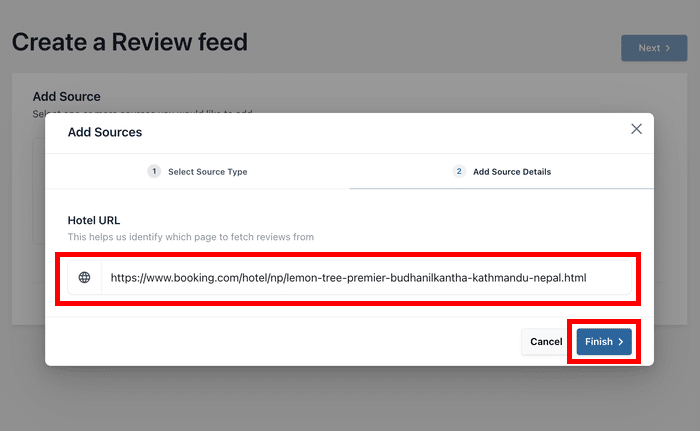
- Add your property. Paste your public property page URL and click Finish. You don’t need an API key, a developer account, or even your Booking.com login.
- Choose how it looks. Pick a template, then open the live customizer. Trim the feed down to the placement you chose in the last section. The Settings tab holds minimum score, keyword filters, and moderation, so you control what shows.
- Embed it. Click Embed and drop the feed onto your rooms and rates page with the Reviews Feed block or the shortcode.
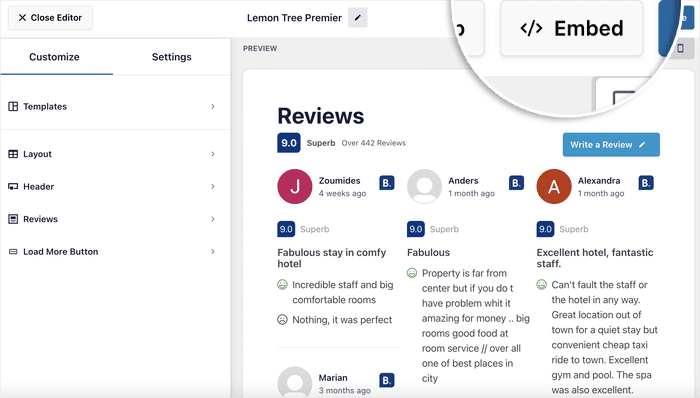
That’s it. Your guests can now read your Booking.com reviews without leaving the page they’re booking on.
For more information, you can check out our step-by-step guide on adding a Booking.com reviews widget to your website.
Will This Get You Stars in Google?
Probably not, and it’s worth knowing why before anyone promises you otherwise.
Google does show star ratings in search results, but mostly for product reviews, where a site reviews something it doesn’t own. Reviews about a business or a place, sitting on that same business’s own website, are a different case. Google calls those self-serving and doesn’t award stars for them. A hotel reviewing itself falls squarely in that second group, so this isn’t a limitation of any plugin.
The feature that handles this side of things is called Rich Snippets, and it ships switched on, with a toggle at Settings » Advanced. Leave it on. It still helps search engines understand what’s on the page, even though the stars aren’t coming.
Before you do anything else here, run your rates page through Google’s Rich Results Test. You’re checking whether something on your site is already describing the page as a hotel, because plenty of hotel themes and booking plugins do their own version of this. If two things are describing the same page, you want to know about it and turn one off.
If you want a feed of your property’s Instagram photos sitting on that same page, the All Access Bundle adds one alongside the reviews.
Won’t a Wall of Five-Star Reviews Look Fake?
Yes. A page of nothing but perfect scores reads like marketing, and guests have learned to skip past it.
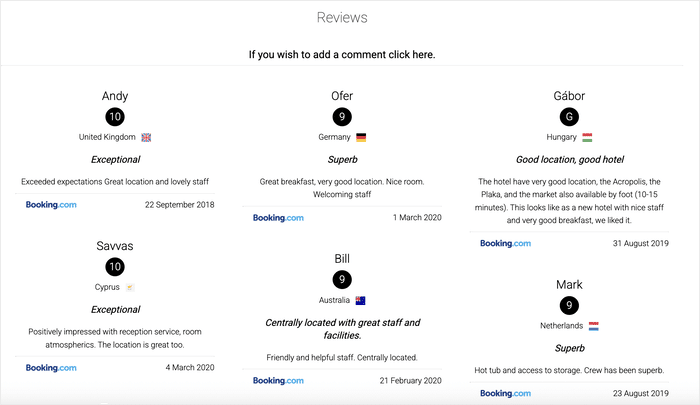
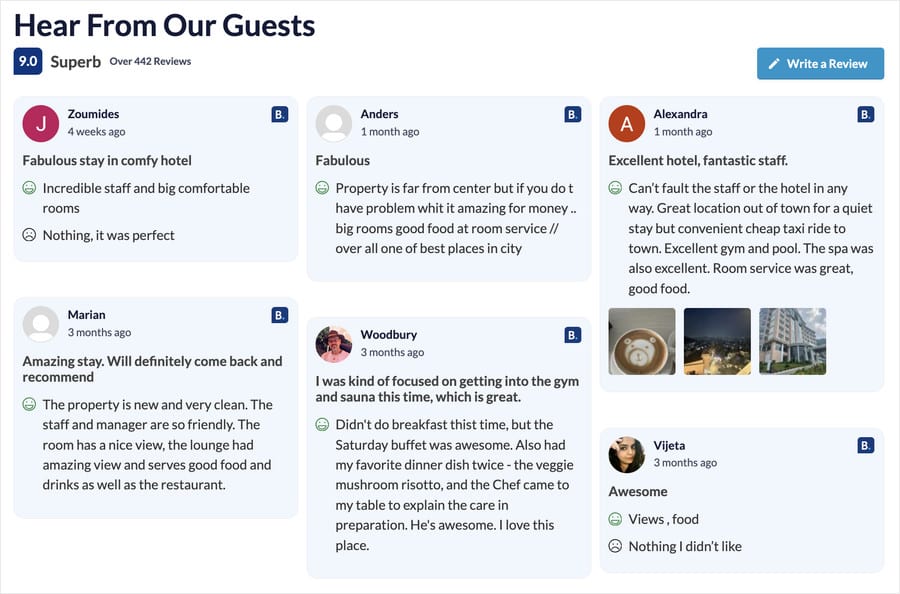
That’s why the Booking.com card shows what could be better right alongside what the guest liked. A small, fair complaint next to the praise makes the praise believable.
Leave those cons visible. I know how uncomfortable that feels the first time you look at your own rates page, but the complaint is doing the work. It proves a real person wrote the review.
There’s research behind this, too. When a score is good, how far people trust it depends on how many reviews are sitting behind it. A strong number on its own is a claim. A strong number with hundreds of dated, named reviews underneath it is evidence.
Three more things make a feed read as genuine:
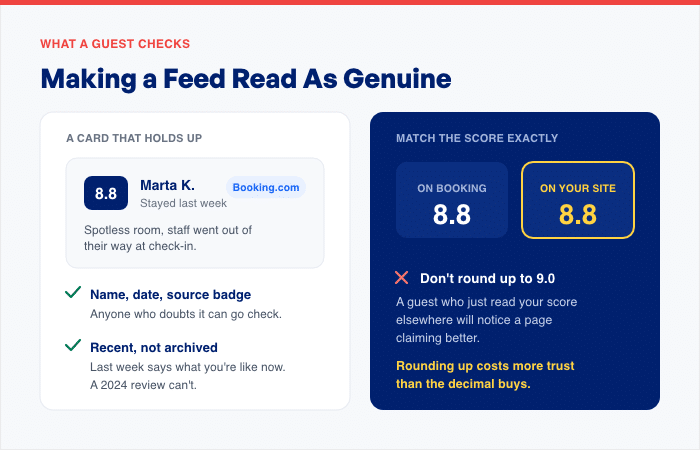
- A name, a date, and a source badge on every card. Anyone who doubts a review can go and check it on Booking.com themselves.
- A rating that matches the one on the platform. If your Booking score is 8.8, show 8.8. A guest who has just read your score elsewhere will notice a page claiming better, and rounding up costs you more trust than the extra decimal buys.
- Recent reviews. A review from last week tells a guest what your hotel is like now. A 2024 review can’t do that.
Here’s the part that surprises people. The hand-copied testimonials page is cherry-picked by definition, because a human sat down and chose the five nicest quotes.
A live feed pulling your most recent reviews is the less curated option of the two. It shows what guests are actually saying this month, not what someone liked best last year.
Use the minimum score and moderation settings in the Settings tab sparingly. They’re there for spam and off-topic entries, not for filtering out your four-star reviews.
Frequently Asked Questions
Do hotels actually make more on direct bookings?
Yes, hotels keep more from direct bookings because there’s no commission taken off the top. Peter O’Connor, writing in Travel Tech Essentialist, puts booking site commission at roughly 18% per reservation. He argues that 18% is fair value, since winning the same guest through paid ads often costs more, which is why the saving only really shows up when the booking comes to you without paid media behind it.
Do I need an API key or developer account to show my reviews?
No, you don’t need an API key or a developer account to show your reviews. Reviews Feed Pro takes your public property page URL for Booking.com, and the listing URL for TripAdvisor and Airbnb. You paste the link into Add Source and click Finish. The setup steps earlier in this guide walk through it.
Can I show my Google reviews without paying?
Yes, you can show your Google reviews for free. Google and Yelp are both sources in the free version of Reviews Feed, so you can put guest reviews next to your date picker today at no cost. Booking.com, TripAdvisor, and Airbnb are the sources that need the Elite plan.
What if Booking.com goes down or changes something?
If Booking.com goes down, the backup caching system keeps showing the reviews it has already saved. Your rates page carries on displaying guest proof instead of an empty white box. That blank-box failure is the reason a lot of operators avoid widgets, and it’s the thing this prevents.
Where exactly should the reviews go on my site?
On the last page you control before the guest leaves to pay. If your booking engine sends people to a separate site, that’s your rooms and rates page, directly above the button that sends them away. If the date picker sits on your own page, put the feed right beneath it. Your homepage is where guests arrive, not where they decide, so it isn’t a substitute.
Start Showing Your Guest Reviews Today
Your homepage already proves you’re a real hotel. The AAA plaque, the membership mark, the magazine badge, they all do that job well. Nothing on that page proves a guest enjoyed staying with you.
SiteMinder found that booking sites have overtaken search engines as the place travelers start looking for a hotel, and that nearly one in five people who start there go on to book directly. They pass through your site to do it. Your website is the last thing they look at before somebody gets the reservation.
So put the proof on the last page you control before the handoff. That’s your rooms and rates page, or right under your date picker if the widget sits on your own site. Not the homepage, and not the footer.
The reviews are already written. Hundreds of them, in most cases, sitting on a platform your guest was reading twenty minutes ago. Moving them across costs you nothing per booking and doesn’t come out of your rate.
Get Reviews Feed Pro Elite and put your Booking.com, TripAdvisor, and Airbnb reviews where your guests decide.