Social Wall
  Feed Analytics

Have you asked every guest, and the number still won’t move?
You asked at checkout, left a note on the pillow, sent the polite follow-up. You reply to every review you get. Eight months, same count. Most hosts read that as a weak ask, so they ask harder, and nothing changes.
The part almost nobody says out loud: only guests who booked through Booking.com can leave you a Booking.com review. Booking.com sends the invitation, not you.
At Smash Balloon I help hotels, B&Bs, and rental hosts put their guest reviews on their own websites, and I see the same gap every time. The reviews sit stranded on the listing while the one page the host controls shows nothing, or a screenshot pasted in years ago.
So this guide covers the real eligibility rule, why your review count has a hard ceiling, and the one lever you control that lifts it.
You’ll also get the setup for putting your live Booking.com reviews on your own site, so the people already browsing your page book through Booking.com and trigger the next invitation.
In this Article:
- The Short Answer: More Reviews Means More Booking.com Bookings
- How Booking.com Reviews Actually Work (The Rule Everyone Gets Wrong)
- Why "Ask Harder" Stopped Working for You
- The One Lever You Actually Control
- How to Put Your Live Booking.com Reviews on Your Site
- Prime the Review Before the Guest Writes It
- Keep Them Coming: What to Do Every Month
- Start Growing Your Booking.com Reviews Now
The Short Answer: More Reviews Means More Booking.com Bookings
You get more Booking.com reviews by getting more bookings through Booking.com, because the platform only invites guests who booked on the platform.
Here is how the system works, according to Booking.com’s partner help center:
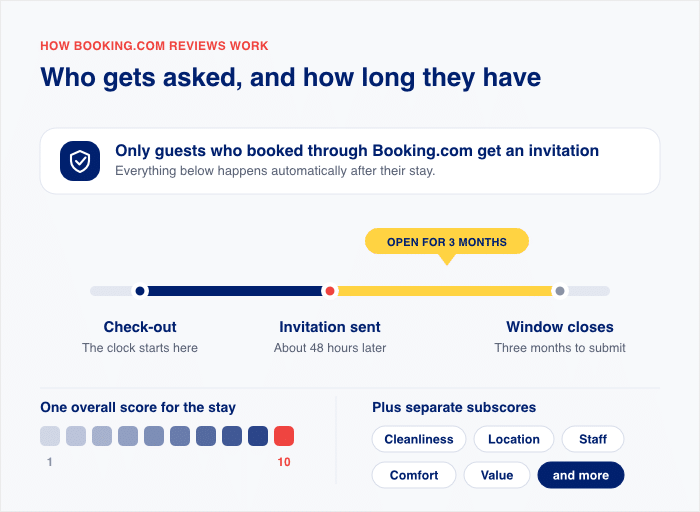
- Only guests who booked through Booking.com get a review invitation
- The invitation lands about 48 hours after check-out
- Guests have three months to submit their review
- Scores run on a 1 to 10 scale
No amount of asking creates an invitation that was never sent. Book a guest directly, and Booking.com has no record of that stay. No invitation exists for them to answer.
So the fastest lever you have is converting the people already looking at your own website into Booking.com bookings. Live guest reviews on that page are what does the converting.
How Booking.com Reviews Actually Work (The Rule Everyone Gets Wrong)
Booking.com decides who gets to review you. You don’t.
The platform sends a review invitation only to people who made a reservation through Booking.com. That invitation is the only way a review gets onto your listing. There is no public “write a review” button a passing guest can click.
Here is the part that surprises most hosts. The guest does not have to sleep in the room to qualify.
According to Booking.com’s guest review process for partners, a reservation is enough. No-shows can review you. So can guests who turned up, took one look, and left.
| Situation | Can they leave a Booking.com review? |
|---|---|
| Booked through Booking.com and stayed | Yes |
| Booked through Booking.com, didn’t show up | Yes |
| Booked through Booking.com, arrived but didn’t stay | Yes |
| Booked through Booking.com for family or friends | Yes |
| Booked direct with you (phone, email, your site) | No |
| Booked through a different OTA | No |
The gate is the booking, not the stay.
Your happiest repeat guest, who calls you every summer to book the corner room, cannot leave you a Booking.com review. Neither can the couple who found you on a rival OTA and adored the place.
Once a booking does exist, the timeline is fixed:
- The invitation goes out about 48 hours after check-out. Booking.com emails it directly to the guest.
- Guests get three months to submit it. After that the window closes.
- Scores run on a 1 to 10 scale. Guests rate the overall stay, plus separate subscores for things like cleanliness and location.
Those figures come from Booking.com’s partner help center, and Your.Rentals reports the same 48-hour and three-month numbers in its guide for hosts.
So your realistic review ceiling is simple maths. It’s the number of Booking.com stays you host, times the share of guests who bother to reply. You can improve that second number. The first one is where the room to grow actually lives.
Why “Ask Harder” Stopped Working for You
Getting more of your invitations answered is worth doing, and it probably has some room in it.
Most hosts with a thin review count have earned more invitations than reviews. Some guests opened the email and never finished it. Others let the three-month window close. A friendly mention at checkout genuinely nudges a few of those people over the line.
So keep asking. Just be honest about what asking can and cannot do.
The invitation is not yours. You cannot send it, resend it, or time it differently. You cannot see which guests ignored it, and you cannot reach that guest inside Booking.com’s messaging to follow up once the window closes.
Picture the best possible version of your year. You hosted 14 Booking.com bookings, all 14 guests reviewed you, and your count reads 14. Then it stops, because there is no 15th invitation to convert.
That is the arithmetic nobody on this topic says out loud:
- Your review count has a hard ceiling. That ceiling is your Booking.com booking volume.
- Asking harder only moves you toward the ceiling. It never raises it.
- Booking volume is the side of the equation you can actually grow.
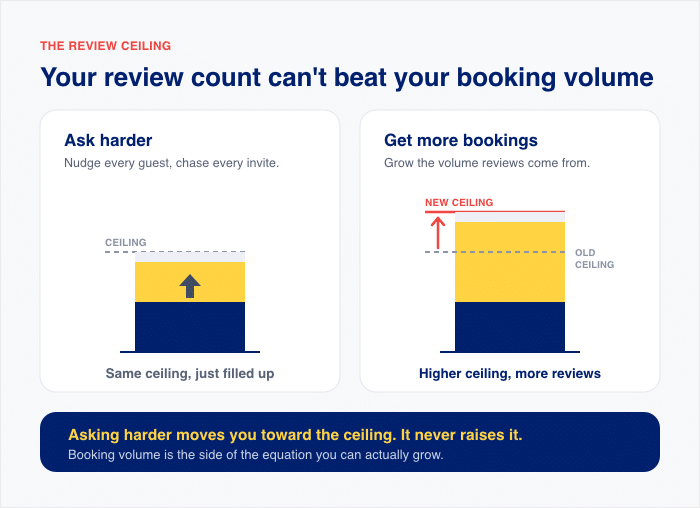
Eight months of asking felt like failure. It was really a capped lever doing all it could.
So the real question is not how to ask better. It is where your next Booking.com booking comes from.
The One Lever You Actually Control
Booking.com owns your listing rank, your search placement, and how much demand flows your way. You own one page: your own website.
That page is the only surface in this chain you can change this week.
Where the Booking Decision Actually Happens
Watch what a guest does after they find you. They see your property in Booking.com search results, then they open a new tab and look you up.
They want to check if you’re real. They want to see the terrace, the breakfast room, and what other people said about the place.
That second page is where the decision gets made. And it has two possible endings:
- Your page closes them. They click back to your listing, book, and Booking.com sends them an invitation 48 hours after checkout.
- Your page doesn’t close them. They leave, or they book through some other channel that never generates a Booking.com invitation at all.
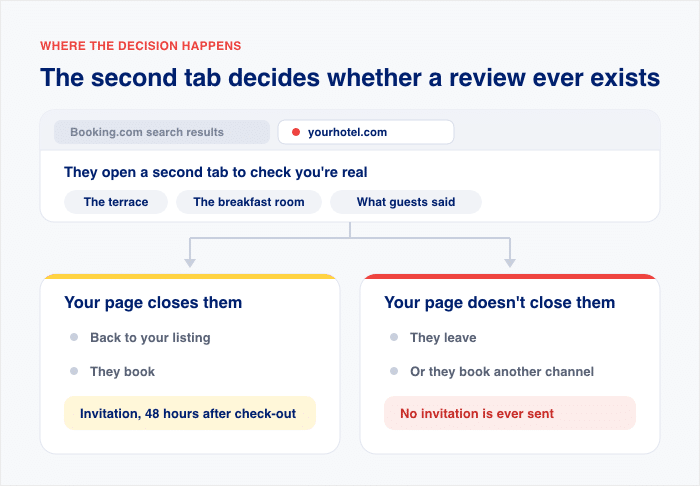
Same guest. Same property. Two very different outcomes for your review count.
What Most Hosts Have on That Page
Nothing. Or a screenshot of four nice reviews, pasted in once, hand-updated never.
I see the second one constantly. A host grabs a snippet of their best reviews, drops it into the homepage, and moves on. Two years later it’s still there, still showing the same four guests, still dated.
The Four Setup Mistakes Hosts Make
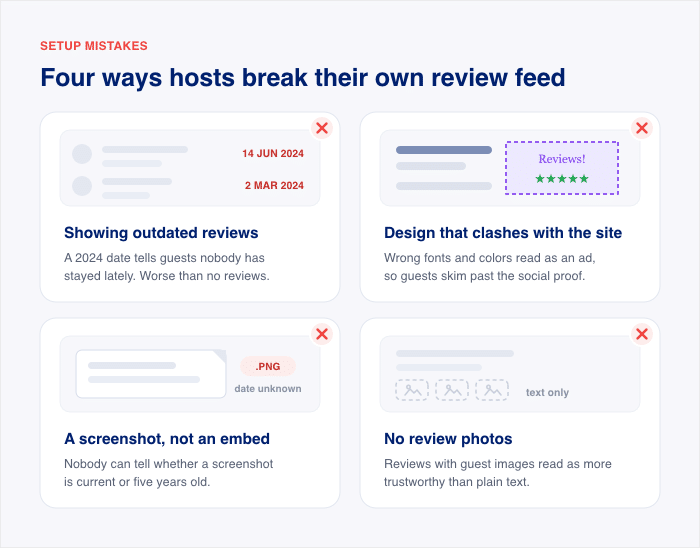
Our support lead for Reviews Feed Pro sees the same four problems over and over from hosts trying to put Booking.com reviews on their own site. Public threads on the topic show the same pattern.
Here they are, with what each one costs you:
- Showing outdated reviews. A 2024 review with a 2024 date tells a browsing guest that nobody has stayed at your property recently. That reads worse than showing no reviews at all.
- Design that clashes with the rest of the site. An off-brand block with the wrong fonts and colors reads as a widget or an ad. Guests skim past it instead of reading it as social proof.
- A screenshot instead of a real embed. Nobody can tell whether a screenshot is current or five years old.
- No review photos. Reviews with guest images read as more trustworthy than plain text.
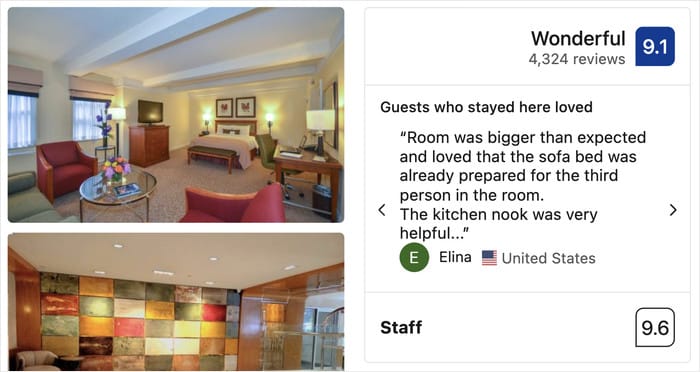
None of these are hard problems. They’re setup problems, which means they’re fixable in an afternoon.
The screenshot is also costing you SEO. Your guest reviews are keyword-rich text written by real people about your terrace, your breakfast, and the ten-minute walk to the station.
A screenshot hides all of that inside an image. A real embed puts it on the page as indexable copy that search engines can read.
How to Put Your Live Booking.com Reviews on Your Site
Reviews Feed Pro pulls your live Booking.com reviews onto your WordPress site and links each feed back to your listing.
Booking.com Reviews is part of the Elite tier of Reviews Feed Pro. Once you connect your property, the plugin keeps the feed current on its own, so you never hand-update a screenshot again.
Here is the setup, start to finish.
1. Install and Activate Reviews Feed Pro
Download the plugin zip from your Smash Balloon account, then go to Plugins » Add New » Upload Plugin and install it.
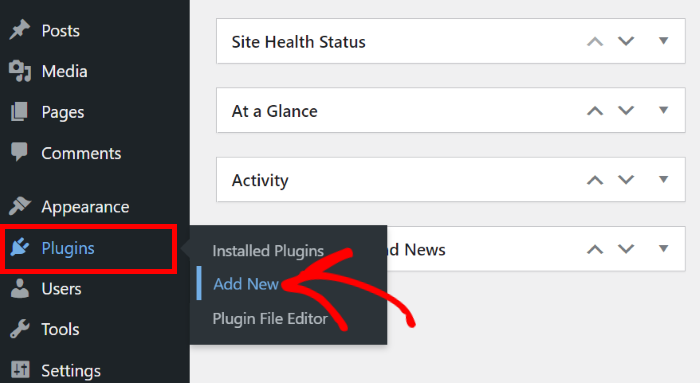
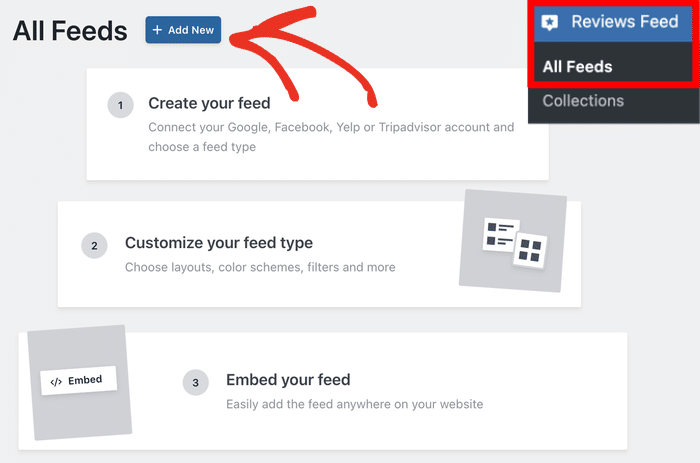
Click “Activate”, and you’ll find the plugin in your WordPress admin menu under “Reviews Feed”.
Open it and click “Add New” to start your first feed.
2. Choose Booking.com as Your Review Source
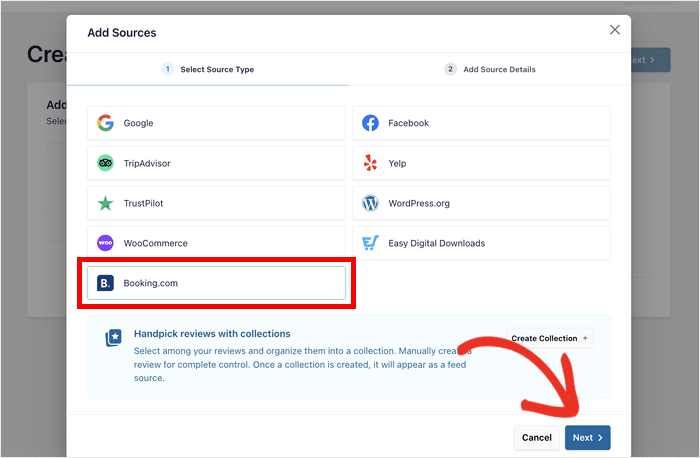
To add a new source of reviews on your site, click on the Add Source button.
The source picker lists every platform you can pull from. Select “Booking.com” and click “Next”.
3. Connect Your Property and Confirm the Listing
Paste your Booking.com property URL, and click on Finish.
This tells the plugin which reviews belong to you, so nothing from a similarly named property ends up on your page.
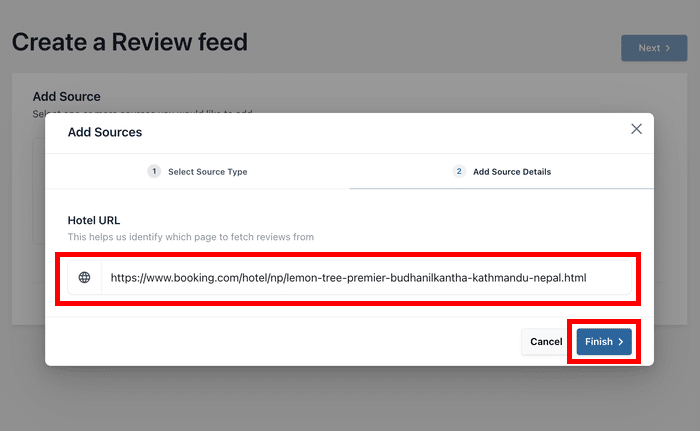
After that, confirm the Booking.com page as a source so you can create new feeds in the future without leaving your site.
4. Pick a Layout and Match It to Your Branding
First, select a template and click on Next to import the design.
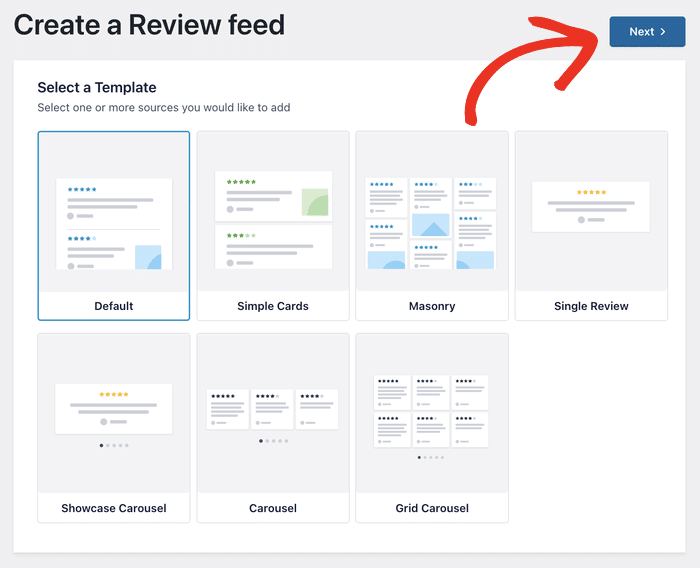
Choose a layout, then open the feed customizer to set your fonts, colors, and spacing.
Match these to the rest of your site so the feed fits the design you have in mind for the page or widget where you want the reviews.
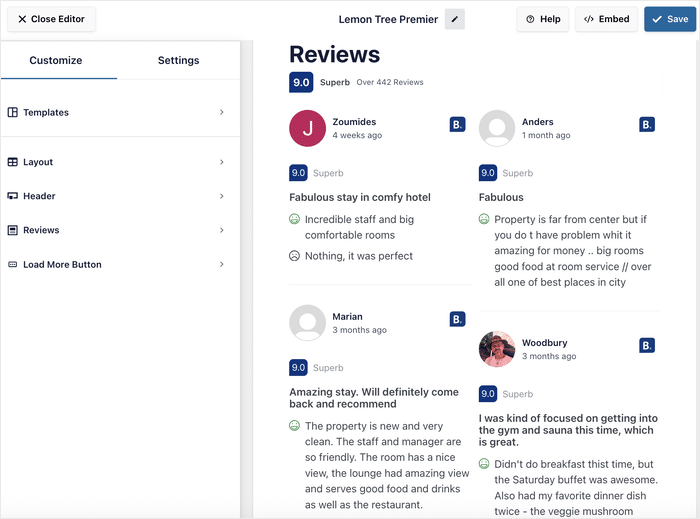
While you’re in the customizer, use the filtering options to choose which reviews to lead with.
For a hotel website, you can try filtering by topic: surface the reviews that mention the terrace, the breakfast, the walk to the station.
Every visitor sees the same reviews and the same link to your listing, so this is display-side curation, not review gating.
5. Embed the Feed Where Guests Decide
Click on the Embed button to start adding the feed to your website.
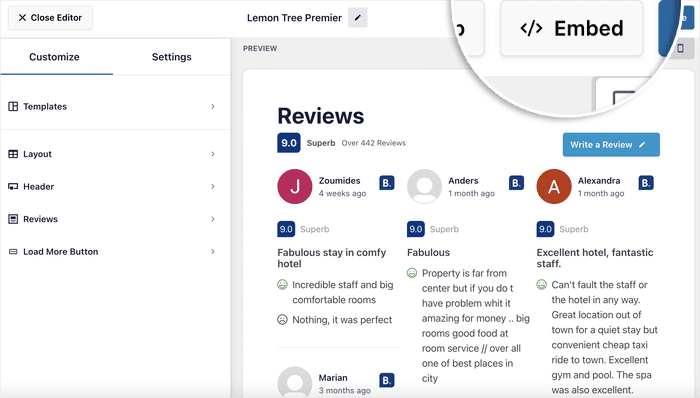
Copy the shortcode, or add the “Reviews Feed” block to your homepage or a dedicated reviews page.
I’d put it on the homepage first, because that’s usually where a guest lands when they look you up.
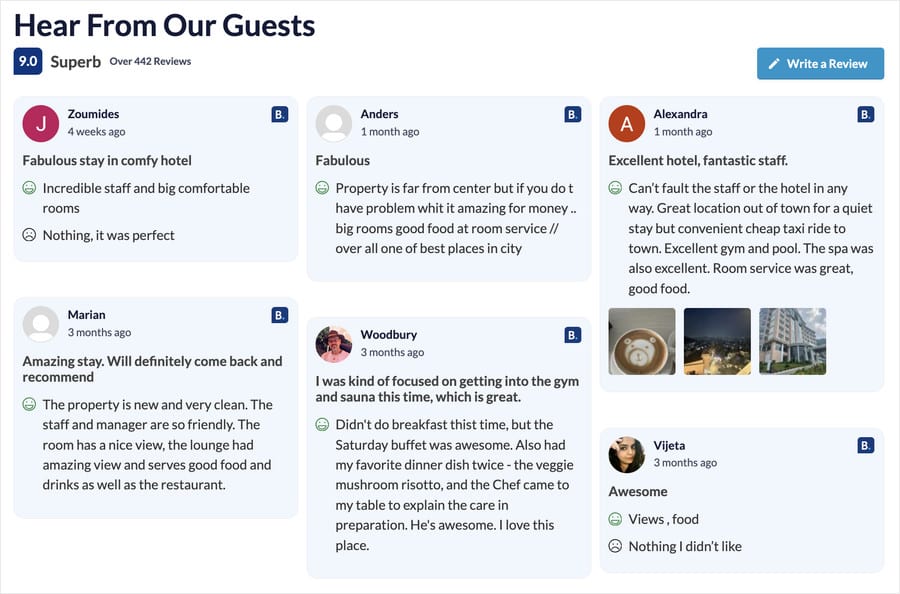
How Each Feature Fixes One of the Four Mistakes
Every problem from the last section maps to something the plugin handles for you:
| The mistake | What fixes it |
|---|---|
| Outdated reviews | Twice-daily fetching keeps the feed current |
| Off-brand design | The feed customizer matches your site’s styling |
| Screenshot instead of embed | A real HTML embed, so the text is indexable and updates live |
Two more worth knowing: manual review upload lets you add feedback from guests who booked elsewhere, and the backup caching system keeps the feed on the page if the connection drops.
You set this up once. After that, the newest review a guest wrote about your breakfast shows up on your homepage without you touching anything.
Prime the Review Before the Guest Writes It
Think about what a guest sees before they book. Your listing sits in search results next to a dozen properties with the same layout and the same score badges.
Your page is different. You decide what a guest reads there before they click through to your listing.
That matters because the specifics a guest notices are the specifics they remember. A guest who read about your terrace is more likely to have it in mind when they write their own review.
Here’s how to use that:
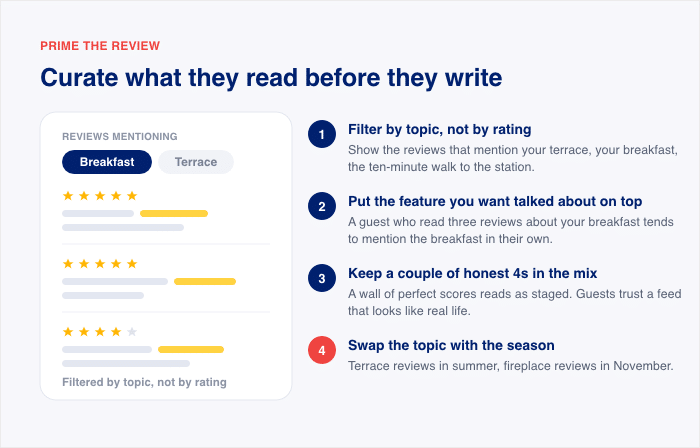
- Filter by topic, not by rating. Surface the reviews that mention the terrace, the breakfast, or the ten-minute walk to the station.
- Lead with what you want mentioned. If your breakfast is your best feature, put the breakfast reviews first.
- Refresh the topic every season. Swap in the terrace reviews for summer and the fireplace reviews for winter.
- Keep the link visible. Each Reviews Feed Pro feed links back to your Booking.com listing, so the guest you just convinced can book in one click.
Keep Them Coming: What to Do Every Month
More reviews do more than pad a number on your listing. They unlock two Booking.com programs that send you extra bookings, and both have a review gate you have to clear.
Here is what each program asks for, according to partner.booking.com:
| Program | What it needs |
|---|---|
| Genius | Open and bookable, at least 3 reviews, and a score of 7.5 or higher (Booking.com may make an exception if your area’s average is below 7.5 and you’re above it) |
| Preferred Partner | Performance Score of 70% or higher and Review Score of 7 or higher |
Genius isn’t free. Joining applies a mandatory 10% discount to your cheapest or most popular room, and if you opt out you can’t rejoin for six months.
A few more facts about Preferred Partner worth knowing before you go for it:
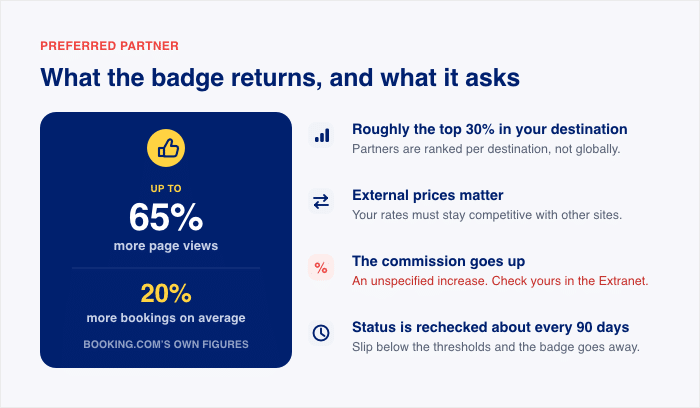
- It’s roughly the top 30% of partners in each destination. Booking.com ranks partners per destination, not globally.
- External prices matter. Your rates have to be competitive against other sites.
- The commission goes up. Booking.com describes it as a small increase without naming a figure, so check what yours would be in the Extranet before you join.
- Preferred Partners get up to 65% more page views and, on average, 20% more bookings. Those are Booking.com’s own figures.
- Booking.com rechecks your status about every 90 days. Slipping below the thresholds can cost you the badge.
Look at what those gates actually measure. Performance Score combines your expected annual bookings with traveler demand for your property, and a review score needs reviews, which need bookings. Both gates are booking-volume gates, so the same lever moves both.
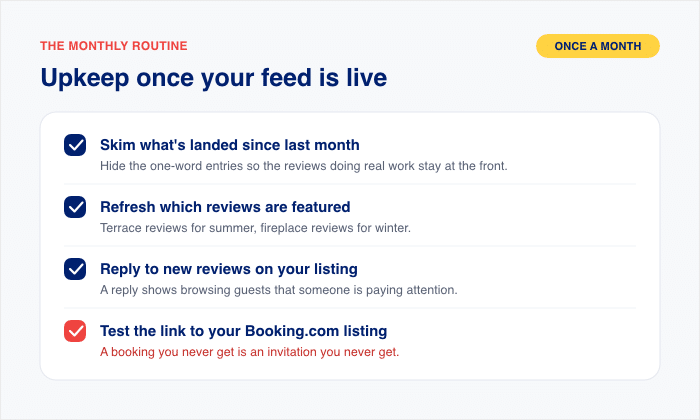
Once your feed is live, the upkeep is small. Here’s the monthly routine I give hosts:
- Skim what’s landed since last month. Open the feed and read the newest reviews. Hide the one-word “Good” and “Nice stay” entries so the reviews doing real work for you stay at the front.
- Refresh which reviews are featured as the season changes. Swap the terrace reviews in for summer and the fireplace reviews in for winter, so the specifics match what guests are shopping for.
- Reply to new reviews on your listing. A reply shows browsing guests that someone is paying attention to the property.
- Keep your direct-booking page pointed at your Booking.com listing. Test the link yourself. A broken link sends an interested guest nowhere, and a booking you never get is an invitation you never get.
That’s fifteen minutes a month. It keeps the page that closes your guests current, and it keeps the next invitation coming.
Frequently Asked Questions
Can a guest who booked direct leave me a Booking.com review?
No, a guest who booked direct can’t leave you a Booking.com review. Booking.com only sends review invitations to people who booked through the platform, so a direct booking never triggers one.
Do no-shows count for Booking.com reviews?
Yes, no-shows count, as long as the person booked through Booking.com. The same goes for guests who arrived but didn’t stay, and for people who booked the room for family or friends. Cancellations are different. If a guest cancels before arrival, there’s no stay, so there’s no review invitation either.
How long do guests have to leave a review?
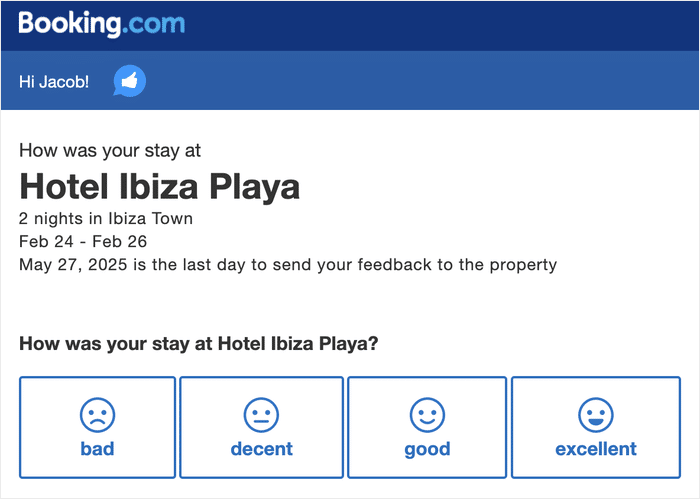
Guests have about three months to leave a review. The clock starts with the invitation email, which Booking.com sends roughly 48 hours after check-out, according to partner.booking.com.
Can I show my Booking.com reviews on my own website?
Yes, it’s allowed, and with Reviews Feed Pro, they update themselves. The plugin fetches new reviews automatically, so the feed on your page stays current without you touching it.
Why can’t I find the review option as a guest?
You can’t find the review option because the link lives in the invitation email Booking.com sends about 48 hours after check-out, and it expires after roughly three months. If you deleted the email, sign in to Booking.com, open “Bookings & Trips”, find the past stay, and use the review option there.
Start Growing Your Booking.com Reviews Now
Only guests who booked through Booking.com can review you, so the ask was never your bottleneck. Your review count is really a booking count, and it moves when your bookings move.
The lever you control is your own page. Live Booking.com reviews there send a browsing prospect back to your listing to book, and that booking earns the next invitation about 48 hours after check-out.
That’s the loop. More bookings, more invitations, more reviews, and those reviews convince the next guest to book.
Get Reviews Feed Pro today and put your live Booking.com reviews on the page where guests decide.