Social Wall
  Feed Analytics

Ever wondered if hiding a bad review on your site counts as review gating?
If you’ve stared at a rambling 1-star rant about a former employee and worried that hiding it on your homepage could get you penalized, you’re not alone.
Most WordPress site owners freeze the moment they hear “review gating,” so they either embed every public review unfiltered or skip the embed entirely.
I work at Smash Balloon helping thousands of WordPress site owners display reviews, and I’ve watched this exact confusion freeze people for months. The line Google drew is much clearer than the top search results make it look.
Below: what Google’s policy bans, why display-side curation is fair game, and how to filter your embedded reviews without putting your Google profile at risk.
- The Short Answer: Display-Side Curation Is Not Review Gating
- What Is Review Gating, Really? (And Why the Definition Matters)
- The Confusion That's Costing WordPress Site Owners Real Reviews
- Collection vs. Display: The Line Google Actually Drew
- How Smart Brands Actually Filter Reviews on Their Site
- A Real Example: Curating a Mixed Review Feed Without Gating
- Why "Show Every Review or Show Nothing" Is the Wrong Trade-Off
- How to Start Filtering Reviews Without Gating (5 Quick Steps)
- Start Curating Your Public Reviews Now
The Short Answer: Display-Side Curation Is Not Review Gating
Picking which public reviews show up on your website is not review gating. Google’s rule is about the collection step, not the display step.
In short, having a different path to leave a review based on a positive or negative experience would be considered gating.
Here’s the line in a few common situations:
| Situation | Review Gating? | Why |
|---|---|---|
| Emailing only happy customers a Google review link, while sending unhappy ones to a private feedback form | Yes | You’re screening people before they can leave a public review |
| Asking every customer for a review, then hiding the 1-star ones on your WordPress site | No | The review still lives on Google. You just chose what to display |
| Showing only 4 and 5-star reviews in your homepage widget | No | You’re curating already-public reviews, like picking a testimonial |
| Asking “Was your experience good?” before deciding whether to show the review link | Yes | The collection path changes based on sentiment |
| Featuring a handful of reviews that match your product’s best use case | No | This is display-side curation, the same as a brochure quote |
So if you hide a 1-star rant on your WordPress homepage, the review still lives on Google. You haven’t blocked anyone from leaving feedback.
You’ve simply picked which public quotes go on your page, the same way you’d pick a testimonial for a brochure.
The good news is, once you see where the line actually sits, the fear disappears.
What Is Review Gating, Really? (And Why the Definition Matters)
Review gating is the practice of filtering which customers get asked for a public review based on how happy they seem. It’s a collection-side trick. You screen people first, then route only the fans to Google.
Here’s the typical gating workflow:
- Send every customer a private feedback form first
- Route the happy ones to Google, Yelp, or another public site
- Suppress the unhappy ones so they never see the public review prompt
Every single one of those steps happens before a review is written. That’s the part most posts miss. Gating is about who gets asked, not what shows up on your homepage later.
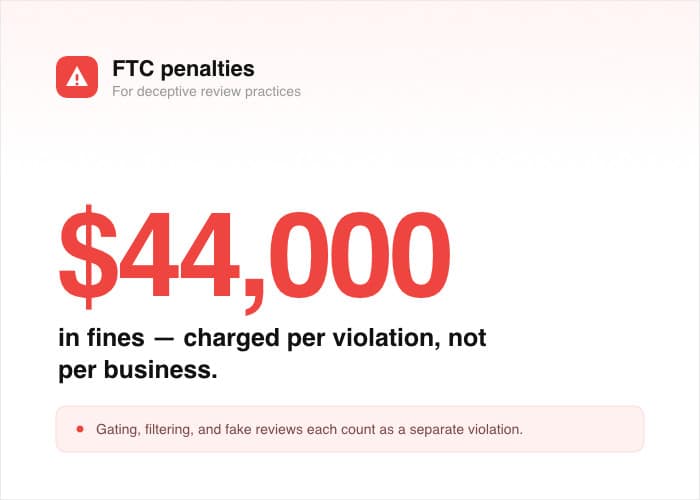
The cost of getting this wrong is real. Google can remove every review on your profile if it catches you gating. The FTC also penalizes deceptive review practices with fines up to $44,000 per violation.
Don’t worry. If you’re not running any of the three steps above, you’re not gating.
How the Top SERP Posts Define It (And Where They Stop)
Open the top three results for “what is review gating” and you’ll see the same pattern. Each one defines gating, lists why Google banned it in 2018, and warns you off. Then the post ends.
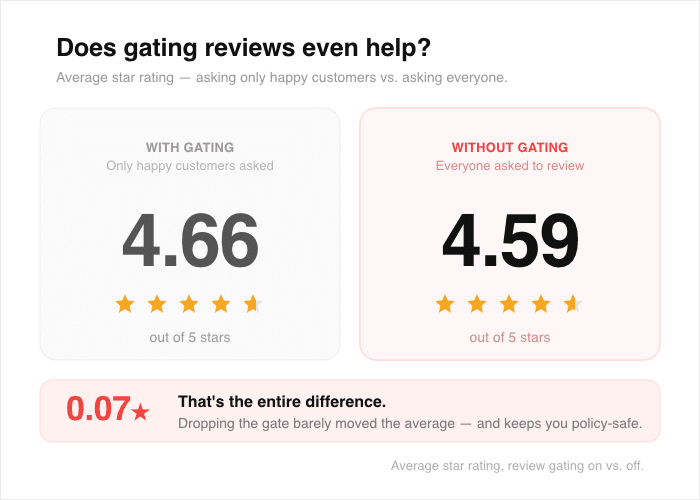
There’s another thing most posts skip: GatherUp data shows the average star-rating difference between gating and not gating is tiny (4.66 vs. 4.59).
Gating isn’t worth the risk anyway. But you’re not trying to gate. You’re trying to curate, and those are different things.
None of them answer the next question, which is the one you actually have. If gating is off the table, what can you do with the reviews you’ve already collected?
That’s the gap this guide fills, and it’s where display-side curation comes in.
The Confusion That’s Costing WordPress Site Owners Real Reviews
Here’s what I keep seeing in our support inbox.
A site owner installs a review plugin, embeds their Google reviews, then spots a rambling 1-star post from a customer who never actually bought anything.
Their hand hovers over the hide button. Then they pull back, worried that touching it could trigger a Google penalty. So the review stays on the homepage, the page looks messy, and the embed stops doing its job.
This hesitation is costing real businesses real conversions every week. The fear is based on a misread of the policy, not the policy itself.
Here’s what the confused site owner thinks vs. what’s actually true:
| What they think | The reality |
|---|---|
| “If I hide this review on my site, Google could penalize me.” | Google’s policy applies to the collection request, not the display layer. The source review is still live on your Google Business Profile for anyone who looks. |
| “Choosing which reviews to embed is cherry-picking, and that feels dishonest.” | Every review is still public on Google. Visitors who want the full picture can click through in one tap. You’re picking quotes for your storefront, not erasing feedback. |
| “Showing every review proves I’m being transparent.” | A wall of unfiltered reviews often hurts trust more than it helps. |
That last point surprises most people. TrustSignals reports that the ideal rating for consumer trust is roughly 4.5 stars, and consumers often get suspicious when a business displays a flawless 5.0.
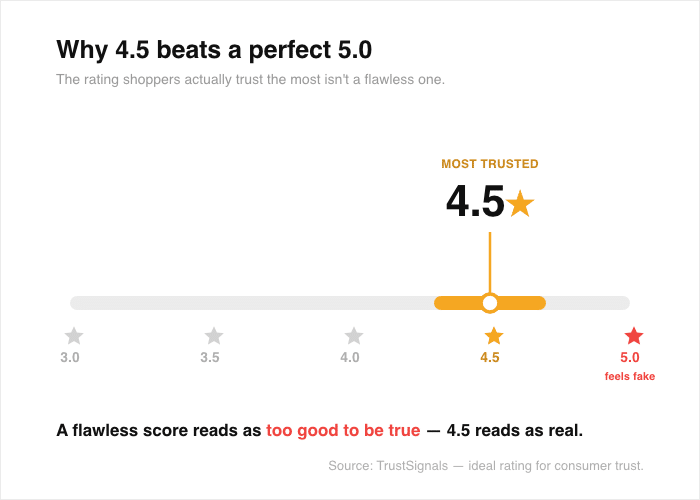
A curated display, done well, actually looks more honest than dumping every review onto the page. The goal is a believable picture, not a polished lie.
Curation also isn’t about hiding negativity for its own sake. Thrive Agency found that 45% of consumers are more likely to visit a business when the company responds professionally to a negative review.
A thoughtfully chosen mix, including a few critical reviews you’ve replied to, often converts better than a sanitized feed.
The good news is, the line is much clearer than the SERP makes it look.
Collection vs. Display: The Line Google Actually Drew
Google’s policy targets one thing: how you ask for reviews. It says nothing about which public reviews you choose to feature on your own site.
Once you see those as two separate steps, the rest of the policy gets easy to read. Here’s the side-by-side that clears it up for most people:
| Collection-side (banned) | Display-side (allowed) |
|---|---|
| Asking only happy customers for a public review | Embedding only 4+ star reviews on your homepage |
| Routing unhappy customers to a private form first | Hiding an off-topic review from your widget |
| Suppressing public review invites based on a survey | Filtering embedded reviews by platform or date |
| Editing what a customer can write before posting | Choosing which platforms feed into your widget |
Screenshot that table. It answers about 80% of the questions you’ll have the next time you reach for a moderation toggle.
If every review your customer wrote is still live on Google, you haven’t manipulated that base of knowledge.
You’ve just decided what to feature on your own marketing real estate. That’s the same call any business makes when picking which customer quotes go on a sales page or in an ad.
The top seven results for “what is review gating” all stop short of drawing this line. They define gating, warn you off, and leave you guessing about your own widget.
That gap is exactly why so many site owners freeze on the hide button. Once this clicks, you’ll stop second-guessing every moderation decision.
How Smart Brands Actually Filter Reviews on Their Site
The category you want is display-side review curation tools. These plugins pull your already-public reviews then let you decide which ones appear on your WordPress pages.
For WordPress, the best tool built for exactly this job is Smash Balloon’s Reviews Feed Pro.
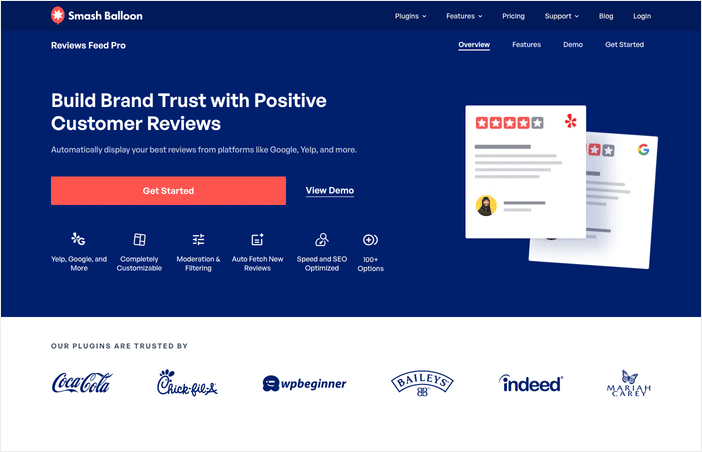
Here’s how it filters reviews the right way:
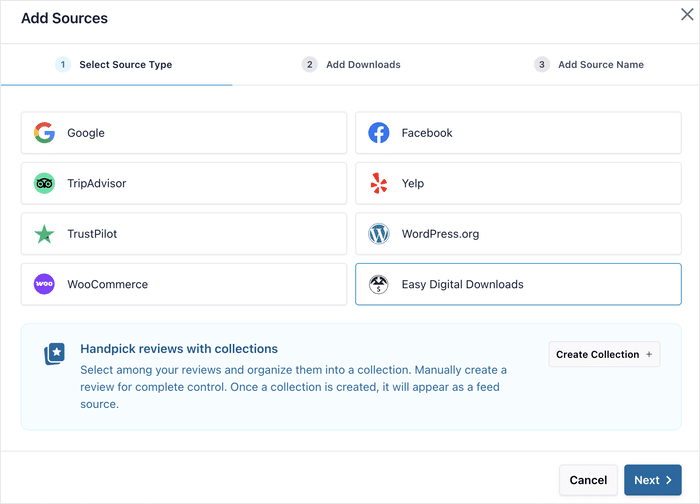
- Pull public reviews automatically from Google, Yelp, Trustpilot, and more. Every review on your widget is also still public on its source platform, so nothing gets suppressed from the public corpus.
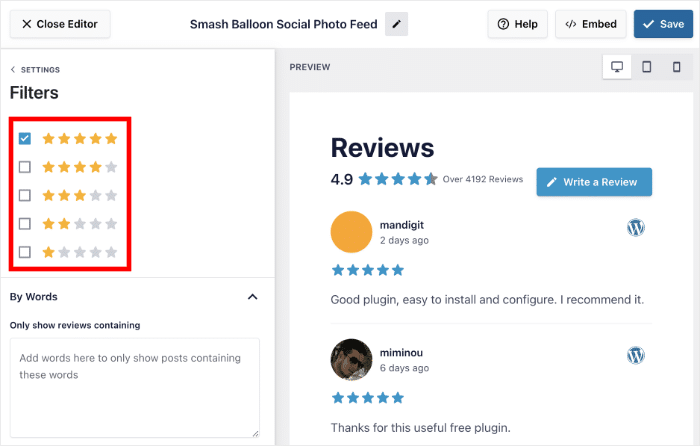
- Use filters and moderation to choose what appears on the page. Filter reviews by star ratings, keywords, or manually pick which reviews to show or hide.
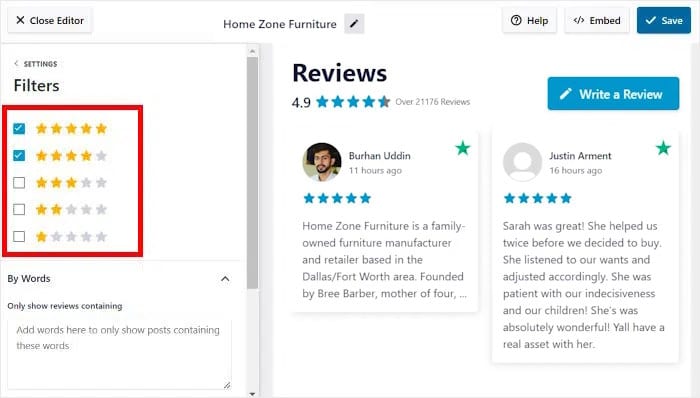
- Filter by platform so the right reviews show in the right place. Show reviews on specific pages, sidebar, or footer areas and match the platform to the location.
- Filter by word count, language, and more. You get fine control over which reviews land on each page without ever touching any code.
Every action inside Reviews Feed Pro happens after a review is already public. Nothing in the plugin touches who gets invited to leave a review.
That’s what makes it a display-side tool, not a collection-side workaround, and it’s why your Google profile stays safe while you curate.
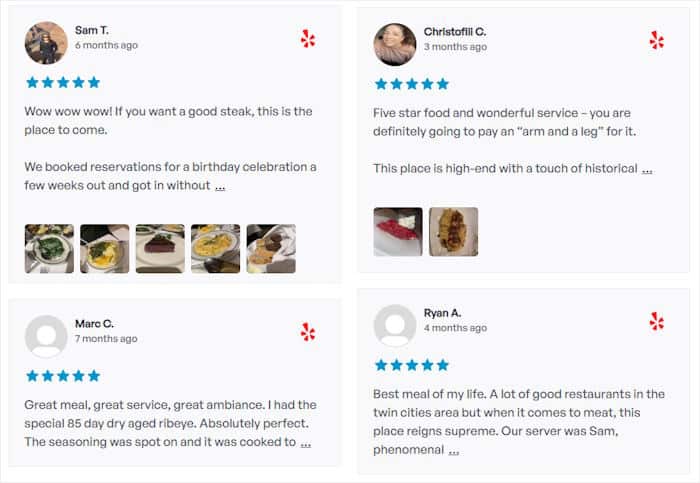
Don’t worry. Using the moderation panel doesn’t put your Google profile at risk.
What Stays Public on the Source Platform
When you hide a review inside Reviews Feed Pro, here’s exactly what still happens out in the world:
- The review still appears on your Google, Yelp, or Trustpilot profile.
- Search engines still index it on the source platform.
- Anyone searching your business name can still find every review you’ve ever received.
So back to the question most site owners get stuck on: if you hide a 1-star review on your WordPress site but it’s still visible on Google, is that review gating?
No. The review is still available on Google for any shopper who wants the full picture. You just chose not to feature it on your marketing page.
A Real Example: Curating a Mixed Review Feed Without Gating
Picture a local bakery called Sunrise Loaf. They’ve collected 180 Google reviews, 40 Yelp reviews, and a handful on Trustpilot over five years.
The owner wants to embed all three on a new “What Customers Say” page on her WordPress site.
A few reviews give her pause. One 2-star review from 2022 complains about a delivery driver who left the business a year ago. Another is a 1-star rant about parking on the street, which the bakery doesn’t control.
A 4-star review from last month says the sourdough “was usually better than this” after one Tuesday’s loaf came out underbaked.
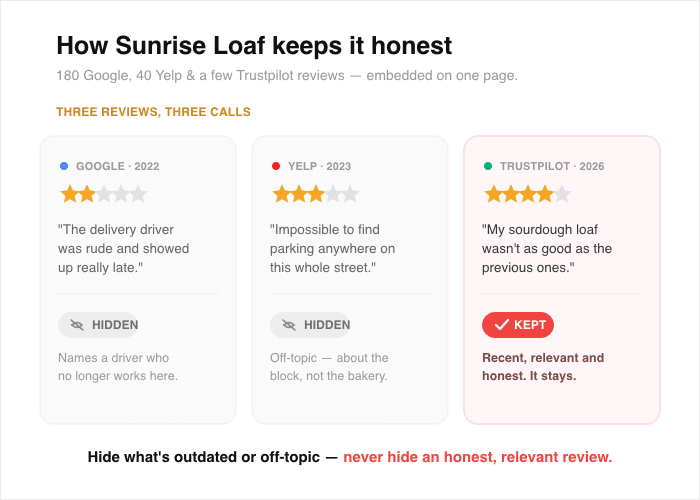
She doesn’t want to gate. She wants to curate. Here’s exactly how she does it:
- Connect Google, Yelp, and Trustpilot as sources. Inside Reviews Feed Pro, she links each platform so every public review flows into one feed. All 220+ reviews stay live on their source platforms.
- Open the visual moderation panel. She sees every review in a point-and-click grid, sorted by date and rating. No code, no spreadsheets.
- Hide reviews that are off-topic or no longer relevant. She hides the 2022 delivery-driver review because it describes a person who no longer works there. She hides the parking rant because it’s off-topic for a page about her bakery. The “usually better than this” sourdough note stays, since it’s recent, fair, and speaks to what she actually sells.
- Save the feed. The widget on her WordPress page updates instantly. The two hidden reviews stay 100% public on Google and Yelp.
A blend of recent 4-star and 5-star notes, including the honest “usually better than this” sourdough mention, reads more believable than a wall of perfect scores.
Shoppers trust a feed that looks like real life, not a highlight reel. Every reviewer can still see their own review on Google.
The good news is, this whole flow takes about ten minutes the first time you try it.
Expert Tip: Want to learn more? Here’s how you can learn how to filter reviews on your WordPress website.
Why “Show Every Review or Show Nothing” Is the Wrong Trade-Off
A curated display is not an inflated rating. A mixed feed that includes a few honest 4-star notes builds more trust than a wall of perfect scores ever will.
Shoppers can spot a highlight reel from a mile away, and they bounce when something feels staged.
The volume of public reviews on Google is what compounds over time, and display-side curation never touches that flywheel.
GatherUp found that businesses that stopped gating saw review volume jump 68% (from 32,689 to 53,790 total Google reviews) with almost no change in average star rating.
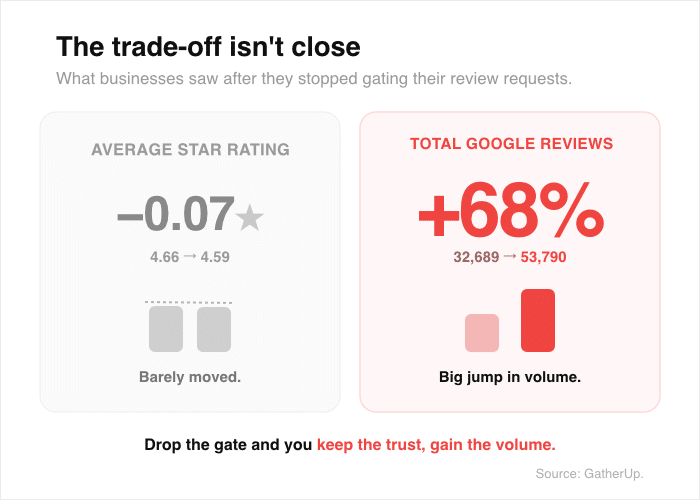
Leave the collection wide open, let your public review pool build on its own, and curate the storefront on your site.
The good news is, you can have both. An honest pool of reviews on Google and a polished on-site presentation that actually converts.
How to Start Filtering Reviews Without Gating (5 Quick Steps)
Ready to set this up on your own site? Here are five steps that take you from scattered public reviews to a curated on-site feed without ever touching the source platform.
- Audit where your public reviews live today. Make a quick list of every platform that hosts your reviews, including Google, Yelp, Trustpilot, and Facebook. This shows you which sources you’ll want to pull into your WordPress site first.
- Install a display-side reviews plugin. Reviews Feed Pro is the natural fit for WordPress, with one-click connections to every major review source. The plugin pulls live public reviews and never edits anything on the source platform.
- Connect each review source. Head to the plugin settings and link your Google, Yelp, and Trustpilot accounts so the feed pulls reviews directly. New reviews flow in automatically as customers post them.
- Open the visual moderation panel and hide what you don’t want on the page. Click any review to remove it from your widget while it stays 100% public on its source platform. This is the step that separates display-side curation from collection-side gating.
- Set platform and word-count filters for future reviews. Set rules once so new reviews are auto-curated as they come in. You won’t need to revisit the moderation panel every week.
Even if you’re just getting started, the whole setup takes under an hour.
Grab a copy of Reviews Feed Pro and get started with filtered review feeds.
Frequently Asked Questions
Is hiding a review on my WordPress site the same as review gating?
Hiding a review on your WordPress site is not the same as review gating. Gating happens at the invitation step, when you decide who gets asked for a review based on how happy they seem. Hiding on a widget happens at the display step, after the review is already public on Google or Yelp. The source review stays live for any shopper to find.
Does filtering reviews by star rating on a website widget count as gating?
Filtering reviews by star rating on a website widget does not count as gating, as long as you asked every customer for that review in the first place. Star-rating filters on a display widget are a curation choice, not a collection manipulation. The full pool of reviews stays public on the source platform.
What does Google’s review policy actually prohibit?
Google’s review policy prohibits collection-side filtering, meaning you can’t pre-screen which customers you invite to leave a review based on how they’re likely to rate you. The rule targets the invitation step, not what you choose to display on your own marketing pages.
Can I show only my Google reviews on one page and only my Yelp reviews on another?
You can show only your Google reviews on one page and only your Yelp reviews on another with no problem. Platform filtering is a display-side feature inside your plugin, and it doesn’t change anything on the source platforms. Every review stays live where it was originally posted.
How do I avoid review gating while still asking for reviews?
To avoid review gating while still asking for reviews, send a request to every customer, not just the ones you expect to rate you well. Route everyone to the same public review link, whether on Google, Yelp, or Trustpilot. Then curate the display on your own site separately using a tool like Reviews Feed Pro.
Start Curating Your Public Reviews Now
Google’s gating ban applies to who you ask, not what you display. Every public review stays live on Google, Yelp, and Trustpilot, while you decide which ones earn a spot on your WordPress page. That separation is what lets you stay compliant and still put your best foot forward.
Reviews Feed Pro handles the display layer for you. You connect your sources, hide what doesn’t belong on your marketing page, and let the rest flow in automatically as new reviews come in.
The visual moderation panel means you never touch code or spreadsheets, and platform filters keep future reviews on-brand without weekly check-ins.
Don’t worry. Once it’s set up, the filtering runs itself, and you can spend your time on the parts of the business that actually need you.
Get Reviews Feed Pro and start curating your public reviews today.