Social Wall
  Feed Analytics

Posting a TikTok and watching it flatline at 200 views is one of the more frustrating experiences on social media.
And unlike most platforms, TikTok’s distribution system means a video can sit dormant for days and then suddenly take off, or never move at all.
The difference usually comes down to a handful of specific things: how your video performs in the first hour, whether it clears certain watch time thresholds, and whether people are rewatching it.
I’ve put together 13 tactics that address all of those, based on what actually works rather than generic “post more content” advice.
How to Get More TikTok Views After Posting (Quick Answer)
The fastest way to recover views on a slow TikTok is to share it to your other platforms immediately after posting, reply to every early comment within the first hour, and make sure your hook lands in the first 2-3 seconds. For long-term growth, embedding your TikTok feed on your website with Smash Balloon TikTok Feeds Pro keeps your content working around the clock, reaching site visitors who haven’t found your TikTok yet.
How the TikTok Algorithm Decides Who Sees Your Video
Before getting into the tactics, it’s worth understanding the mechanics behind why some videos reach millions of people and others don’t break a few hundred.
Seed audience: When you post, TikTok shows your video to a small initial group, usually a mix of your TikTok followers and a test batch of non-followers.
How that group engages in the first hour determines whether TikTok expands distribution to a wider audience. A strong early reaction triggers the next wave. A weak one stops the video there.
Watch time threshold: TikTok tracks what percentage of your video people actually watch. A 60-second video where most viewers leave at 15 seconds will get throttled. A 10-second video that most people watch to the end will keep getting pushed.
This is the biggest reason short videos consistently outperform long ones on TikTok, especially for smaller accounts.
Rewatch rate: If people watch your video more than once, TikTok treats that as a strong quality signal. Short, satisfying, or surprising videos get rewatched more.
This is one of the main reasons a 7-second video can outperform a 3-minute one on this platform.
Understanding these three signals makes every tip below make more sense. You are not trying to trick an algorithm. You are giving it the signals it needs to distribute your content further.
What Exactly Counts as a View on TikTok?
We’re all chasing those views on TikTok, but it’s helpful to understand what actually makes the algorithm tick (and what doesn’t!).
Every time someone starts watching your TikTok, even for a few seconds, it counts as a view.
If someone loves your TikTok video so much they watch it multiple times, that’s amazing! But those repeat views from the same account won’t give you as big of a boost as views from different people.
Now that you know what counts as a TikTok view, let’s talk about how to improve your number of views.
What to Do in the First Hour After Posting
The first hour after you post is when TikTok is actively measuring your seed audience response. What you do during that window matters more than almost anything else.
Reply to every comment immediately. TikTok treats comment replies as engagement signals. If someone comments within the first 20 minutes, reply right away. Even a short response adds to the engagement count and can bring the commenter back for another view.
Share to your other platforms straight away. Cross-posting to Instagram Stories, X (Twitter), and Facebook within the first 30 minutes drives early traffic from your existing audience. That external traffic counts toward your view total and can kickstart the algorithm’s push to a wider audience.
Pin a comment on your own video. Add a question, a “watch until the end” tease, or context that makes people want to stick around. This also gives viewers something to respond to, which generates more comment activity.
Check Analytics once at 30 minutes and once at 1 hour. Looking for early patterns is useful. Obsessively refreshing doesn’t change anything and distracts you from actually engaging with your audience.
Feature your TikTok momentum right on your homepage
Smash Balloon TikTok Feeds Pro keeps a live feed of your videos on your website, so visitors see your latest activity without leaving your site. Try it risk free with our 14 day money back guarantee.
Feature My TikTok VideosTop Tips to Help You Get More Views on TikTok After Posting
Looking for ways to get more eyes on your TikToks, even after you’ve hit that “Post” button?
These tried-and-tested tips below will show you how to boost your TikTok views after you’ve uploaded your video.
1. Hook Viewers in the First 2-3 Seconds
TikTok’s average drop-off happens in the first few seconds. If you don’t give people a reason to keep watching immediately, they scroll, and the algorithm registers that as a negative signal.
A strong hook can be a surprising statement, a visual that demands attention, a question the viewer wants answered, or jumping straight into the most interesting part of the video. What kills early watch time is a slow intro, a title card, or anything that delays getting to the point.
One thing I test when I’m unsure about a hook: watch the first 3 seconds with the sound off. If it still makes you want to keep watching, it’s working.
2. Comment on Trending TikTok Videos for More Visibility
Similar to making popular Instagram videos, here’s a “secret” hack that TikTok marketers use to get more views on their videos after they’ve posted: become a master commenter on trending videos for your niche!
Think of it this way: those popular videos within your niche are already attracting the exact viewers you want to reach.
By providing valuable insights and contributing thoughtfully to the conversation, you can establish your expertise and pique the interest of potential followers.
Here’s a simple strategy to maximize your impact:
- Identify Relevant Trending Content: Use hashtag searches to quickly find popular videos that align with your brand and target audience.
- Become a Thoughtful Contributor: Instead of just dropping a “Nice!” comment, add substance. Share insights, answer questions, or provide unique perspectives that encourage further discussion.
- Subtly Guide Viewers to Your Content: When relevant and valuable, mention your own TikTok videos that complement the conversation or provide additional insights.
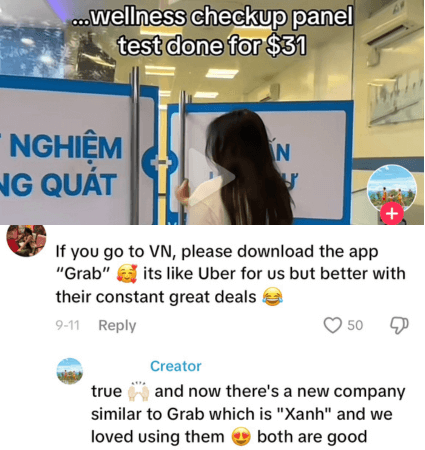
In the example below, this video on the top things to do in Vietnam got around 260,000+ views on TikTok.
That means this TikTok video is popular for travelers who are planning a trip to Vietnam. So, if you’re a travel content creator who wants to reach the same audience, commenting on this TikTok with a tip can encourage viewers to click on your profile for more tips.
Remember, authenticity is key. By consistently offering value and engaging authentically within your niche, you can leverage trending content to drive traffic to your profile and get more views on your TikTok after posting.
3. Use Trending But Relevant Audio
TikTok’s algorithm loves trending sounds, and for good reason!
Similar to getting more views on Instagram Reels, using a popular audio clip can skyrocket your TikTok video’s chances of landing on the coveted “For You” page (FYP), the place to be for maximum visibility.
To get more TikTok views after posting, though, you need to make sure that the trending audio you’re using:
- Aligns with Your Niche: If your content is about cooking, look for trending sounds that are popular within the food community. Similarly, if you’re promoting makeup, then look for viral makeup videos and pay attention to the sounds they’re using.
- Fits Your Target Audience: What kind of music or sounds does your ideal viewer enjoy? Choose audio that resonates with them.
4. Embed TikTok Video Feeds on Your Website
Interested in a simple but effective way to promote your TikTok videos to your site visitors? You can display your TikTok videos feed on your website to increase your views.
By adding your TikTok videos to your homepage, sidebar, or footer areas, your visitors can view your TikToks right on your site, even if they haven’t followed your account yet.
This is especially valuable for capturing those potential followers who haven’t discovered you on TikTok yet!
Adding TikTok feeds on your site is easy. Using Smash Balloon TikTok Feeds Pro, you can create, customize, and embed customizable TikTok feeds on your website in just a few minutes.
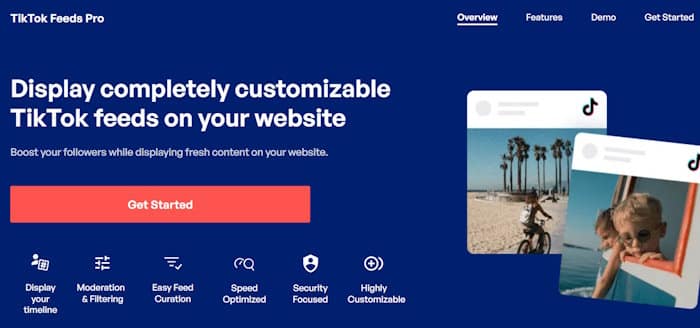
As the best TikTok feed plugin for WordPress, TikTok Feeds Pro is easy to use, with no technical knowledge needed.
I also love the fact that it works right out of the box, meaning, you can easily embed TikTok widgets that automatically match your site’s visual branding.
Plus, this TikTok plugin also comes with a visual feed customizer with live preview. As a result, it’s pretty easy to control my TikTok feed’s design and content with just a few clicks. No need to hire a developer or designer!
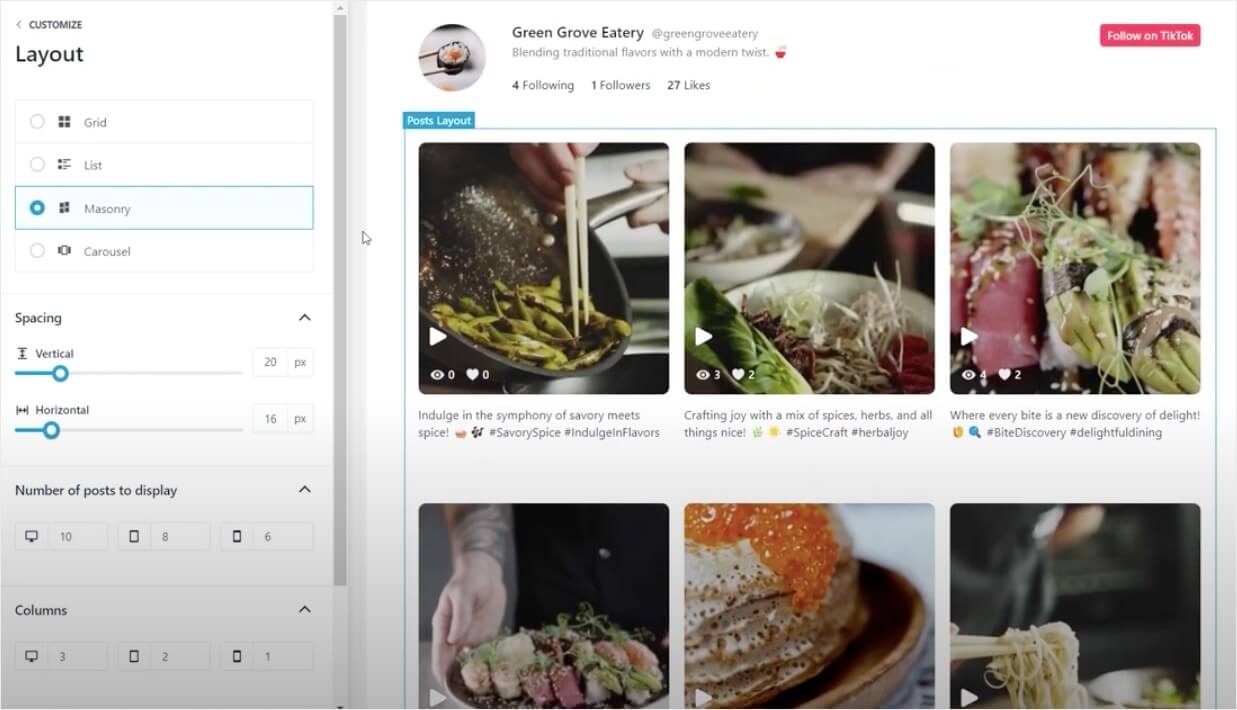
The best part? Your future TikTok videos can get more views as well.
Once you’ve used TikTok Feeds Pro to embed your TikTok videos feed on your site, it updates automatically with new TikToks you post on your account.
Want to increase your TikTok views by showcasing TikTok feeds on your site?
Get started with TikTok Feeds Pro today.
5. Post When Your Audience Is Most Active
Your seed audience response is stronger when your followers are actually online to see the video.
Posting at 2am when your audience is asleep means slower early engagement, which signals to the algorithm that the content isn’t landing.
To find your peak times: go to your TikTok profile, tap the menu, select Creator Tools, then Analytics.
Under the Followers tab, scroll to “Follower Activity” to see when your specific audience is most active by day and hour. Post within that window consistently for a few weeks and compare the results.
6. Use Duet or Stitch to Revive Underperforming Videos
If a video has been live for 48 hours and barely moved, one option is to create a Duet or Stitch using a trending or high-performing video in your niche. This lets you attach your content to something that already has distribution momentum.
Duet works well when you’re reacting to or building on popular content. Stitch is better when you’re adding context, a correction, or a follow-up to the first few seconds of someone else’s video.
This also works in reverse: if one of your older videos has picked up traction recently, you can Stitch or Duet it yourself to drive fresh views back to the original.
7. Post Multiple Videos Regularly
On TikTok, consistency is key!
To increase your views even after you’ve just posted, don’t be afraid to grace your followers’ FYP multiple times a day.
The beauty of this video platform is that it moves fast, so a steady stream of high-quality content won’t overwhelm your audience (as long as it’s actually good content, of course!)
Think of it this way: the more videos you post, the more opportunities you have to catch someone’s eye.
And when you hook them with a fantastic video, they’re far more likely to check out your profile for more, so your existing TikTok videos can also get more views this way.
TikTok itself recommends posting 1-4 times per day, so channel your inner creative machine and get those TikToks rolling!
Pro-Tip: Want to rock that consistent posting schedule? Batch-create your TikToks, just like in this sample TikTok feed below.
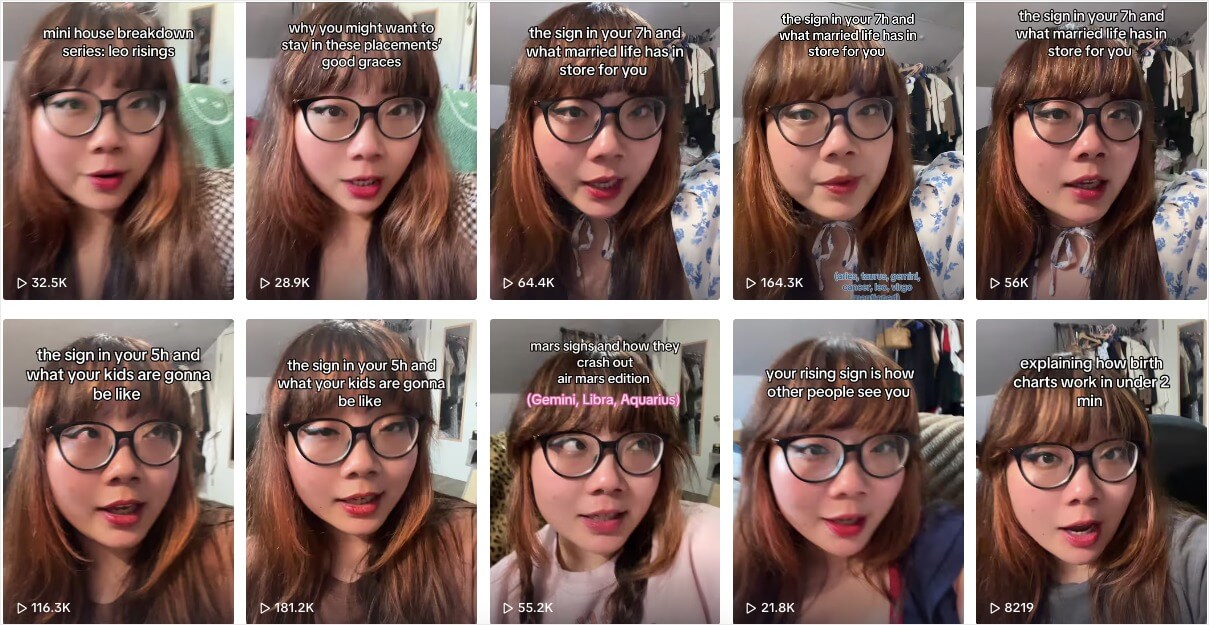
Dedicate a day to filming multiple videos at once, saving you time and effort throughout the week, so you can also upload multiple TikTok videos daily.
8. Create Short TikTok Videos
One of the easiest ways to get more views on TikTok after posting is to create videos that are 10 seconds max in duration.
That’s because the average attention span is up to 8 seconds only, so just like YouTube Shorts, your viewers will be less likely to view your TikToks if they’re longer than 10 seconds.
By creating short but sweet TikTok videos, you force yourself to be concise, creative, and get to the good stuff fast.
This approach increases the likelihood of viewers sticking around for the entire video, which sends positive signals to the TikTok algorithm!
To master the art of short-form TikTok, start your videos with a captivating visual, a funny one-liner, or an intriguing question that makes viewers want to see what happens next.
Let’s take this TikTok video as an example. It has an interesting hook because it’s relatable, plus it got over 2 million views because it’s just 10 seconds in duration.
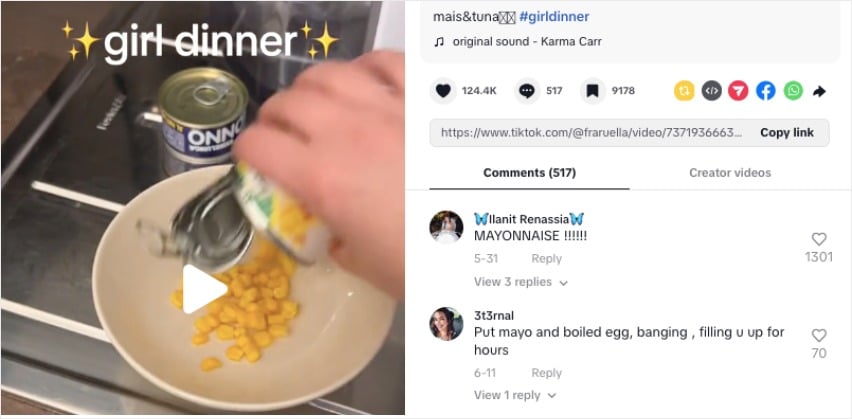
You can see more tips on how to increase watch hours on social media videos in this blog post.
9. Cross-Promote Your TikTok Videos on Other Social Platforms
Did you know the average social media user has accounts on at least 3 different platforms?
If your ideal audience is active across multiple channels, then your content should be too!
Don’t limit your TikTok videos to just the TikTok app. Sharing them on your other social media profiles like Instagram Reels, Facebook, YouTube Shorts, and even X is a powerful way to expand your reach.
Even better, you can use Social Wall Pro to embed posts from Instagram, Facebook, YouTube, X and TikTok on WordPress, in a unified social media wall!
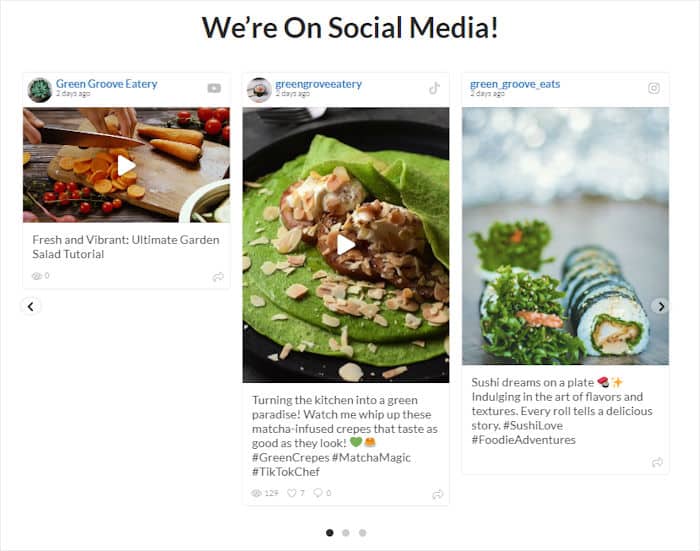
By displaying a multi-channel feed on your website, you can get more views on your TikTok videos, Instagram Reels, Facebook videos, and more!
You may want to read this next article on how to add social media feeds to your WordPress for more details.
10. Use TikTok Analytics to Diagnose the Problem First
Before trying to revive a video, it helps to understand exactly why it underperformed. TikTok’s built-in Analytics give you enough data to figure this out in a few minutes.
Go to your profile, tap the three-line menu, select Creator Tools, then Analytics. Tap the Content tab and select the underperforming video.
The two metrics to check first:
- Average watch time: If this is under 50% of your video’s total length, people are dropping off early. That points to a hook or pacing problem, not a distribution problem.
- Reached audience: If average watch time is solid but reached audience is low, TikTok is restricting distribution. That usually points to hashtags, captions, or posting time as the variable to test next.
Once you know which metric is the issue, you know which tips in this list to prioritize.
11. Add Captions or Text Overlays to Every Video
Most people scroll TikTok with the sound off, especially in public or at work. If your video relies entirely on audio to make sense, you’re losing a significant chunk of potential viewers before they even give it a chance.
TikTok has an auto-captions feature built right into the app. Tap the Captions option in the editing screen before posting and it generates subtitles automatically. Review them quickly for errors, then publish. The whole thing takes under two minutes.
Text overlays do double duty: they make your video accessible to silent scrollers and they give viewers a second reason to rewatch (reading while listening), which boosts your rewatch rate and sends a positive signal to the algorithm.
12. Write Your Caption for TikTok Search, Not Just for Context
TikTok has become a search engine, particularly for younger audiences. People search for tutorials, recipes, travel tips, and product reviews directly in the TikTok search bar, and the algorithm uses your caption to figure out what your video is about.
Write your caption the way someone would actually search for your content. If your video is about budgeting tips for beginners, a caption like “budgeting tips for beginners when you have no idea where to start” will surface in search results in a way that “money stuff I learned this year” won’t.
You don’t need to stuff keywords awkwardly. Just lead with the most specific description of what your video covers, using plain language. Three to five relevant hashtags after the caption helps too, but the caption itself carries more weight than hashtags alone.
13. End Your Video or Caption with a Question
Comments are one of the strongest engagement signals TikTok tracks. A video with a high comment count tells the algorithm that it’s generating real conversation, which pushes it to more people.
As a small business getting started with TikTok marketing, the simplest way to get comments is to ask for them directly.
End your video with a question related to your content, or add it to the caption. It doesn’t have to be complicated. “Which one would you try first?” or “Am I missing any?” is enough to get people typing.
Questions that create mild debate or invite personal answers tend to perform best. Avoid yes/no questions since they get fewer responses than open-ended ones. And when comments come in, reply quickly, since each reply is another engagement signal that keeps the video active in the algorithm’s eyes.
Does Editing a TikTok After Posting Hurt Views?
Yes, it can. When you edit a TikTok after posting, such as changing the caption, adding hashtags, or adjusting privacy settings, TikTok often resets the distribution process.
The edited video essentially goes back through the seed audience phase, which means any traction you’d already built can disappear.
The practical rule: make your edits before you post. If you spot a typo in the caption right after publishing, it is usually better to leave it than to risk losing early momentum. The exception is privacy settings: if you accidentally posted to the wrong audience, fixing that is worth the reset.
If a video has been live for a few days and has stalled anyway, editing it has less to lose. In that case, updating the caption or hashtags to be more search-optimized is a reasonable experiment.
Once a video takes off, give it a second life on your website. The All Access Bundle lets you show your TikTok videos next to your YouTube and Instagram content, so new visitors keep watching after they leave the app.
Frequently Asked Questions About TikTok Views After Posting
How do I get more TikTok views after posting?
The highest-impact thing you can do in the first hour is reply to every early comment and share the video to your other platforms right away. That creates an early engagement spike TikTok reads as a positive signal and pushes the video to a wider audience. After that, the tips in this article cover the longer-term levers: hook strength, watch time, audio, and posting consistency.
Why is my TikTok getting 0 views after posting?
A few common reasons: your account may be new and still building a seed audience, you may have accidentally posted to a limited audience in your privacy settings, or your content may have been flagged during automatic review. Check your privacy settings first. If those are fine, open Analytics and look at your reached audience number. If it’s very low, TikTok may have limited distribution on that video. Re-uploading the same video as a fresh post gives it a new chance with a new seed audience.
Does editing a TikTok after posting hurt views?
Yes, usually. Editing a posted TikTok can reset the distribution process, sending it back through the seed audience phase and erasing early traction. Leave minor errors alone if the video is gaining momentum. If the video has already stalled, updating the hashtags or caption is a lower-risk experiment since there’s less to lose.
Start Getting More Views on Your TikTok Videos
Those are 13 tactics that work together to give your TikToks a real shot at wider distribution, whether you’re trying to revive a slow video or build a consistent posting strategy from scratch.
Remember, consistency, cross-promoting on different social media platforms and a focus on your audience are key to standing out in the ever-evolving world of TikTok.
Are you ready to watch your TikTok views soar organically? Get started with TikTok Feeds Pro and increase your TikTok views and engagement today.
Pair these growth tactics with a stronger website presence
Smash Balloon TikTok Feeds Pro brings your videos to your website automatically, so the audience you build on TikTok also discovers you there. Backed by a 14 day money back guarantee.
Bring My TikTok to My Site