Social Wall
  Feed Analytics


Someone’s planning a trip. They’ve got your site open in one tab and Booking.com in another.
On your site: a few nice photos, a room list, a booking button.
On Booking: your guest score and dozens of reviews saying the location was perfect and the host thought of everything.
That’s the proof that books the room. And right now it only lives on Booking.com, where your property sits in a list beside every competitor’s.
Smash Balloon Reviews Feed Pro now supports Booking.com as a source, so those same reviews can show up on your own site: your homepage, your booking page, right where travelers make the call.
Nothing to set up on Booking’s side. No API key, no developer account, no login. Just your public property page.
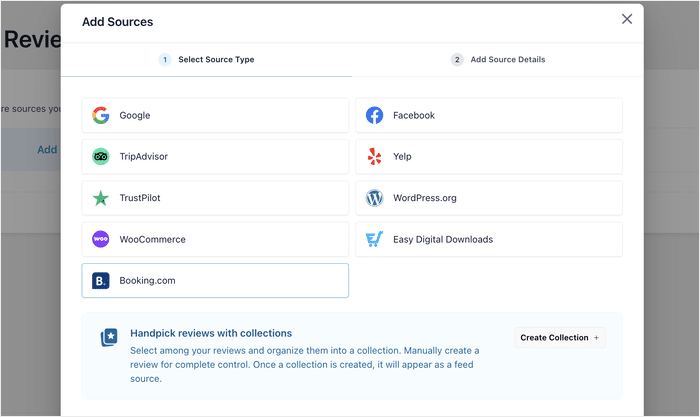
Booking.com joins Google, Tripadvisor, Trustpilot, and the rest in the Add Source modal, so the reviews you already earned can finally work off Booking too.
Here’s what you can do starting today:
- Add your Booking.com property as a review source with one property URL
- Keep Booking’s own score and word, like 8.8 Excellent, instead of a flattened star average
- Show the pros, cons, and review titles that actually move a booking decision
- Mix Booking reviews with Google, Tripadvisor, and every other source in one feed
- Use the same filters, moderation, themes, and layouts you already use everywhere else
Show Your Booking.com Guest Reviews on Your Own Site
Every review a guest leaves on Booking.com is proof you earned. But it only does its job where Booking shows it, sitting next to every other property a traveler is weighing up.
Now that same proof can live on your own site, right where a booking decision actually happens.
- Put your Booking reviews on your hotel’s homepage, so travelers comparing options see them without leaving the site
- Add them to a holiday rental’s booking page, so guests book directly on your site instead of paying Booking’s commission
- Drop them onto the landing page behind a guesthouse’s ads, so the traffic it’s paying for converts better
The reviews you built up on Booking keep working, but now they’re working on the pages you own.
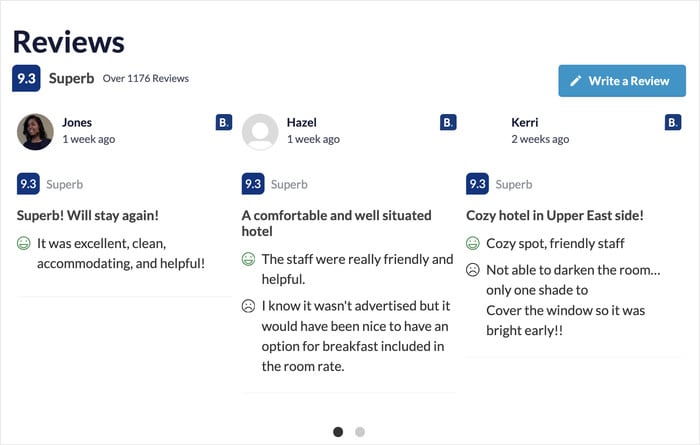
Keep the Score Travelers Already Know
Booking.com has a unique scoring system. It scores out of 10 and pairs the number with a word, like Wonderful, Superb, Excellent, Good, and so on.
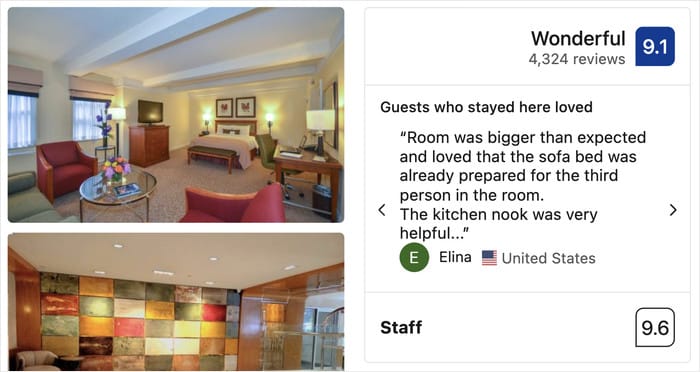
Anyone who books travel knows that scale on sight. Flattening a 9.1 Wonderful into “4.5 stars” throws away the exact signal a traveler recognizes and trusts.
So the card keeps Booking’s format instead of converting it. Your exact label shows on your site just as guests saw it when they booked.
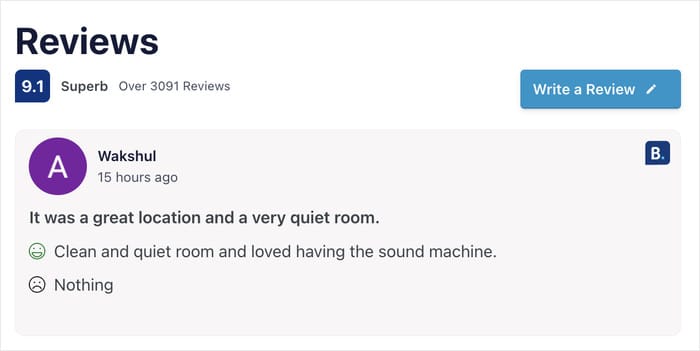
Show What Guests Liked and What Could Be Better
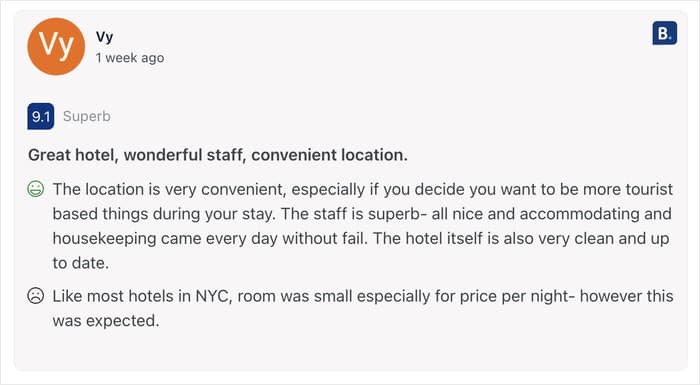
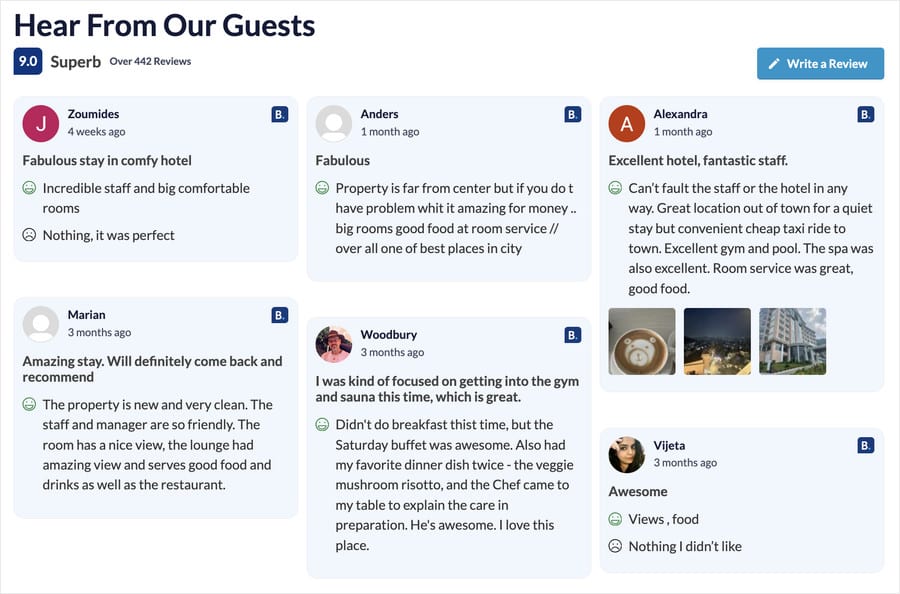
A Booking.com review carries more than a rating. Each one has a title, a list of what the guest liked, and a note on what could be better, and all of it renders on the card.
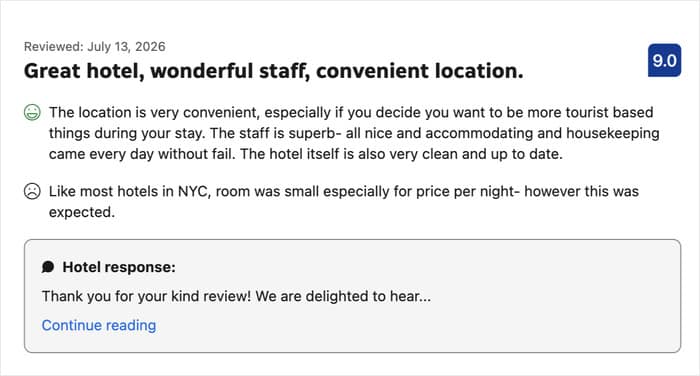
That detail does something a star count can’t. The pros give a traveler concrete reasons to book, the title gives them a headline they can scan, and the honest cons make the praise believable.
A wall of nothing but perfect scores reads like marketing, while a small, fair complaint reads like a real guest.
- A boutique hotel leads with location-titled reviews, so city-break guests find their reason to book faster
- A guesthouse leaves the cons visible and converts better, because a fair review is more believable than a flawless one
- An aparthotel features its “long stay” reviews on its extended-stay page and books more of the guests that page was built for
Each of these is text a guest already wrote for you on Booking. Now it’s working on the page where the booking happens.
Your Review Feed Fills Out on Its Own
Just like every other source in Reviews Feed Pro, there’s nothing to import and no reviews to copy across by hand.
When you add your property, the feed pulls in a first batch of reviews right away.
From there, more of your review history keeps arriving in the background, so even a property with years of guest reviews fills out on its own.
As new reviews come in on Booking, they get picked up and added to your feed automatically, so what visitors see stays current without you touching it.
Show Booking Reviews Alongside Your Other Sources
Booking doesn’t have to stand alone. It sits in the same feed as Google, Tripadvisor, Trustpilot, Facebook, and every other source you’ve connected.
Each card is badged with its provider, so visitors know exactly where the review came from.
Everything you already use carries straight over. The same sorting, rating filters, keyword filters, moderation, themes, and layouts all work on Booking reviews, just like they do on the rest.
- Show Google and Booking reviews on one hotel page, so travelers see the full picture without leaving to go check
- Pair Booking with Tripadvisor on a rental’s booking page, so a guest about to book sees two travel platforms agreeing
- Combine a handful of Yelp reviews with hundreds from Booking, so a B&B finally has enough proof to fill its site
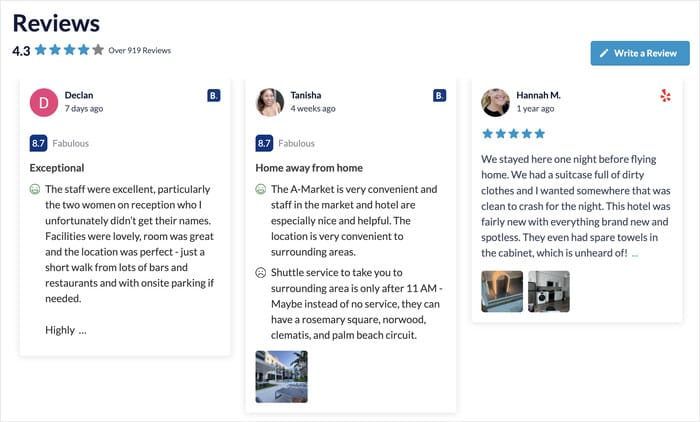
Independent reviews, from the sources travelers already trust, all in one place. That’s the kind of agreement that moves someone from comparing to booking.
Ready to put your Booking.com reviews to work? Get Reviews Feed Pro Elite to add Booking.com as a source.
How to Add Your Booking.com Reviews in Minutes
Booking.com is available on the Elite plan, and all you need on Booking’s side is your public property page.
Step 1: Create a new reviews feed
From your WordPress dashboard, go to Reviews Feed » All Feeds and click Add New.
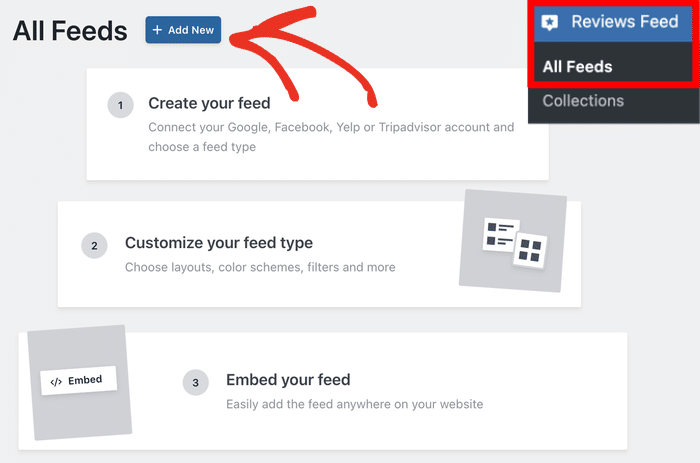
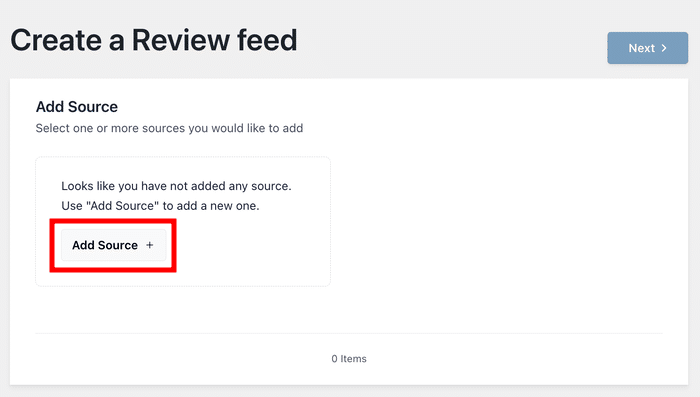
First, click on Add Source to add your business as a source for the plugin.
After adding a source, you can freely use it for future review feeds without leaving your site.
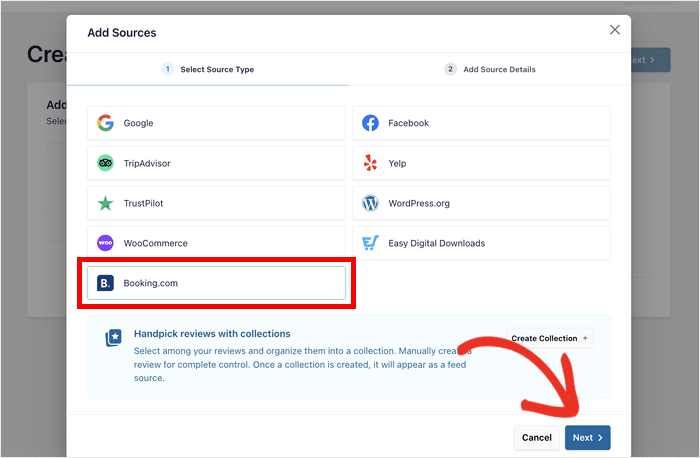
In the pop-up, select the Booking.com tile and click Next.
You’ll see it listed alongside Google, Facebook, Yelp, Tripadvisor, Trustpilot, WordPress.org, WooCommerce, and Easy Digital Downloads.
Step 2: Add your property
Paste your property’s Booking.com URL into the popup and click on Finish.
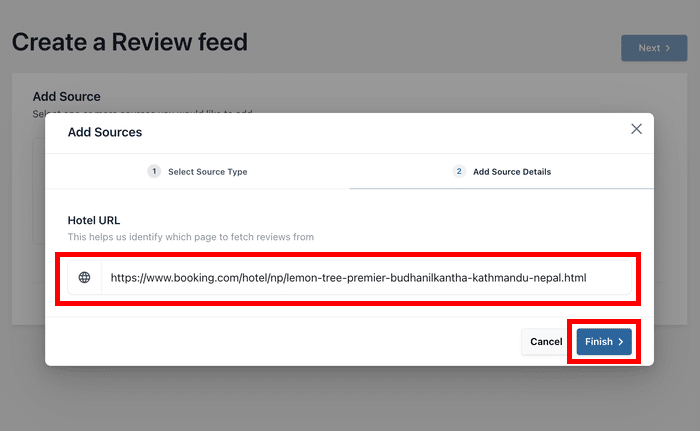
Finally, you can select your new source and click on Next to start building your Booking review feed.
Step 3: Customize your feed
First, pick a template from available options to set the overall look and click on Next.
The live customizer then opens with your reviews already pulling in.
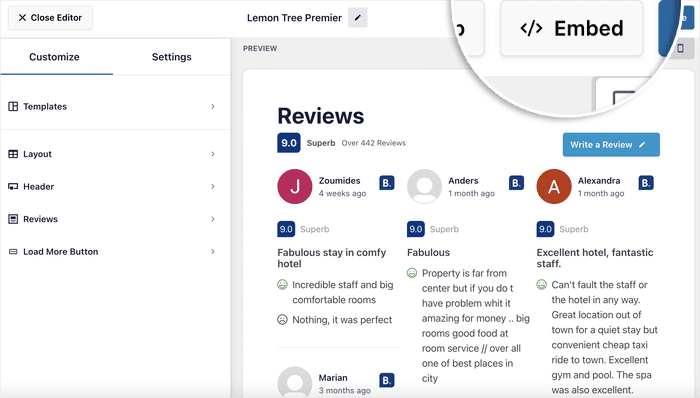
On the left you’ll find panels for Layout, Header, Reviews, and the Load More button, and the preview on the right updates as you change them.
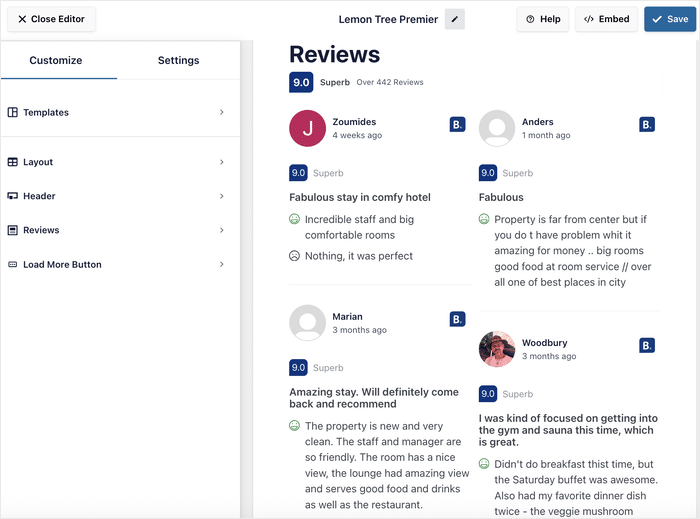
You can also open the Settings tab to set a minimum score, add keyword filters, or moderate which reviews show up.
Step 4: Embed it anywhere on your site
When it looks right, click Save to confirm your changes.
Then click on Embed, and you can add the feed to any page, post, sidebar, or footer with the Reviews Feed block or its shortcode.
Your Booking.com reviews are live from here, and they’ll keep filling in and staying current on their own.
Start Showing Your Booking.com Reviews Today
Right now your strongest reviews only convert on Booking.com, next to every competitor. Why not on your homepage?
Those reviews are already yours, your guests wrote them. Now they can work on the pages where your bookings happen, in the exact format travelers know: your 8.8 Excellent, the pros and cons, the titles, all of it.
And you can do it without:
- A separate review widget bolted onto your site
- Copying and pasting reviews by hand
- An API key, developer account, or Booking login
- Reviews going stale the moment you stop updating them
Booking.com is available on the Elite plan, along with other sources like Tripadvisor.
So if you’re already on Elite, update the plugin from your dashboard and add your property, and the source is ready to go.
On a lower plan? Upgrade to Elite to unlock Booking.com, along with every other source and feature the plan includes.
Not using Reviews Feed Pro yet? Now is the perfect time to get it and put those reviews to work across your whole site.
Get Reviews Feed Pro Elite Today
Finally, a huge thank you to our community. Your feedback is what shapes these releases, and Booking.com support is one we heard about often.
So where will your Booking.com reviews go first, your homepage or your booking page? Let us know in the comments.