Social Wall
 Feed Analytics


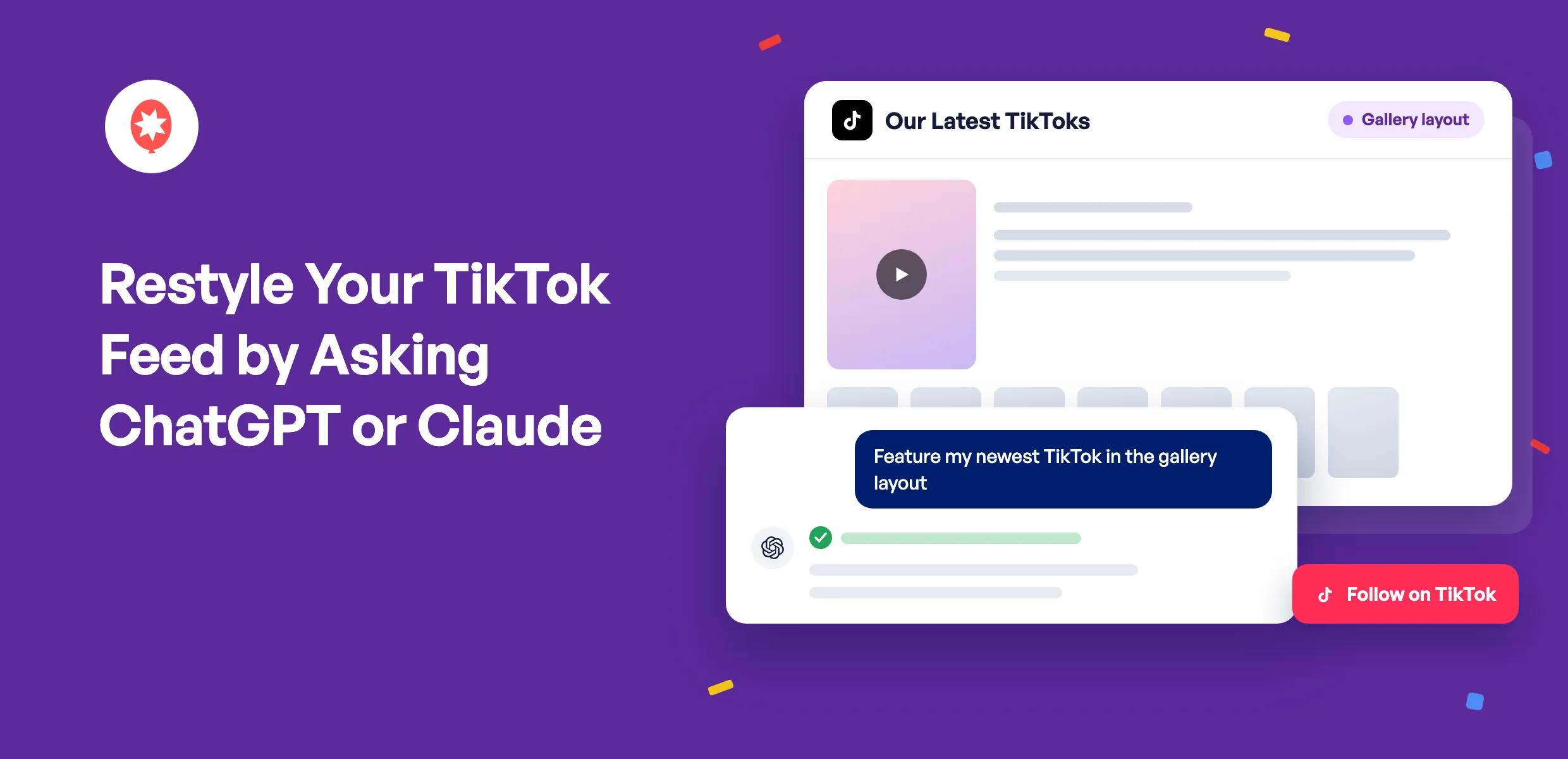
Your TikToks already do the work of grabbing attention. Now you can tell ChatGPT or Claude how you want them shown on your website, and your feed updates while you keep chatting.
Smash Balloon TikTok Feed puts your TikTok videos on your WordPress site and adds new ones as you post them. Since version 1.9.0, TikTok Feeds Pro lets your AI feature one video above the rest, put your most-viewed videos first, and show only the ones with your hashtag. AI Agents works on the free plugin too.
A few things you can hand to your AI today:
- Feature your newest TikTok in a big player with the rest lined up below
- Show your most-viewed or most-liked videos first, on TikTok Feeds Pro Elite
- Keep a feed on-topic by showing only videos with a certain word or hashtag
- Start a new feed from your TikTok account and get the shortcode for it
- Okay any feed deletion yourself, from a link in your browser
Give Your Newest TikTok the Spotlight
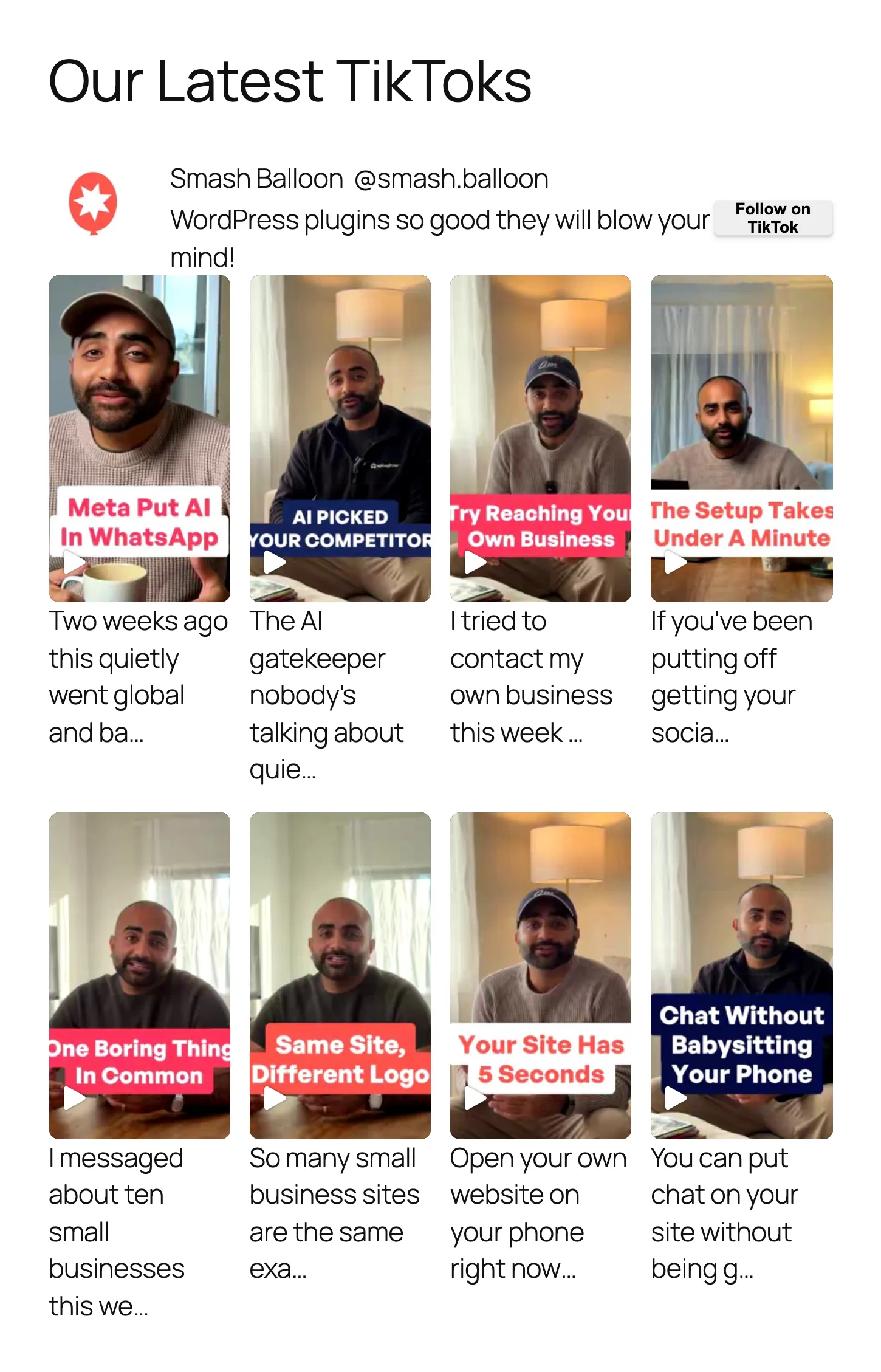
This is a TikTok Feeds Pro feed of Smash Balloon’s own TikToks, eight videos in a four-column grid.
Ask your AI to switch it to the gallery layout, and the newest video moves into a big player at the top, with its caption beside it and every video lined up in a grid of thumbnails underneath. Your header, Follow button, and captions carry over untouched.
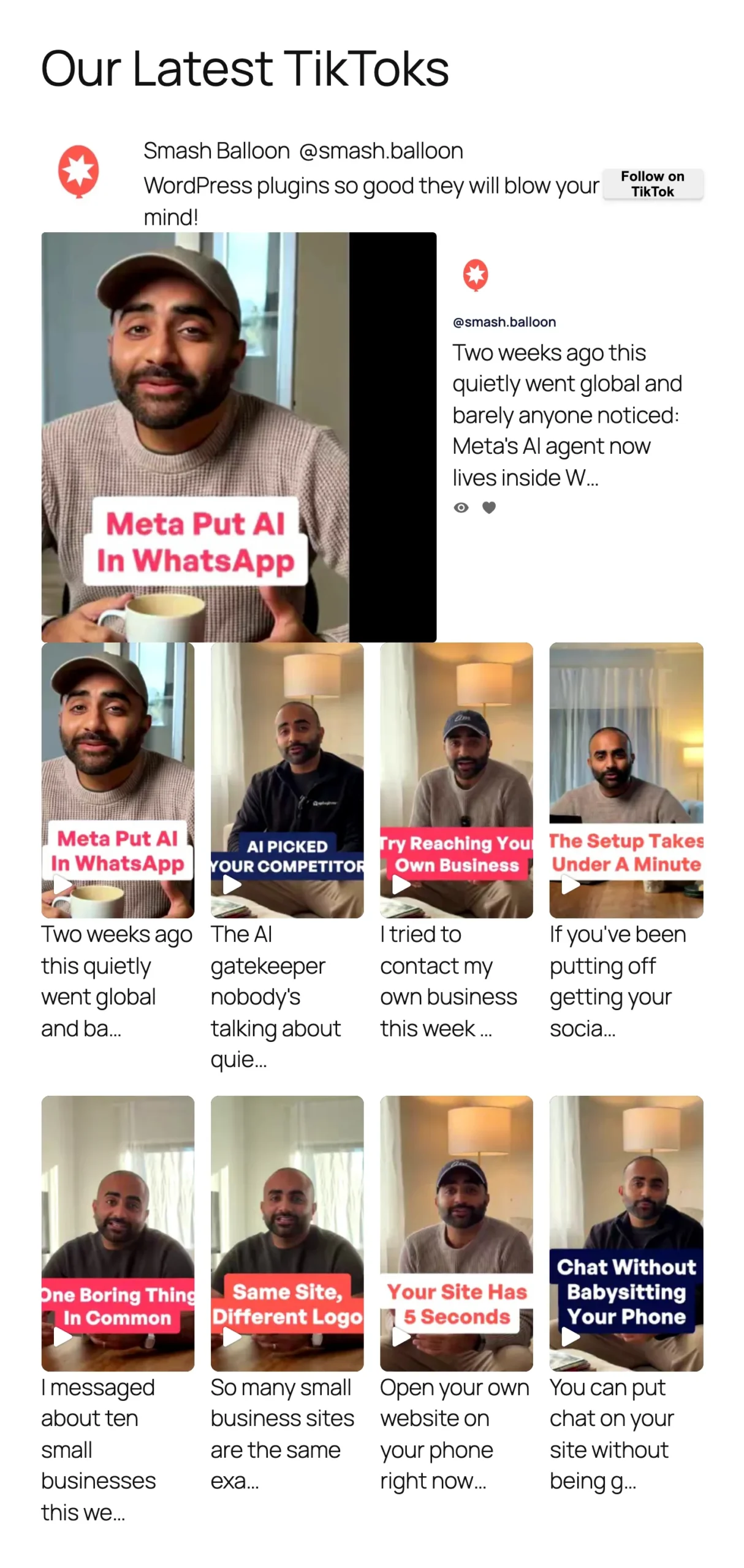
Gallery is part of the TikTok Feeds Pro Plus plan, along with carousel and masonry layouts. Plus is a good fit if your feed sits on a busy page and needs to stand out.
Tell Your AI What You Want Your Feed to Do
You can describe the result you’re after and let your AI work out the settings. Here’s what to ask for, depending on the job you want your feed to do.
Lead With Your Most Popular Videos
Your best-performing TikToks are your strongest pitch. On the Elite plan, ask your AI to sort your feed by views or by likes, so a first-time visitor sees the videos that already won people over. Elite can also pull several TikTok accounts into one feed, which is handy if your team or your locations each post on their own.
Keep the Feed About One Thing
Post about more than one topic? On Plus, ask for a feed that only shows videos with a certain word or hashtag in the caption, like #recipes on your Recipes page, or one that hides videos mentioning something you’d rather leave out. Plus can also shuffle your videos into a new order each time the feed refreshes.
Keep Visitors Watching on Your Page
Every Pro plan, starting with Basic, lets your AI add a Load More button so people can keep scrolling, and switch videos to play right where they sit in the feed instead of in a pop-up. Pro also shows view and like counts on each video and your follower count in the header, which works as quiet social proof, and your AI can recolor them to match your site.
Make It Look Like Your Site
The free plugin handles this part on its own. Ask your AI to change the number of columns or videos, or the spacing between them. It can also recolor your header and your Follow on TikTok button to match your brand, or change the button’s text.
Put your best TikToks front and center
TikTok Feeds Pro adds Load More, view and like counts, and videos that play right in the feed on every plan. Plus adds gallery, carousel, and masonry layouts and hashtag filters, and Elite sorts your feed by views or likes. AI Agents is included with all of them, and every plan comes with a 14-day money back guarantee.
Get TikTok Feeds ProSettings That Cover Every TikTok Feed
Your AI can reach a few site-wide settings too. It can turn on image optimization, which stores smaller copies of your video covers so pages load faster. It can also switch on GDPR mode, so your feeds wait for a visitor’s consent before loading anything from TikTok.
Your AI Asks, You Decide
When you first connect, TikTok Feed’s AI tools can only read. They see your feeds, settings, and connected accounts, but your license key and the tokens that link your TikTok account are never shared with them. Edits stay locked until you switch on write access, and you can lock them again at any time.
Adding a new TikTok account works the same careful way. Your AI gives you a one-time link that’s good for 15 minutes, and you log in to TikTok yourself in your browser.
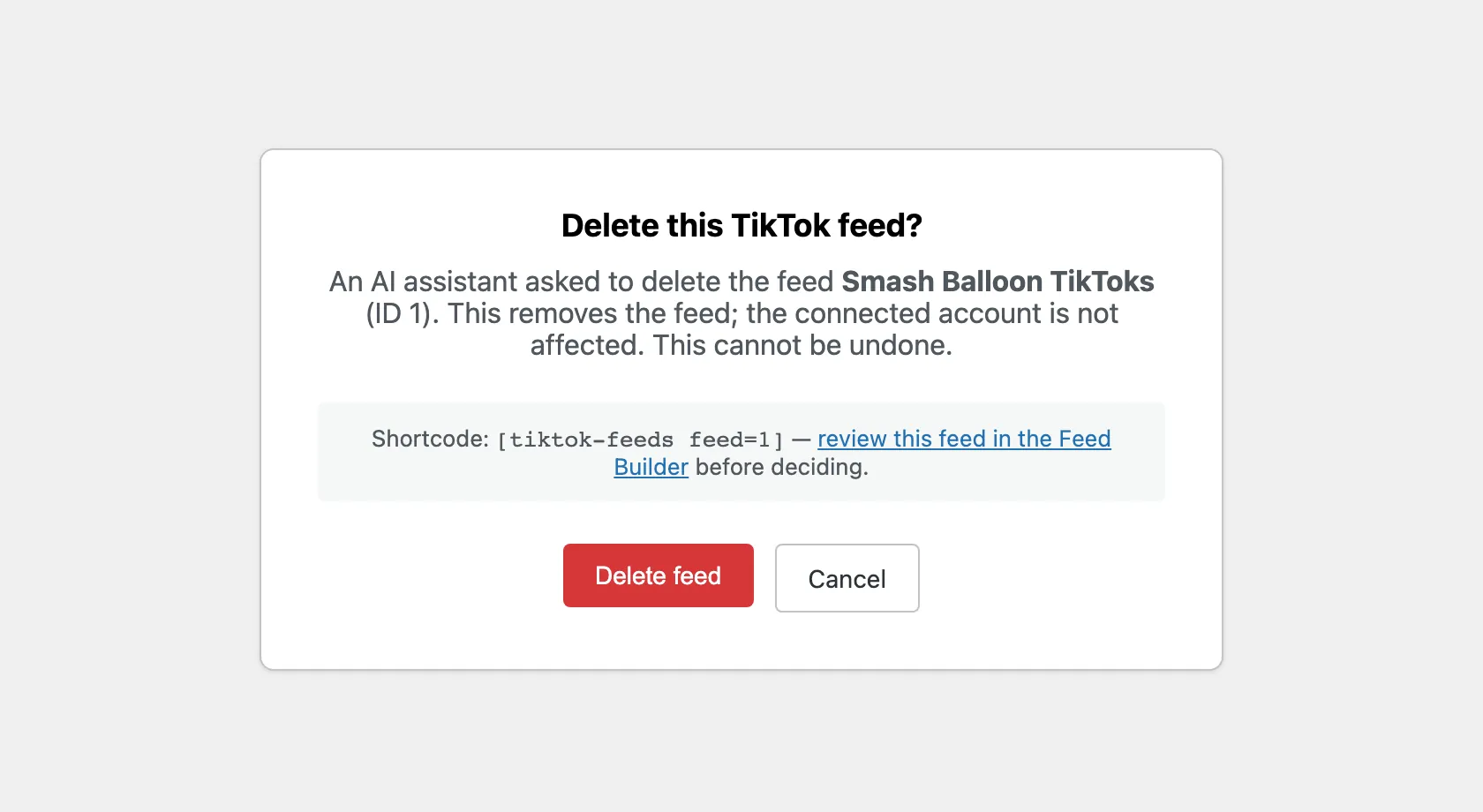
Deletes always need you. Your AI can’t remove a feed on its own. It sends you a page instead, which names the feed and its shortcode and gives you a link to look it over first. Nothing happens until you click Delete feed, and the page stops working after one use or 15 minutes.
WPVibe, the free plugin that connects your AI to WordPress, adds its own check for the rest of your site, and asks you in the chat before anything destructive.
How to Connect TikTok Feed to ChatGPT or Claude
Here’s what you need first: Smash Balloon TikTok Feed or TikTok Feeds Pro on version 1.9.1, WordPress 6.9 or later, and a site address that starts with https://. WPVibe won’t connect without that secure address.
WPVibe comes from SeedProd, part of the same family of WordPress plugins as Smash Balloon, and TikTok Feed takes care of installing it.
WPVibe comes free with TikTok Feed
Skip the extra download. TikTok Feed installs WPVibe in one click from its Settings page, on the free plugin and every Pro plan, and WPVibe’s starter plan doesn’t cost anything. Trying Smash Balloon for the first time? Grab the free TikTok Feed and start there.
Get TikTok Feed FreeStep 1: Install WPVibe From TikTok Feeds » Settings
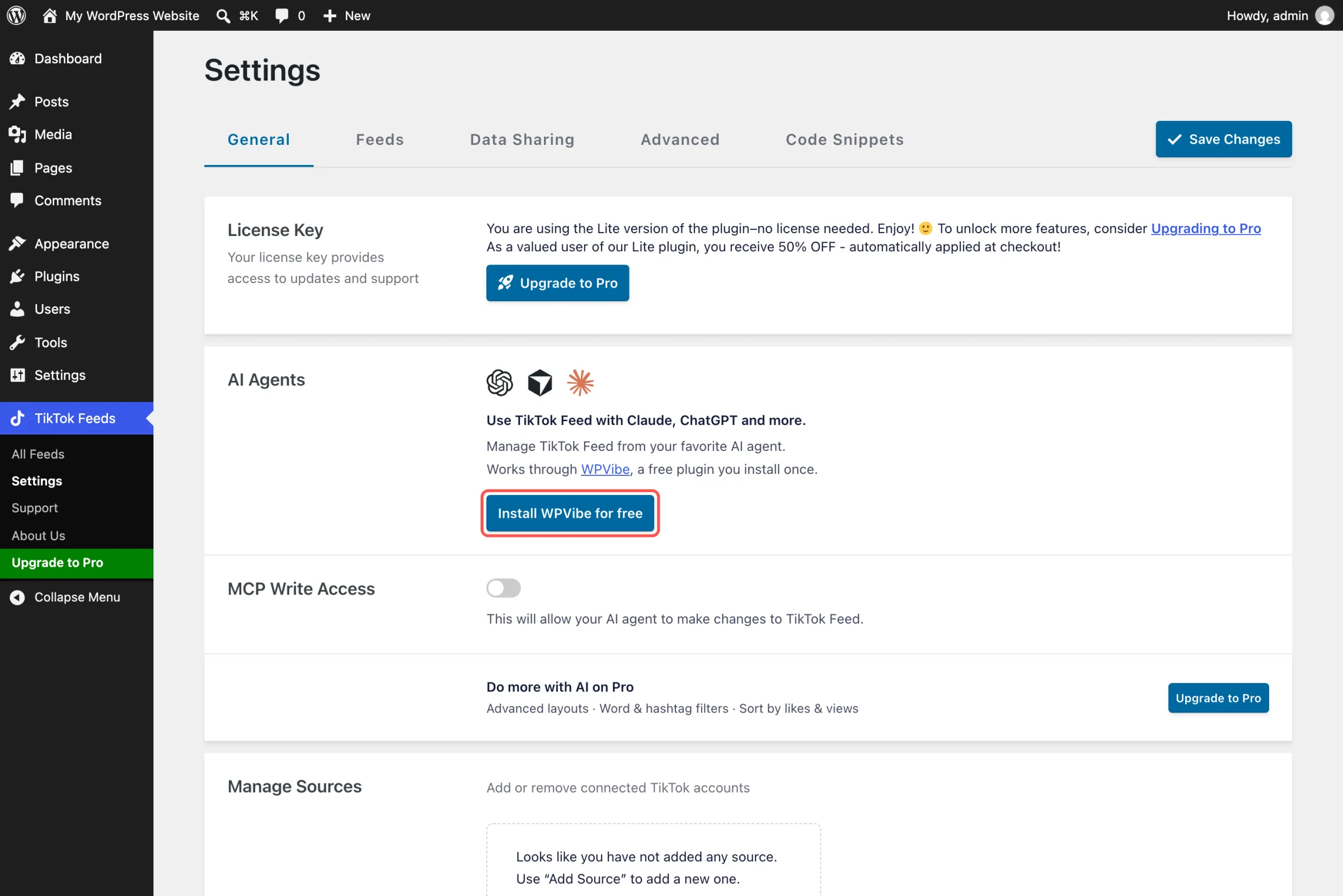
In your WordPress dashboard, open TikTok Feeds » Settings. The AI Agents box sits near the top of the General tab. Click Install WPVibe for free, wait for it to say WPVibe is connected to TikTok Feed, then click Open WPVibe.
Step 2: Add WPVibe to Your AI
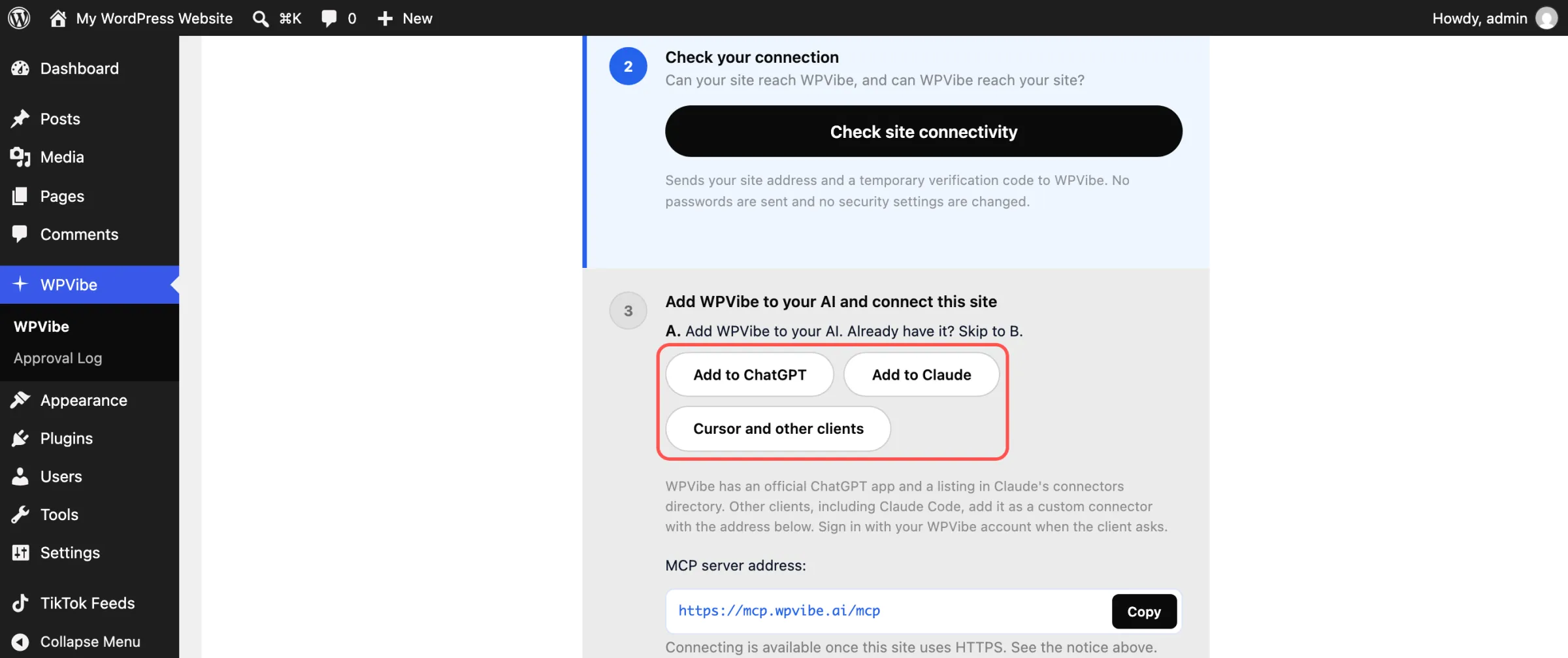
WPVibe’s checklist walks you through the rest. Under Add WPVibe to your AI, pick Add to ChatGPT, Add to Claude, or Cursor and other clients. You’ll sign in with a free WPVibe account, and it only takes your email to make one.
Step 3: Let WPVibe Into Your Site
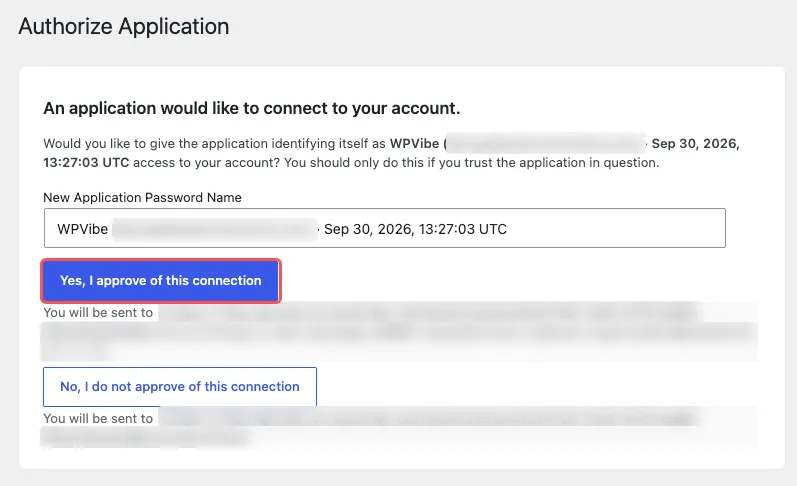
WPVibe gives you a short message to send to your AI. Sending it brings up a WordPress screen that asks for your permission, so click Yes, I approve of this connection. Your AI confirms with your site’s name and address when it’s done.
Step 4: Turn On Changes
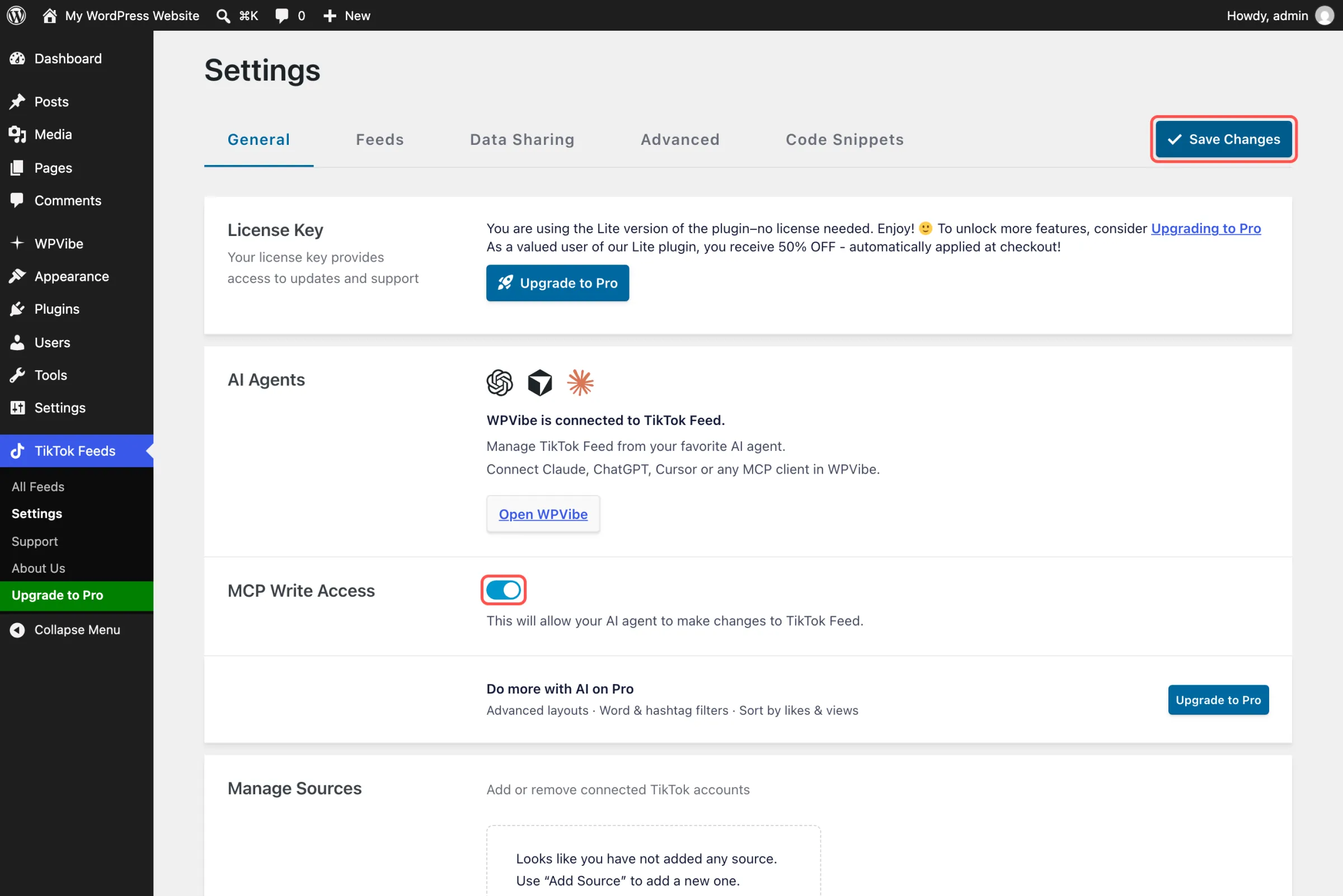
Head back to TikTok Feeds » Settings, flip the MCP Write Access switch, and click Save Changes. Until you do, TikTok Feed’s AI tools can look at your feeds but can’t change them, which is a fine place to start if you’d like to try it out first.
For your first request, try “Show me my TikTok feeds and the shortcode for each one.” In ChatGPT, pick WPVibe from the + button before you send it, so the answer comes from your site and not from the web.
Why TikTok Feeds Pro Is Worth It
TikTok Feeds Pro turns your feed into something closer to TikTok itself. Videos play in a clean player on your page, visitors can swipe through them full screen, and a backup copy keeps your feed showing if TikTok has a bad day. Plus adds gallery, carousel, and masonry layouts and hashtag filters, and Elite sorts by views or likes and combines accounts into one feed.
AI Agents is on every Pro plan, so upgrading keeps your chat setup exactly as it is and opens up the Pro options to your AI. Using the free plugin? Ask your AI, “What else could TikTok Feeds Pro do for my feed?” It reads the plugin’s own feature list and sends back the upgrade link.
Frequently Asked Questions
Does TikTok Feeds Pro include AI Agents?
Yes. Basic, Plus, Elite, and the All Access Bundle all come with it, and the free Smash Balloon TikTok Feed has it as well, for the settings the free plugin includes. Pro is where your TikToks earn their spot on the page. On Plus, your AI can feature your newest video in a gallery and show only the videos with your hashtag, and on Elite it can lead with your most-viewed videos, the ones already proven to hook people.
Can my AI sort my TikToks by views?
Yes, on the Elite plan. Ask it to sort by views or by likes, and your most popular videos move to the front of the feed.
Is there a cost for WPVibe?
You can start for free. WPVibe’s free plan covers a set number of WordPress actions each day, and paid plans give you more room if you need it.
Will my AI ever see my TikTok password?
No. When you add an account, your AI hands you a link and you log in to TikTok yourself. TikTok Feed’s AI tools never get your login, your access tokens, or your license key.
How do I stop my AI from making changes?
Switch off MCP Write Access in TikTok Feeds » Settings and click Save Changes. TikTok Feed’s AI tools go back to read-only, and any delete page that’s still open stops working.
Update to 1.9.1 and Put Your TikToks to Work
A one-time setup, and from then on you can change your TikTok feed by typing what you want into ChatGPT or Claude. No hunting through the feed editor for the layout setting, no digging for a shortcode, and no chance your AI deletes a feed without you clicking the button.
Already running the free Smash Balloon TikTok Feed or TikTok Feeds Pro? Update to 1.9.1 and look for the AI Agents box on the Settings page.
New to Smash Balloon? TikTok Feeds Pro gets you the gallery, hashtag filters, and AI Agents right away. Or start with the free Smash Balloon TikTok Feed from WordPress.org, connect your TikTok account, and follow the setup above.
Run your TikTok feed from ChatGPT or Claude
TikTok Feeds Pro gives your videos a bigger stage, with gallery and carousel layouts, hashtag filters, and your most-viewed videos up front, and AI Agents on every plan means you can change any of it from the chat. Pick Plus for the layouts and filters, or Elite to sort by views and likes. Backed by a 14-day money back guarantee.
Get TikTok Feeds ProPost on YouTube or Facebook too? Here’s how to update your YouTube feeds by asking ChatGPT or Claude, and the same for your Facebook feed.
Which of your TikToks would you put in the spotlight? Let us know in the comments.