Social Wall
  Feed Analytics

Wondering if your social proof widget is doing anything?
You pasted three testimonials onto a page months ago. Traffic stayed flat. Sales stayed flat. And you still can’t tell whether they’re doing nothing or doing something you can’t see.
I work at Smash Balloon, where our plugins run on more than 1.75 million sites, and I’ve watched this exact question come up again and again.
Here’s the part nobody tells you: published research can tell you what kind of proof works. It can’t tell you which of your own testimonials to feature on a given page. That answer is specific to your site.
So the useful question isn’t whether social proof works. It’s what “working” actually means, and that breaks into five things you can check on your own page.
- Do Social Proof Widgets Work? The Short Answer
- What Practitioners Say Actually Works (and What They Ignore)
- Criterion 1: Is Your Proof Recent?
- Criterion 2: Are You Showing the Right Amount and the Right Mix?
- Criterion 3: Is It on a Page Where People Are Deciding?
- Criterion 4: Can a Reader Tell Who Said It?
- Criterion 5: The Decision Every Site Owner Is Making Blind
- How to Publish Proof That Meets All Five Criteria
- Score Your Own Widget Against the Five Criteria
- Start Measuring Your Social Proof Now
Do Social Proof Widgets Work? The Short Answer
Yes. Yotpo measured conversion across e-commerce brands displaying reviews versus those without and found a 10–30% lift. Documented split tests from VWO put testimonials on a landing page at up to 34%.
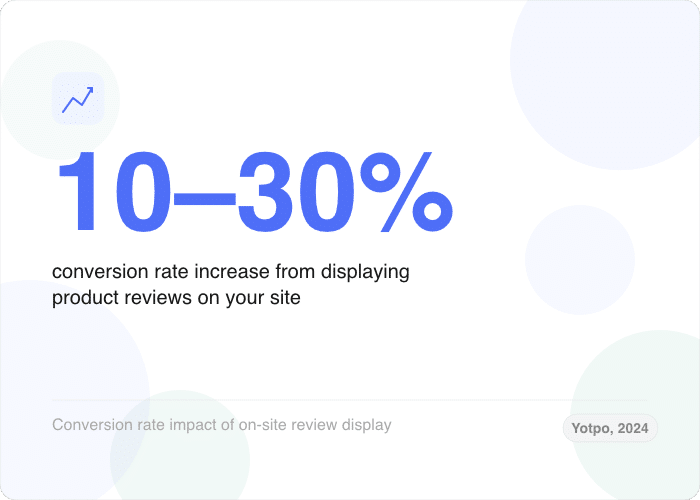
So your instinct to put proof on the page was right. But read the Yotpo finding closely: that lift appeared on product pages where buyers were actively deciding. It isn’t a passive benefit from having reviews somewhere on your site.
So here’s the short answer. A social proof widget is “working” when it meets five conditions:
- Recent. The reviews are from the last few months, not last year.
- Right-sized. A small, mixed set beats a wall of five-star raves.
- On a high-consideration page. Proof earns the most where people decide, like pricing and checkout.
- Attributable. A reader can see a real name and where the review came from.
- Measurable. You can see which reviews people actually click.
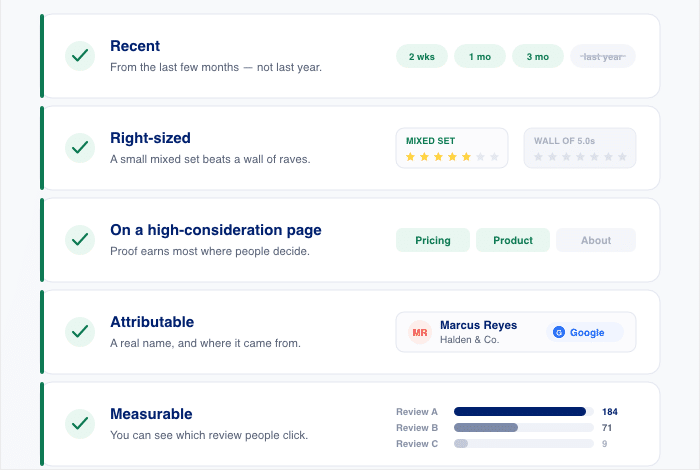
A widget that fails three of these looks exactly like “social proof doesn’t work.” That’s why the yes/no question is the wrong one. You’re not testing whether proof works. You’re testing whether yours does.
Each criterion gets its own section below, with the research behind it and how to fix it on your own site.
What Practitioners Say Actually Works (and What They Ignore)
The top-ranking result for this question is a Reddit thread, and the replies split down the middle. Some people report clear lift from social proof. Others say they ignore it, block it, or actively distrust it.
That split looks like a dead end. It isn’t. Once you sort the replies against the five criteria, the pattern is obvious.
Here’s what people in that thread report tuning out, keeping in mind this is self-reported sentiment rather than measured conversion data:
| What people report ignoring | Which criterion it fails |
|---|---|
| “Sarah from Austin just bought this” popups with no order to verify | Attributable |
| Testimonials with a first name only, or no name at all | Attributable |
| Undated quotes that could be from any year | Recent |
| Stock-photo faces next to generic praise | Attributable |
| Walls of identical five-star reviews | Right-sized |
| Vague praise like “great service, highly recommend” | Attributable |
| Counters and tickers that never seem to change | Recent |
| Reviews sitting on an About page or a testimonials page nobody visits | On a high-consideration page |
And here’s what the same thread reports paying attention to:
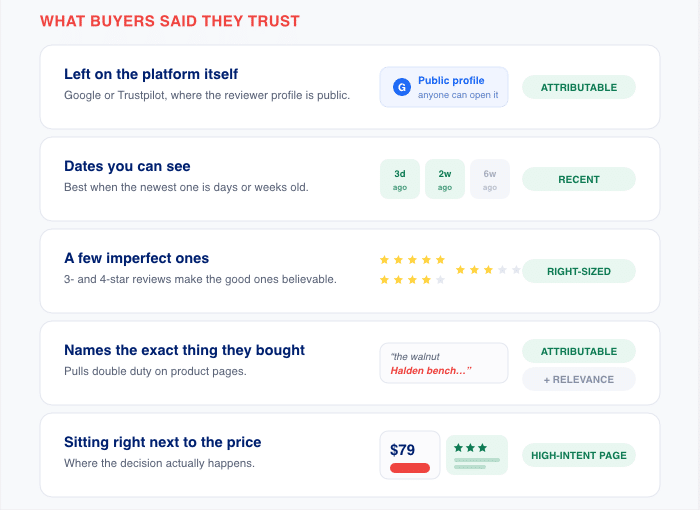
- Reviews on the platform itself, like Google or Trustpilot, where the reviewer profile is public. Satisfies Attributable.
- Recent reviews with visible dates, especially when the newest one is days or weeks old. Satisfies Recent.
- Mixed ratings, including 3- and 4-star reviews. People said a few imperfect reviews made the good ones believable. Satisfies Right-sized.
- Reviews that name the specific product or feature the person bought. Satisfies Attributable and helps on product pages.
- Proof placed next to the price, where the decision actually happens. Satisfies On a high-consideration page.
Read those two lists next to each other, and the disagreement resolves. One camp is describing proof that fails the criteria. The other camp is describing proof that passes them. Almost everything in the “ignored” column has the same three problems.
That’s the useful takeaway for your own page. When someone tells you social proof didn’t work for them, ask what they showed and where. The answer is usually a stale, anonymous quote sitting somewhere nobody was making a decision.
Notice what neither list mentions: Measurable. Nobody in that thread could tell you which review did anything, because nobody could see it.
Your three pasted testimonials may be in the “ignored” column right now. The five criterion sections ahead tell you how to move them out of it.
Criterion 1: Is Your Proof Recent?
Your testimonials are two years old. Does that actually matter, or is a good quote a good quote?
It matters. And there’s a specific number that says so.
BrightLocal’s Local Consumer Review Survey 2026 asked 1,002 US adults how far back they look when reading reviews. The answers form a ladder, and it’s steeper than most site owners expect:
- 74% look for reviews written in the last three months.
- 32% look for reviews from the last two weeks, up from 20% the year before.
- 18% are swayed only by reviews from the last week.
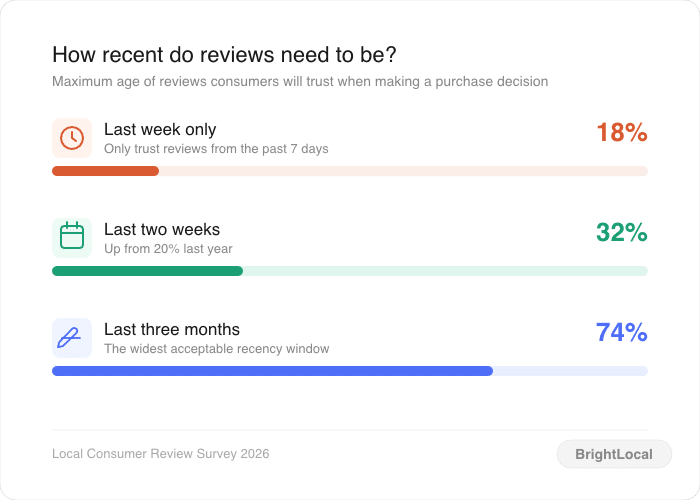
Read that top number again. Three-quarters of shoppers are applying a three-month standard.
A 14-month-old testimonial fails that standard for 74% of the people who see it. Not because the quote is bad. Because it’s old, and old proof reads as proof that stopped arriving.
That’s the part that stings. You may have a genuinely great testimonial on your pricing page right now that most visitors quietly discount.
Here’s the structural problem, and I’ve watched a lot of site owners hit it. A pasted-in quote block is frozen the day you paste it.
So recency isn’t really a writing problem or a taste problem. It’s a mechanism problem. Either your page pulls in new reviews on its own, or it goes stale on a schedule you can predict.
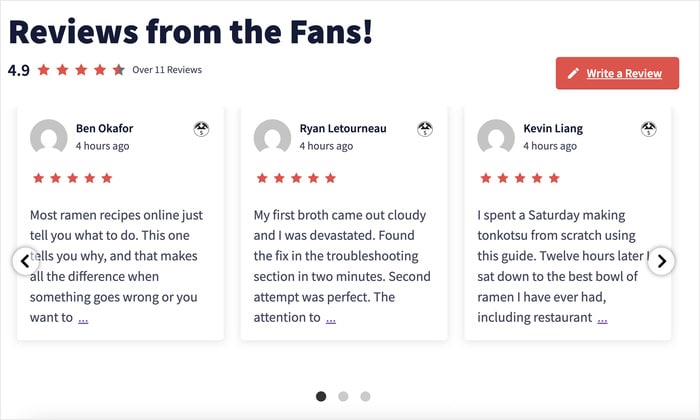
We’ll get to the mechanism later in this guide. For now, go look at your own page and find the date on your newest testimonial. If it’s older than three months, you already know which criterion you’re failing.
Criterion 2: Are You Showing the Right Amount and the Right Mix?
Most site owners assume more reviews and higher ratings always win. The research says otherwise, and the numbers are worth stating plainly.
The Medill Spiegel Research Center at Northwestern studied online reviews in “How Online Reviews Influence Sales.” Two findings from that study should change how you build your widget:
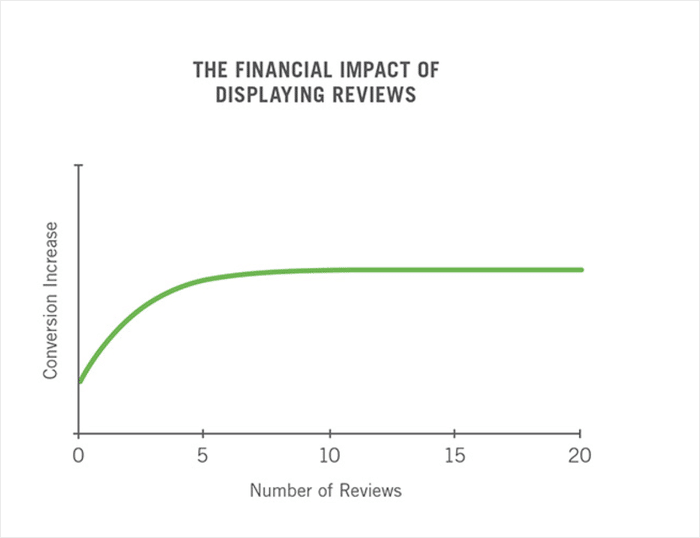
- Purchase likelihood rises 270% at five reviews compared to none. After the first five, the added benefit drops off fast.
- Purchase likelihood peaks between 4.0 and 4.7 stars, then declines as ratings approach 5.0.
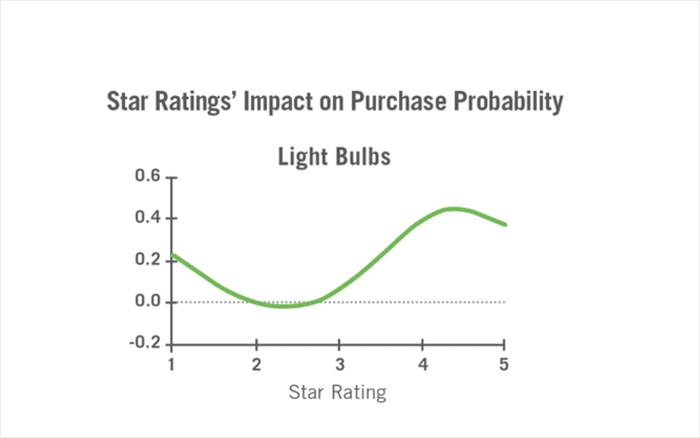
Read that second one again. A 5.0 average performs worse than a 4.5 average.
That is not a rounding quirk or a small effect. Shoppers see a perfect score and assume someone removed the bad reviews.
Should you hide your 3 and 4-star reviews?
No. And you don’t have to take my word for it, because Spiegel says so directly.
The researchers recommend embracing negative reviews. Their reasoning is simple: negative reviews establish credibility and authenticity for the positive ones sitting next to them.
Ratings between 4.0 and 4.7 convert better than 5.0, so pulling your imperfect reviews out of the mix pushes your display into the range that performs worse.
BrightLocal’s Local Consumer Review Survey 2026 confirms it from the shopper’s side:
- 92% of consumers factor star ratings into their decision, so the number itself matters.
- 31% will only use a business rated 4.5 stars or higher, up sharply from 17% the year before.
- Only 10% require a full five stars.
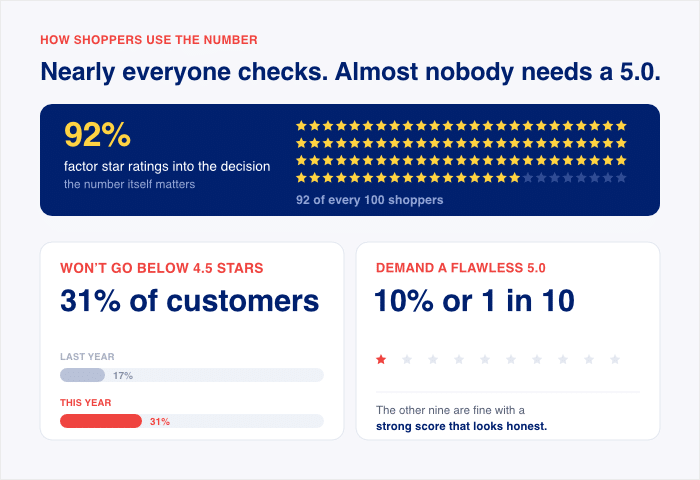
Put those together and you get a target, not a maximum. Nine out of ten shoppers do not need perfection, and a bar around 4.5 stars is what most of them are actually applying.
A wall of flawless praise reads as filtered. A mix that includes a fair 4-star review reads as real.
How many reviews are too many for one page?
Five reviews capture most of the available lift, and everything past the first handful buys very little.
So a short, curated shortlist does the job. A page with 60 reviews stacked on it is not 12 times more persuasive than a page with five.
There’s a cost to the wall, too. Long review lists slow your page down and push your actual offer further from the visitor’s eye.
I’ve seen plenty of site owners embed everything they have because it feels safer. It isn’t. You end up burying your three best reviews inside 57 mediocre ones, and the visitor reads the first two and scrolls past.
Here’s the combined conclusion, and it’s the sentence to keep for the rest of this guide:
A small, mixed, recent shortlist beats a long wall of five-star raves.
Five reviews. A range of ratings, not just perfect ones. Written in the last three months.
That’s what “right-sized” means, and it’s a very different instruction than “show as much proof as possible.”
Criterion 3: Is It on a Page Where People Are Deciding?
Homepage, product page, or checkout? Most site owners guess, and most guess wrong.
The Medill Spiegel Research Center’s study, “How Online Reviews Influence Sales,” settles it with one finding. Reviews lifted conversion by 190% on lower-priced items and by 380% on higher-priced ones.
Read those two numbers side by side. Proof earns twice as hard when the decision costs more.
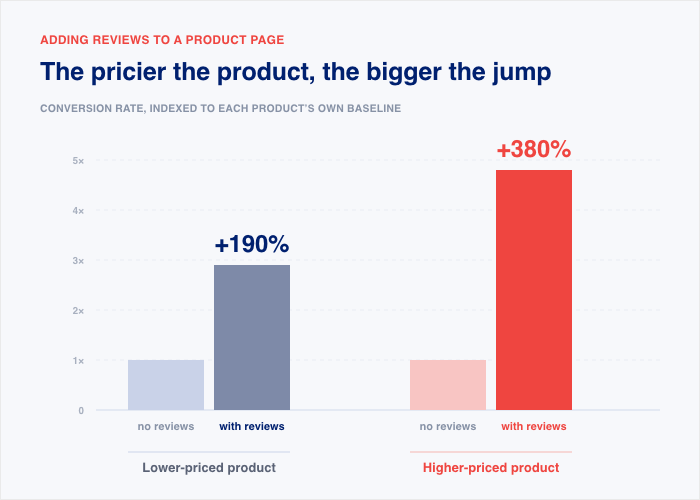
That’s the whole placement rule. Put your reviews where the visitor is weighing money, not where they’re still browsing.
Spiegel takes the same finding one step further. The researchers recommend prioritizing review generation for higher-priced and higher-consideration products.
That’s worth pausing on. The study isn’t just telling you where to display proof, it’s telling you which products deserve your review-collection effort first.
Both instructions come from the same number, and both point at your expensive, slow-decision pages. Here’s how we apply that rule to the pages you already have:
| Page | What to show | Why |
|---|---|---|
| Pricing page | Your strongest recent reviews, next to the plan names. | This is where the visitor stops reading and starts calculating, so proof does its heaviest lifting here. |
| Checkout or cart | Short reviews that mention delivery, support, or the refund process. | Doubt at checkout is rarely about the product. It’s about whether you’ll follow through. |
| Product page | Reviews that name the specific item or feature on that page. | A generic rave doesn’t tell a visitor whether this product is the right one. |
| Service or booking page | Reviews from customers with the same problem the page solves. | It lets a visitor see themselves in the person quoted. |
| Homepage | A small strip of proof, with low expectations. | Homepage visitors are orienting, not deciding. |
That last one is the trap. The homepage is where most site owners put their testimonials, and it’s the lowest-consideration page on the site.
In our roundup of testimonial displays, Tarte Cosmetics stands out for displaying their website testimonials on high-performance product pages, right where a shopper is choosing between shades and deciding whether to add to cart.
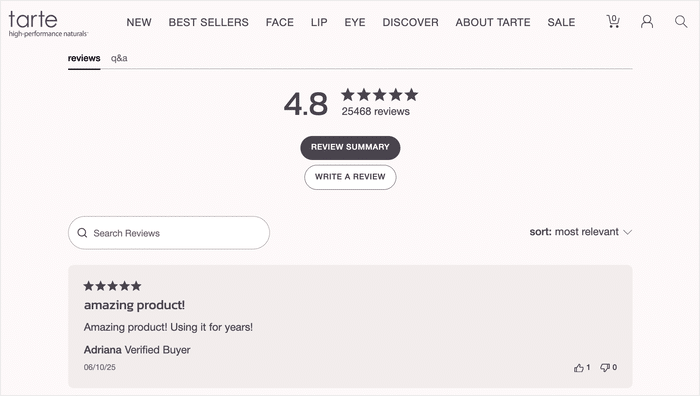
The roundup doesn’t publish a conversion figure for that move. What it shows is the pattern: real customer proof sitting on the page that carries the decision, not on the page that carries the logo.
Compare that to the common setup. SusieCakes includes customer testimonials on their homepage, which is a fine place to build a first impression. It’s just not the page where a visitor commits.
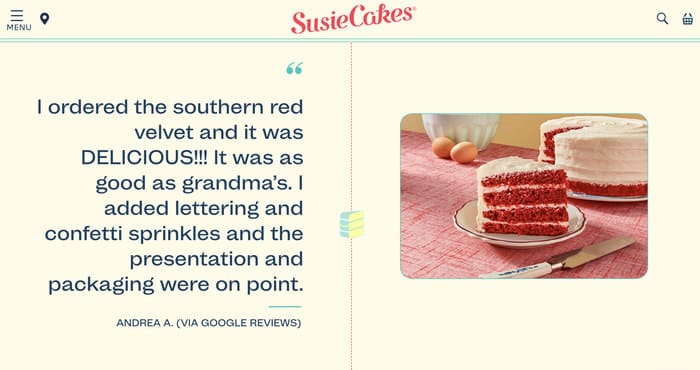
Go open your own pricing page right now. If there isn’t a single review on it, you’ve found a failing criterion.
Criterion 4: Can a Reader Tell Who Said It?
Look at the testimonial from the start of this guide: “Great service, highly recommend.”
Who said that? What did they buy? When did they say it? You can’t answer any of those questions, and neither can your visitor.
That sentence is decoration. It sits in the same visual spot as proof, but a reader can’t check a single thing in it.
Now compare it to this review on Yelp, which includes the name, profile pic, review photos, and a detailed account of the visit.
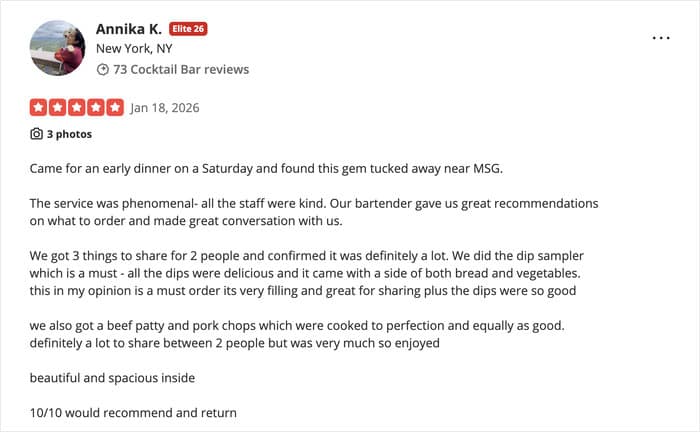
A review from a faceless account that’s just one sentence can be from anyone. But a detailed review with enough information feels like a real person talking, which is where the conversion happens.
What attribution requires
Every review you display should carry all four of these:
- A named author. A first name and last initial at minimum, with the reviewer’s profile photo where the platform provides one.
- The source platform. Google, Facebook, Yelp, or Trustpilot, labeled clearly so the reader knows where it came from.
- A date. The date the customer posted it, not the date you added it to your page.
- The star rating they gave. Not your paraphrase of how happy they were. The number the customer chose, shown as they left it.
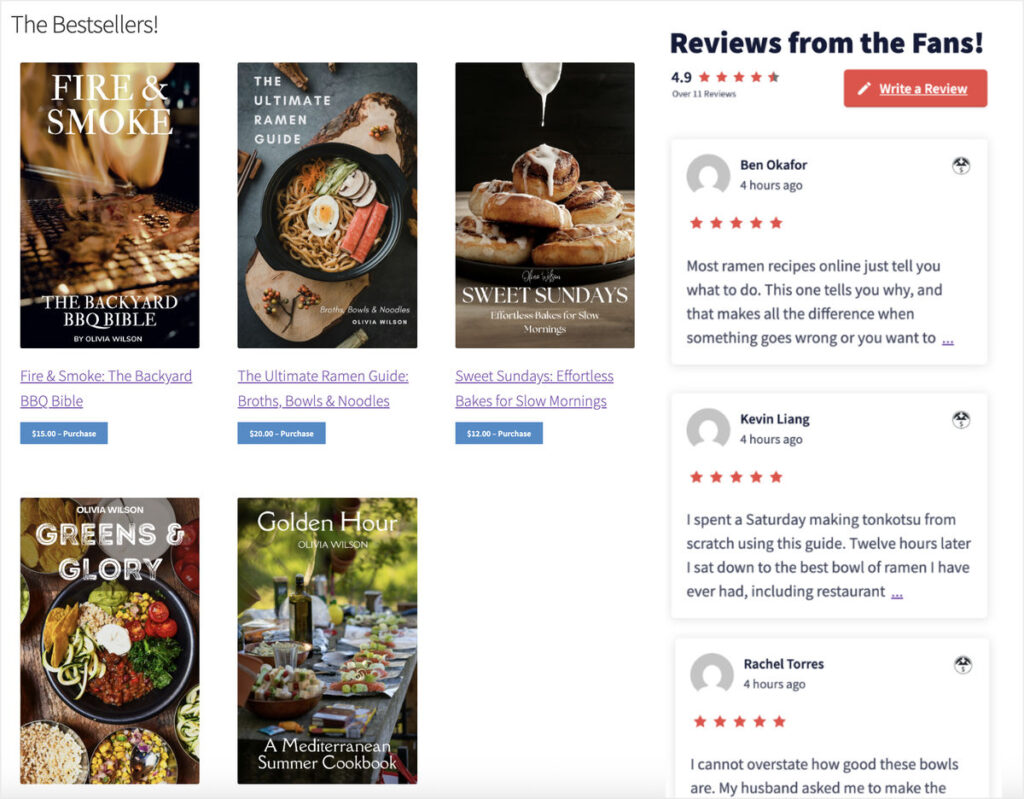
Only 20% of consumers fully trust reviews on a brand’s own website. That’s the deficit every testimonial section starts with, and attribution is how you close it.
A review that names Google as its source borrows Google’s credibility. A quote you typed borrows nothing.
Criterion 5: The Decision Every Site Owner Is Making Blind
You’ve now got four criteria you can check by looking at your page. This last one is different, because you can’t see it by looking.
PowerReviews found shoppers who interact with ratings and reviews convert 108.6% higher than those who don’t. Interaction is the thing that pays, which is why knowing whether anyone interacts with yours is worth measuring.
Here’s the pattern I see when talking to business owners who want to embed social media reviews. It shows up in the same order almost every time:
- Someone asks which of their reviews would be more convincing to show. They already sense that not every review earns its spot on the page.
- The question turns technical. They ask about filtering, hiding reviews, setting a minimum rating, or showing fewer of them.
- They pick one of two extremes. Either they display everything they have, or they display 5-star reviews only. Neither default is careless. The information needed to decide well sits outside the page, so people fall back to a rule of thumb.
- Later, the real question arrives. Which of these reviews on my page is actually doing the work?
That fourth question is an important one, but this data isn’t something a WordPress site tracks on its own, so answering it takes setup most site owners never do.
The standard: you should know which reviews are earning their spot
Criteria 1 through 4 all had a version of this. Recency has a date you can read. Right-sizing has a count you can make. Placement has a URL you can open. Attribution has four elements you can tick off.
Criterion 5 asks for something harder. Name the two or three reviews on your page that are earning a visitor’s attention.
Not the ones you like best. Not the ones from your biggest customer. The ones a stranger stops and actually reads.
If you can name them, you pass. If you’re guessing, you don’t.
Here’s how to tell you’re failing it
Try answering these four questions about your own testimonial section right now:
- Which review sits in position one? If you don’t know without looking, you’ve never treated that slot as valuable.
- How long has it been there? Most testimonial sections have the same order they had the day they were built.
- Why is it first? “It was the first one we got” and “it was the nicest one” are the two most common answers.
- What happened after you added it? You can only answer this one if somebody was watching.
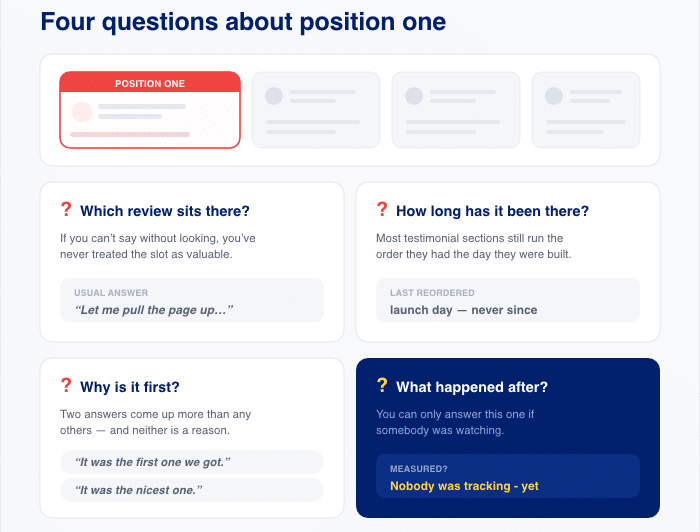
Four blanks means you’re running your most persuasive real estate on autopilot.
And it costs you twice. You can’t tell which reviews to feature more, and you can’t tell which ones to stop showing.
Why guessing here is worse than guessing elsewhere
A bad placement decision is visible. You open your pricing page, see no reviews, and you know what to fix.
A bad selection decision hides. Your page looks full of proof, the widget loads fine, and the reviews are real. Nothing on the screen tells you the top two are the weakest ones you own.
That’s the difference between a broken widget and a widget doing nothing. A broken one you notice in an afternoon.
Go look at the first review on your highest-value page. If you can’t say why it’s there, you’ve found another failing criterion.
How to Publish Proof That Meets All Five Criteria
Five criteria is a lot to hold together by hand. Recency needs maintenance. Attribution needs discipline. Measurement needs tracking that you have to build.
That’s the real reason most testimonial sections fail. Not because the site owner didn’t care, but because a pasted quote block gives them no way to pass.
So here’s how we solved each criterion at Smash Balloon, in the same order you just read them.
Recency: a connected feed instead of a pasted quote
Reviews Feed Pro connects to your review platforms and pulls your current reviews automatically. When a customer leaves a new one, it appears on your page without you touching anything.
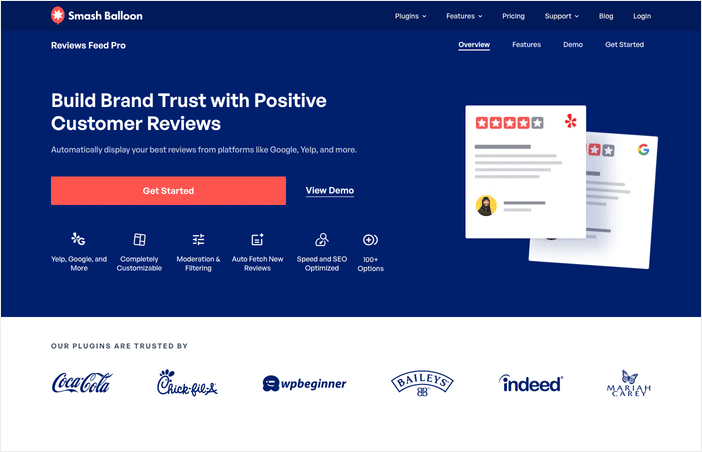
Go back to the BrightLocal number from Criterion 1. Reviews from the last three months are what 74% of people look for.
A hand-pasted block cannot meet that standard. Not because the quote is bad, but because the freshness of the display depends on you remembering to update it. The day you paste it is the last day it’s current.
But with a reviews feed, you can automatically have the latest reviews added to your site and keep your conversion up.
Right-sized: filters that build the shortlist for you
Criterion 2 asked for a small mixed set. Around five reviews, not every review you own, and not five perfect ones either.
Pulling every review automatically would break that. So the filters are what turn a full feed into a shortlist you actually chose.
Reviews Feed Pro gives you four controls:
- Star rating. Set a minimum, or include a 4-star review on purpose so the set doesn’t read as curated.
- Word count. Set a minimum length, and “great service, highly recommend” never enters your shortlist, because it’s too short to carry any information. That single setting removes the exact testimonial from the start of this guide.
- Keyword. Show reviews that mention a feature, a location, or a use case, which is how you match proof to the page it sits on.
- Allow and block lists. An allow list displays only the specific reviews you choose. A block list hides individual reviews while everything else keeps flowing in.
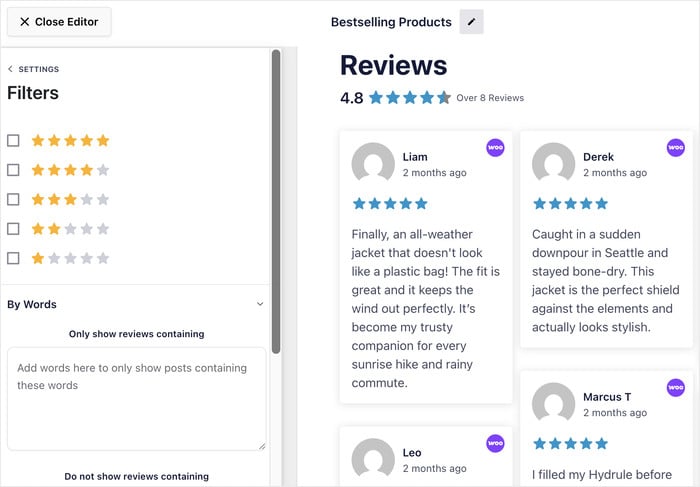
Use them together, and you define the set once, then the feed keeps filling it, instead of picking between showing everything and showing 5-star reviews only. Those were the two extremes from the support pattern in Criterion 5.
Placement works the same way. You create different feeds with different filters and place each one on the page where that proof belongs.
Attribution: every review carries a name and a source
Reviews Feed Pro pulls from the biggest review sites out there: Google, Facebook, Tripadvisor, Yelp, Trustpilot, WordPress.org, WooCommerce, Easy Digital Downloads, and Booking.com.
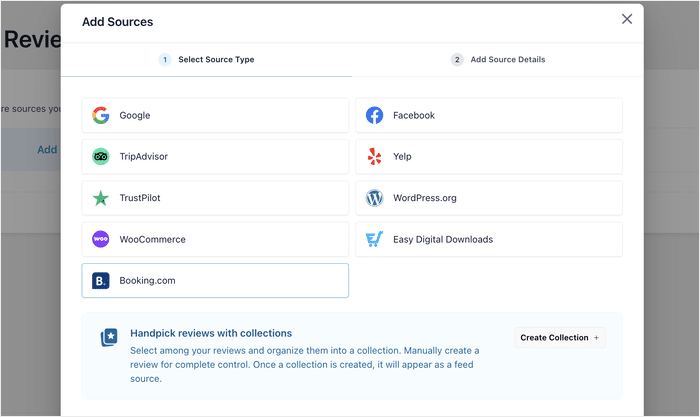
Every review arrives with the pieces Criterion 4 asked for already attached. The author’s name, their profile photo where the platform provides one, the star rating, the date they posted, and the platform it came from.
This is the difference between passing that criterion by default and passing it by discipline. Nobody has to remember to keep the date on or make sure every piece of info is included.
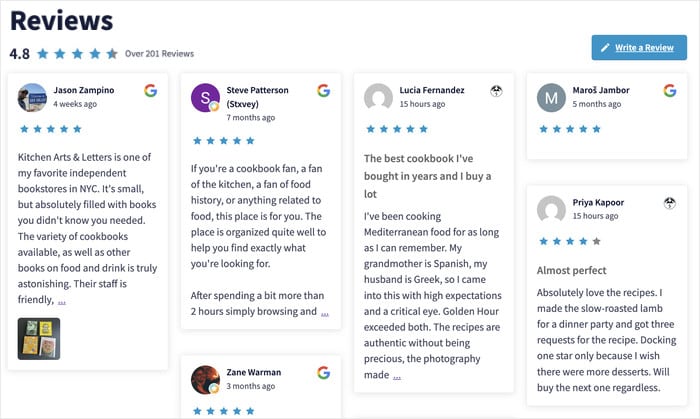
You can still choose what displays. But you’re choosing from complete reviews instead of rebuilding them by hand, which is where attribution normally gets lost.
What happens when Google’s API goes down?
Reviews Feed Pro stores your feed data locally through backup caching. If Google, Yelp, or any other API stops responding, the plugin serves the reviews it already saved.
Your page keeps showing proof instead of an empty space where the widget used to be.
Measurement: which review is actually getting clicked
Criterion 5 was the one you couldn’t check by looking, so it needed different tooling. This is where Feed Analytics comes in.
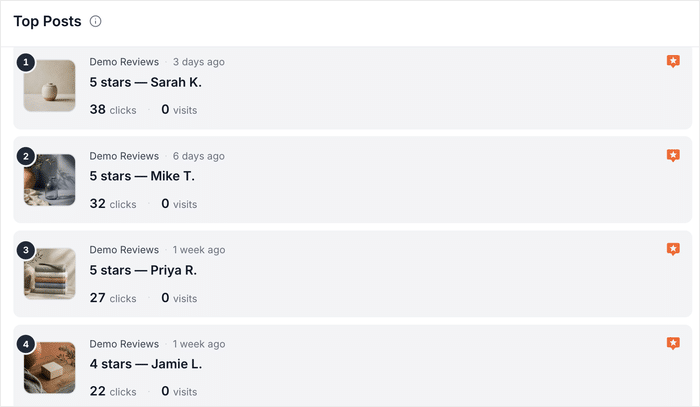
It tracks every review you display as its own post, with clicks and profile visits recorded separately for each one. Those show up in a Reviews tab alongside your social feeds.
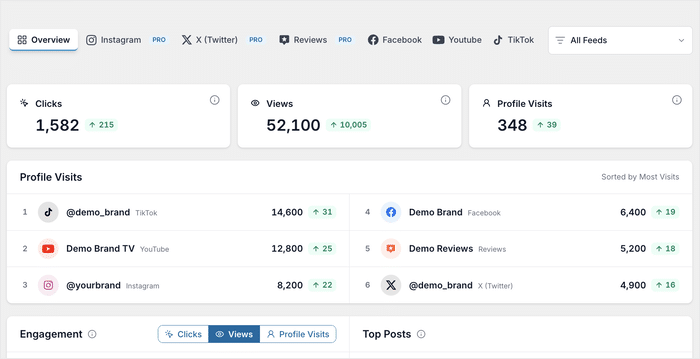
That tracking follows the review wherever it appears. Pricing pages, product pages, your homepage, a sidebar widget.
Two details make the numbers usable:
- Your own clicks don’t count. Admin activity is excluded automatically, so you’re not measuring yourself testing the page.
- You can narrow the view. Filter down to a single feed, data type, and any timeframe you want.
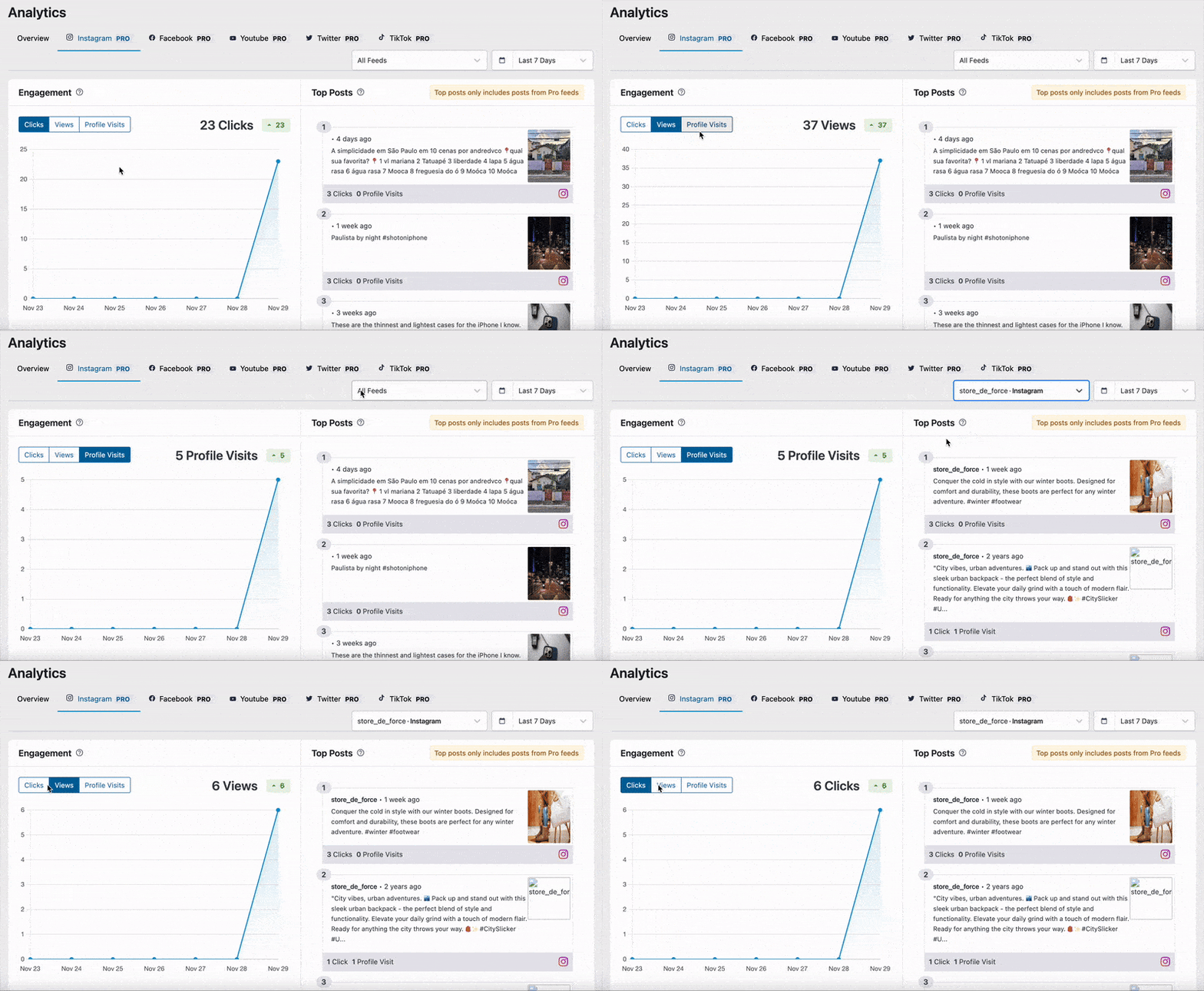
Now go back to those four questions from Criterion 5. Which review sits in position one, how long it’s been there, why it’s first, and what happened after you added it.
Once you turn on the tool and start building data, the fourth one becomes answerable.
Pass All Five Criteria on Your Own Page
Reviews Feed Pro keeps your proof recent, right-sized, and attributed. Feed Analytics shows which review is actually getting clicked, and All Access includes both.
See Which Reviews ConvertScore Your Own Widget Against the Five Criteria
You came here with a page you couldn’t diagnose. Here’s the diagnostic.
Open your highest-value page in one tab and work down this table. Each row is one of the five criteria, in the order you read them.
| Criterion | The question to ask | What a fail looks like | What fixes it |
|---|---|---|---|
| 1. Recency | When was the newest review on this page posted? | Your best quote is 14 months old, and nothing has been added since launch. | Replace the pasted block with a feed that pulls your current reviews on its own. |
| 2. Amount and mix | How many reviews are here, and are they all five stars? | Twenty reviews stacked down the page, or three perfect raves and nothing else. | Cut to around five. Keep a 4-star review in the set so it reads as real. |
| 3. Placement | Is this page where someone decides, or where they browse? | Every review sits on the homepage. Your pricing and product pages have none. | Move a set to the pages where price and choice get settled. |
| 4. Attribution | Can a reader tell who said this and where they said it? | “Great service, highly recommend” with no name, no date, no platform. | Show the full name, the date, rating, and the source on every review. |
| 5. Measurement | Which review on this page gets clicked most? | You have no answer, because nothing on the page is being tracked. | Turn on review-level tracking. This is the one row you need a tool for. |
Most of these rows are decisions, not purchases. Mix and placement, you can fix this afternoon without installing anything, because both come down to choosing what shows and where.
The last row is different, and I want to be straight about it. You cannot see click data by looking at your page, so measurement is the one criterion that needs tracking installed.
Count your fails. One fail explains a quiet widget. Three or four explains a page you assumed was working for months.
Start Measuring Your Social Proof Now
“Does social proof work” was never a question anyone could answer for you in the abstract.
The first four are settled. Recent, small, and mixed, on the page where money gets decided, and traceable to a real person. You can check all four this afternoon, and the research already tells you where the bar sits.
But the fifth criterion is yours alone. Which of your reviews is doing the work, on your page, for your visitors? Nobody’s survey can answer that, and until now nothing on your page was counting on its own.
So start with the four you can fix today, then turn on the one you can’t see.
Get Reviews Feed Pro, connect your site to the biggest review platforms, and start converting visitors.
Want to see exactly how your reviews are performing? With the All Access Bundle, you get the full set in one purchase: your reviews, your social feeds, and the numbers behind all of them.