Social Wall
  Feed Analytics


When we created X (Twitter) Feed Pro, we wanted to make it simple for everyone to create engaging X (Twitter) feeds.
And ever since we released the plugin, our team at Smash Balloon has constantly been working to make it more effective and user-friendly.
Today, we’re proud to announce our biggest update yet for our X (Twitter) plugin.
With this complete overhaul for X (Twitter) Feed Pro, it’s more user-friendly than ever before to create, customize, and embed your X (Twitter) feeds.
You get tons of convenient features in our newest update, such as:
- Brand New Interface: With our new and easy interface, it’s now much simpler to find and use all the plugin’s options
- Easy Feed Management: Your X (Twitter) feeds will be listed in a single place where you can individually manage them
- Guided Feed Creation: The plugin comes with a simple guided flow that takes you through the process of creating your X (Twitter) feeds easily
- New Feed Customizer with Live Preview: To help you track all of your changes in real-time, you get a new feed customizer that shows a live preview of your feed
- X (Twitter) Feed Templates: You can pick a pre-designed template to instantly create unique X (Twitter) feeds for your site.
- And Much More: Lots of other useful features like color scheme options, easy X (Twitter) feed import and export, improved account manager, and more.
Want to learn how they can help your business grow?
We’ll take a closer look at each of these features below so you can see for yourself.
1. Simpler Feed Management
To help you manage your X (Twitter) feeds, our newest update comes with lots of awesome features such as:
All Your X (Twitter) Feeds in One Place
In the old version of X (Twitter) Feed Pro, you had to manually browse through your website to find your X (Twitter) feeds.
After the X (Twitter) Feed 2 update, you can now see all of your X (Twitter) feeds listed in a brand new All Feeds dashboard.
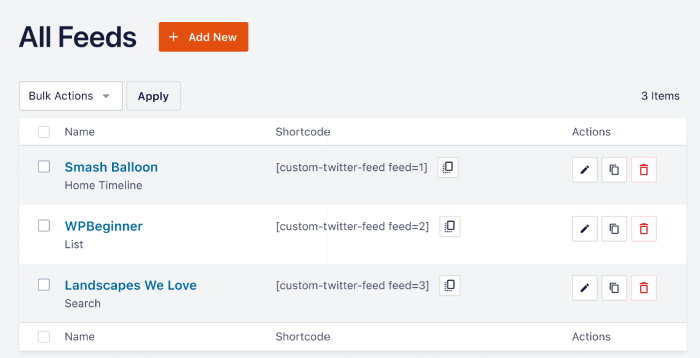
From this dashboard, you can use our improved feed management to:
- Easily track how many X (Twitter) feeds you’ve created for your site
- Duplicate feeds that perform well to quickly create engaging X (Twitter) feeds
- Remove X (Twitter) feeds that you don’t need anymore
- And a lot more!
As you can see, X (Twitter) Feed 2 makes it quick and easy to add X (Twitter) feeds to your website.
You can then grow your business using X (Twitter) marketing, even if you’re new to WordPress.
Edit Your Feeds Individually
Before this update, editing individual X (Twitter) feeds meant changing shortcodes.
Now, we’re adding a new feature so you can manage every single one of your X (Twitter) feeds separately — absolutely no coding needed.
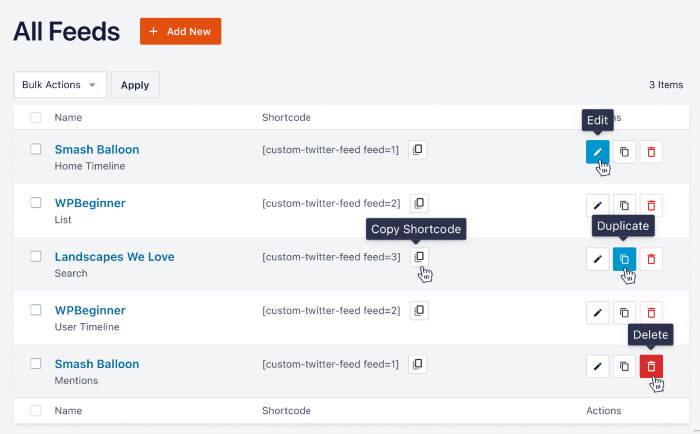
From the All Feeds dashboard, all you need is a single click, and you can:
- Edit an X (Twitter) feed and customize how it looks to fit your website
- Delete a feed if you don’t need it anymore
- Duplicate an engaging feed and copy the design for a new feeds
- Copy Shortcode to manually add X (Twitter) feeds to pages, posts, sidebar, or footer
If you use the Edit button here, you can open an X (Twitter) feed in our brand new visual feed customizer.
From there, you can change your feed layout, color scheme, header design, buttons style, feed template, and much more — no need to touch a single line of code.
When you customize your X (Twitter) feed here, it won’t affect the design of any other feeds.
As a result, you can freely customize your feeds and create unique designs for separate feeds. And by showing these X (Twitter) feeds on your website, you can:
- Embed relevant photos and videos from X (Twitter) on your homepage to grab people’s attention and keep them engaged
- Display positive X posts and reviews on your product pages and convince visitors to buy from you
- Show your X (Twitter) profile on your “Contact Us” page to get more X (Twitter) followers
- And much more!
Brand New Dashboard
For our new update, we’ve completely redesigned the X (Twitter) Feed Pro dashboard from the ground up.
With our new and improved dashboard, you can now browse all the options much more easily.
On top of that, you can set up the plugin and start creating X (Twitter) feeds much faster as well.
Let’s take a look at our new dashboard.
Remember the first thing you do after installing the X (Twitter) Feed Pro? You just activate the plugin using your license key.
To make that easier, you can now see the License Key section as soon as you open the plugin settings.
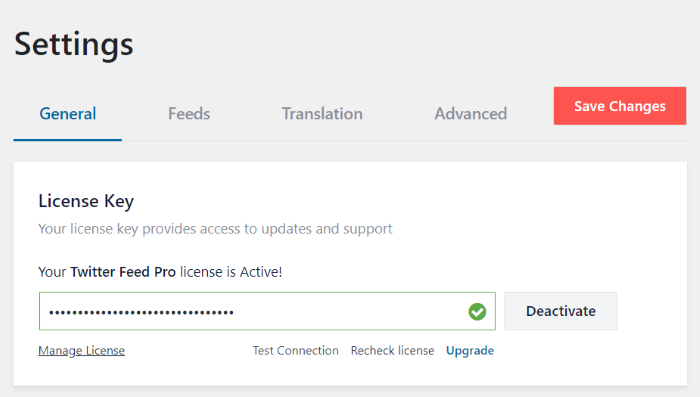
The next step is to connect your website to X (Twitter), and it’s a lot more convenient than before.
Just below the license key option, you have the Connected X (Twitter) Account section.
From here, you can add your X (Twitter) account in just a few clicks.
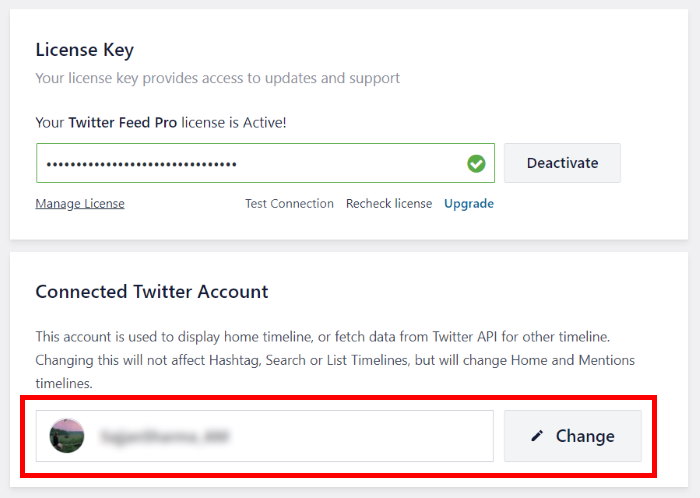
Just like that, all the other options on our new dashboard are easy to use. Plus, you even get a larger font, clean colors, and more whitespace to make everything clearer and easier to read.
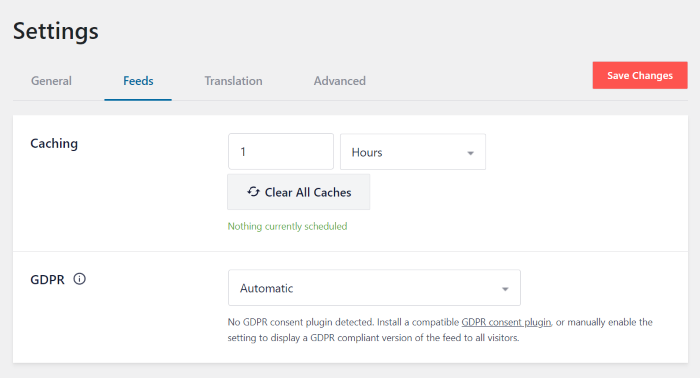
As you can see, it’s much easier to set up X (Twitter) Feed Pro after this update.
So, you can start building X (Twitter) feeds faster and use that saved time to grow your business.
2. Easily Create X (Twitter) Feeds
Want an even easier way to create X (Twitter) feeds for your website?
After the X (Twitter) Feed 2 update, you can create new feeds in just a few seconds. And just like before, there’s absolutely no coding needed.
3-Step Guided Flow
Now, you can follow a guided flow that’ll take you through the 3-step process of creating X (Twitter) feeds.
To show X (Twitter) feeds on your site, all you have to do is follow these steps:
- Step 1: Choose your X (Twitter) feed type
- Step 2: Customize the feed design
- Step 3: Embed the feed on your site
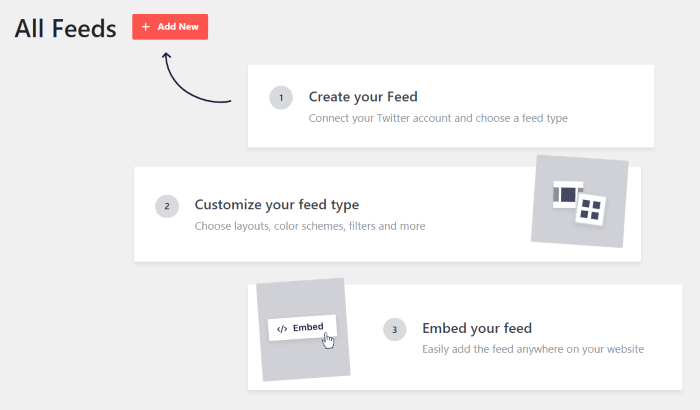
To get started, just click on Add New, and X (Twitter) Feed Pro will ask you to choose from 6 different feed types.
There are tons of options to choose from, such as user timeline, hashtag, search results, home timeline, and much more.
Plus, you can select multiple options here to combine different feed types in a single feed.
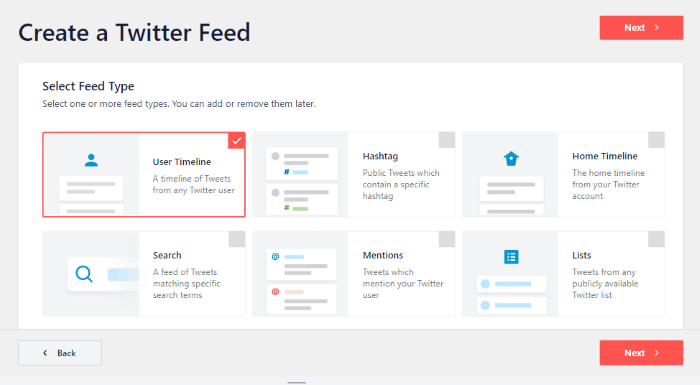
For the next step, you can just connect your X (Twitter) account and use it as a source for your feed.
Finally, you can customize your X (Twitter) feed using our brand new feed editor with a live preview and then embed it on your website.
In fact, you can now embed your X (Twitter) feeds directly from the visual feed editor.
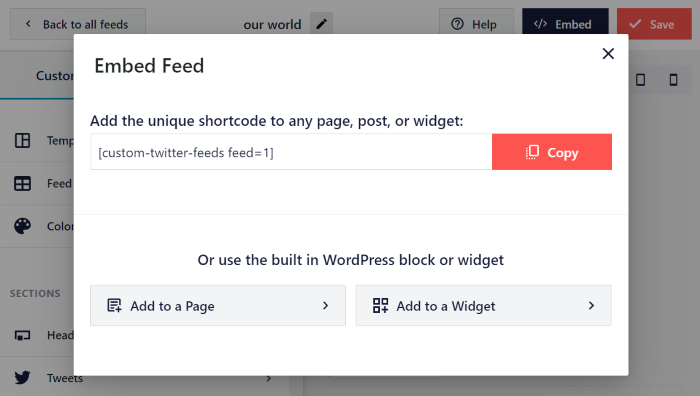
Our plugin overhaul will make it easier than ever to show engaging X (Twitter) feeds and grow your business.
You can just follow the 3-step guided flow – no need to spend money on hiring a developer to help you embed X (Twitter) feeds on your site!
X (Twitter) Feed Templates
In the past, creating unique feeds meant customizing them from scratch, which took time and effort.
But with our X (Twitter) Feed 2 update, you can pick from a collection of pre-built templates. That way, you can instantly have a beautiful X (Twitter) feed ready to go.
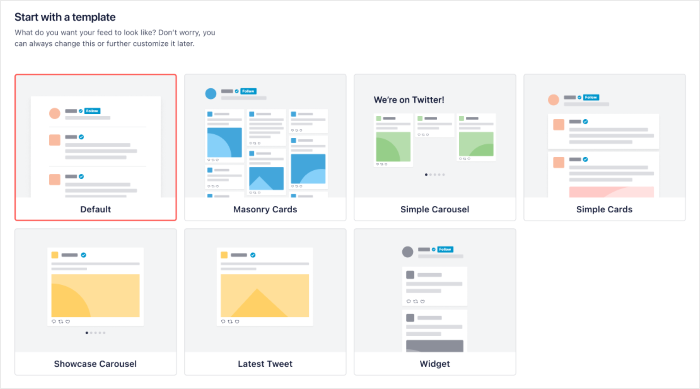
And with the help of these amazing X (Twitter) feed templates, you can:
- Highlight important news and announcements using the latest X posts template
- Pick masonry cards and show engaging X (Twitter) photos and videos on your site
- Display user reviews on your website sidebar using the widget template to boost sales
- Show your product images in a showcase carousel so customers can check them out
- And much more!
Easy Feed Export and Import
If you have multiple websites or want to expand your business in the future, our new update has you covered.
Now, you can export high-converting X (Twitter) feeds and quickly import them to another website.
Just go to your Settings page, and you can export your X (Twitter) feeds in just a couple of clicks.
This will safely store your X (Twitter) feed as a .json file on your computer.
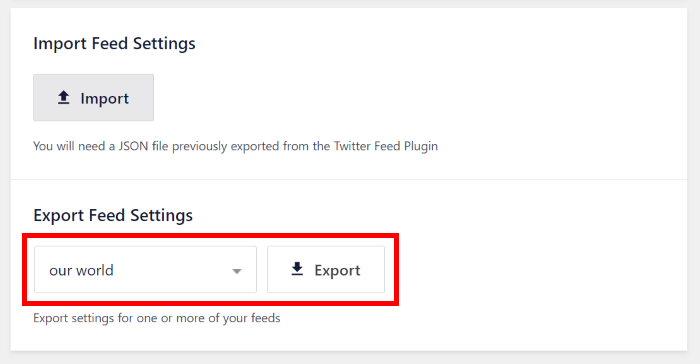
Then, you can quickly import that .json file into another site and have an engaging X (Twitter) feed ready to go – it’s that simple!
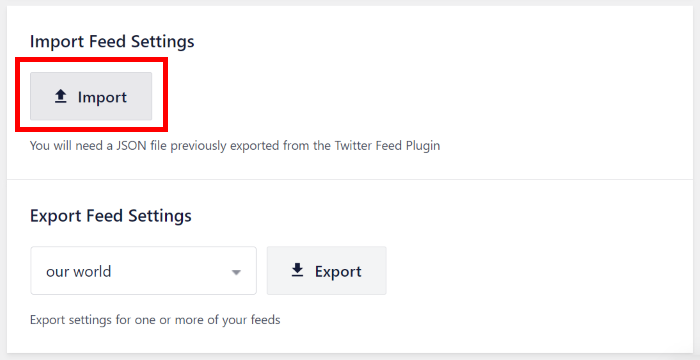
You can export tried-and-tested X (Twitter) feeds and use them on another website to get tons of followers.
Want to boost your sales? You can export feeds where you effectively showcase your products and then use them for another website.
On top of that, you can export your X (Twitter) feeds and safely save the backups on your computer.
With the X (Twitter) Feed 2 update, you can grow multiple websites at the same time – even if you’re new to WordPress.
3. New X (Twitter) Feed Customizer
Our brand new update completely changes how you customize the design of your X (Twitter) feeds.
From feed layout to color scheme to post style, and much more, you can change everything much faster than before.
The best part? It’s so much simpler, so no need to bother with coding or hiring a professional.
Visual Feed Editor with Live Preview
Before this update, customization took more time since you had to go and check your X (Twitter) feed in another tab to see how it looked.
This time, we wanted to give you a customization experience that’s faster as well as more accurate.
In X (Twitter) Feed 2, you get a brand new feed customizer with a user-friendly design as well as a live preview.
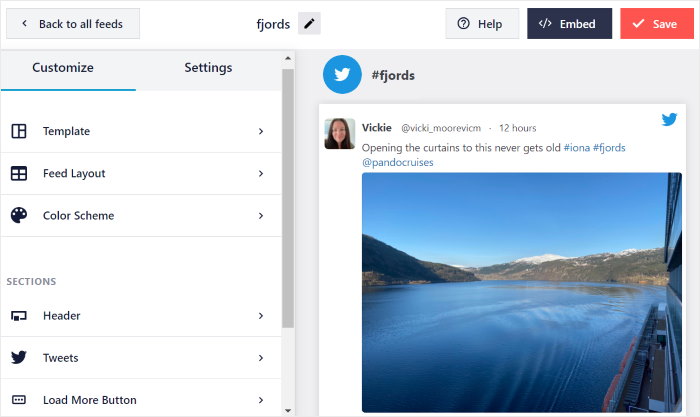
On the left, you can find the customization panel where you can change options for your X (Twitter) feed layout, color scheme, header design, X post style, and much more.
And on the right, there’s a live preview of your X (Twitter) feed where you can track your changes in real-time.
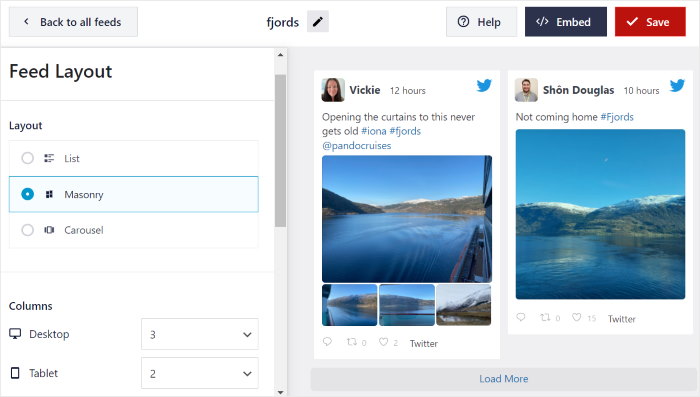
As a result, you can accurately create beautiful designs for your X (Twitter) feeds since you can clearly see all of your changes.
Since you don’t need to manually check your X (Twitter) feed whenever you make any changes, customization is so much faster.
Give our live feed customizer a try, and you can easily create beautiful X (Twitter) feeds in much less time.
Preview for Mobile Devices
Did you know that up to 60% of visitors can leave your site for a competition if it’s not mobile-friendly?
You’re losing so many potential customers and sales that way.
The good news? Our X (Twitter) Feed 2 comes with a new preview feature that lets you see how your X (Twitter) feeds will look on mobiles and tablets.
With just a single click, you can check your mobile preview directly from the visual feed editor.
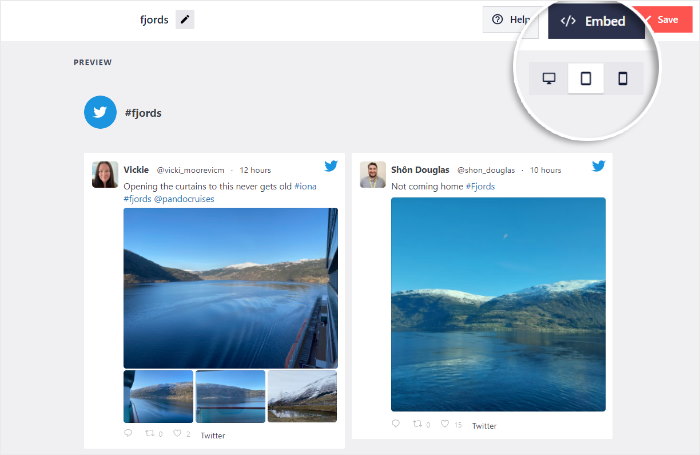
As a result, you can use X (Twitter) feeds to engage your mobile visitors and convert them into X (Twitter) followers and customers.
Color Scheme Options
Fun fact: People can take as little as 0.05 seconds to make a first impression of your website.
And a huge part of that is due to the colors that you use.
To help you create an amazing site that grabs people’s attention, it’s now fast and simple to change the colors of your X (Twitter) feeds.
All you have to do is pick a color scheme, and you can change all the colors of your feed at once – it’s that easy.
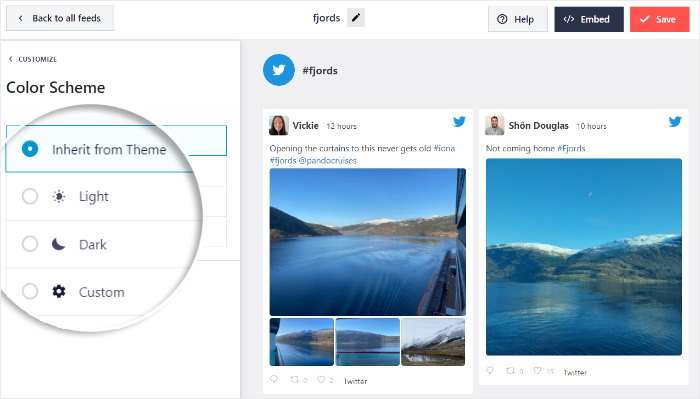
With the help of these color scheme options, you can instantly turn on light mode or dark mode for your feed.
You can also choose to inherit from your theme, so your X (Twitter) feeds perfectly match your branding.
Want to manually pick your feed colors like before? You can still use a custom color scheme and select all the colors on your X (Twitter) feed.
And with our new live preview, you can clearly see how all the colors look directly on the customizer.
That way, you can create X (Twitter) feeds to promote different products and give each feed a fitting color scheme.
With the help of X (Twitter) Feed 2, you can easily set the feed layout, template, color scheme, header design, and much more to create beautiful X (Twitter) feeds.
On top of that, you can do it all in a few simple clicks – much faster and simpler than before.
What Do Existing Users Need to Know?
Already using X (Twitter) Feed Pro for your website?
The good news is that you can keep using the plugin, and all of your old X (Twitter) feeds will continue working like usual.
After the update, X (Twitter) Feed Pro will take you through our new dashboard so you can see where all the options are.
All of your old X (Twitter) feeds will continue working, and they will be saved on your site as legacy feeds.
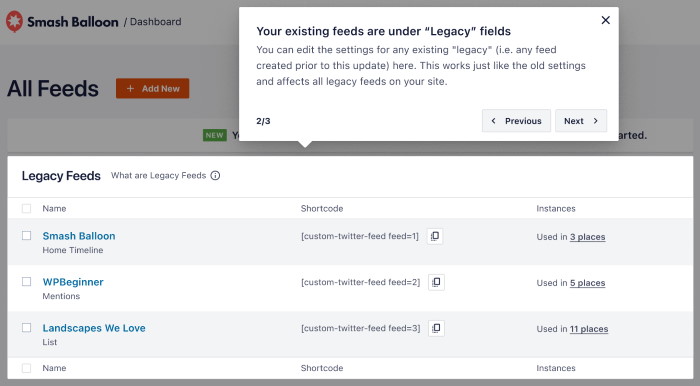
Just open the All Feeds dashboard, and you can see the Legacy Feeds section, which lists out all of your old X (Twitter) feeds.
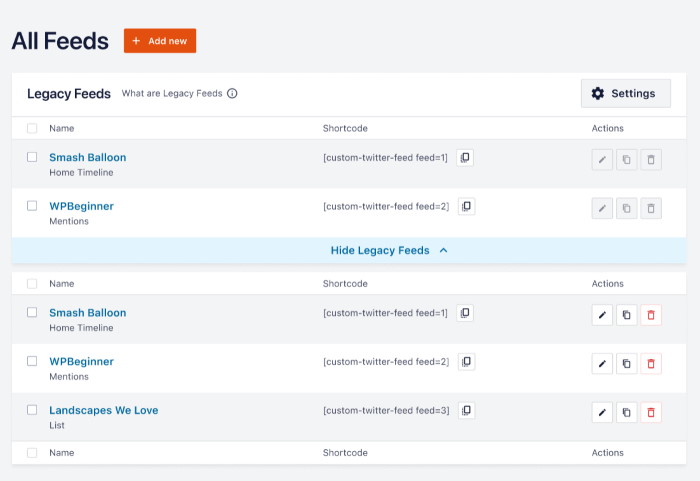
Since legacy feeds are a bit different from the new feeds, you can’t edit them individually. The cool thing is, you can just edit all the legacy feeds at once, just like you used to.
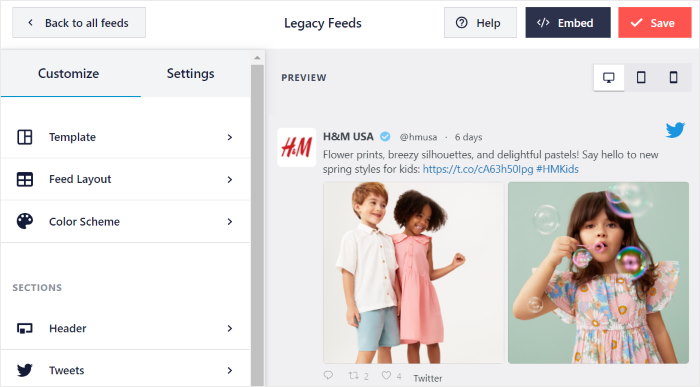
What’s more, you can edit your old X (Twitter) feeds using the new feed customizer with a live preview, so it’s fast and accurate. Plus, all of your feeds will continue showing up on your site like they used to.
As you can see, our X (Twitter) Feed 2 update makes sure you can switch to the new version and continue working right away.
To learn more about this update, just check out our X (Twitter) documentation here.
Have any questions? You can reach out to our support team of experts, who are always ready to answer questions and help you out.
And that’s it!
We’re super proud to present our biggest update yet for X (Twitter) Feed Pro.
Releasing this has been a massive milestone for Smash Balloon, and we’re really happy that you’re here with us.
With your support, Smash Balloon has grown this big, and we hope to continue improving our plugins to help your business even more.
If you’re not a Smash Balloon user, you can join our community and check out this massive update right away.
Get your copy of X (Twitter) Feed Pro today.
X (Twitter) Feed Pro is a fantastic tool that can help you show engaging content from X (Twitter) on your website.
You can then boost your X (Twitter) following, convert your visitors, and get more sales to grow your business.
What’s more, Smash Balloon also has the best social media feed plugins for Facebook, Instagram, and YouTube.
With the All Access Bundle, you can get ALL the Smash Balloon plugins, along with Social Wall Pro, at a deep discount.
Want to see if Smash Balloon is right for you?
There’s a 14-day 100% money-back guarantee with no questions asked. Just give Smash Balloon a try and see for yourself,
We’ve got even more updates and fantastic new features planned in the future so remember to keep an eye out.
You can follow us on Facebook and X (Twitter) to keep up with the latest updates.
Finally, a massive thank you for supporting Smash Balloon and X (Twitter) Feed Pro.
With your support, we’ve worked hard to make sure Smash Balloon has the best social media feed plugins.
In the future, we hope to help your business grow even more.