Social Wall
  Feed Analytics


You’ve got a feed live on your homepage. Posts are going up, the layout looks good, everything seems fine.
But every day it runs, you have no real way of knowing if it’s doing anything.
Are people clicking through? Which post is actually pulling people back to your Instagram, and which ones aren’t earning any clicks?
Feed Analytics has always come with the All Access Bundle. Now it also comes with every Elite license, on any single Smash Balloon plugin, at no extra cost.
See What’s Actually Working Across Your Feed
If you’ve never opened it before, here’s the quick picture. Feed Analytics lives right inside your Smash Balloon plugin, no extra login, no separate app to juggle.
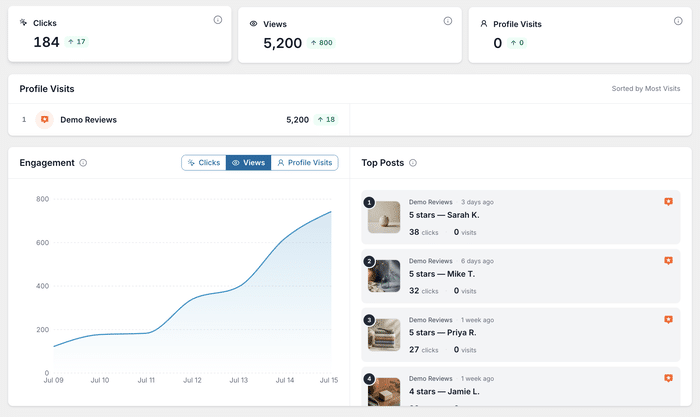
Once it’s active, you’ll find a clean dashboard with a card for Clicks, a card for Views, and a card for Profile Visits, each one showing a little arrow so you can tell at a glance whether things are trending up or down.
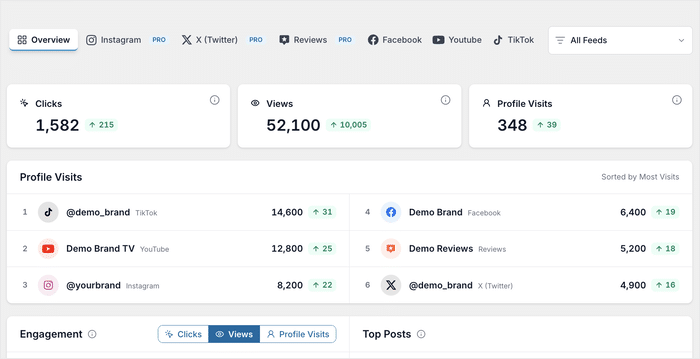
Every feed you run gets its own tab, whether it’s Instagram, Facebook, YouTube, TikTok, X (Twitter), or your Reviews Feed, so everything you’re tracking lives in one place instead of scattered across separate screens.
Views and Clicks for Every Feed
Every feed you build gets tracked on its own, so you’re never left wondering how it’s doing compared to everything else on your site.
A photography studio running Instagram Feed Pro Elite on its homepage can see exactly how many visitors scrolled past versus how many stopped to click into a photo.
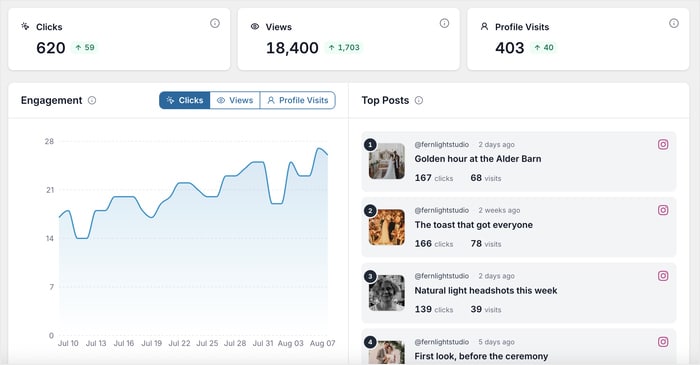
And you don’t need huge traffic for this to matter. A weekend farmers market running that same setup, with a fraction of the visitors, can watch those numbers climb week over week and still find the data genuinely useful.
Watch Your Engagement Trend Over Time
A single number tells you where you stand today, but not whether you’re actually improving.
Switch to the Clicks, Views, or Profile Visits trend and watch your numbers over time, so you can tell if last week’s new post genuinely pulled in more attention or if it was just a one-time fluke.
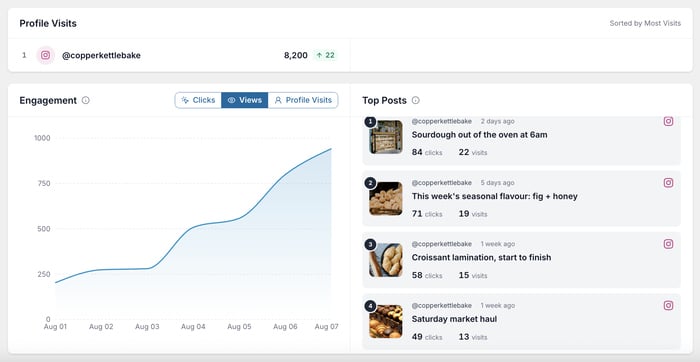
A neighborhood bakery switches to the Views trend and notices a real, repeatable spike every time it posts a new seasonal flavor. Instead of guessing what to post next, it builds its whole content schedule around what the numbers prove actually works.
Your Top Performing Posts
No more guessing which posts deserve to stay pinned or featured. Feed Analytics ranks everything by clicks, so you can see exactly what’s earning attention and what’s just taking up space.
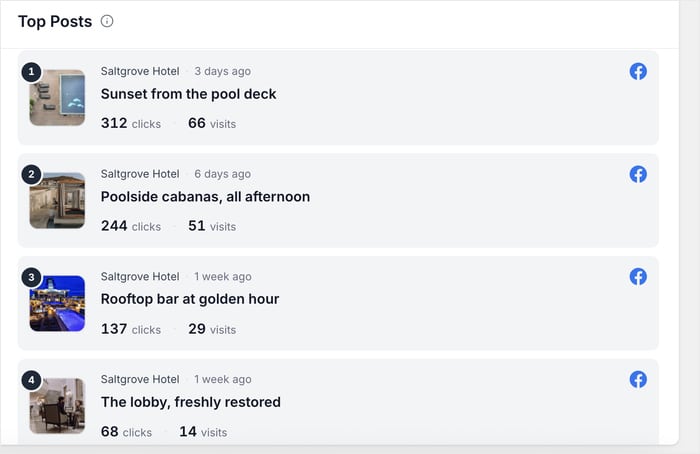
A boutique hotel running Facebook Feed Pro Elite might discover its pool deck photos are outperforming its lobby shots by a wide margin, good to know before the next content calendar gets planned.
Reviews show up in that same ranking too. A skincare brand running Reviews Feed Pro Elite can see exactly which Google review is earning the most clicks on its product pages, and lean on that one in its next round of marketing instead of guessing which testimonial actually builds trust.
Profile Visit Tracking
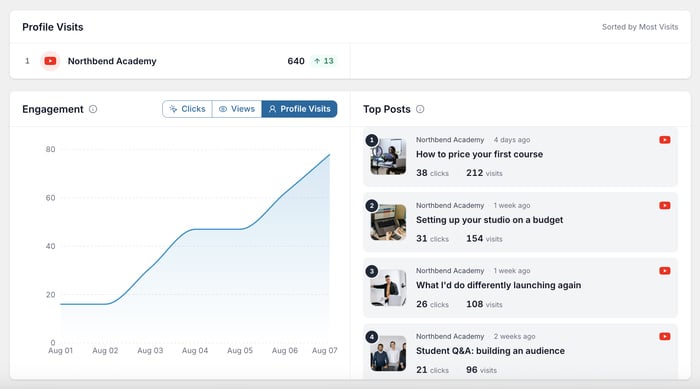
Clicks on the feed are only part of the story. Feed Analytics also tracks how often a feed actually sends someone over to your real social profile.
For an online course creator running YouTube Feed Pro Elite, this is the number that shows whether the feed is actually growing subscribers, or whether all those views never turn into anyone visiting the channel.
Filter by Feed or Time Range
You’re not stuck staring at one big running total either. Filter the dashboard down to a single feed, or zoom into any time range you want, anywhere from the last seven days to all time.
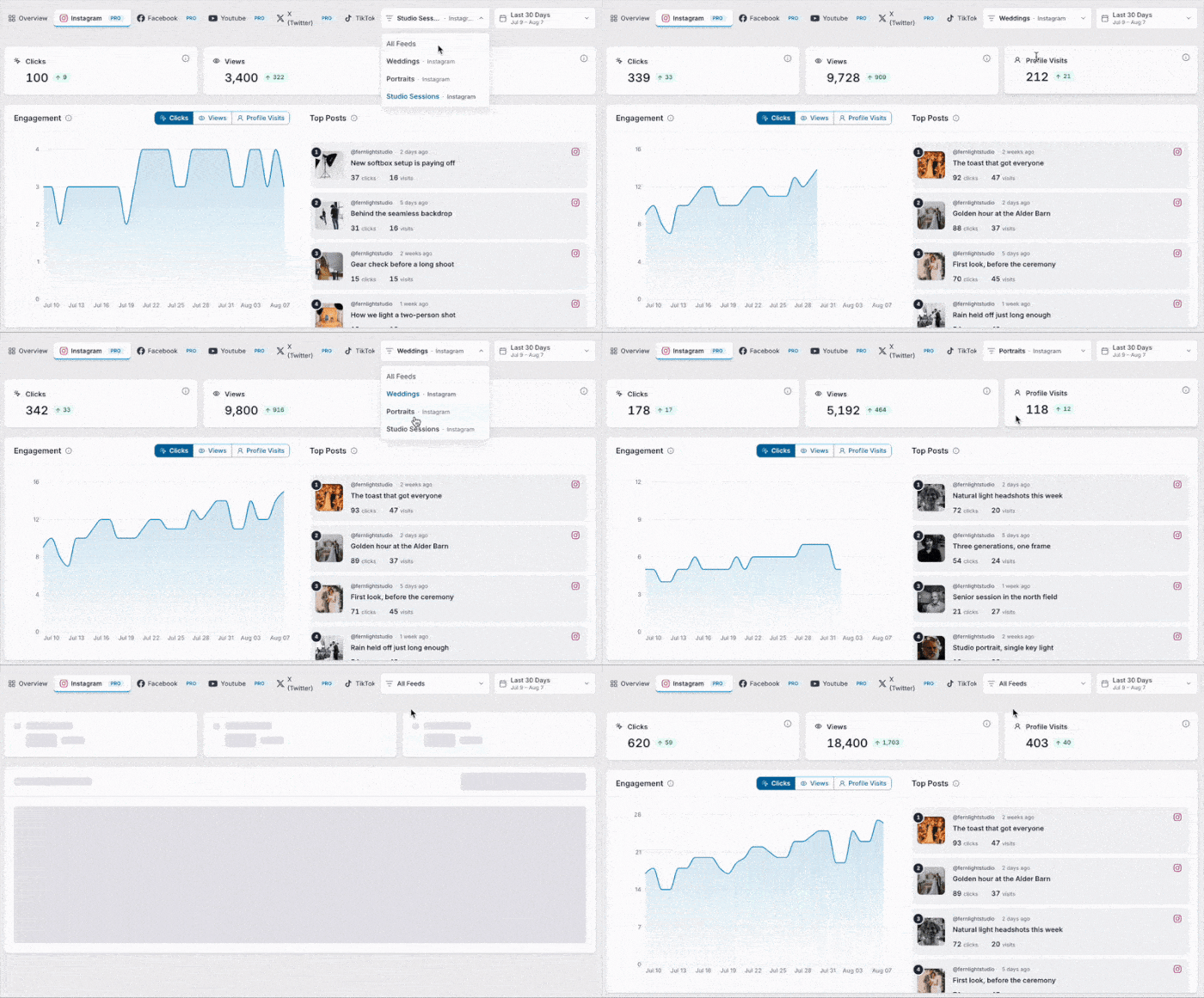
A seasonal business like a holiday pop-up shop running Instagram Feed Pro Elite can pull up performance for just the weeks it was actually open, instead of sifting through a full year to find the part that matters.
Numbers You Can Actually Trust
Every click and view you see comes from a real visitor, not you. Your own admin activity while you’re testing or previewing the feed never gets counted, so when a small business checks its numbers for the first time, there’s no second-guessing whether that spike is real traffic or just their own clicks while setting things up.
See exactly which posts are actually working
Elite gets you Feed Analytics on any single Smash Balloon plugin you’re already running. Try it with our 14-day money back guarantee.
See My Feed’s Real NumbersHow to Get Feed Analytics on an Elite License
Good news: this is available on any Elite license, on any Smash Balloon plugin, right alongside the All Access Bundle as always, and it only takes about five minutes to set up.
1. Log into your Smash Balloon account and go to your Downloads page.
2. Your existing Elite license card now shows Feed Analytics as an included download.
The card title updates to reflect it, so “Instagram Feed Pro” becomes “Instagram Feed Pro + Feed Analytics,” with its own Download Plugin link and its own activation count tracked separately from your main plugin.
3. Click the Feed Analytics download link to save the plugin file, then go to your WordPress dashboard and install it the same way you installed your original Smash Balloon plugin: Plugins » Add New » Upload Plugin.
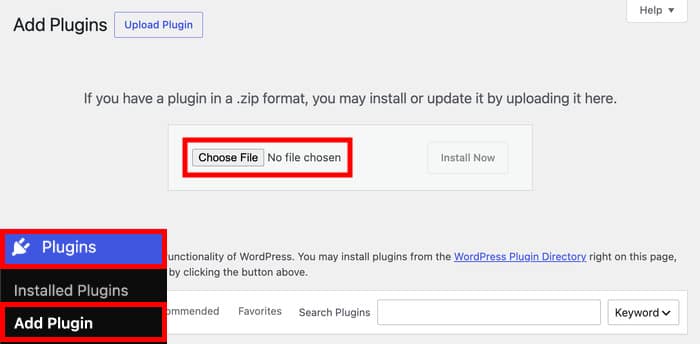
4. Once it’s installed and activated, you’ll be prompted to enter a license key. Use the same key already tied to your Elite plan. It activates as its own license automatically, with its own activation pool, so it doesn’t draw from your main plugin’s site limit.
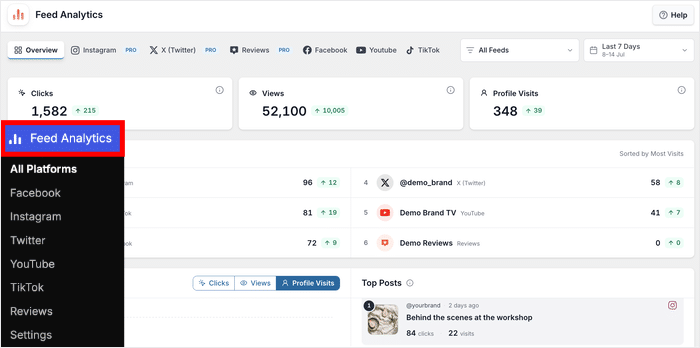
5. Now, a new Feed Analytics tab appears in your plugin’s dashboard. The first time you open it, you’ll see the full dashboard layout with tabs across the top for Overview and each connected platform.
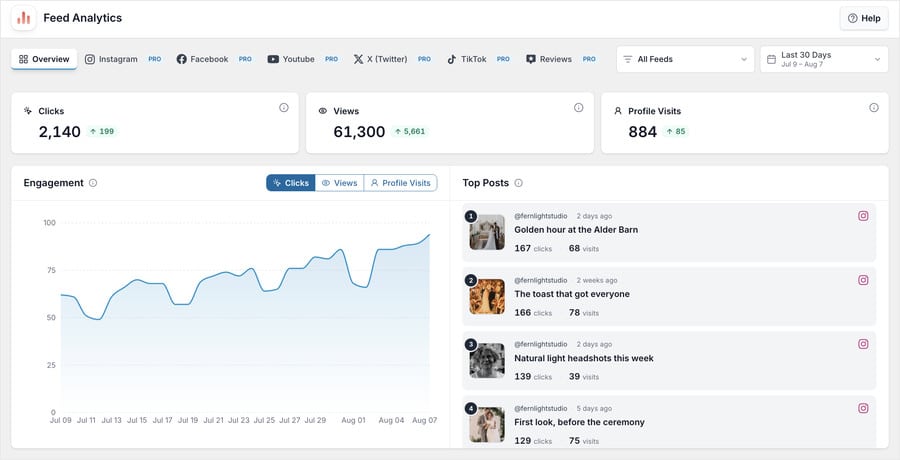
6. Give it a few hours, then come back to see your first real views and clicks. Use the filter controls at the top of the dashboard to narrow to a specific feed or a specific date range, and scroll down to the Top Performing Posts section to see which posts are earning the most clicks. That list updates as more data comes in.
Running Multiple Smash Balloon Plugins? The All Access Bundle Might Pay for Itself
If you’re only running one Smash Balloon plugin, an Elite license already gets you Feed Analytics.
But if you’ve got Elite running on two or more plugins already, it’s worth doing a little quick math.
Two Elite licenses land you right around the same price as the All Access Bundle. For that same money, the bundle hands you unlimited websites instead of 10 per plugin, plus every Smash Balloon plugin there is: Instagram Feed Pro, Facebook Feed Pro, X (Twitter) Feed Pro, YouTube Feed Pro, TikTok Feeds Pro, and Reviews Feed Pro, plus Social Wall and Feed Analytics.
In other words, you could be covering every plugin for roughly what you’re already paying for two.
Take a marketing agency running Elite licenses on Instagram Feed Pro and Facebook Feed Pro for one client site.
Switching those two licenses to an All Access Bundle costs about the same, and it immediately opens up YouTube, TikTok, X (Twitter), and Reviews Feed for the next client site, no separate purchase needed when that next project comes in.
See What’s Included in the All Access Bundle
| Plan | Feed Analytics Included |
|---|---|
| Free | No |
| Basic | No |
| Plus | No |
| Elite | Yes |
| All Access Bundle | Yes, as before |
Frequently Asked Questions
Does this replace the All Access Bundle?
Not at all. The All Access Bundle still gives you every Smash Balloon plugin on unlimited sites for one price, Feed Analytics included. This update simply adds another way in: an Elite license now gets you Feed Analytics too, on whichever single plugin you’re running.
What about Basic or Plus licenses?
Feed Analytics comes with Elite and the All Access Bundle. If you’re on Basic or Plus, upgrading to Elite gets you Feed Analytics right away.
Is a new license key needed?
Nope, you can use the same license key you already have tied to your Elite plan. Nothing new to buy or type in.
What if Elite is running on more than one plugin already?
Feed Analytics activates separately for each Elite license you have. So if you’ve got Elite running on two different plugins, each one connects to its own Feed Analytics instance.
Start Tracking Your Feed Performance Today
Feed Analytics is built to answer exactly that question: is this feed actually working? Up until now, getting it meant picking up the All Access Bundle. Now it comes with any Elite license too, so you can get the same data on just the plugin you’re already using.
Here’s where to start:
- Log in and check whether Feed Analytics is already listed under your Elite license downloads
- Install and activate it, then give it a day to start collecting real data
- Check your Top Performing Posts before planning the next round of content
Stop guessing which feed is actually driving results
Upgrade to Elite and Feed Analytics comes included on any plugin you’re already running. Backed by our 14-day money back guarantee.
Get Elite and Start TrackingOn Basic or Plus? See what you get when you upgrade to Elite.
New to Smash Balloon? Any Elite license includes Feed Analytics right from the start.
See If Feed Analytics Is Already on Your Account