Social Wall
  Feed Analytics

You ran PageSpeed Insights. The report lit up red. And the culprit? Your social media embeds, flagged as the thing dragging down your scores. Now every article you find says the same thing: just delete it.
I’ve talked to a lot of site owners stuck right here. They love their feed. It’s social proof that helps them convert. But they’re scared it’s the reason their site feels slow, and they would rather not rip it out.
So I ran the tests myself. One WordPress site, raw embeds versus a plugin feed, measured with PageSpeed Insights, Chrome DevTools, and Pingdom.
The numbers surprised even me. In one run, swapping the embed cut page weight by nearly 90% and dropped blocking time from 4,510 ms to zero.
I’ll show you why your feed got flagged, what it costs, and how to keep it while your Core Web Vitals pass. There’s a hard way and an easy way, and I’ll cover both.
- Quick Answer: Do You Have to Delete Your Social Feed?
- Why PageSpeed Flagged Your Feed (It's Not What You Think)
- Why "Just Delete It" Is the Wrong Fix
- What Your Social Feed Actually Costs (We Measured It)
- The Hard Way vs. the Easy Way to Fix This
- How Smash Balloon Feeds Protect Each Metric
- Does This Work for Other Smash Balloon Feeds Too? (Yes — Same Fix)
- Keep Your Feed. Pass Your Core Web Vitals. Start Now.
Quick Answer: Do You Have to Delete Your Social Feed?
No. You don’t have to delete anything.
The feed was never the real problem. The problem is the raw embed you pasted in. That third-party iframe or oEmbed loads a whole player before anyone clicks a thing.
Swap that raw embed for a WordPress-native feed. It lazy-loads images and defers the player so your page loads faster even with your embeds working perfectly.
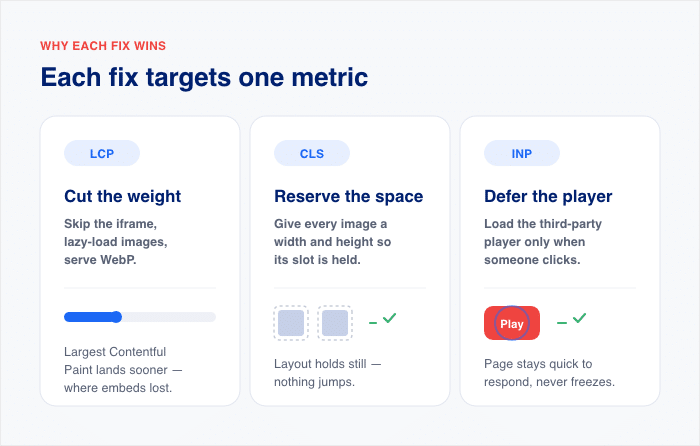
Here’s what each fix protects:
- Skip the iframe, lazy-load images, serve WebP. This is the measured win. It cuts page weight and speeds up your Largest Contentful Paint, the exact spot where the raw embeds lost.
- Reserve space for each image. This holds your layout still and keeps Cumulative Layout Shift clean.
- Defer the third-party player until someone clicks. This keeps the browser from getting bogged down, so the page stays quick to respond and doesn’t freeze up while it loads.
There’s a hard way and an easy way to pull this off. We’ll show both. The easy way wins.
Why PageSpeed Flagged Your Feed (It’s Not What You Think)
Why did PageSpeed flag your social feed specifically? Because you didn’t just add a feed. You added a whole media player.
Here’s the part most people miss. That Instagram oEmbed or YouTube embed doesn’t quietly show a photo. It pulls the platform’s full player, scripts, and iframe the moment your page loads.
Not when someone clicks. Before anyone does anything.
So the browser stops building your page and goes to fetch Instagram’s or YouTube’s code first. That fetch is heavy. And it happens at the worst possible time.
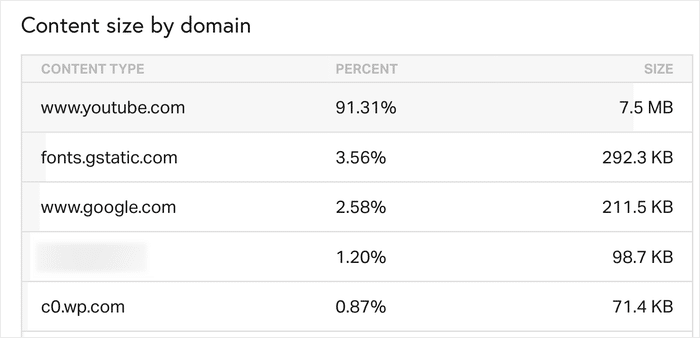
In my own Pingdom test on a WordPress site, nine raw YouTube embeds pulled about 7.5 MB of player code before anyone pressed play.
That was roughly 92% of the page weight. Just players sitting there, loading.
That’s what moves your Largest Contentful Paint, which is just how fast your main content loads. The player elbows in front of your real content and makes your visitor wait.
Now picture a page with more than one embed. Each one repeats the whole thing.
All that script also ties up the main thread, the single lane your browser uses to respond to clicks and taps. When it’s jammed, two more things suffer:
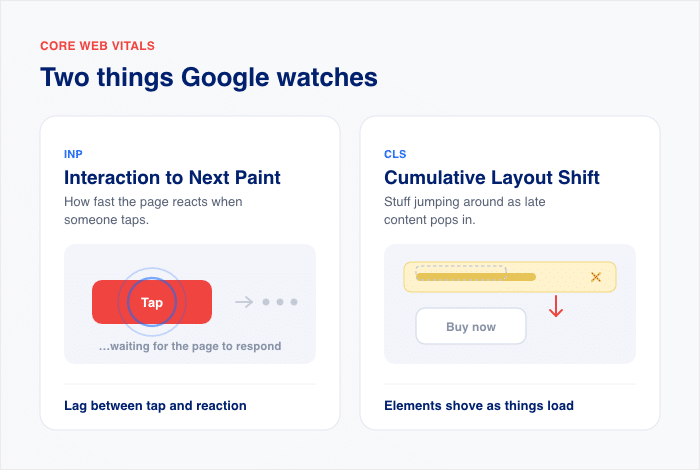
- Your Interaction to Next Paint, which is how fast the page reacts when someone taps.
- Your Cumulative Layout Shift, which is stuff jumping around as late content pops in.
So PageSpeed isn’t wrong. It sees a slow page. It just points at “the feed” when the real weight is the third-party player bolted to it.
The feed is the part you want. The player load is the part you don’t.
Why “Just Delete It” Is the Wrong Fix
Here’s the half that’s right. Raw embeds really are slow. My own test proved it, and I’ll show you the numbers below.
Think about what your feed does for you. It’s social proof. It shows real people using your product, real reviews, real posts. That builds trust, and trust drives sales.

Deleting it to pass a speed test is a bad trade. You’d win a green score and lose the thing that helps you convert.
So the real choice was never “keep it” versus “delete it.” That’s a false pick.
The real choice is this:
- A raw embed pastes in the platform’s heavy player and drags your metrics down.
- A native plugin feed shows the same posts but lazy-loads images and defers the player.
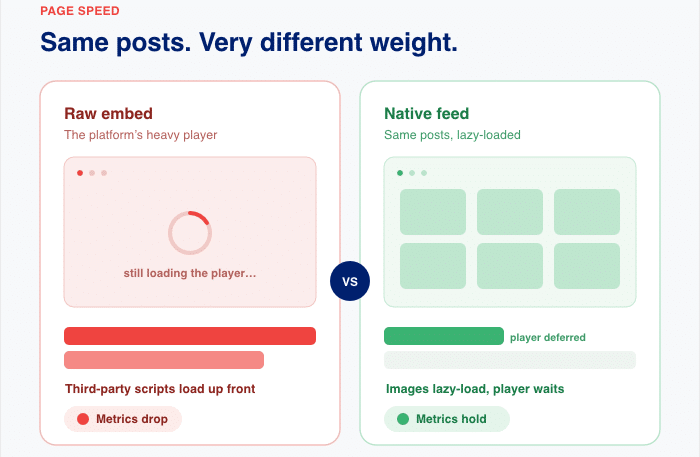
Same feed. Same social proof. Very different speed that gives your visitors a better experience.
Keep reading. Every fix from here builds on that one swap.
What Your Social Feed Actually Costs (We Measured It)
You’ve seen the theory. Now here are the numbers.
I ran a real test on a public WordPress site with raw embeds on one version, a plugin feed on the other. I measured with PageSpeed Insights, Chrome DevTools, and Pingdom.
Here’s what nine raw YouTube embeds did to that page and what the plugin feed changed:
| What I measured | Raw embeds | Plugin feed |
|---|---|---|
| YouTube code loaded | 8.8 MB (92% of page weight) | 457 KB (down ~95%) |
| Total Blocking Time | 4,510ms | 0ms |
| Mobile Speed Index | 15.1s | 4.9s |
| Mobile PageSpeed score | 49 | 72 |
| Desktop PageSpeed score | 52 | 99 |
Look at that first row. Nearly 8.8 MB of YouTube player code loaded before anyone pressed play.
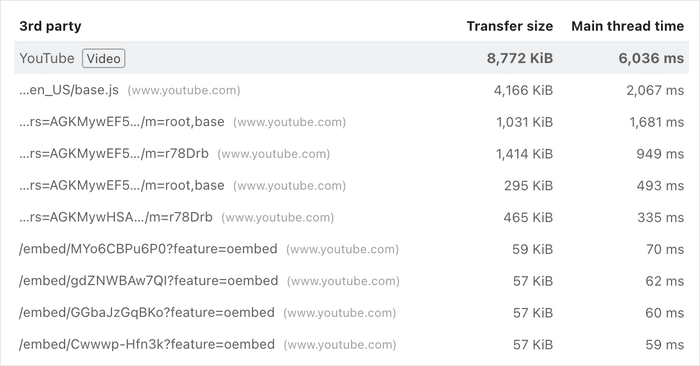
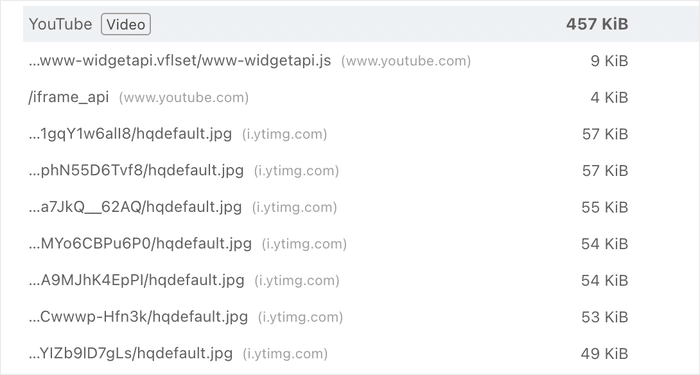
That was about 92% of the whole page. The plugin feed cut it by roughly 95%, down to 457 KB.
Total Blocking Time went from 4,510 ms to zero. That’s the time your page sits frozen, unable to respond to a tap. It’s tied straight to your Interaction to Next Paint.
Then I checked the whole page in Pingdom to confirm. It agreed. The raw embed page was 8.4 MB across 176 requests.
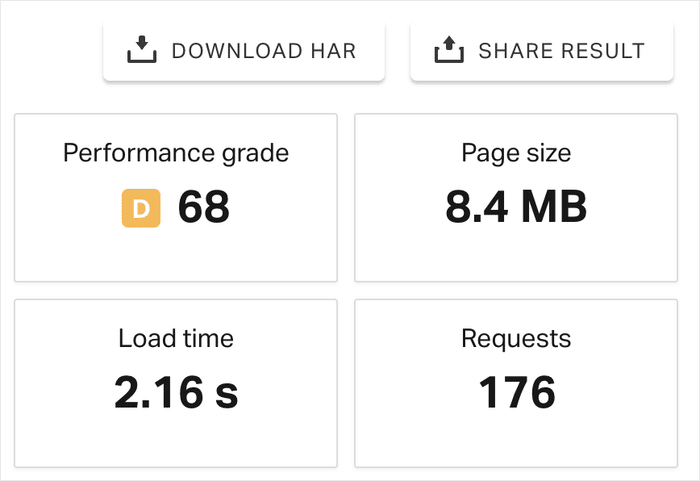
In comparison, the WordPress plugin feed page was 1.1 MB across 42 requests.
Two separate tools, tested on the same page, which came to the same results.
Instagram told the same story on a smaller scale. A working iframe embed hit a mobile Largest Contentful Paint of 3.2s. That fails.
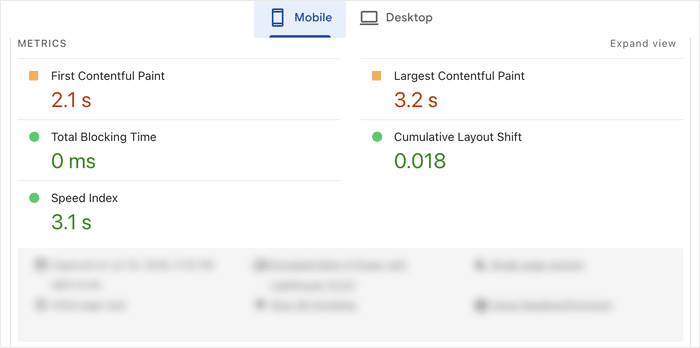
But the same number of embedded Instagram posts in a plugin feed came in at 2.3s.
Full disclosure, so you can trust the rest. A couple of things here need a caveat.
- Some raw embeds showed a lower video LCP in the lab. That was an artifact. The browser used for the test couldn’t render the thumbnail. For actual visitors, the LCP would be higher.
- The Instagram LCP figure is a single test run, so treat it as useful evidence, not a final judgment.
- This is one test site. Your numbers will shift with your theme, your host, and your content.
I’m telling you the soft spots on purpose. The point isn’t one perfect number. It’s the size of the gap, and two tools agreeing on it.
Want to check your own site? Run PageSpeed Insights, open Chrome DevTools, and test the page in Pingdom. The same three tools I used. You can re-run every number above.
The Hard Way vs. the Easy Way to Fix This
So you want to keep the feed and pass the test. There are two ways to get there.
One is manual. You do every fix by hand. The other is a plugin that does those fixes for you.
Both work. But they are not the same amount of work. Let me show you what each one really takes.
The Manual Way: Hand-Code It Yourself
Want to fix this yourself, by hand? You can. It’s just a lot of code, and it never really ends.
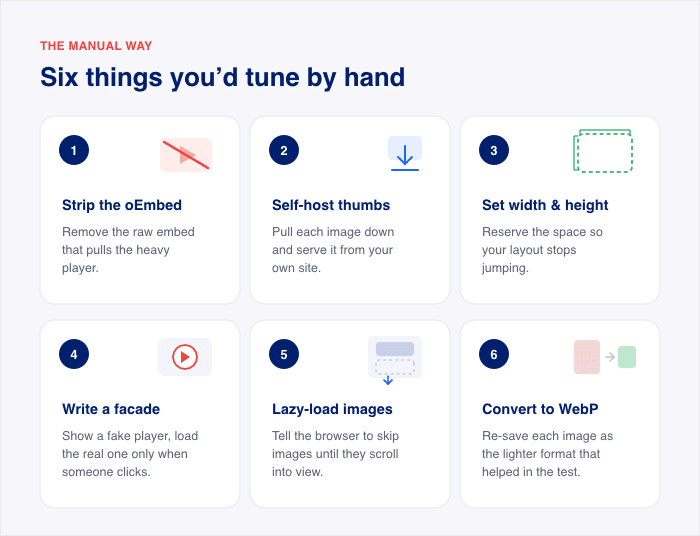
Here’s the short version of what “doing it yourself” means. You’d need to work through each of these, one at a time:
- Strip out the oEmbed. Remove the raw embed that pulls the heavy player.
- Self-host the thumbnails. Pull each image down and serve it from your own site.
- Add width and height to every image. This reserves the space so your layout stops jumping.
- Write a facade. Show a fake player image, and load the real YouTube player only when someone clicks.
- Lazy-load the images. Tell the browser to skip images until they scroll into view.
- Convert each image to WebP by hand. This is the lighter format that helped in my test.
That’s the build. Now here’s the part nobody warns you about.
You have to maintain all of it. Every time Instagram or YouTube changes its markup, your code can break. Then you’re back in there, fixing it again.
It’s valid work. It’s honest work. But you’ll be babysitting it forever.
The Easy Way: A WordPress-Native Feed Plugin
Here’s the easier path. Use a WordPress-native feed plugin like Smash Balloon, and it does every step above for you.
No coding needed. The plugin strips the embed, self-hosts and lazy-loads the images, reserves the space, serves WebP, and defers the player until a click. All of it, on its own.
That’s the whole manual list, handled automatically. Even if you’re not a tech wizard, you can set it up.
And you’re not the first one to reach for it. Smash Balloon has more than 1.75 million active users, with a rating of 4.9 stars out of 5.
That kind of adoption tells you something. A lot of site owners already picked the easy way, and it held up. Next, let me show you exactly how it protects each metric.
How Smash Balloon Feeds Protect Each Metric
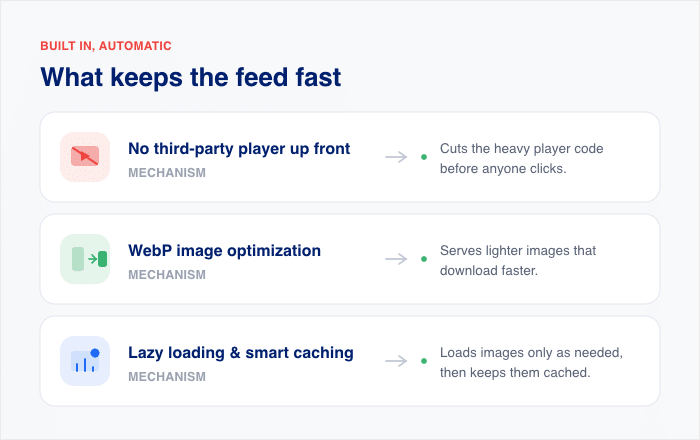
So how does one plugin protect all three metrics at once? It goes after the exact thing that hurt them: the weight loading up front.
Each fix maps to a metric. Here’s the plain version.
| Mechanism | What it does |
|---|---|
| No third-party player or iframe loads up front | Cuts the heavy player code before anyone clicks |
| WebP image optimization | Serves lighter images that download faster |
| Lazy loading and smart caching | Loads images only as needed, then keeps them cached |
Look at the first row. That one change is the whole story from my test.
Nine raw YouTube embeds pulled about 8.8 MB of player code before anyone pressed play.
The plugin feed skipped that and showed thumbnails instead. YouTube’s footprint dropped roughly 95%, down to 457 KB.
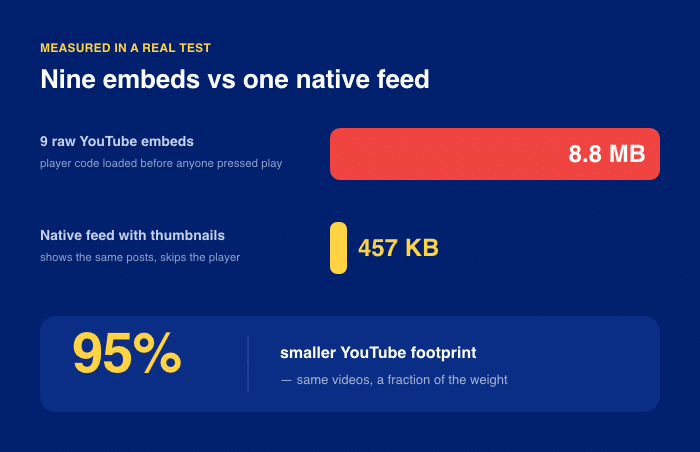
Less to load means your main content wins the race. That’s your Largest Contentful Paint passing.
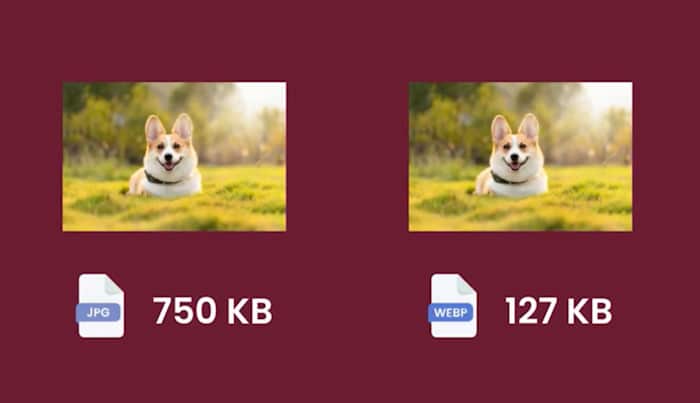
The second part is the images themselves. Smash Balloon Instagram Feed Pro serves your photos in WebP, a lighter format. Lighter images paint faster, and again, that helps your LCP.
The third part is timing and reuse. Images load as a visitor scrolls, not all at once. Cached images then load fast on the next visit.
This is why the lab numbers moved the way they did. The feed didn’t get lighter by magic. It got lighter because the player never loaded until someone asked for it.
Same posts your visitors see. Same social proof you built. Far less weight behind it.
Does This Work for Other Smash Balloon Feeds Too? (Yes — Same Fix)
Does this only work for Instagram? No. It’s the same fix for every Smash Balloon feed.
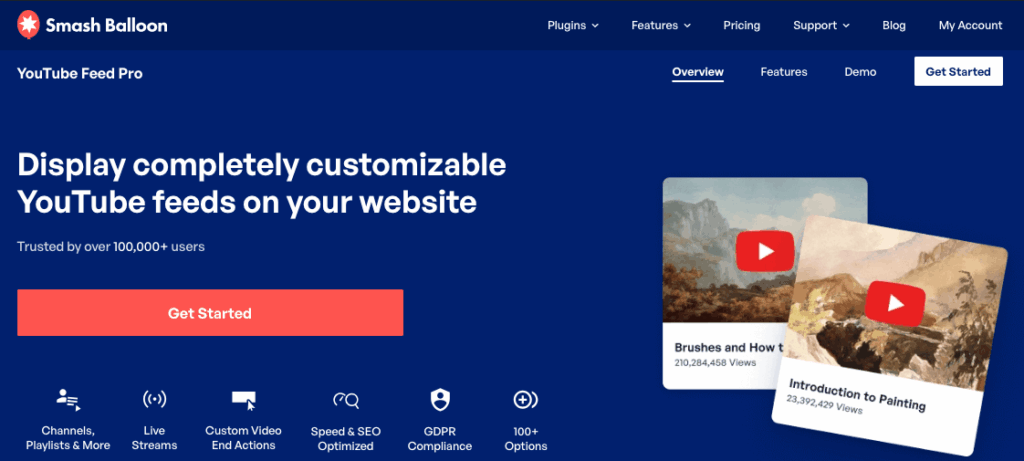
For YouTube, the sibling plugin is YouTube Feed Pro. Same job, same result: thumbnails first, player on demand.
The root cause never changes. A raw embed loads the platform’s heavy player up front.
On the other hand, YouTube Feed Pro shows thumbnails and defers that player until someone clicks.
Remember that YouTube is the worst offender of the bunch from the tests.
Nine raw YouTube embeds pulled about 8.8 MB of player code before anyone pressed play. Total Blocking Time sat at 4,510 ms.
Using YouTube Feed Pro flipped that. It showed the same videos as thumbnails and loaded the player only on click. YouTube’s footprint dropped roughly 95%, and Total Blocking Time fell to 0 ms.
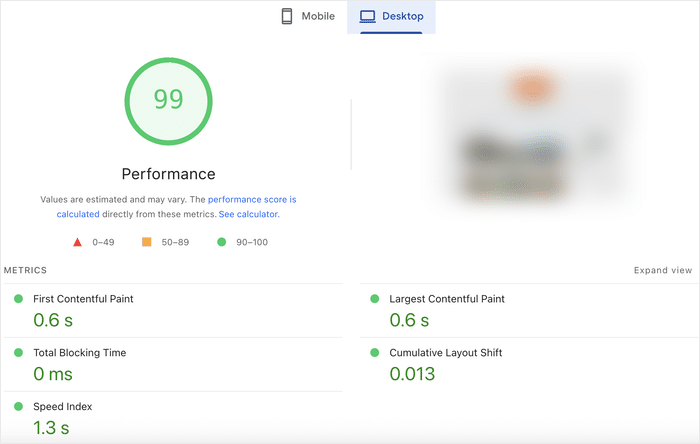
And it doesn’t stop there. All of Smash Balloon’s feed plugins are built with speed and fast loading in mind. That covers Facebook, Instagram, TikTok, YouTube, and X (formerly Twitter).
Keep Your Feed and Pass Core Web Vitals
The All Access Bundle covers Instagram, Facebook, YouTube, TikTok, and X, each one loading thumbnails first and deferring the player until someone clicks.
Speed Up My FeedsFrequently Asked Questions
If I delete the embed, do I lose the feed on my page?
No, deleting the embed does not lose the feed on your page. You swap it for a plugin feed block or shortcode using a tool like Smash Balloon. Same posts, same spot, just a lot lighter.
Won’t adding a plugin just slow my site down more?
Not all plugins slow your site down, so adding the right one won’t drag it further. A raw embed pulls the platform’s full player up front. A plugin feed lazy-loads images and defers that player, which is why my test dropped page weight by nearly 87%.
How do I know if my feed is really the problem?
You can check whether your feed is the problem in a few minutes. Run PageSpeed Insights and look at two things: the LCP element and the biggest network transfers. If the flagged element is your embed, or the largest bytes are player scripts, that is your culprit.
Do I need to touch any code to fix the speed of my social feeds?
No, you don’t need to touch any code. You install the plugin, connect your account, and paste one block. Even if you’re not a tech wizard, that’s the whole job.
Keep Your Feed. Pass Your Core Web Vitals. Start Now.
Here’s the one thing worth holding onto. Your feed was never the problem. The trouble was the raw embed, loading the platform’s full player before anyone clicked.
Swap that embed for a social feed plugin like Smash Balloon, and watch your site speed improve while your social proof stays right where it belongs.
So there’s no need to delete your feed. Keep it, and let it load the light way instead.
The simplest path is the All Access Bundle. It includes every Smash Balloon feed plugin, so whether you’re on Instagram, YouTube, Facebook, TikTok, or X, you’re covered.
Grab the All Access Bundle, swap your embed, and watch your PageSpeed report turn green.