Social Wall
  Feed Analytics


Your product page has forty reviews on it, averaging 4.8. A shopper scrolling Google sees none of that. Just your page title and two lines of description, same as every other result.
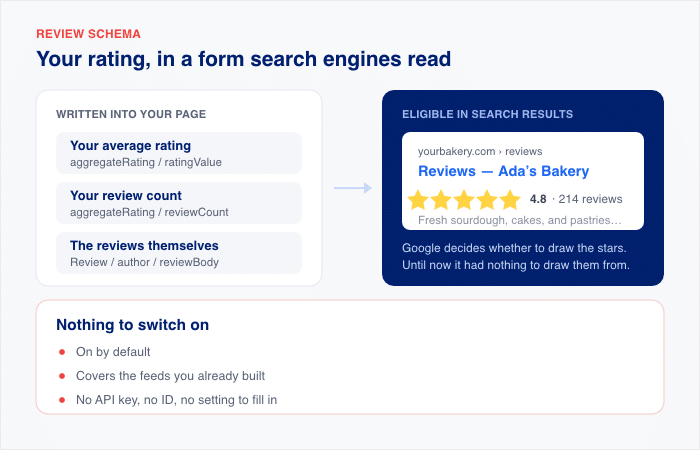
Reviews Feed now writes that rating into your page in a form search engines read. Your average, your review count, and the reviews themselves, in schema.org markup, alongside every feed you display.
That makes your page eligible for star ratings in search results. Google decides whether to draw them, but until now it had nothing to draw them from.
Nothing to switch on. It’s on by default, it covers feeds you already built, and it needs no API key, no ID, and no setting to fill in. And it’s on every plan, including free.
Here’s what you get:
- Star rating eligibility for every page where you display a feed
- Your real average and review count, matching what visitors see on the page
- Correct markup whether you run All in One SEO, another SEO plugin, or none
- Coverage for feeds you’ve already built, the moment you update
- One switch under Settings » Advanced if your theme already handles review schema
Show Google the Rating Your Visitors Already See
Alongside every feed you display, Reviews Feed adds a description of what’s on the page. Your average, how many reviews it came from, and the reviews themselves, each with its author, its text, and its own rating.
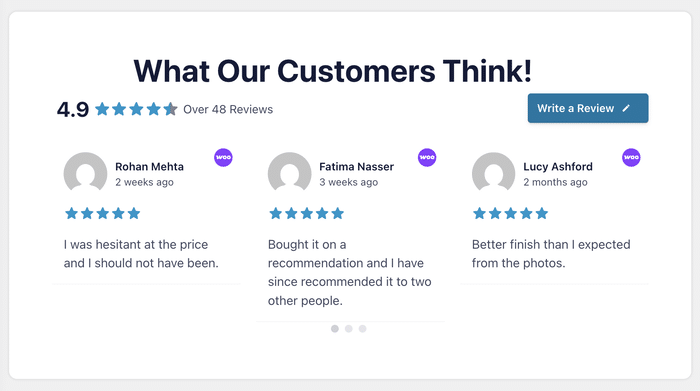
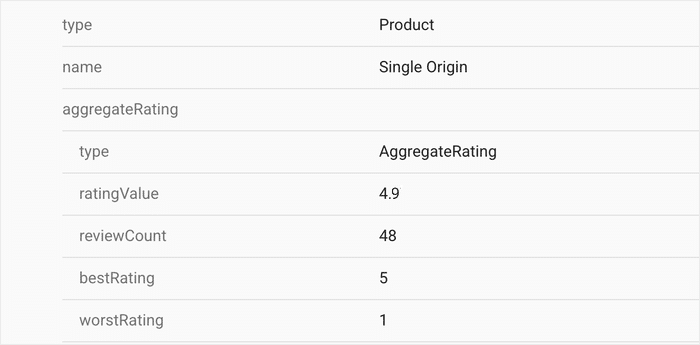
The numbers match what’s on the page. If your feed header reads 4.9 from 48 reviews, that’s what the description says too.
It’s written for search engines rather than for people, so it sits in your page’s code, and a visitor never sees it.
- A kitchenware store puts its WooCommerce reviews on each product page, so a shopper comparing three results sees a rating on the one that’s actually reviewed
- A plugin developer shows EDD reviews on a download page, so the listing carries proof of use before anyone clicks through
- A dropshipper adds AliExpress buyer reviews to a product page, so the reviews that convince visitors now describe the page to Google as well
You collected the reviews and put them on the page. This adds the part you’d otherwise have to write by hand, in a language only search engines read.
What Your Listing Looks Like With Stars on It
A search result without a rating gives someone your page title and two lines of text. A result with one shows a row of stars, your average, and how many people left a review, before they click anything.
That extra line takes up more room on the page, and it carries something a title can’t: proof that other people bought this and said what they thought.
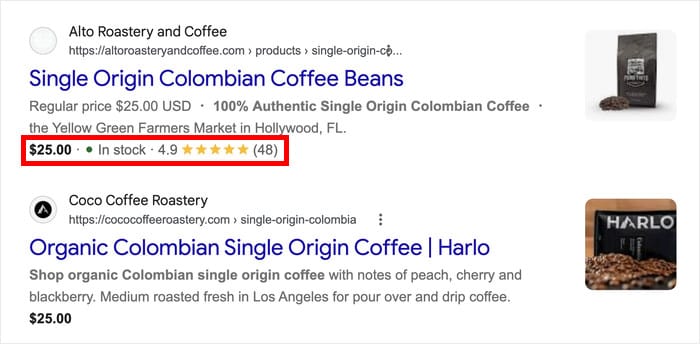
The same reviews, in the same feed, in the same place you put them. What changes is how much of that reaches someone who hasn’t arrived yet.
- A coffee roaster’s subscription page shows its rating in the result, so a first-time buyer has a reason to open that tab first
- A course creator’s landing page carries its review count into search, so someone weighing five options can see which has people behind it
- A furniture shop’s product result shows 4.8 from 260 reviews, so the traffic the page already earns turns into more clicks
Get your product pages describing themselves to Google
The free version already outputs the markup. Reviews Feed Pro adds WooCommerce, Easy Digital Downloads and AliExpress as sources, so your product pages get typed as products. Backed by a 14-day money back guarantee.
Show My Reviews in SearchWhere Star Ratings Are Most Likely to Show
Google decides for itself whether to draw stars on a result. Valid markup makes your page eligible, and eligible is as far as any plugin can take you.
Where it works most reliably is product pages. If your feed pulls from WooCommerce, Easy Digital Downloads, or AliExpress, Reviews Feed describes the page as a product, which is the case Google handles most consistently.
Reviews about a business or a place to stay are described correctly too, as a local business or a property. Google is more cautious with those, because the rating is about you, and it’s sitting on your own site. The markup is right either way, and Google makes the call.
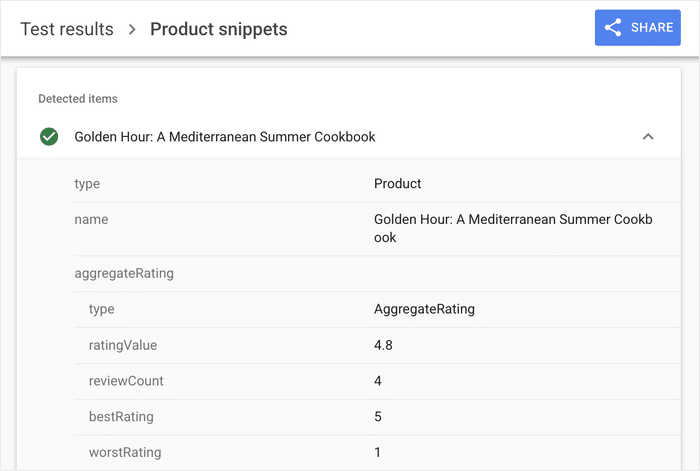
You don’t have to set up any of this. Reviews Feed reads which sources are in your feed and describes the page accordingly.
- Sell bikes through WooCommerce, and your product pages get described as products, the case where stars show up most dependably
- Show EDD reviews on a font download page, and it gets the same treatment, so your most-reviewed files are the ones most likely to stand out
- Display Google reviews for a guesthouse, and the page is described as a local business, valid markup with the display decision left to Google
Run All in One SEO? Your Reviews Join the Schema It Already Builds
All in One SEO already describes your pages to search engines. Reviews Feed hands it the review data, and AIOSEO includes it in the description it was building anyway.
One description of the page, covering everything on it. Not two separate ones making their own claims about the same page.
Running Yoast, Rank Math, or no SEO plugin at all? Reviews Feed handles the whole description on its own, and your reviews are eligible for star ratings just the same.
- Run AIOSEO on a WooCommerce store, and your product reviews go into the same description AIOSEO already writes for the product page
- Add a reviews feed to a page AIOSEO is already handling, and the review data joins what’s there instead of sitting beside it
- Switch SEO plugins later, and Reviews Feed picks the right path on its own, with nothing for you to reconfigure
Nothing to connect. If both plugins are active, Reviews Feed finds AIOSEO and hands its data over.
Your Reviews Are Already Covered, With Nothing to Set Up
Update the plugin, and it’s done. The feeds you built months ago get described from the next page load, without you opening them.
There’s no key to generate, no ID to paste, and no box to tick per feed. It’s on from the moment you update.
If your theme or another plugin already handles review schema for a page, there’s a switch to turn this off.
Open the Reviews Feed » Settings menu and click on Advanced. You can then disable the Rich Snippets (SEO Schema) option.
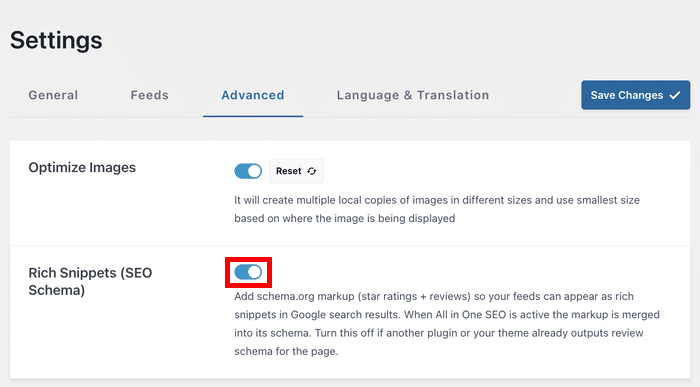
- Update a site with six feeds already live, and all six are described without you touching any of them
- Add a new feed next month, and it’s covered the same way from the day you publish it
- Hand a client site over, and the schema keeps working without anyone maintaining it
The reviews were already doing their job on the page. Now they do it in search too, and you didn’t have to do anything to make that happen.
How to Check Your Reviews Are Ready for Rich Results in Minutes
This works on Reviews Feed free and Pro, on feeds you’ve already built. There’s nothing to switch on first.
Step 1: Update Reviews Feed
From your WordPress dashboard, go to Plugins » Installed Plugins and update Reviews Feed to the latest version.
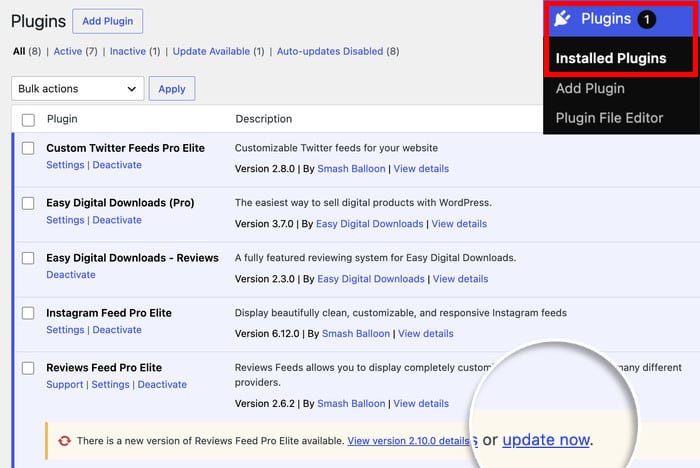
If you’re already on the latest version, then you’re good to go to step 2.
Step 2: Open a page with your feed on it
Any published page or post displaying a reviews feed will do. Product pages are a good one to start with.
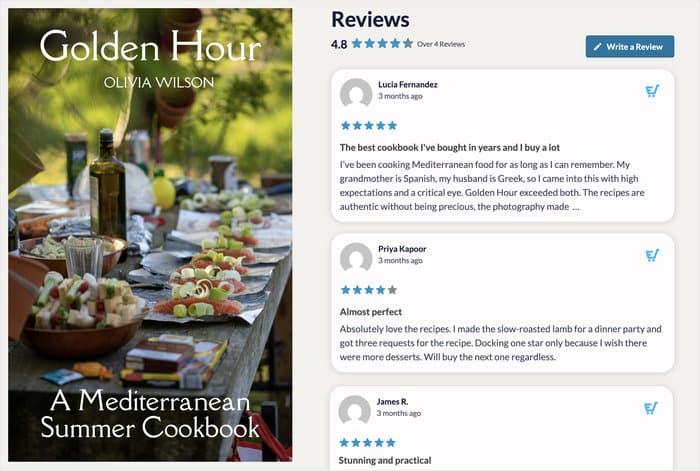
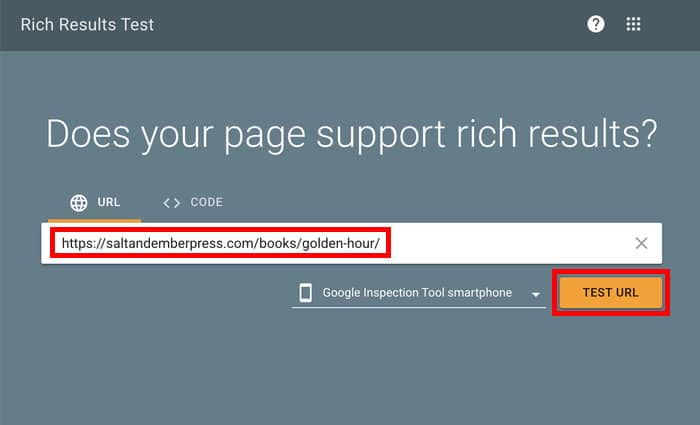
Step 3: Run it through Google’s Rich Results Test
Go to Google’s Rich Results Test, paste the page’s URL, and hit Test URL.
Step 4: Check what it found
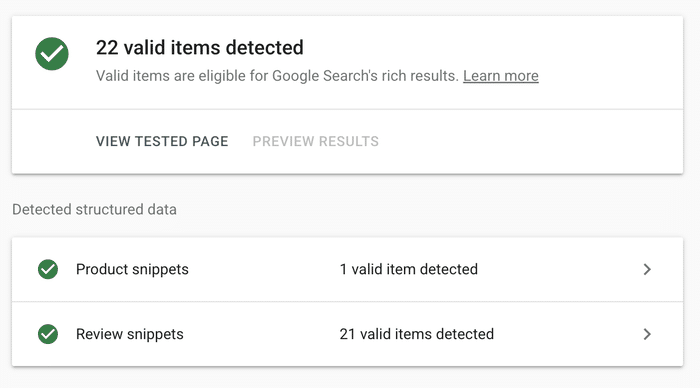
Look for review snippets in the results, with the number of valid items detected beside it. That’s your reviews, read and understood.
Valid items are eligible for Google’s rich results. Your reviews are now in a form Google can act on.
Frequently Asked Questions
Will my reviews definitely show as stars in Google?
Valid markup makes a page eligible, and Google decides which results get stars. Product pages are the most dependable case, so a feed pulling from WooCommerce, Easy Digital Downloads, or AliExpress has the best odds.
Does this work on the free version?
Yes. The rating, the review count, the individual reviews, and the description of what the page is about are all output on every plan, free and Pro alike.
What if I use Yoast or Rank Math?
They work fine. Reviews Feed writes the description itself, and your reviews are eligible just the same. All in One SEO is the one that merges the two into a single description of the page.
Do all my reviews go into the markup?
A sample of up to 20 reviews per feed goes in, which is what search engines need. The rating and review count always carry your true totals, so a feed with 3,000 reviews reports 3,000.
Does it work with the block editor and Elementor?
Yes, and with shortcodes and Review Collections as well. However you’ve placed a feed on a page, post, or sidebar, it’s covered.
Will it add markup to a page with no reviews?
No. If there’s no feed on the page, or the feed has no rating to report, nothing gets added.
Start Showing Your Ratings in Search Today
Right now your reviews only work on people who’ve already found you. The ones still choosing between ten results see a title and two lines of text, the same as every listing around it.
Your average and your review count can travel with your page into search results, so the proof you collected starts working before the click instead of after it.
And you get there without:
- Writing a line of markup yourself
- Installing a separate schema plugin
- Configuring anything per feed
- Keeping it in step with your SEO plugin
It’s on every plan, free and Pro. Update Reviews Feed from your dashboard, and your feeds are described from the next page load.
Not using Reviews Feed yet?
Get Reviews Feed Pro and put your reviews to work on your own site, backed by a 14-day money back guarantee.
Finally, a huge thank you to our community. Rich snippets have been one of the most requested additions to Reviews Feed, and this one came directly from your feedback.
So which page gets your reviews first: a product page, or your homepage? Let us know in the comments.