Social Wall
 Feed Analytics


Your customers just finished their surf lesson, downloaded your template, or unboxed their order. Was it worth it? Would they buy again? They know the answer, and plenty of them would be glad to share it.
The tricky part is asking every buyer, at the right moment, with a link that takes them straight to the right place. That’s a lot to keep up with when you’re also running the store.
Smash Balloon Reviews Feed Pro can take that off your plate. With Review Invitations, every buyer on your Easy Digital Downloads or WooCommerce store gets one friendly email after their order, asking them to review what they bought.
Here’s what that means for your store:
- Every buyer gets asked. The email goes out on its own once an order is completed, so you don’t have to remember who’s next.
- It arrives at a good time. You pick the day, from the same day up to 90 days later, so buyers have had a chance to try what they bought.
- Reviews land where they help most. Send buyers to your product page, a review form on your own site, or your Google, Facebook, Yelp or TripAdvisor listing.
- You stay in control. Reviews from your form wait for your OK before they show up in any feed.
- You can see it working. One screen shows who’s been invited, who’s next, and who has already left a review.
If you’re new here, Reviews Feed Pro is the Smash Balloon plugin that shows your customer reviews from Google, Facebook, Yelp, TripAdvisor, WooCommerce and more right on your WordPress site, no coding needed. Review Invitations is the part that helps you collect new ones, and it’s included with the Elite plan and the All Access Bundle.
Ask Every Buyer for a Review, Automatically
Once it’s on, you don’t have to remember a thing. When a WooCommerce order is marked Completed or an Easy Digital Downloads payment is complete, Review Invitations schedules that buyer’s email and sends it on the day you chose. If an order is refunded or cancelled before then, the email is quietly withdrawn.
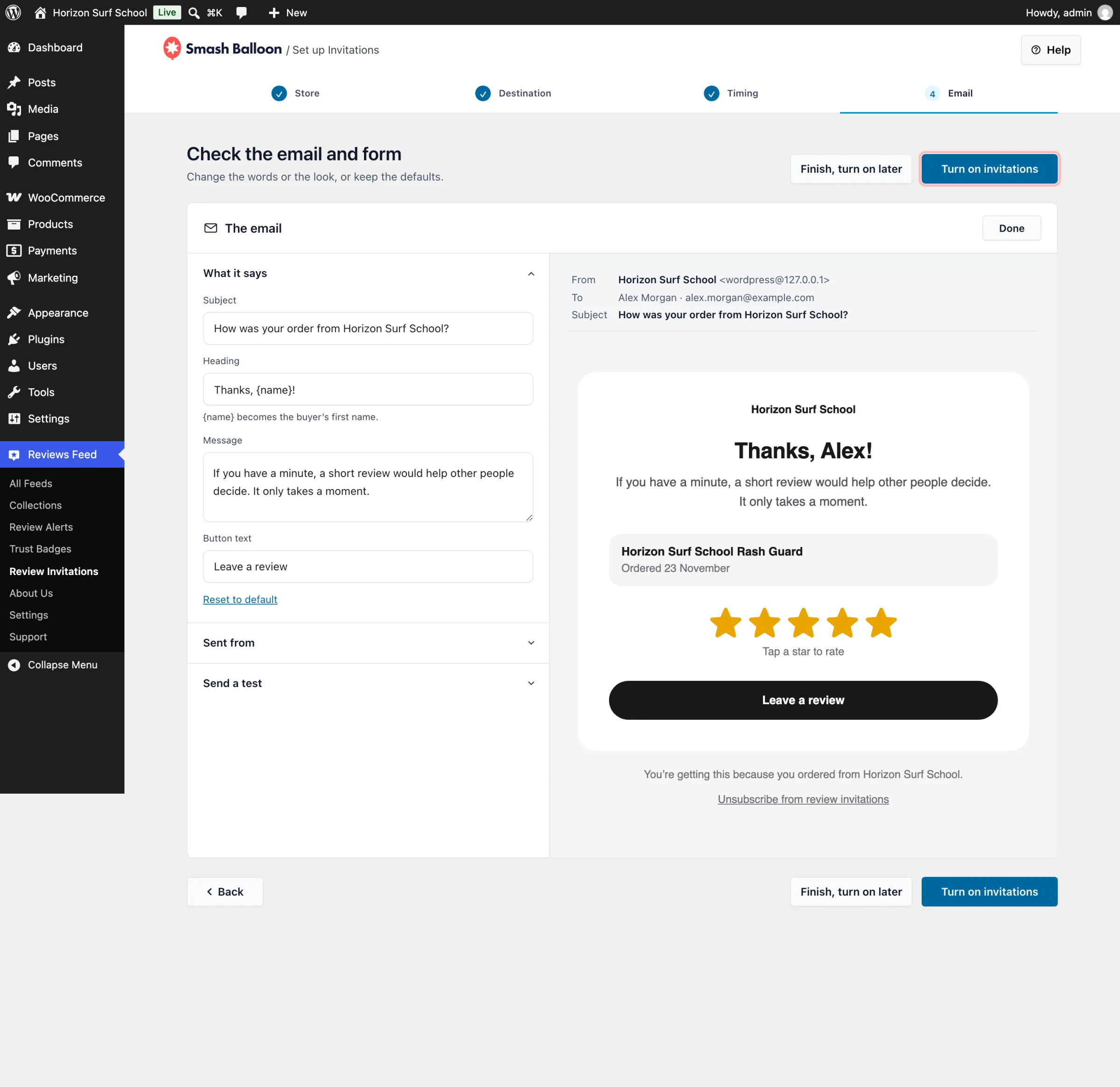
Here’s the email your buyers get. It thanks them by first name, shows what they ordered, and has one clear button, so it’s quick to answer even from a phone. If they bought a few things, each one gets its own link instead. Here’s a single-item order:
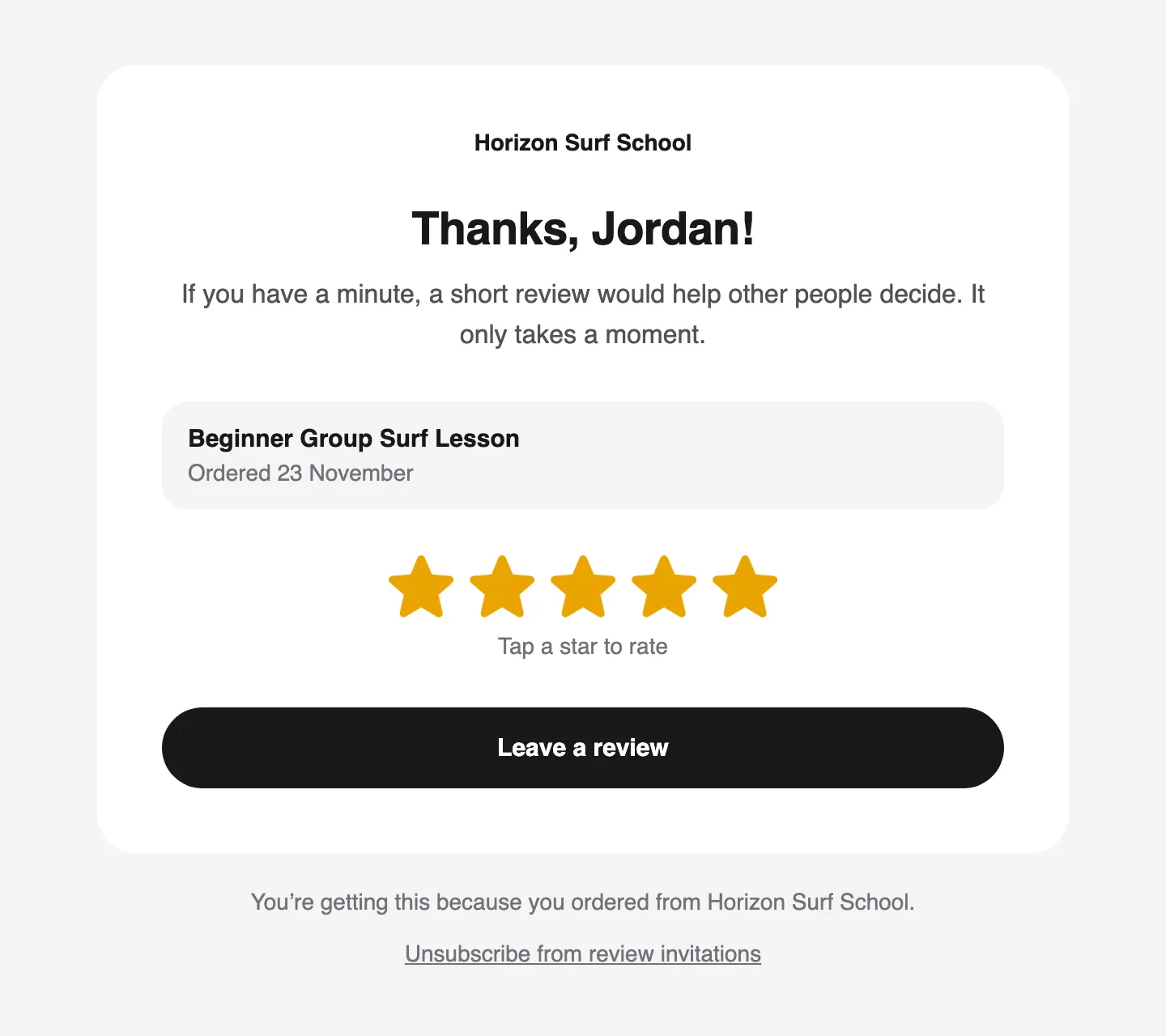
Want it to sound more like you? Change the subject, the heading, the message and the button text, then send yourself a test to see it the way your buyers will.
Send Buyers Where Their Review Helps You Most
A review does the most good in a different place for every business, so you get to choose where each invitation leads:
- Selling products where reviews help the next shopper decide? Send buyers to the product they bought, so their review lands right on its page.
- Point buyers to your own review form when you want reviews you can show anywhere on your site. Every one goes into a review collection you can add to any feed.
- Local customers find you on Google first, so a surf school or a bakery can send buyers straight to its Google listing. Facebook, Yelp and TripAdvisor listings work too.
Your listings come from the sources already in your feeds. So if your Google reviews are showing on your site today, your Google listing is ready to pick.
Collect Reviews on Your Own Site With a Review Form
The review form is a clean, simple page on your own site. It shows buyers what they ordered and asks them to rate it, add a title and write a few lines. There’s no account to create, since the link in their email is all it takes, and their name is already filled in.
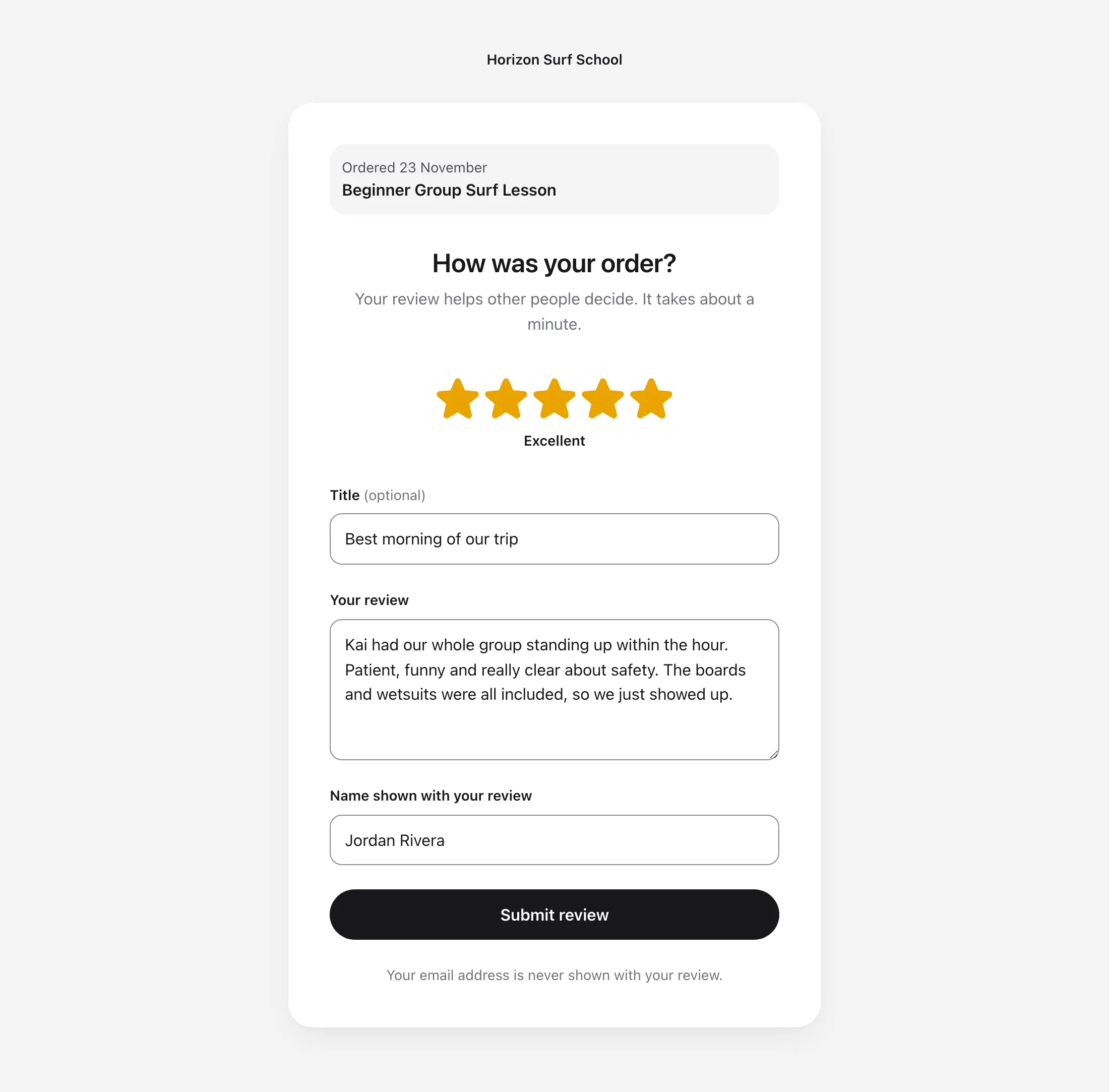
Here’s a nice touch: if a buyer taps a star in the email, the form opens with that rating already picked. Their email address is never shown with their review.
You always get the final say. Reviews from the form don’t go live on their own. Each one waits in its review collection until you approve it, and then it shows up in any Reviews Feed that uses that collection. If you’d rather not check each one by hand, you can set the collection to approve reviews automatically, for example every 5-star review.
Ready to start collecting more reviews?
Review Invitations is included with the Elite plan of Reviews Feed Pro and the All Access Bundle. Set it up once, and every new Easy Digital Downloads or WooCommerce order gets its own review request. Backed by a 14-day money-back guarantee.
Get Review InvitationsKnow Exactly Who You’ve Asked
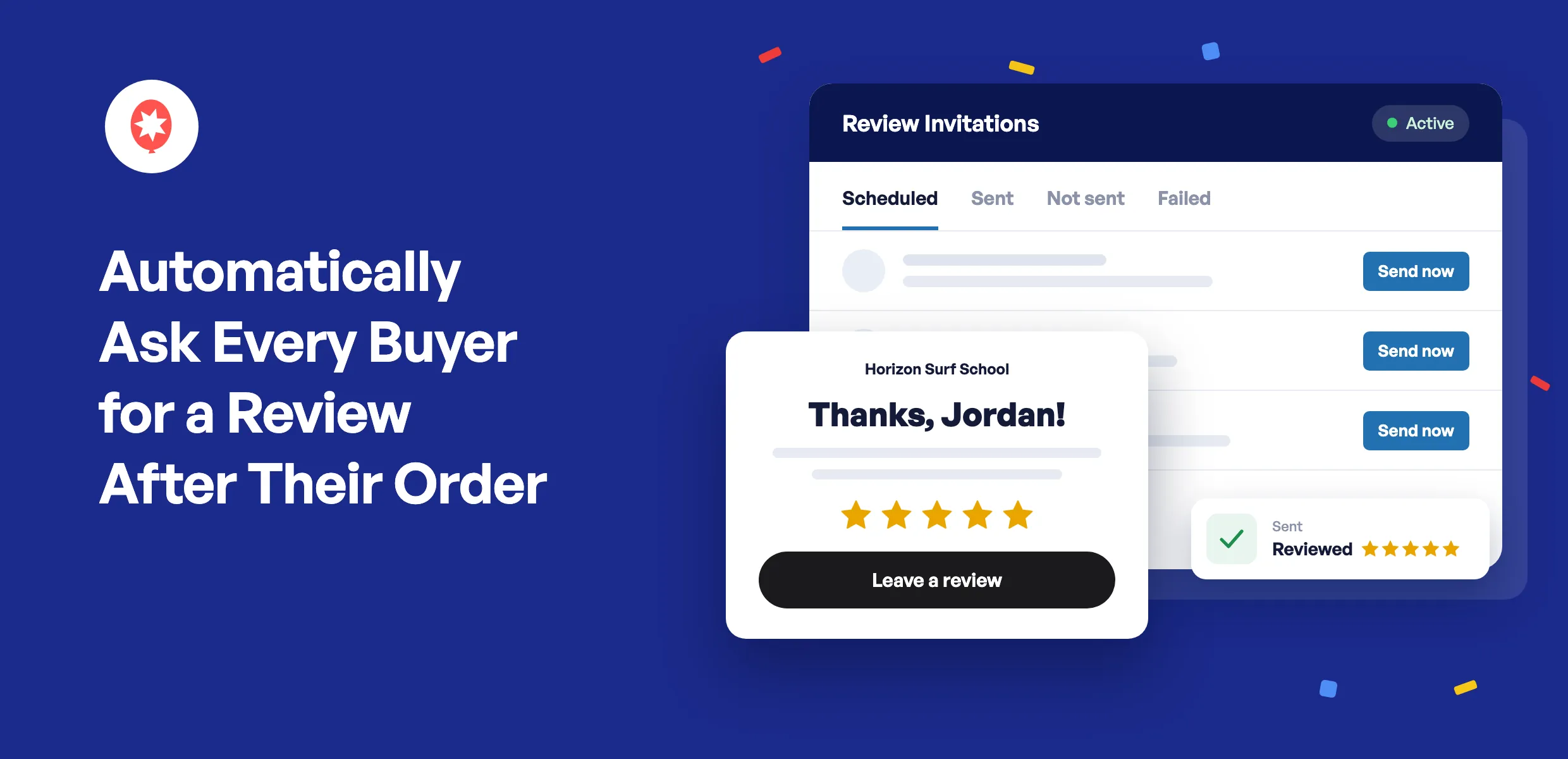
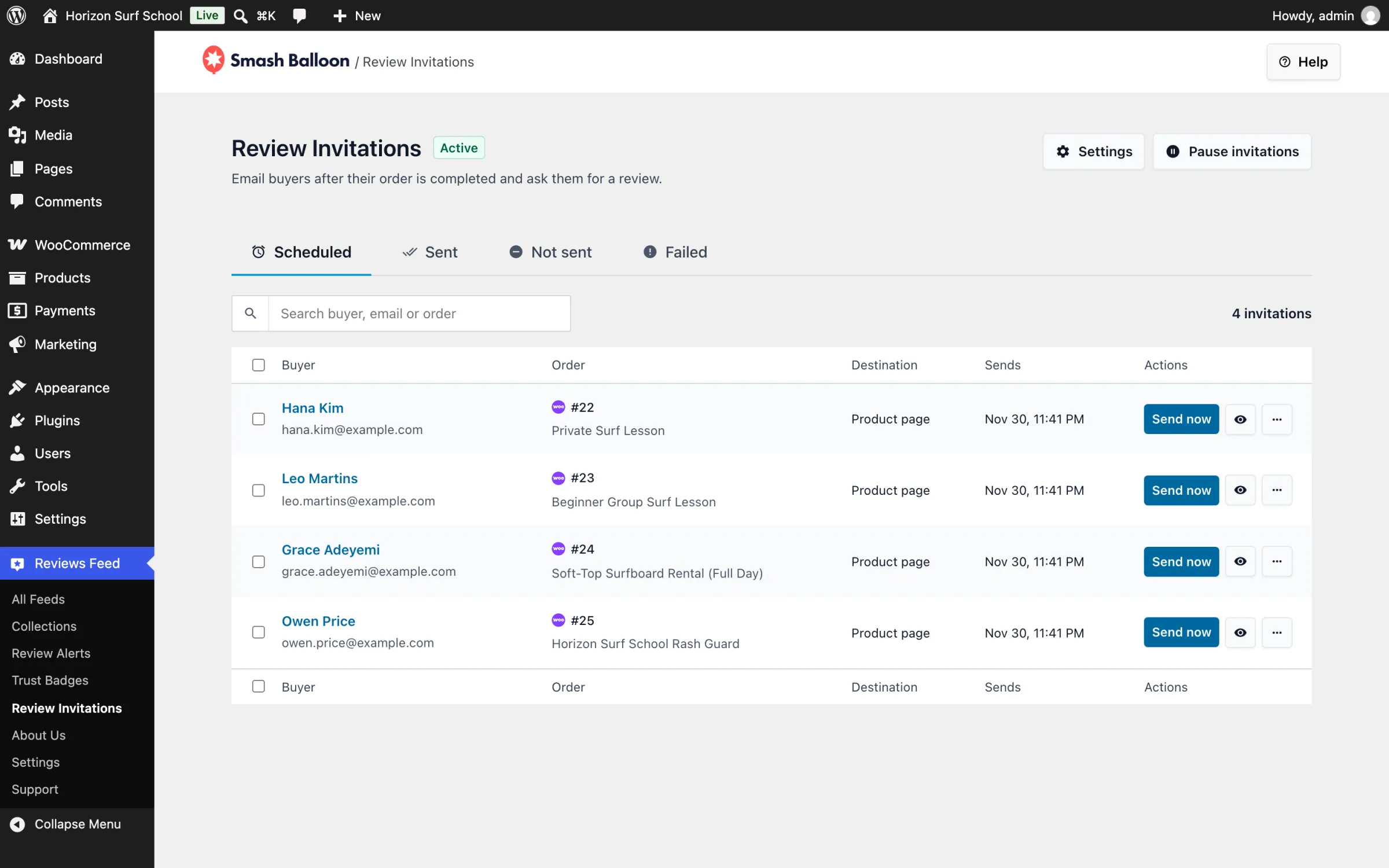
Curious how it’s going? The Review Invitations screen shows every invitation in one place. Scheduled lists the emails waiting to go out and the day each one sends, with a Send now button if you’d like one to go early. Sent shows the emails already delivered and which buyers have gone on to leave a review on your site, along with their star rating. Reviews left on Google or other listings aren’t tracked there.
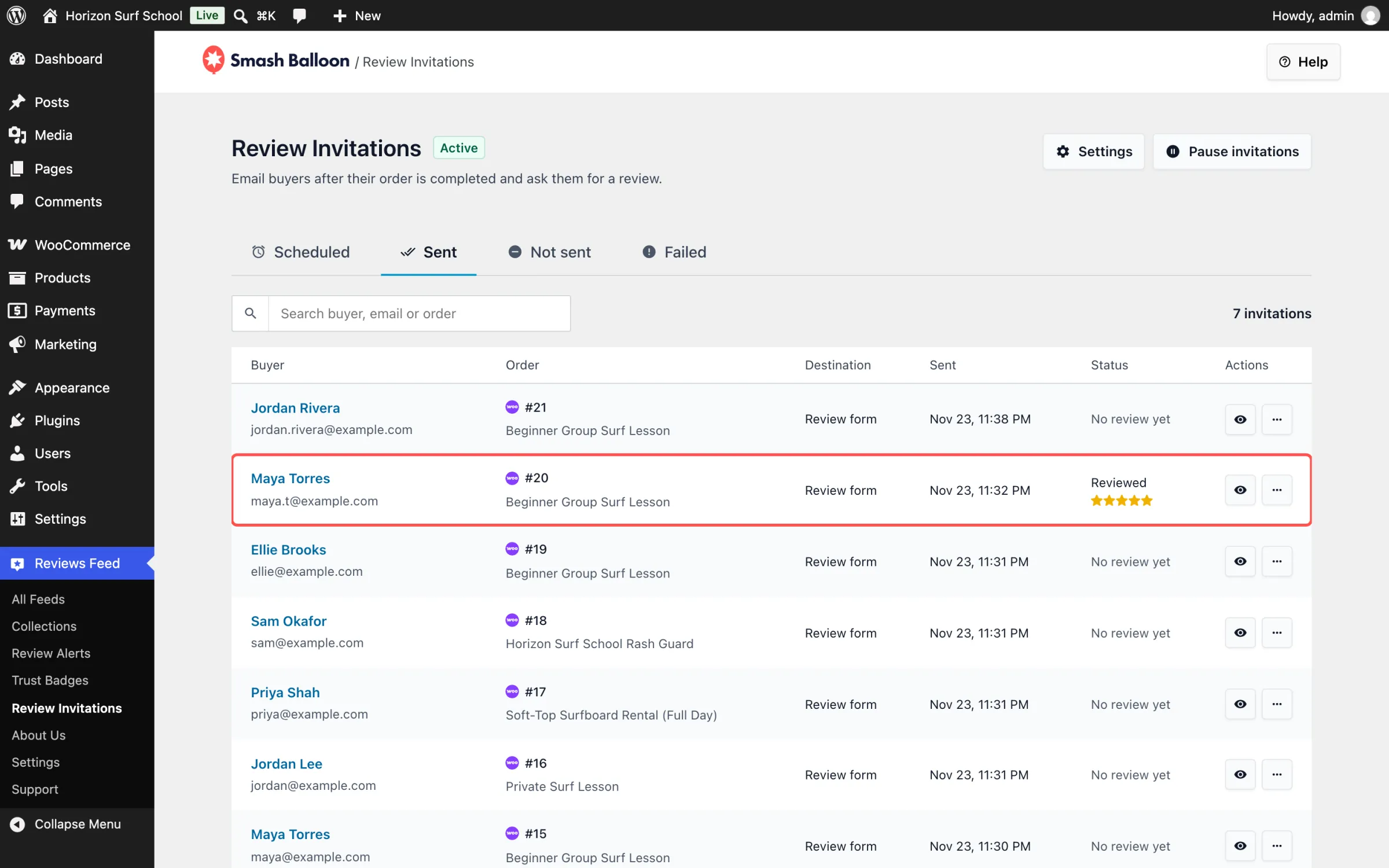
If a buyer opts out, their invitation moves to Not sent with the reason. And if your site can’t send an email, it shows up under Failed, where you can send it again with Send now.
Respect Your Buyers’ Inboxes
A review request should feel like a friendly thank-you, not one more email to delete. Review Invitations keeps it that way:
- Each buyer gets one email per order, and never more than one a month, even if they order again
- Every email has an unsubscribe link, and buyers who opt out won’t be invited again
- Want buyers to agree first? Turn on an opt-in checkbox at checkout, and only people who tick it get the email
It also works with WordPress’s own Tools » Export Personal Data and Erase Personal Data, so you can handle a buyer’s privacy request the same way you already do for the rest of your site.
Already Using Reviews Feed?
If you run the free Reviews Feed plugin on an Easy Digital Downloads or WooCommerce store, you’ll find Review Invitations in your Reviews Feed menu. It’s part of the Elite plan, so that’s where you can see how it works and upgrade when you’re ready.
On Reviews Feed Pro Basic or Plus, you’ll see it in the same menu with the option to move up to Elite. Already on Elite or the All Access Bundle? Update to Reviews Feed Pro 2.19.0 and it’s ready to set up.
How to Set Up Review Invitations (Reviews Feed Pro 2.19.0)
Review Invitations comes with Reviews Feed Pro 2.19.0 on the Elite plan and the All Access Bundle. You’ll need Easy Digital Downloads or WooCommerce on your site.
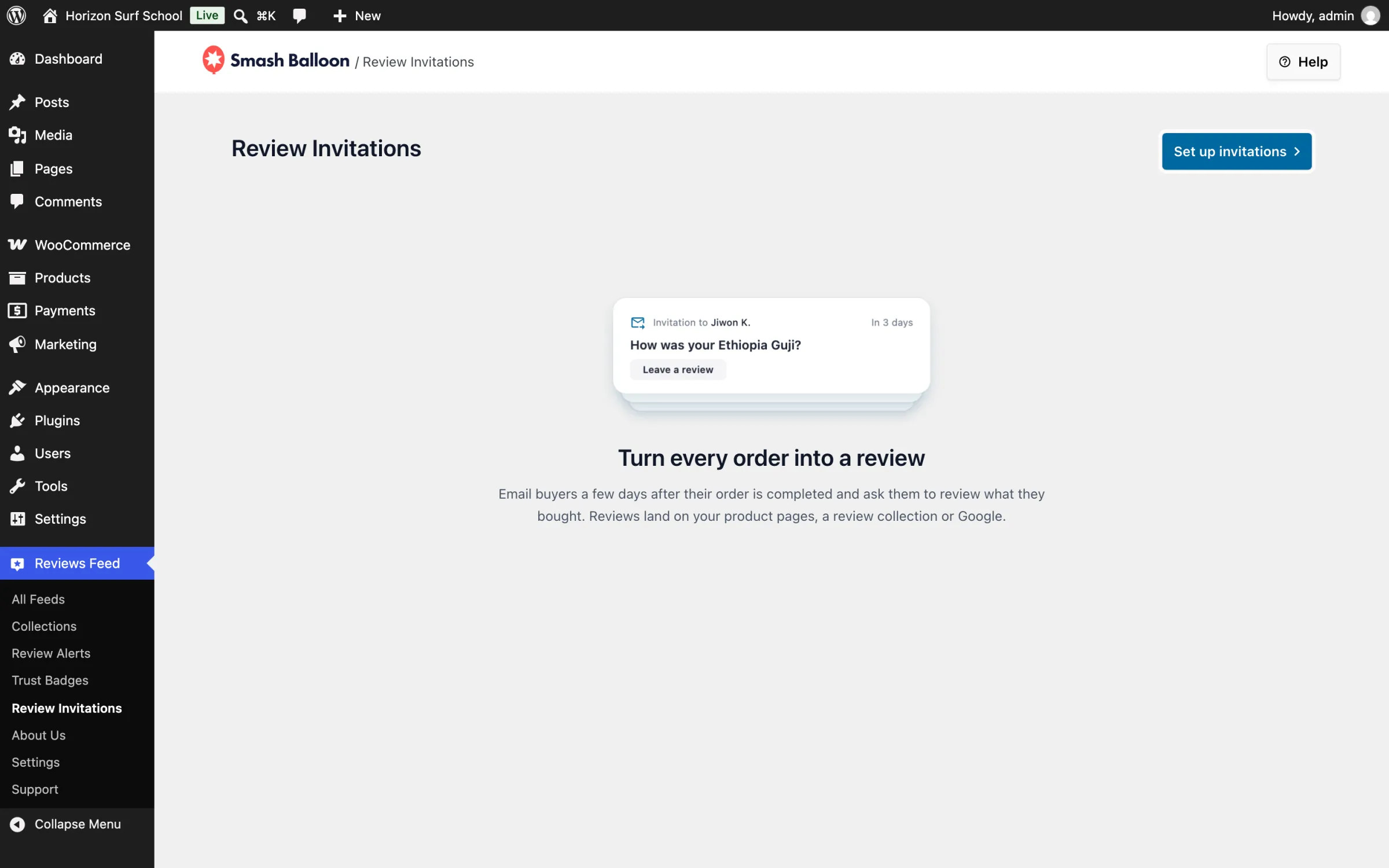
Step 1: Open Review Invitations. In your WordPress dashboard, go to Reviews Feed » Review Invitations and click Set up invitations.
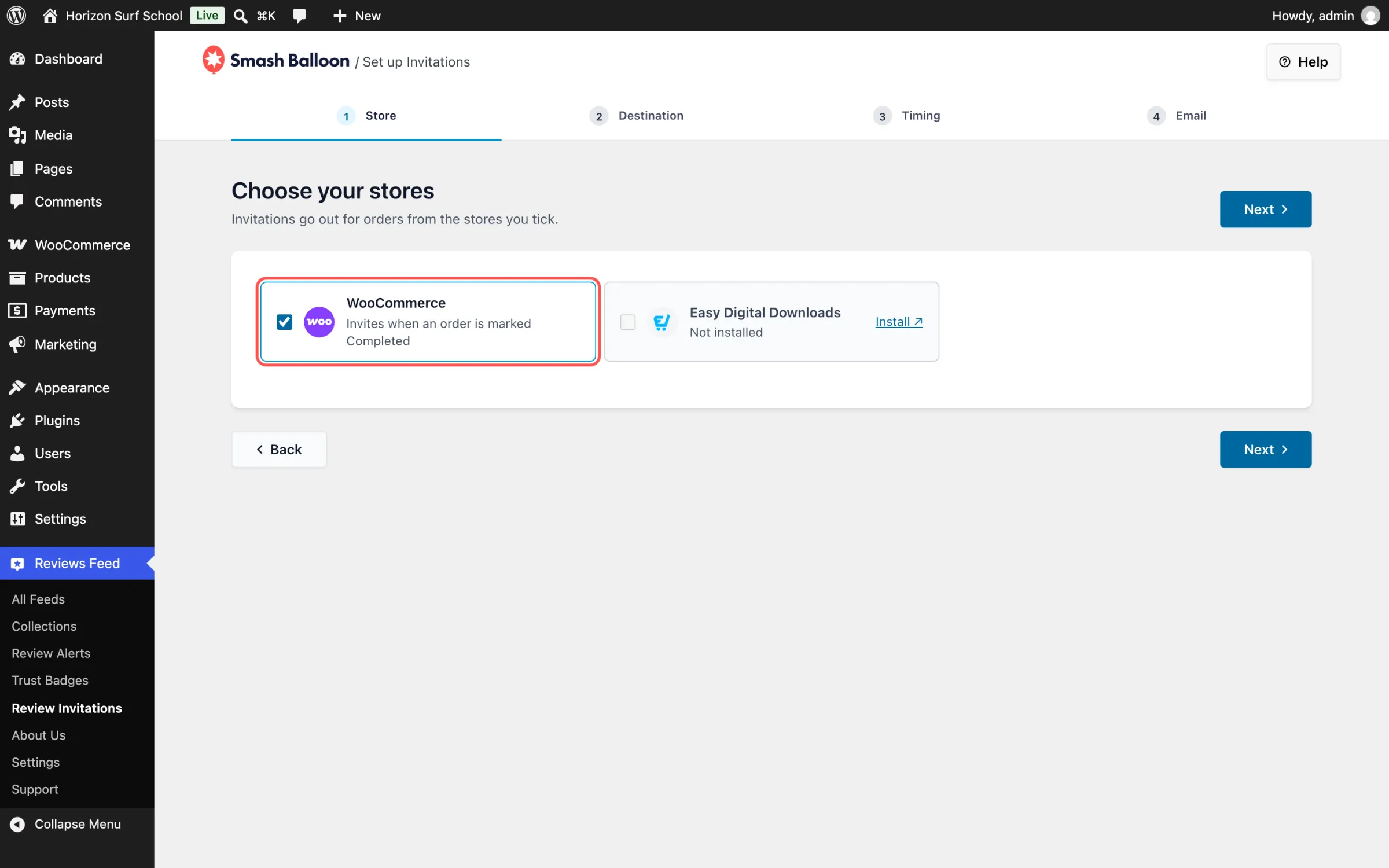
Step 2: Choose your store. Tick Easy Digital Downloads, WooCommerce, or both, then click Next. Invitations go out for orders from the stores you tick.
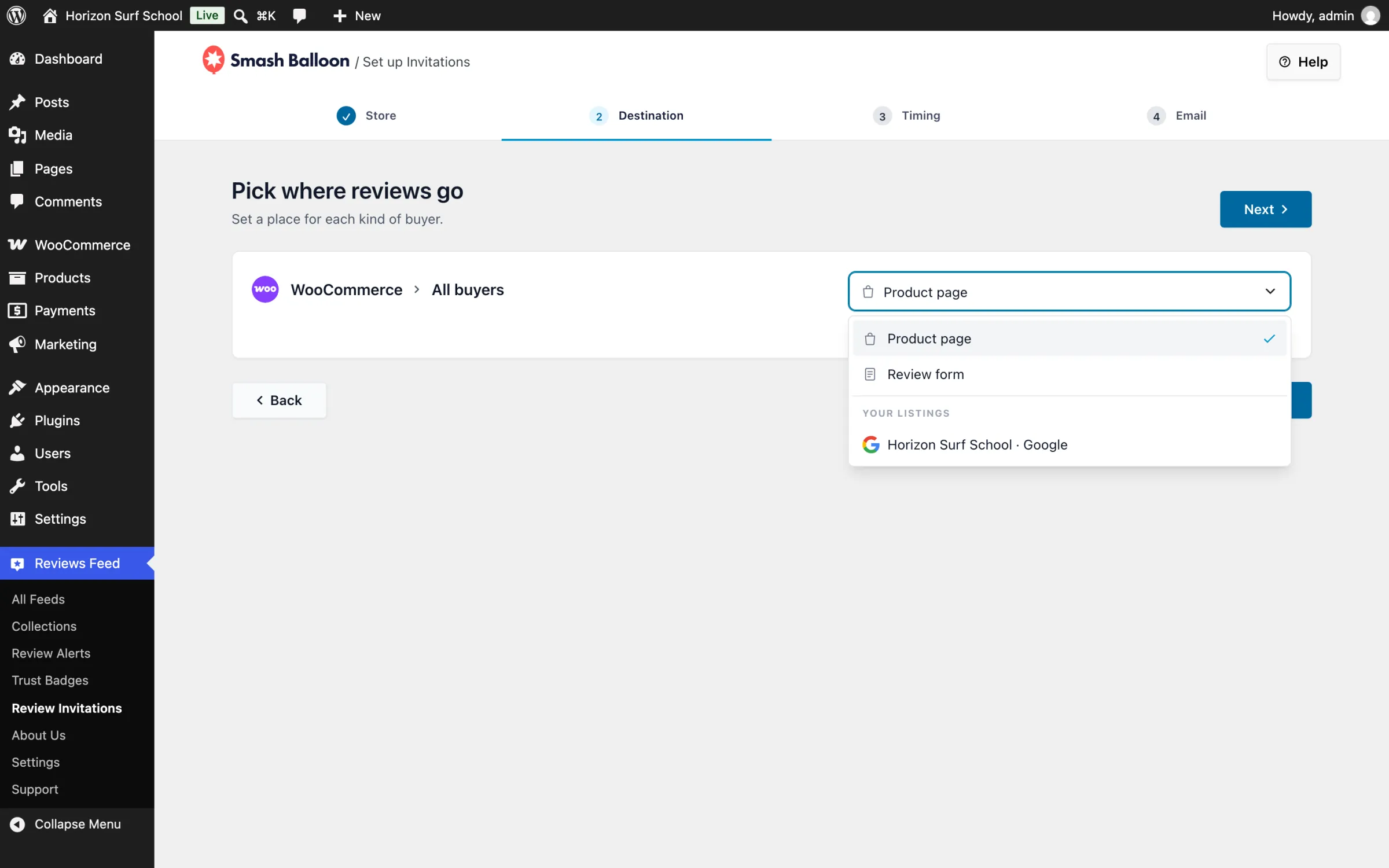
Step 3: Pick where reviews go. Open the dropdown and choose Product page, Review form, or one of your listings, like Google. Product page works when product reviews are turned on in WooCommerce. If your store only lets logged-in customers review, you can send guests somewhere else, like your review form. On an Easy Digital Downloads store, you’ll see Download page instead, which works with the EDD Reviews add-on. If you pick the review form, choose the collection your reviews should be saved to.
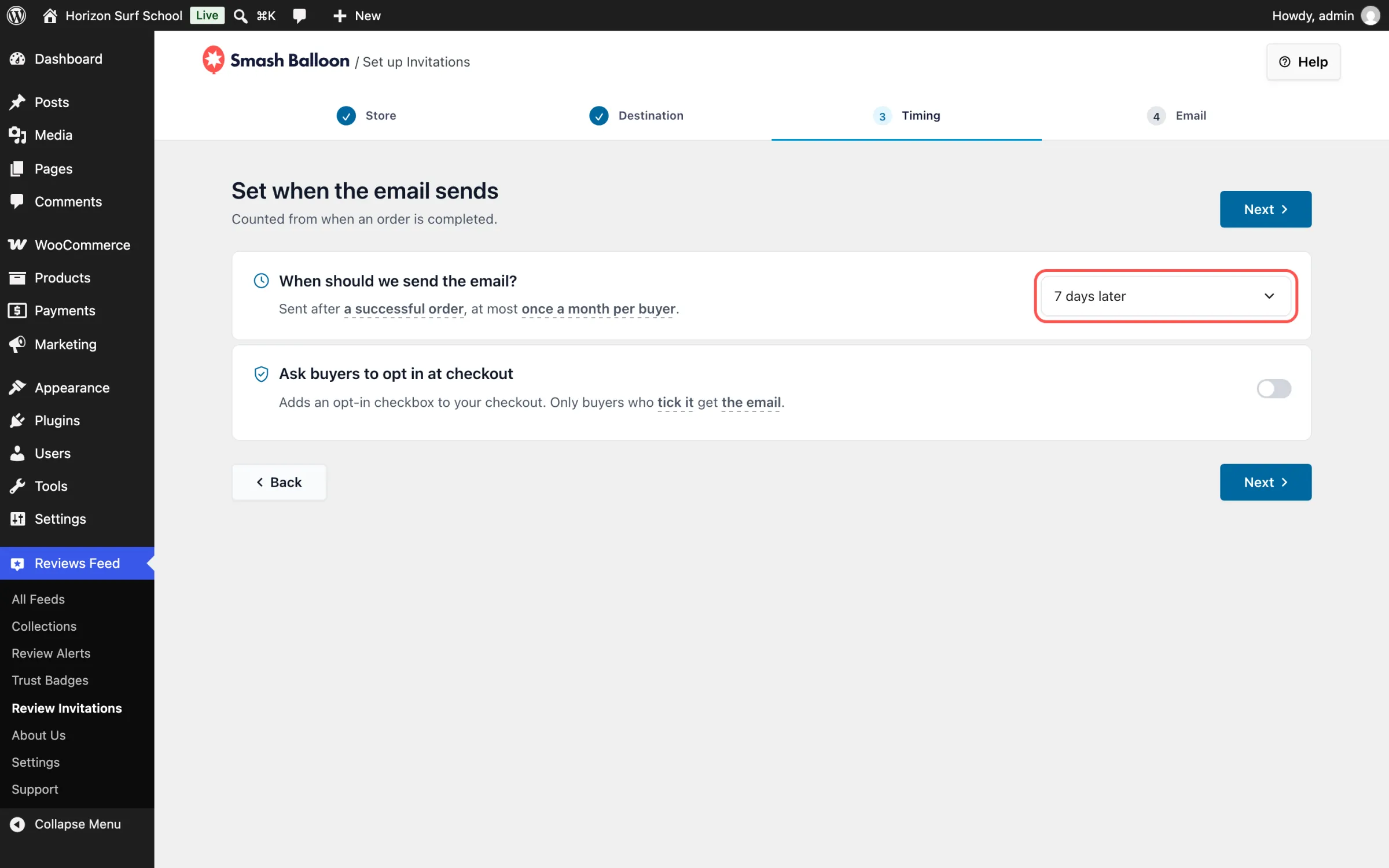
Step 4: Set when the email sends. Choose Same day, 3, 7, 14 or 30 days later, or a custom number of days. A few days usually gives buyers time to use what they bought. Here you can also turn on Ask buyers to opt in at checkout.
Step 5: Check the email and turn it on. Read through the email, change any words you like, and send yourself a test under Send a test. When you’re happy, click Turn on invitations. Prefer to wait? Click Finish, turn on later and switch it on whenever you’re ready.
From then on, new completed orders show up under Scheduled with the day each email will send.
Frequently Asked Questions
Which plan includes Review Invitations?
The Elite plan of Reviews Feed Pro and the All Access Bundle. Basic and Plus users can upgrade to Elite from the Review Invitations screen.
Does it work with Easy Digital Downloads and WooCommerce?
Yes, both. You can turn on invitations for one store type or both, and choose a different destination for each.
When does the email go out?
On the day you pick, counted from when the order is completed. You can choose anything from the same day up to 90 days later.
Will reviews from my review form go live right away?
No. They wait in your review collection until you approve them, unless you’ve set that collection to approve reviews automatically.
Can buyers stop getting these emails?
Yes. Every invitation has an unsubscribe link, and you can also require buyers to opt in at checkout.
I already use WooCommerce’s review request email. Will buyers get two emails?
No. When WooCommerce’s own review request email is turned on, Review Invitations doesn’t send one for WooCommerce orders, so buyers only hear from you once. Turn WooCommerce’s off to use Review Invitations instead.
Your Next Review Is One Order Away
Every order you complete is a chance to hear from someone who knows your store first-hand. Set up Review Invitations once, and each buyer gets a friendly nudge at the right time, with a link that takes them straight to the right place.
And you can do it without:
- Paying for a separate review request service
- Writing a follow-up email every time an order ships
- Keeping a list of who you’ve already asked
Already on Elite or the All Access Bundle? Update to Reviews Feed Pro 2.19.0 and open Reviews Feed » Review Invitations. On Basic or Plus, upgrade to Elite to start inviting your buyers. New to Reviews Feed? Get the Elite plan and you can show your reviews and collect new ones from the same plugin.
Start turning orders into reviews
Review Invitations is included with the Elite plan of Reviews Feed Pro and the All Access Bundle, for Easy Digital Downloads and WooCommerce stores. Backed by a 14-day money-back guarantee.
Get Review InvitationsSo the next time a customer loves what they bought from you, they’ll have an easy way to say so. Where would you send your buyers first: your product pages, your own review form, or Google? Let us know in the comments.