Muro social
  Feed Analytics

![[NUEVO] Descubre qué reseñas y publicaciones generan resultados con Smash Balloon Feed Analytics](https://cdn.smashballoon.com/wp-content/uploads/2026/07/15061133/NEW-See-Which-Reviews-and-Posts-Drive-Results-with-Smash-Balloon-Feed-Analytics.png "NEW See Which Reviews and Posts Drive Results with Smash Balloon Feed Analytics - Smash Balloon")
Utiliza los feeds de Smash Balloon para generar confianza y conseguir que la gente interactúe con tu contenido.
Pero cada día que publicas sin saber qué es lo que funciona es un día que pasas dando palos de ciego. Estás promocionando contenido basándote en corazonadas, mientras que tus contenidos más exitosos pasan desapercibidos.
Feed Analytics soluciona ese problema. Podrás ver los clics, las visualizaciones y las visitas a los perfiles en todos tus feeds, directamente desde tu panel de control de WordPress.
Además, con la actualización 1.1.0, ahora también se realiza un seguimiento de tu feed de reseñas, por lo que todos los feeds de Smash Balloon se recogen en el mismo panel de control.
Esto es lo que puedes hacer a partir de hoy:
- Descubre qué publicaciones y reseñas atraen a la gente y cuáles son las que más atención reciben
- Realiza un seguimiento de tu feed de reseñas junto con Instagram, Facebook, YouTube, X y TikTok
- Identifica de un vistazo a tus usuarios más activos, ordenados por clics y visitas al perfil
- Filtra todo el panel de control para mostrar un único flujo de datos o cualquier intervalo de tiempo, desde los últimos 7 días hasta todo el historial.
- Confía en tus cifras, ya que tu propia actividad administrativa nunca se tiene en cuenta a la hora de calcularlas
En este artículo:
- Descubre de un vistazo qué es lo que realmente funciona
- Comprueba el rendimiento de tus reseñas junto a tus publicaciones en redes sociales
- Confía en todas las cifras que veas
- Cómo empezar a hacer un seguimiento de tus fuentes en solo unos minutos
- Empieza hoy mismo a hacer un seguimiento del rendimiento de tu feed
Descubre de un vistazo qué es lo que realmente funciona
No hace falta que te pierdas en los datos para saber cómo van tus feeds. El panel de control te ofrece una visión general completa de un solo vistazo.
Además, se ha rediseñado: tarjetas más sencillas, flechas de tendencia claras y una pestaña para cada una de tus fuentes.
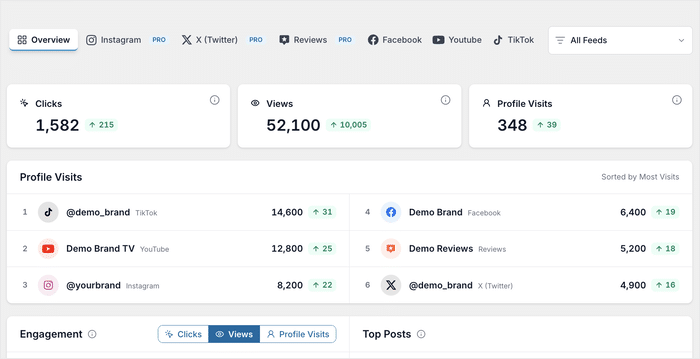
En la parte superior aparecen tres tarjetas, cada una con una flecha que indica cómo ha cambiado la situación desde el último periodo:
- Clics: qué publicaciones atraen a los usuarios
- Visitas: lo que realmente se ve
- Visitas al perfil: ¿quién quiere verte más?
Consulta la evolución de la interacción para cualquier métrica
Los totales te indican cuál es tu situación. El gráfico de interacción te indica si estás ganando impulso o perdiendo velocidad.
Muestra la evolución de tu interacción a lo largo del tiempo y permite alternar entre «Clics», «Visualizaciones» y «Visitas al perfil».
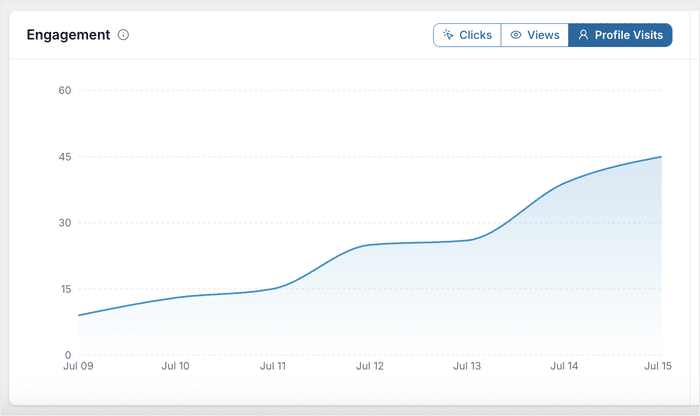
Esto es lo que ocurre en la práctica:
- Una floristería se pasa a Views y observa un repunte cada vez que publica fotos de sus arreglos florales
- Un podcast cambia a «Profile Visits » y descubre que sus publicaciones en las que anuncia a los invitados son las que generan más clics
- Una tienda online observa cómo aumentan los clics las semanas en las que publica fotos de clientes, y organiza su calendario en función de ello
Encuentra las publicaciones que se encargan del trabajo pesado
Parte de tu contenido se encarga silenciosamente de la mayor parte del trabajo, y rara vez se trata de las publicaciones que uno se imagina.
La sección «Publicaciones más populares» te muestra exactamente cuáles son. Cada fila clasifica tu contenido con mejor rendimiento, con su imagen de vista previa, la plataforma, los clics y las visitas.
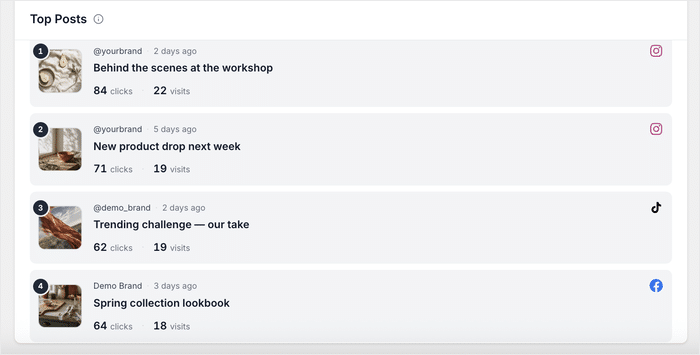
Una vez que sepas qué es lo que funciona, puedes ponerlo en práctica:
- Una tienda de decoración del hogar identifica la foto de una habitación que atrae más visitas al perfil y diseña su próxima campaña en torno a ese estilo.
- Una empresa de software descubre que la reseña más visitada destaca la facilidad de configuración y se basa en ello para los testimonios de su página de precios.
- Un fotógrafo de bodas identifica qué reseña es la que más interés despierta entre los visitantes y la destaca en su página de reservas.
Céntrate en un solo canal o en un solo periodo de tiempo
Puedes centrarte exactamente en los datos que te interesan, en lugar de tener que revisar todo de una vez.
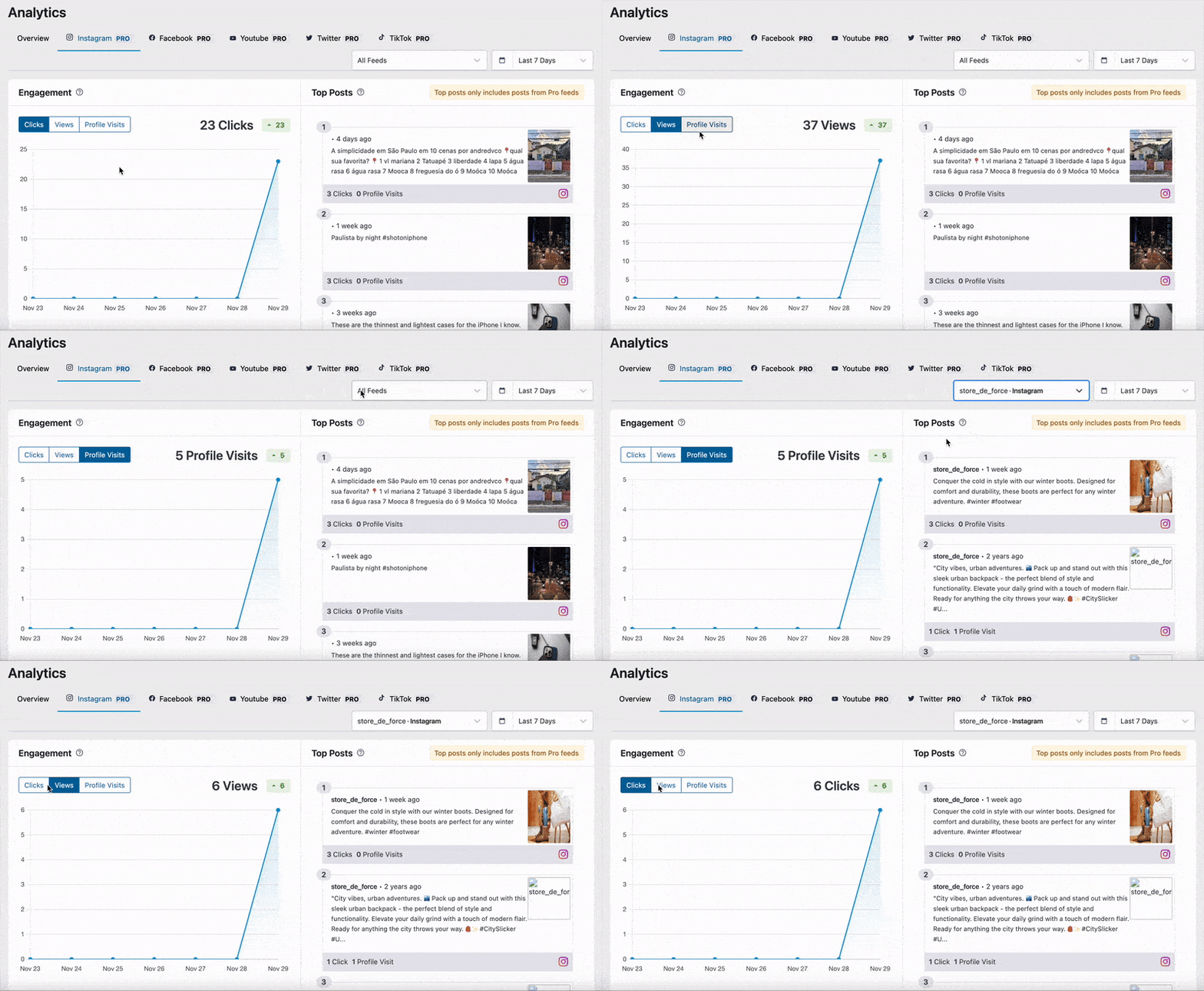
Filtra todo el panel de control para que solo se muestre una fuente o cuenta conectada, de modo que puedas comprobar el rendimiento de una plataforma por sí sola, como, por ejemplo, solo tus reseñas de Google.
También puedes elegir cualquier intervalo de tiempo, desde «Los últimos 7 días» hasta «Desde el inicio», y cada periodo se compara con el anterior.
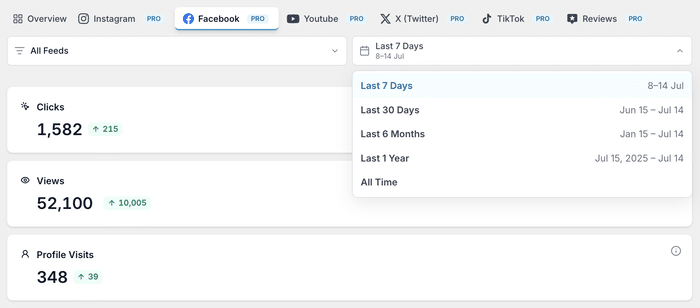
De esta forma, podrás comprobar si una campaña reciente ha influido realmente en las cifras.
¿Estás listo para ver tus propias estadísticas? Hazte con el paquete «All Access» para empezar a utilizar Feed Analytics.
Comprueba el rendimiento de tus reseñas junto a tus publicaciones en redes sociales
Ahora se realiza un seguimiento de tus reseñas igual que con cualquier otro feed, por lo que puedes ver en cuáles hacen clic y con cuáles interactúan realmente los visitantes.
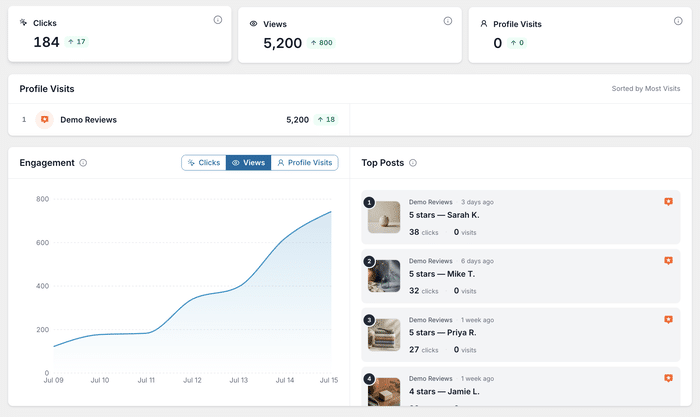
Además, funciona de forma automática. Todas las reseñas que ya estén en tus fuentes empiezan a aparecer en cuanto actualices.
Cada reseña se convierte en una publicación que se puede seguir
Cada reseña que publiques en tu página web recibe sus propios clics y visitas, y aparece en la sección «Publicaciones más populares» como cualquier otro contenido.
La pestaña «Reseñas» cuenta con todas las funciones: sus propias fichas de estadísticas, un gráfico de interacción y una clasificación de las reseñas más populares, igual que en Instagram o TikTok.
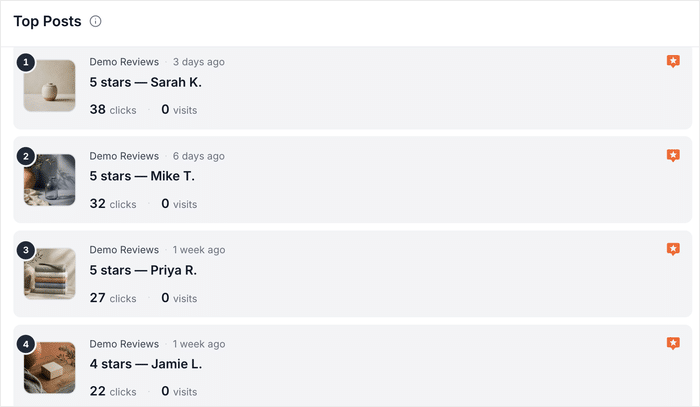
Se realiza un seguimiento de tus reseñas independientemente de dónde las muestres: en las páginas de productos, en tu página de inicio o en un widget de la barra lateral, sin necesidad de ninguna configuración adicional.
Por qué los clics en las reseñas son más importantes de lo que crees
Las reseñas suelen aparecer en las páginas más importantes: las de precios, las de pago y las páginas de destino. Es precisamente ahí donde un clic o una visita son fundamentales para cerrar una venta.
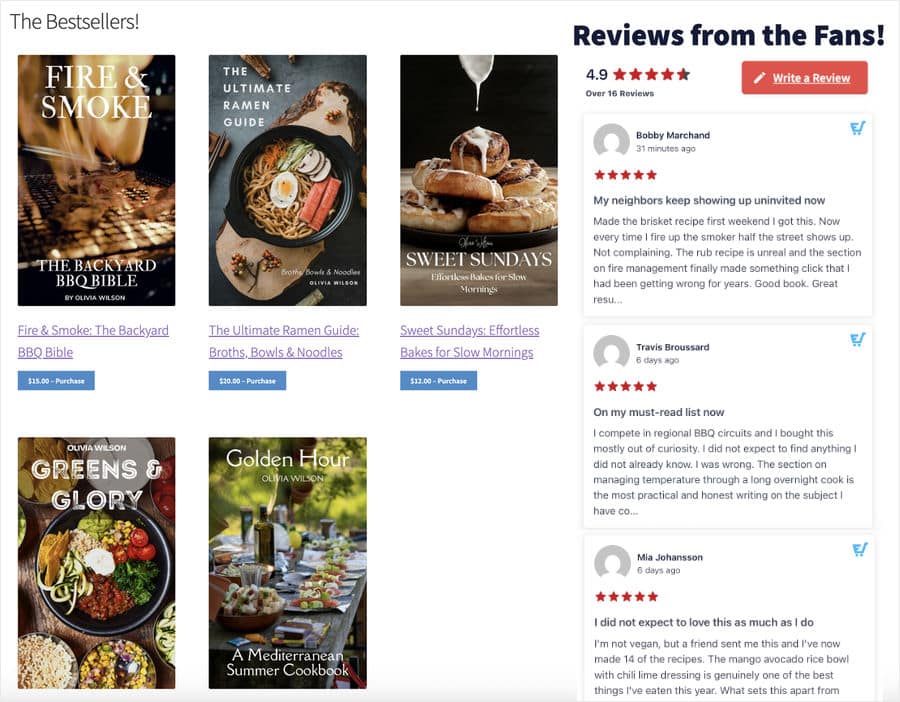
Una página puede generar conversiones sin que tú sepas si las reseñas que contiene han influido en ello. Ahora puedes verlo directamente.
A continuación te explicamos cómo se aplica esto en diferentes sectores:
- Una marca de productos para el cuidado de la piel muestra reseñas de Google en las páginas de sus productos, pero no sabe en cuáles hacen clic los compradores, así que contrata el paquete «All Access» y lo descubre en menos de una semana.
- Un estudio de yoga identifica el testimonio que genera más clics que el resto y lo destaca en su página de reservas
- Una empresa de SaaS compara sus reseñas de Trustpilot con su feed de Instagram para ver en cuál confían más sus clientes.
Confía en todas las cifras que veas
Las cifras solo sirven de ayuda si puedes confiar en ellas. Por eso, Feed Analytics solo tiene en cuenta la actividad real de los visitantes.
La actividad de los administradores se excluye automáticamente, por lo que las visitas de tu equipo al sitio web nunca influyen en las estadísticas.
Cada dato estadístico está vinculado al intervalo de fechas exacto que elijas, y las publicaciones más populares se clasifican por plataforma, por lo que lo que ves refleja lo que realmente ocurrió en tu sitio web.
Explora el panel de control completo desde el primer día
No hace falta esperar a que se acumulen los datos para ver de lo que es capaz Feed Analytics.
En tu primera visita, todos los informes se rellenan con datos de ejemplo realistas, para que puedas explorar todo el panel de control desde el primer momento, en lugar de quedarte mirando gráficos vacíos.
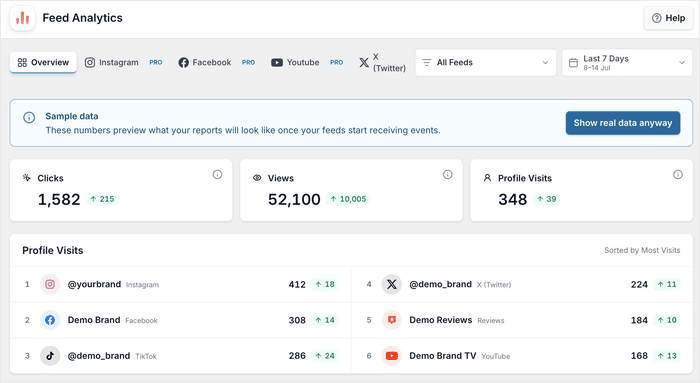
En cuanto tus fuentes empiecen a recopilar datos reales, con un solo clic todo pasará a basarse en tus propias cifras.
Cómo empezar a hacer un seguimiento de tus fuentes en solo unos minutos
Feed Analytics empieza a funcionar en cuanto se instala. Actualiza o instala el plugin, abre Feed Analytics en tu panel de control de WordPress y tus feeds ya estarán generando informes.
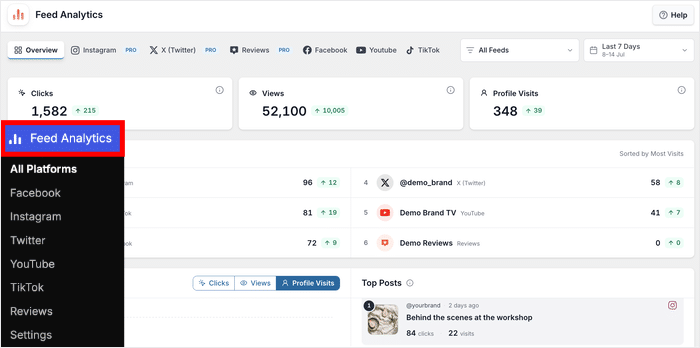
En la parte superior encontrarás una pestaña para cada una de tus fuentes: Resumen, Instagram, Facebook, YouTube, X (Twitter), TikTok y Opiniones.
Ve directamente al feed que quieras o échale un vistazo a todo junto en «Resumen».
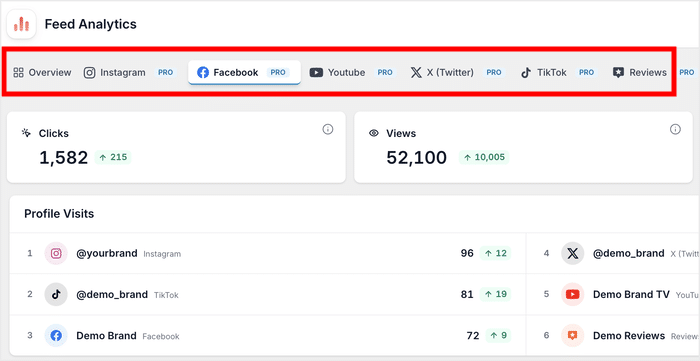
Si utilizas Reviews Feed, tus reseñas ya están incluidas, así que tampoco hay que hacer nada más.
Desde ahí, cambia el gráfico entre clics, visualizaciones y visitas al perfil, y filtra por feed o periodo de tiempo para profundizar exactamente en lo que te interesa.
¿Quieres probarlo en tus propias publicaciones?
Feed Analytics forma parte del paquete All Access, junto con todos los complementos de feeds de Smash Balloon.
Empieza hoy mismo a hacer un seguimiento del rendimiento de tu feed
Con Feed Analytics 1.1.0, puedes ver el rendimiento de cada feed en un único panel de control. Esto incluye tus reseñas, que se muestran junto al resto.
Hay muchos complementos que te ayudan a mostrar tus feeds. Sin embargo, son muchos menos los que te permiten comprobar si funcionan, y para eso sirve precisamente Feed Analytics.
Si ya tienes Feed Analytics, actualízalo desde tu panel de control de WordPress para poder hacer un seguimiento de las reseñas y disfrutar del nuevo diseño.
Consigue el paquete «All Access» para empezar a utilizar Feed Analytics hoy mismo y convertir las conjeturas en cifras reales.
Por último, muchísimas gracias a nuestra comunidad. Vuestros comentarios dan forma a lo que creamos, y estamos deseando ver qué aprendéis de vuestras fuentes de noticias.
¿Cuál es la primera red social que vas a consultar? ¡Cuéntanoslo en los comentarios de abajo!