Social Wall
 Feed Analytics


Instagram does not return avatars for personal accounts through its API. Switching to a business profile restores it.
Would you like to fix a missing profile picture in the header of your Instagram feed?
The header shows the profile picture of the connected account. If it is blank, you can add your own picture in the feed’s settings.
Why the Profile Picture Is Missing
The picture can be missing for one of these reasons.
- The source is still a Personal connection. Instagram Feed only asks Instagram for the profile picture on a Business Basic or Business Advanced connection. Instagram ended Personal connections in December 2024. To fix this, reconnect the source as Business Basic or Business Advanced. Our guide to Instagram Business Basic explains the two connection types.
- The GDPR setting is set to Yes, or it is set to Automatic and a supported consent plugin is active. If the plugin also has no saved copy of the picture, the header shows a placeholder image instead. Our guide to Instagram Feed GDPR compliance covers the setting.
Using a Custom Avatar
Whatever the cause, you can set your own picture. The Use Custom Avatar setting is in both the free plugin and Instagram Feed Pro. The plugin shows this picture instead of the one from Instagram.
- In your WordPress dashboard, go to Instagram Feed » All Feeds.
- Click the edit icon next to your feed.
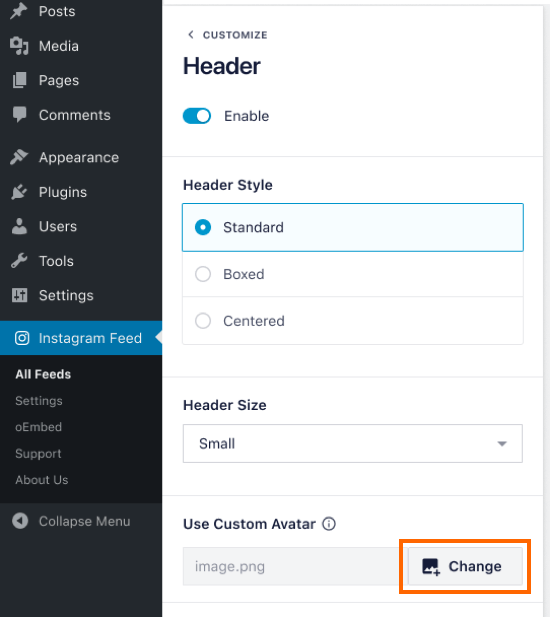
- Click Customize. Then click Header.
- The Enable switch must be on, because the Use Custom Avatar setting only shows when the header is on.
- Under Use Custom Avatar, click Add Image and choose the picture you want to use. If a picture is already set, the button reads Change instead.
- Click Save.
To change other parts of the header, such as its style, size, and colors, see our guide on changing the header in Instagram Feed.
That’s it! Your feed header now shows the picture you chose.