Social Wall
 Feed Analytics


The differences between an Instagram Business Basic and Business Advanced connection, and which feed types each one supports.
Would you like to know whether Just my posts or My posts and more is the right connection for your Instagram feed?
When you connect an account, Smash Balloon’s connection page asks “What should your feed show?” and gives you 2 options. Just my posts connects directly through Instagram. My posts and more connects through Facebook and needs a Facebook Page.
On the older connection page, which some sites still see, these options are called Business Basic and Business Advanced.
In this guide, we’ll compare what each one can display, help you choose between them, and show what to check when likes, comments, or followers are missing.
Before you get started, make sure Instagram Feed is installed and activated on your WordPress site.
- Comparing Just My Posts and My Posts and More
- Choosing Between Just My Posts and My Posts and More
- Instagram Likes, Comments, and Followers Not Working
- Frequently Asked Questions
Comparing Just My Posts and My Posts and More
Both options need an Instagram Creator or Business account. A Creator account has the same capabilities as a Business account and connects the same way.
The table below shows what each option gives you.
| Feature | Just my posts | My posts and more |
|---|---|---|
| Button on the connection page | Continue with Instagram | Continue with Facebook |
| Connects through | ||
| Name on the older connection page | Business Basic | Business Advanced |
| Facebook Page | Not required | Required. The Instagram account must be linked to a Facebook Page. |
| Accounts per connection | 1 Instagram account | The Instagram business accounts connected to the Facebook account you log in with, listed for you to pick from |
| Posts from the connected account | Yes | Yes |
| Likes and comment counts | Yes | Yes |
| Account avatar, bio, and number of followers in the header | Yes | Yes |
| Reels | Yes | Yes |
| Collab posts (more details) | Yes | Yes |
| Comments inside the lightbox | No | Yes |
| Instagram Stories | No | Yes |
| Hashtag feeds | No | Yes |
| Tagged feeds (the plugin also calls these Mentions) | No | Yes |
Note: The connection decides what the plugin can get from Instagram. Your license level decides what it shows. Likes, comments, followers, and Stories need a paid license. Hashtag feeds need the Plus license level or higher, and Tagged feeds need the Elite license level.
Personal sources are no longer an option. As of December 4, 2024, Instagram ended the Basic Display API. A feed connected through a Personal account no longer updates.
To move that feed over, see our guide on reconnecting a Personal Instagram source.
Next, we’ll look at which option fits your feed.
Choosing Between Just My Posts and My Posts and More
You pick the option on Smash Balloon’s connection page. The Add Source button in the Manage Sources box under Instagram Feed » Settings opens that page.
Just my posts is the option the connection page recommends. It fits you best if both of the following are true.
- You only need to display posts, likes and comment counts, and the profile header.
- You prefer a simple setup that does not link a Facebook Page.
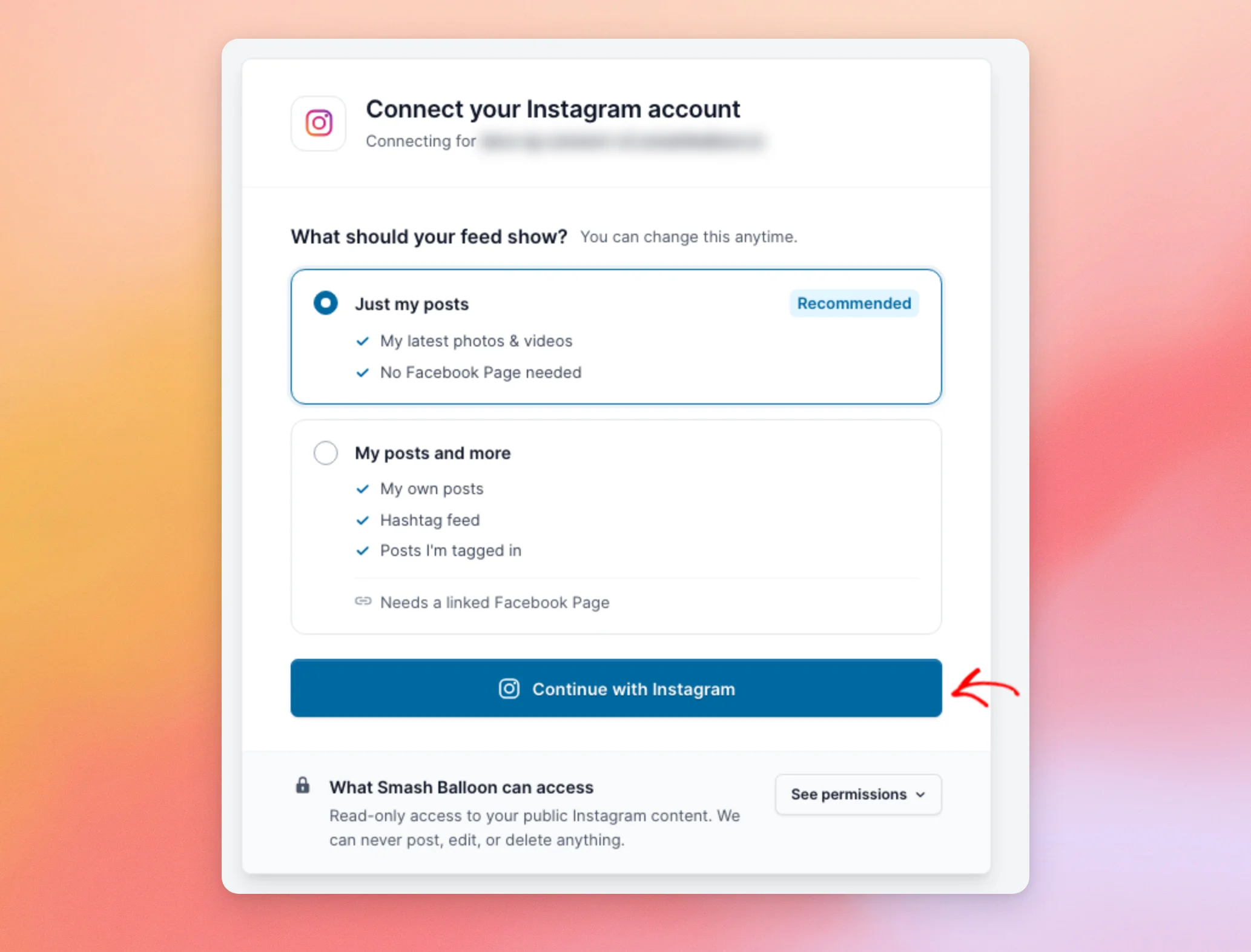
My posts and more fits you best if any of the following is true.
- You want to display Hashtag feeds, Tagged feeds, or Instagram Stories.
- You want to show comments inside the lightbox.
- You manage several Instagram accounts under the same Facebook account. After you log in with Facebook, My posts and more lists the connected accounts for you to pick from.
- Your Instagram account is already linked to a Facebook Page, which My posts and more requires.
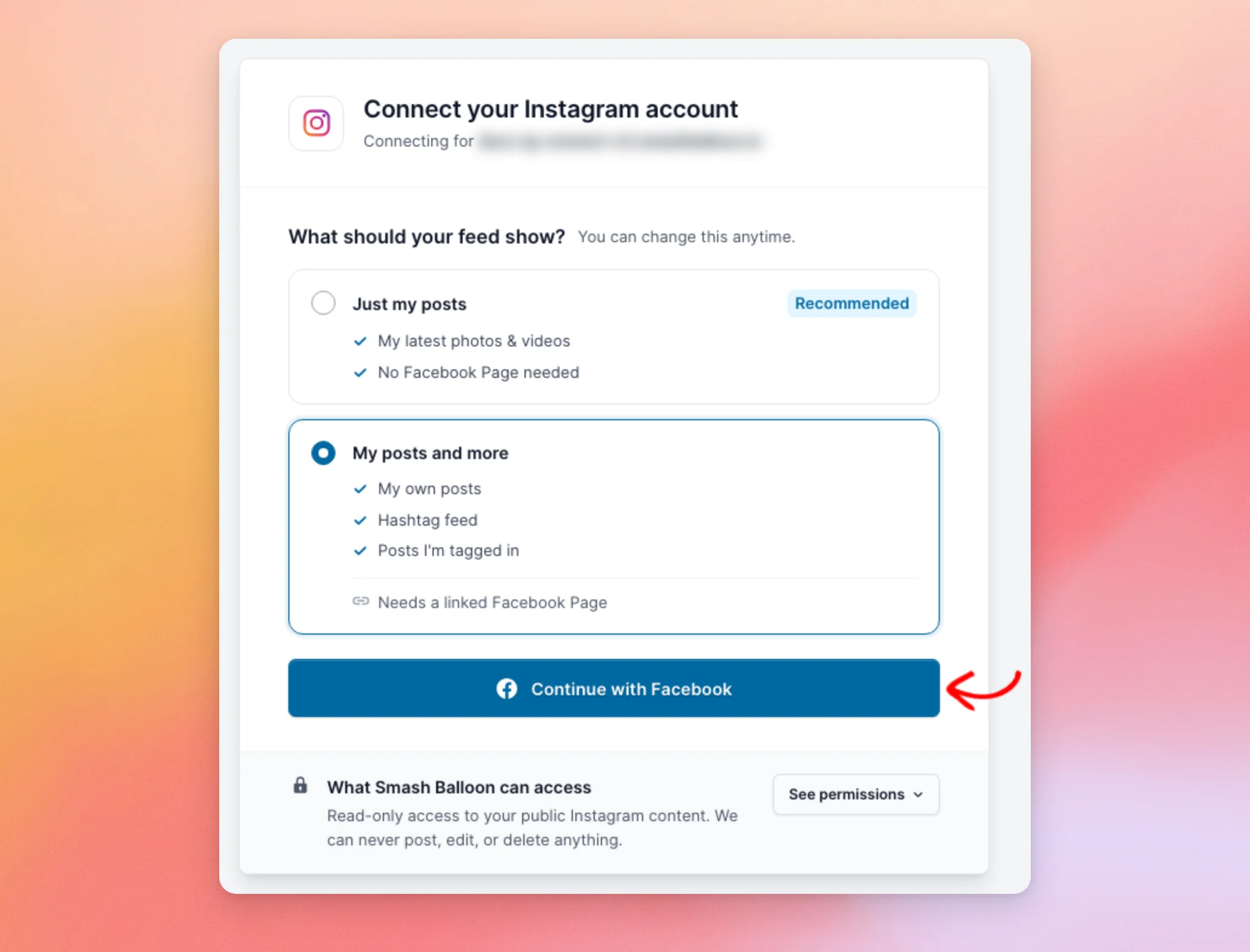
To switch to My posts and more, link your Instagram account to a Facebook Page first. Our guide on connecting through Facebook walks you through it.
Finally, we’ll cover what to check when likes, comments, or followers are missing.
Instagram Likes, Comments, and Followers Not Working
If your feed shows no likes, comments, or followers, check these 2 things.
- First, check the source’s connection. A Personal source does not return likes, comment counts, or followers. Just my posts and My posts and more both do. If the source is Personal, reconnect it with either option.
- Next, check your license. In the free version, the Like and Comment Summary and Show number of followers settings in the feed customizer are locked. A paid license level unlocks them.
That’s it! You now know how Just my posts and My posts and more differ and which one fits your feed. To connect with My posts and more, see our guide on connecting through Facebook.
Frequently Asked Questions
Below, we’ve answered some of the most common questions about Just my posts and My posts and more.
Do I need a Facebook Page for Just my posts?
No. Just my posts connects through Instagram. The Instagram account only needs to be a Creator or Business account. My posts and more is the option that needs a Facebook Page.
Why can’t I show Hashtag feeds, Tagged feeds, or Stories with my Just my posts source?
The plugin requests these from Instagram only through a My posts and more connection. Connect the account again with My posts and more, using the steps in our guide on connecting through Facebook.
My connection page shows Business Basic and Business Advanced. Are those different options?
No. That’s the older connection page, which some sites still see, for example sites without HTTPS or with an older version of Instagram Feed. Business Basic is Just my posts, and Business Advanced is My posts and more.
Can I still connect a Personal Instagram account?
No. Instagram ended the Basic Display API on December 4, 2024. To keep a feed running, convert the account with our professional account guide and connect it with Just my posts or My posts and more.