Social Wall
 Feed Analytics


What causes a TikTok connection to drop and need reconnecting, starting with password changes.
Would you like to keep your TikTok account connected to your feed, and know what to do if it ever needs reconnecting?
In this guide, we’ll explain how the plugin keeps your connection active, what can interrupt it, and how to reconnect your account. All you need is access to your WordPress dashboard.
Before you get started, make sure the latest version of TikTok Feeds Pro is installed and activated on your WordPress site. You also need to have already connected a TikTok account.
- How Does the Plugin Keep Your Account Connected?
- What Can Interrupt the Connection?
- Reconnecting Your TikTok Account
- Frequently Asked Questions
How Does the Plugin Keep Your Account Connected?
When you connect your TikTok account, TikTok gives the plugin an access token. The plugin uses this token to ask TikTok for your latest videos. A token doesn’t last forever. The plugin looks after it for you in 2 ways.
- A daily refresh. Once a day, the plugin asks TikTok for a fresh token for every connected account. This refresh runs through WP-Cron, the WordPress task scheduler.
- A refresh when TikTok says the token is invalid. If TikTok rejects the token while the plugin is getting your videos, the plugin tries to refresh the token on the spot. If the refresh works, the plugin asks for your videos again and your feed carries on as normal.
If the refresh doesn’t work, the plugin asks you to reconnect. In that case, it marks the source as needing attention and shows the message “Invalid Access Token. Please reconnect the source.” To learn more about this message, see Error: Invalid Access Token in our error message reference.
If the plugin’s next request to TikTok works, it clears the mark from the source on its own.
The Test Connection button in the License Key box checks your Smash Balloon license, not your TikTok account (see the settings reference). The state of your account shows on your source in Manage Sources, as shown in the steps below.
What Can Interrupt the Connection?
At times, you may need to reconnect your TikTok account to the plugin. The changes below, made in your TikTok account, may interrupt the connection.
Changing Passwords
If you change your TikTok password, the access token the plugin uses to stay connected may stop working. If the plugin can’t refresh it, reconnect your account.
Changing Security-Related Settings
If you change security settings on your TikTok account, the connection with the plugin may be invalidated too. After you change them, check your source in Manage Sources to see whether it needs to be reconnected.
Removing Smash Balloon’s Access
For TikTok to send the plugin your latest videos, you need to give Smash Balloon access to your account. If you remove this access in TikTok, the plugin may no longer be able to get new videos. To get them back, reconnect your account.
Reconnecting Your TikTok Account
To get started, we’ll open the Manage Sources box, where you can see whether your account needs to be reconnected.
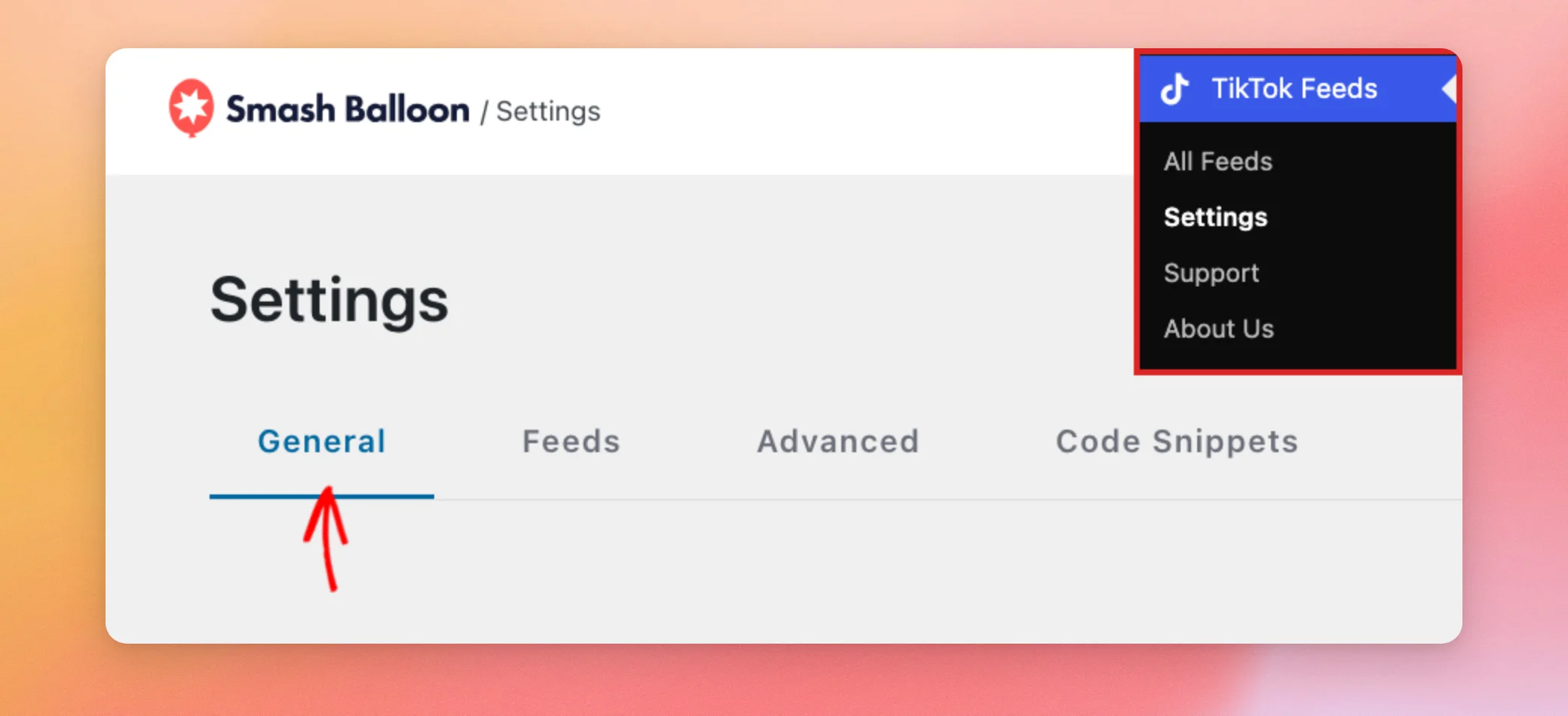
In your WordPress dashboard, go to TikTok Feeds » Settings. Then click the General tab.
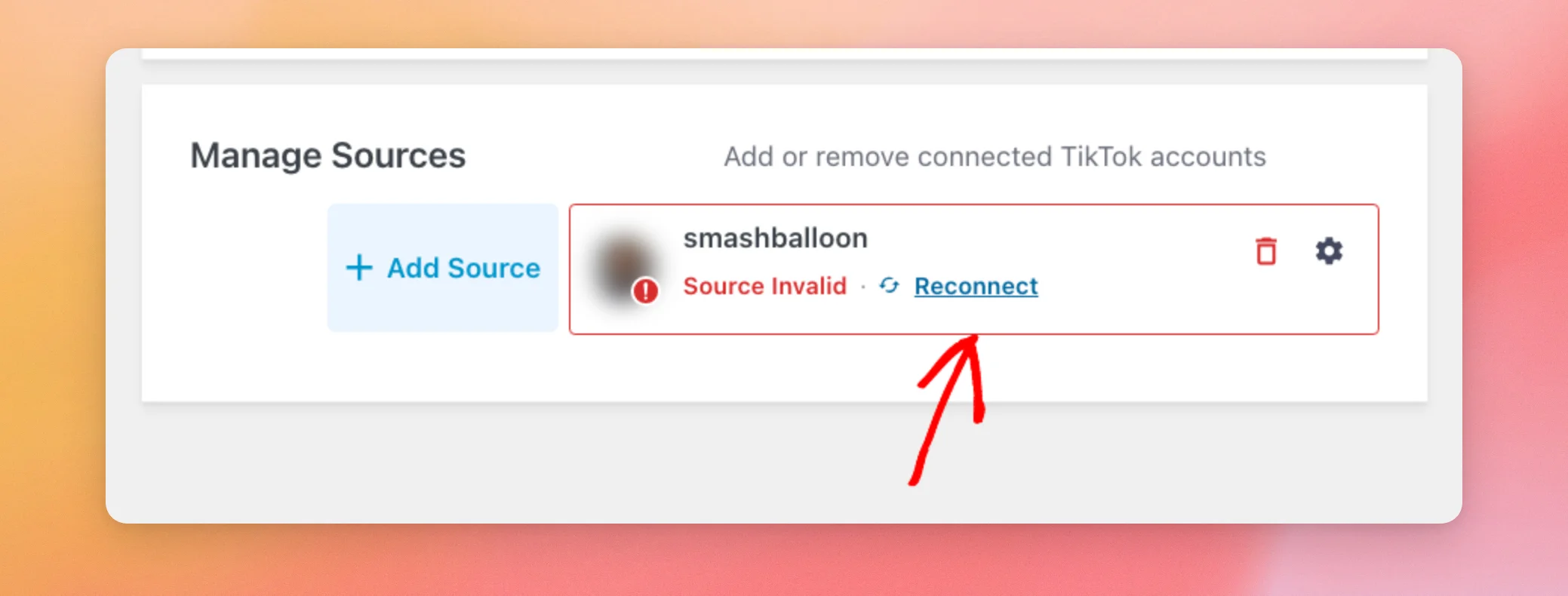
Next, scroll down to the Manage Sources box. It lists every connected TikTok account. If your connection is working, you don’t need to do anything.
If your account needs to be reconnected, its card shows Source Invalid and a Reconnect button.
Next, click Reconnect. The plugin then takes you through the same connection steps as when you first added the account. If TikTok asks you to, log in to the TikTok account you want to use and approve access for Smash Balloon.
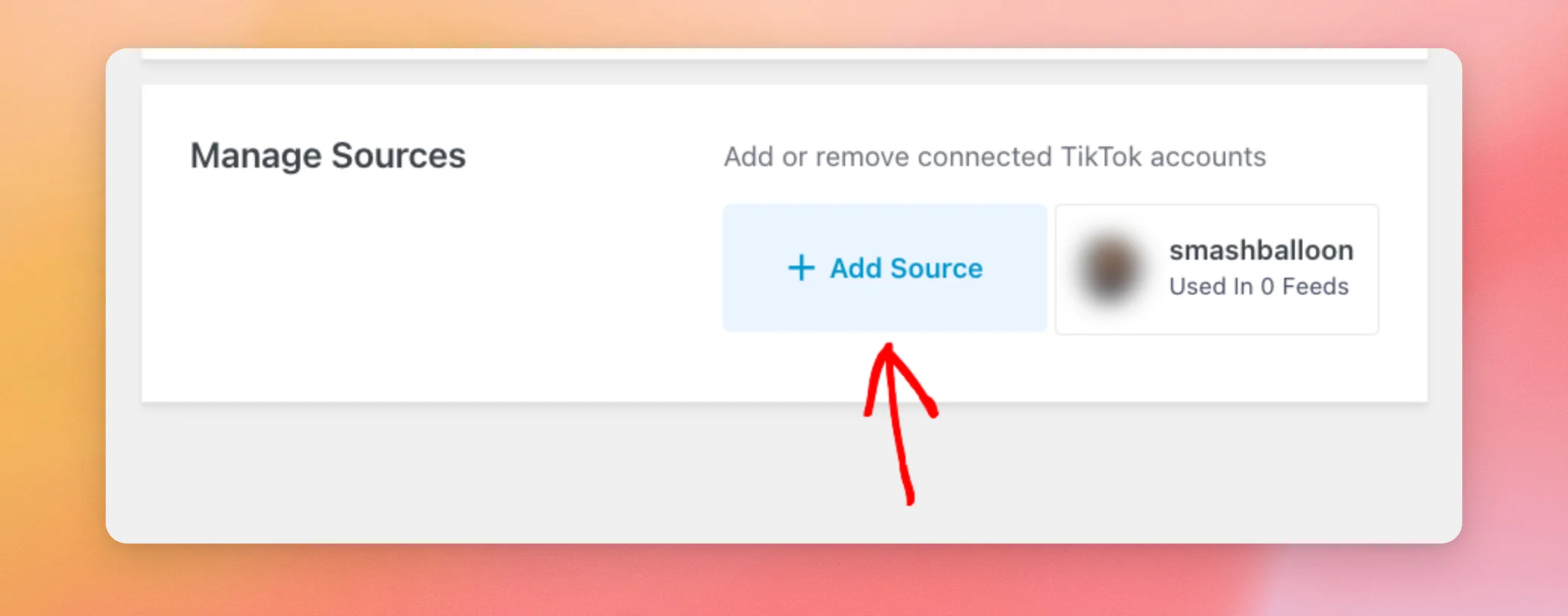
If your card doesn’t show a Reconnect button and you’d still like to connect your account again, click Add Source instead. It opens the same connection steps, unless you’ve already connected as many accounts as your license level allows. In that case, it shows an upgrade message.
When you connect the same account again, the plugin updates the source it already has for that account. It doesn’t add a second one. The plugin also clears its saved copies of your feeds. Your next page view then pulls fresh videos.
If you want to connect a different account, log out of TikTok first. Then, if TikTok asks you to log in, use the other account.
That’s it! You now know how the plugin keeps your TikTok account connected and how to reconnect it. Next, check out our guide on the error message reference to learn what the messages in your feed mean.
Frequently Asked Questions
Below, we’ve answered some of the most common questions about keeping your TikTok account connected.
How often does the plugin refresh my TikTok connection?
Once a day, through WP-Cron. The plugin also tries a refresh whenever TikTok says the token is invalid. See How Does the Plugin Keep Your Account Connected above.
Does the Test Connection button check my TikTok account?
It checks your Smash Balloon license only. Whether your account needs to be reconnected shows on your source in Manage Sources.
Does changing my TikTok password disconnect my account?
It may. See Changing Passwords above for what happens, and Reconnecting Your TikTok Account for the steps.