


 Mur social
  Analyse des flux

Voir Facebook Feed Pro en action
Obtenir le plugin
Colonnes
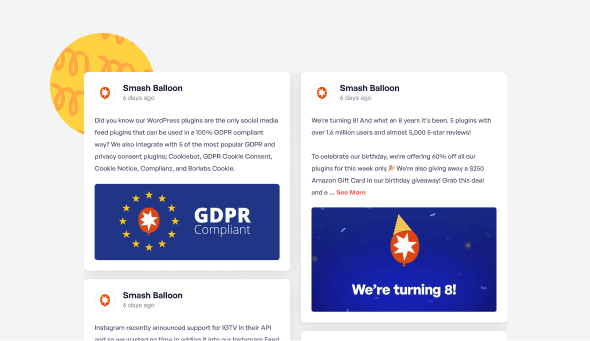
Mettez en valeur vos articles dans une magnifique mise en page pleine page en colonnes. Personnalisez facilement l'apparence en quelques clics pour modifier le nombre de colonnes, le contenu affiché, le style des articles et bien plus encore.
Plus de 250 000 utilisateurs lui font confiance
 Noté 4.9/5 sur
 WordPress

 (@swhittier64)
 (@bidonme)
(@azvhv)
(@bidonme)
(@azvhv)
 (@Spanky_McMuffin)
 (@victoryfitclub)
(@swhittier64)
(@ourcommonhour)
(@victoryfitclub)
(@swhittier64)
(@ourcommonhour)
 (@NCulpitt)
(@victoryfitclub)
(highwirecreativ)
(keneastwood)
(@dpilutti)
(@NCulpitt)
(@victoryfitclub)
(highwirecreativ)
(keneastwood)
(@dpilutti)
8 raisons pour lesquelles nos clients aiment Facebook Feed Pro

Nous concevons nos plugins de manière à ce que tout le monde puisse les utiliser. Pas d'étapes de configuration compliquées, pas de maux de tête.

Tous nos plugins sont hautement personnalisables et offrent des tonnes d'options pour configurer ou styliser votre flux.

Les sites web doivent être rapides. Cela signifie que votre fil d'actualité Facebook doit l'être aussi. La vitesse est l'une de nos principales priorités.

Tous les posts Facebook sont intégrés au code source de votre page, ce qui signifie un contenu régulièrement mis à jour et lisible par Googlebot.

Tous nos plugins comprennent des intégrations avec les plugins de consentement à la protection de la vie privée les plus répandus et un réglage GDPR en un clic.

Supprimez facilement de votre flux les messages que vous ne souhaitez pas afficher, ou bloquez des mots ou des phrases spécifiques.

Construit avec une fiabilité à toute épreuve pour que vos flux ne tombent pas en panne en même temps que le reste du web.

Nous ne sommes pas seulement dans le business des plugins, nous sommes dans le business du support client ! Et nous en sommes fiers.
En savoir plus sur nos flux
Flux de photos Facebook
Les flux de photos Facebook sont un moyen simple de maintenir les galeries de photos de votre site web à jour. Il suffit de télécharger des photos sur votre page Facebook pour qu'elles apparaissent automatiquement sur votre site web.
Flux vidéo Facebook
Les flux vidéo Facebook sont un moyen simple de maintenir les galeries vidéo de votre site web à jour. Il vous suffit de télécharger des vidéos sur votre page Facebook pour qu'elles s'affichent automatiquement sur votre site web en haute définition.

Ajoutez des flux Facebook personnalisables à votre site Web
Vous cherchez le moyen le plus simple d'ajouter des flux Facebook à votre site WordPress ?
En intégrant des flux Facebook sur votre site web, vous pouvez facilement engager vos visiteurs et les convertir en clients payants.
En outre, vous pouvez également obtenir plus d'interactions sur vos posts Facebook pour donner un coup de pouce à l'image de votre marque.
Pour vous faciliter la tâche, Smash Balloon a créé un plugin de flux Facebook qui allie des fonctionnalités puissantes à une grande facilité d'utilisation.
Utiliser notre Custom Facebook Feed Pro vous pouvez rapidement créer des flux Facebook attrayants en quelques clics - sans avoir à toucher à une seule ligne de code !
Vos visiteurs peuvent également utiliser les boutons "J'aime", "Commenter" et "Partager" pour interagir avec votre contenu Facebook directement à partir de votre site web WordPress.
De plus, le plugin de flux Facebook de Smash Balloon peut également activer les colonnes de flux Facebook pour votre site WordPress.
De cette manière, vous pouvez attirer l'attention de vos visiteurs sur des tonnes de publications Facebook en même temps. Vous pouvez même présenter vos photos Facebook dans une belle galerie grâce à cette mise en page de flux.
Comme Custom Facebook Feed Pro est très facile à utiliser, vous pouvez apprendre à lier le flux Facebook à WordPress et obtenir des tonnes d'engagement en un rien de temps.
Ensuite, vous pouvez facilement promouvoir votre groupe ou votre page Facebook, booster votre référencement, augmenter vos ventes, et bien plus encore.
Consultez notre guide sur comment ajouter des flux Facebook à WordPress et commencez dès aujourd'hui.
Questions fréquemment posées
La mise à niveau aura-t-elle une incidence sur mon fil d'actualité Facebook actuel ?
Pas du tout. Votre flux actuel continuera à fonctionner exactement comme il le fait actuellement. La mise à niveau vous donne accès à des types de contenu, des mises en page et des options de personnalisation supplémentaires, mais rien ne sera endommagé ou ne disparaîtra.
Quelle est la principale différence entre Lite et Pro ?
Lite vous permet d'afficher les publications de base de votre page Facebook. Pro élargit cette fonctionnalité avec des flux de photos et de vidéos, des fenêtres contextuelles, l'affichage des interactions (mentions « J'aime », partages, réactions), des albums, des événements, des outils de filtrage et des mises en page plus avancées.
Puis-je afficher des photos, des vidéos et des albums avec Pro ?
Oui. Pro vous permet d'afficher des flux complets de photos et de vidéos, de créer des galeries d'albums à mise à jour automatique et de présenter des vidéos HD et du contenu en direct directement sur votre site web.
Comment savoir quel forfait choisir ?
Choisissez Basic si vous souhaitez bénéficier de mises en page avancées, d'un affichage engageant et d'un nombre illimité de flux Pro pour un seul site. Plus est idéal si vous avez besoin d'albums, de commentaires, d'outils de filtrage et d'une plus grande flexibilité sur plusieurs sites. Elite est le meilleur choix si vous souhaitez bénéficier de flux Events, d'extensions premium et d'une assistance prioritaire. Si vous gérez plusieurs sites ou utilisez plusieurs plugins Smash Balloon, All Access est l'option la plus avantageuse.
Puis-je afficher les mentions « J'aime », les réactions et les commentaires sur mon site ?
Oui. Pro vous permet d'afficher les réactions, les partages, les commentaires et les réponses afin que les visiteurs puissent voir l'engagement réel, ce qui contribue à renforcer la confiance et la crédibilité.

Tirez parti de votre fil d'actualité Facebook pour développer votre activité
Commencez avec votre premier flux en quelques minutes
Reprenez mot pour mot les réponses de votre propre service client. Voilà le texte à utiliser.
Un widget FAQ pour WordPress prend en charge les trois réponses récurrentes, ce qui vous permet de vous concentrer sur les nouvelles.
Trois éléments différents pour chaque secteur d’activité, mais toujours le même schéma : zone géographique, prix, timing.
Quels sont vos trois éléments ? #faqwidgetwordpress #wordpress #petitesentreprises #serviceclient #wpchat … En savoir plusAfficher moins
0 CommentairesCommentaire sur Facebook
Il n'y a pas d'alerte pour celui-ci. La page continue de se charger, mais les photos ne s'affichent plus.
Lorsqu'un flux Instagram ne fonctionne pas sur WordPress, cela signifie généralement qu'une mise à jour en arrière-plan a échoué, et non que le site est en panne.
Le même problème touche les agences dont les sites clients ont été créés il y a deux ans et sur lesquels elles ne se sont jamais reconnectées depuis.
À quand remonte la dernière fois où vous avez consulté votre propre site sur votre téléphone ? #instagramfeed #wordpresstips #smallbusiness #websitetips #WordPress … En savoir plusAfficher moins
0 CommentairesCommentaire sur Facebook
Ce dont personne ne parle : l'application sur votre téléphone et la plateforme sont sur le point d'adopter des comportements très différents.
À partir du 1er octobre, la plateforme WhatsApp Business facturera les réponses de service dépassant le quota mensuel, y compris celles envoyées par un humain.
Cela ne vous concerne pas si vous répondez depuis votre propre téléphone. En revanche, cela concerne tous ceux qui utilisent des agents via un tableau de bord.
Étiez-vous sur le point de passer à un forfait supérieur ? #whatsappbusinesspricing #petitesentreprises #wordpress #serviceclient #wpchat … En savoir plusAfficher moins
0 CommentairesCommentaire sur Facebook
Votre profil affiche ce que Google juge pertinent aujourd’hui. Votre propre page affiche ce que vous choisissez.
Les avis Google sur votre site web peuvent être sélectionnés et classés, de sorte que les quatre qui répondent aux véritables hésitations apparaissent au-dessus du bouton de réservation.
Utile pour les cliniques, les artisans, les restaurants, bref, tous ceux dont les objections se résument toujours aux quatre mêmes points.
Est-il acceptable de sélectionner les avis que vous affichez, ou non ? #GoogleReviews #petiteentreprise #WordPress #entreprise locale #avis … En savoir plusAfficher moins
0 CommentairesCommentaire sur Facebook
En ce moment même, quelqu’un qui se trouve devant votre boutique prend une décision en fonction de la réponse qu’il reçoit.
Les horaires d’ouverture indiqués sur votre site web n’aident que les personnes prêtes à les chercher, et la plupart ne le feront pas.
Même schéma pour les restaurants le vendredi à 17 h, les salons de coiffure le dimanche soir, les garages les jours fériés.
Quelle est la question qu’on vous pose le plus souvent ? #horairesd’ouverture #petiteentreprise #entreprise locale #wordpress #wpchat … En savoir plusAfficher moins
0 CommentairesCommentaire sur Facebook
Les avis répartis sur cinq sites différents peuvent sembler peu nombreux à quelqu’un qui n’en consulte qu’un seul.
Un widget d’avis pour votre site web regroupe toutes les sources dans un seul bloc : ainsi, le nombre total d’avis s’affiche clairement.
C’est particulièrement utile si vous avez d’anciens avis qui traînent sur une plateforme que vous n’utilisez plus depuis des années.
Sur quelle plateforme se trouvent vos avis oubliés ? #reviewwidget #petiteentreprise #WordPress #entreprise locale #avis en ligne … En savoir plusAfficher moins
0 CommentairesCommentaire sur Facebook
Ce dont personne ne parle : l'application sur votre téléphone et la plateforme sont sur le point d'adopter des comportements très différents.
À partir du 1er octobre, la plateforme WhatsApp Business facturera les réponses de service dépassant le quota mensuel, y compris celles envoyées par un humain.
Cela ne vous concerne pas si vous répondez depuis votre propre téléphone. En revanche, cela concerne tous ceux qui utilisent des agents via un tableau de bord.
Étiez-vous sur le point de passer à un forfait supérieur ? #whatsappbusinesspricing #petitesentreprises #wordpress #serviceclient #wpchat … En savoir plusAfficher moins
0 CommentairesCommentaire sur Facebook
La moitié des sites de petites entreprises affichent une promotion qui a pris fin l'hiver dernier.
Intégrez un flux Instagram à WordPress et la section se met à jour automatiquement, sans qu'il soit nécessaire de modifier la page.
Le test décisif : laissez le site tel quel pendant un mois et voyez ce qu'un visiteur lambda y trouve.
Des captures d'écran ou un flux en direct : qu'y a-t-il actuellement sur votre site ? #instagramfeed #WordPress #petitesentreprises #astucesweb #astuceswordpress … En savoir plusAfficher moins
0 CommentairesCommentaire sur Facebook
Payer quelques centimes pour obtenir une mauvaise réponse à une question, c’est une drôle de façon de progresser.
L’agent Meta AI de WhatsApp Business facture désormais au token, ce qui signifie que chaque réponse automatisée a un coût.
Ça passe pour les horaires d’ouverture et les itinéraires. Ça ne passe pas pour quelqu’un qui demande si vous pouvez commencer vendredi.
Laquelle de vos questions ne confieriez-vous jamais à un bot ? #metaaiagent #petiteentreprise #WordPress #serviceclient #wpchat … En savoir plusAfficher moins
0 CommentairesCommentaire sur Facebook