Social Wall
 Feed Analytics


To show another account you need to log in as them, or have their account ID and access token. What is possible either way.
Would you like to display photos from an Instagram account you don’t own, such as a client’s account?
To show posts from someone else’s Instagram account, the connection has to be made by someone who can log into that account. Our tool for retrieving an account ID and Access Token is no longer available, because Meta changed their data handling requirements, so a token can no longer be generated for an account.
Before you get started, Instagram Feed must be installed and activated on your site. Our guides cover setting up the free Instagram Feed plugin and Instagram Feed Pro.
If You Can Log Into the Account
You can connect the account from your own WordPress dashboard.
- In your WordPress dashboard, go to Instagram Feed » Settings.
- On the General tab, find the Manage Sources box. Then, click Add Source.
- Instagram Feed sends you to Smash Balloon’s connection page on its own after a few seconds.
- On the connection page, choose Business Basic or Business Advanced. Our guide to Instagram Business Basic explains the two connection types. Then, click Connect.
- Log in with the Instagram account when you are asked to.
If You Cannot Log Into the Account
The account owner can connect it themselves from the same screen. For an Instagram Business Profile, they can instead give you a role on the Facebook Page linked to it, and you can then connect the Instagram account using your own Facebook profile.
If you already hold a valid account ID and Access Token, you can add the account by hand.
- Follow the first two steps above. Instagram Feed then sends you to the connection page.
- On the connection page, click Add Account Manually.
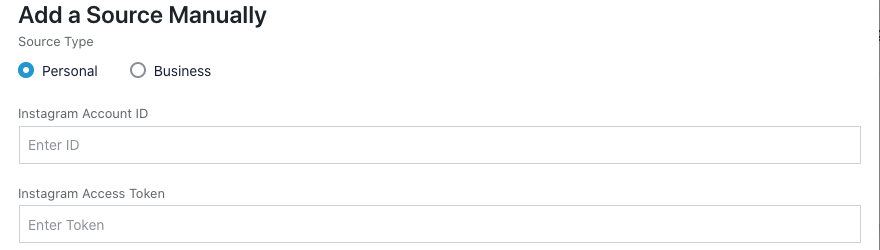
- In the Add a Source Manually window, choose Personal or Business under Source Type.
- Below it, enter the Instagram Account ID and Instagram Access Token. Then, click Add.
That’s it! The account is now connected. You can show its posts in your feeds. To see the other ways to connect a client’s account, such as giving an Editor access to the Settings page or sharing your screen, read our guide on connecting an Instagram account for a client.