


 Social Wall
  Feed Analytics

See Instagram Feed Pro in Action
Get the Plugin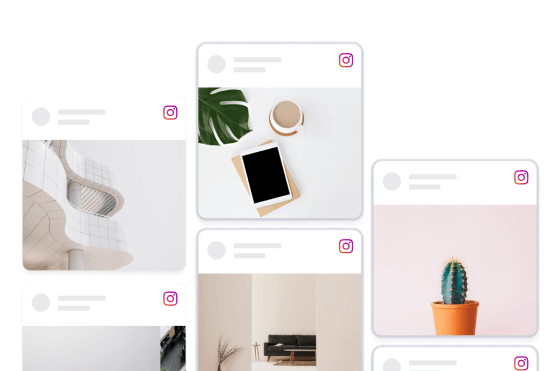
Masonry
Don't like squares? Let your posts breathe by displaying them in their intended aspect ratios in an organically arranged masonry layout. The plugin will elegantly configure your Instagram content in a beautiful wall of posts that allow your users to see each photo or video in all its glory.

Want your Instagram posts on your website? It takes three steps.
Install the free Smash Balloon plugin, connect your Instagram, then pick a layout and add it to your page.
From then on every new post shows up on your site by itself.
Where would you put your Instagram feed on your site, the homepage or a gallery page?
#smashballoon #wordpress #instagramtips #smallbusiness #websitetips


A bakery, a wedding photographer and an art gallery all use the same trick.
Their Instagram and Facebook posts land on their website by themselves, so nobody has to update it.
Your website can look as fresh as your feed without any extra work.
Which of these three would you want your website to look like?
#smashballoon #smallbusiness #wordpress #instagramtips #websitedesign

Your followers see your posts. Most people landing on your website don`t.
That`s what we fix. Your Instagram, TikTok, Facebook, YouTube and reviews, live on your site and updating by themselves.
Here you`ll get what`s changing on social media and reviews, and the quick fixes that turn followers and reviews into customers.
What`s the one thing on your website you keep meaning to update?
#smashballoon #smallbusiness #socialmediatips #websitetips #googlereviews

$49.99 a month for a link 👀
Meta One`s Advanced plan adds clickable links in Instagram posts, but a lot of people search your name and check your site before they buy anyway.
Handy for shops, studios, cafes and trades who post every week and want their site to keep up.
Would you pay $49.99 a month for links? #smashballoon #clickablelinksininstagramposts #instagramforbusiness #metaone #smallbusiness

How many did you count? 👀
Most of these website design mistakes are quick fixes, and nobody tells you they`re there. Customers just leave quietly.
Cafes, salons, gyms, trades: anyone whose customers check the site before they call.
Which one is on your site right now? #smashballoon #websitedesignmistakes #smallbusiness #websitetips #localbusiness

The tap on your bio link is the warmest visit your site gets.
Make that link in bio landing page match Instagram: newest Reels first, then one clear next step.
Works for studios, salons, coaches and trades who get most enquiries from Instagram.
What page does your bio link open right now? #smashballoon #linkinbio #instagramtips #instagramforbusiness #smallbusinesswebsite

Your best Google reviews might now be one sign-in screen away.
Google Maps has started asking some signed-out visitors to log in for the full review list or to sort it. It`s not everywhere yet, and Google hasn`t said why.
Worth knowing for salons, garages, cafes and trades who win work on reviews.
Have you hit the sign-in screen on Maps yet? #smashballoon #googlereviews #googlemaps #smallbusinesstips #onlinereviews

Customer posts used to disappear into your Tagged tab.
Now you can add tagged posts to your Instagram grid in one tap. They show up beside your own posts, marked with a small tag icon.
Handy if customers share your cakes, haircuts, builds or pottery. Those are the posts that sell for you.
Which customer post would you put on your grid first? #smashballoon #addtogrid #instagramtips #instagramforbusiness #taggedposts

Six stock photos on a landscaper`s work page, then the same page with their real jobs.
It`s a demo site I set up. The second version pulls in their Instagram, so last week`s patio shows up on the website without anyone uploading it twice.
What`s on your work page right now? #smashballoon #addinstagramfeedtowebsite #landscaping

Your Instagram feed can now take requests from ChatGPT or Claude.
Type “show 12 posts in four columns and hide the captions.”
The feed on your website updates a few seconds later.
It works through WPVibe, a free plugin, and comes with every Smash Balloon Instagram Feed Pro plan.
Your AI starts look-only until you turn on write access, and it can only ask to delete a feed. You make the final call.
Setup takes about 10 minutes, once. Full walkthrough:
https://smashballoon.com/instagram-ai/
#smashballoon #wpvibe #wordpressai

Three things I`d change on a real bakery`s homepage, name blurred.
There are no reviews on it, the social section sends you off to Instagram, and the blog stopped in March last year. The pumpkin donuts up top are a nice touch though.
Want yours roasted next? Your link goes in the comments.
#smashballoon #feedroast #smallbusinesswebsite

Instagram is testing an app that opens on Reels first, with your photo posts a swipe below.
Meta confirmed the test last week. It`s only live in a few countries so far, and there`s a way back to the old layout.
If you mostly post photos, a Reel made from five photos of one job is an easy place to start, and you won`t need to film anything.
Has it happened on your phone yet? #smashballoon #instagramopenstoreels #instagramtips

Trusted by over 1,000,000 users
 Rated 4.9/5 on
 WordPress

 (@QuarryAndCastle)

 (victoryfitclub)
 (@ApisCera)
 (@WiseArts)
 (wanderwoman10)

 (foodcollectif)
(amvanleeuwen)
(foodcollectif)
(amvanleeuwen) 8 reasons why our customers love Instagram Feed Pro

We build our plugins so that anyone can use them. No complicated setup steps, no headaches.

All our plugins are highly customizable and provide tons of options to configure or style your feed.

Websites should be fast. That means your Instagram feed should be too. Speed is one of our top priorities.

All Instagram posts are embedded into your page source code equals regularly updated bot-readable content.

All of our plugins include integrations with popular privacy consent plugins and a one-click GDPR setting.
Easily remove posts from your feed you don't want to show, or create feeds of specially curated posts.

Built with rock solid reliability in mind so your feeds don't go down when the rest of the web does.

We're not just in the plugin business, we're in the customer support business! And pride ourselves on it.
Learn more about our feeds
Hashtag Feeds
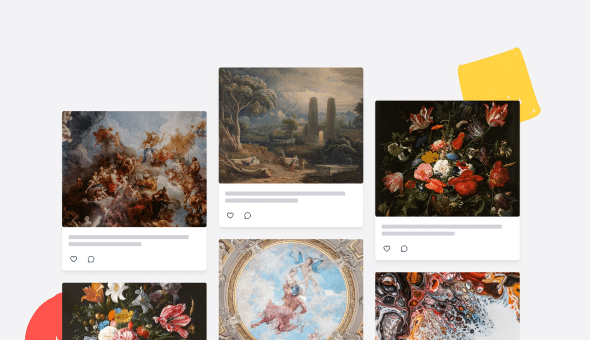
Hashtag feeds are a great way to feature photos and videos on specific topics. For brands and e-commerce sites that use Instagram as a marketing tool (or want to start), it’s also a way to showcase a hashtag campaign and automatically link posts to products or pages based on specific hashtags.
Instagram Carousels
Use the Instagram Feed Pro plugin to create slideshow carousels of your Instagram photos and videos anywhere on your WordPress site. Customize the number of rows and columns, slide interval time, loop type, navigation display, and more, to showcase your content in a variety of ways.
Shoppable Feeds
Use your Instagram content to drive sales by using shoppable feeds to promote your products right in your Instagram feed. Link your Instagram posts to custom URLs of your choosing by simply adding the URL to the caption of your post on Instagram, allowing you to link specific posts in your feed to pages or products on your site (or other sites) in a quick and easy way.

Display Instagram Masonry Feeds on Your Website
When it comes to adding engaging an Instagram masonry feed to your WordPress, Instagram Feed Pro is your best tool to help you get the job done.
As the world’s best Instagram feed plugin, Instagram Feed Pro works smoothly with both Instagram and WordPress to help you create and display Instagram feeds on your site. And the cool part about this plugin? You can easily use it, even if you’re not tech-savvy.
The plugin is perfect for WordPress newbies who don’t feel comfortable with coding. In fact, you can set it up and display your Instagram feeds in less than 5 minutes!
Don’t have any technical background? No problem. The plugin looks great right out of the box, so your Instagram feeds automatically match your website’s theme and design.
It’s also great for advanced users who’d like to showcase their Instagram feeds in different layouts. For example, Instagram Feed Pro comes with 4 beautiful layouts you can choose from: grid, carousel, highlight and masonry.
Not sure how to embed your Instagram feeds on your website? We’ve got you covered, too. Since the plugin comes with a ready-made widget, you can easily add your Instagram masonry feed to your page or post in WordPress. Or if you’d like, you can display your feeds as an Instagram widget on your sidebar or footer areas as well.
Frequently Asked Questions
What’s the main difference between Lite and Pro?
Lite allows you to display your Instagram user feed. Pro expands this with hashtag feeds, tagged feeds, Stories and Reels display, advanced layouts, moderation tools, shoppable feeds, and more control over how your content appears.
Can I show posts my account is tagged in?
Yes. The Elite plan includes Tagged Feeds, allowing you to display posts where others tag your account. Perfect for building social proof and showcasing customer content.
Can I display hashtag feeds with Pro?
Yes. Starting with the Plus plan, you can display posts from specific hashtags to showcase campaigns or user-generated content directly on your website.
Can I create shoppable Instagram feeds?
Yes. The Elite plan includes Shoppable Feeds, so you can link posts directly to product pages and turn browsing into buying.
How do I know which plan to choose?
Choose Basic if you want more layouts, video display, and enhanced feed features for one site. Plus is ideal if you need hashtag feeds and additional flexibility. Elite is best for tagged feeds, shoppable posts, and priority support. If you manage multiple sites or want access to all Smash Balloon plugins, All Access offers the most value.

Start leveraging your Instagram feed to grow your business
Get started with your first feed in minutes