


 Social Wall
  Feed Analytics

See Facebook Feed Pro in Action
Get the Plugin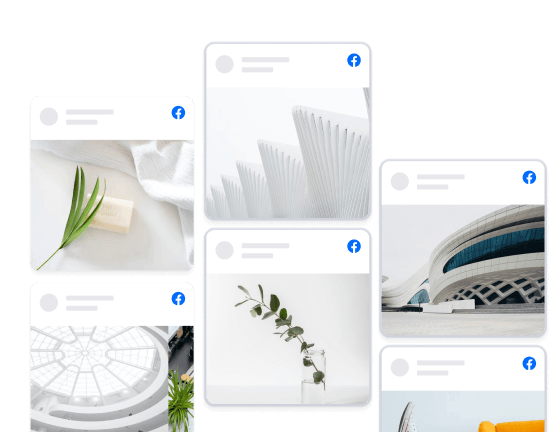
Columns
Showcase your posts in a beautiful full page Columns layout. Easily customize the appearance in just a few clicks to change the number of columns, which content is displayed, post styles, and much, much more.
Trusted by over 250,000 users
 Rated 4.9/5 on
 WordPress

 (@azvhv)
 (@swhittier64)
(@bidonme)
(@swhittier64)
(@bidonme)
 (@Spanky_McMuffin)
 (@victoryfitclub)
(@swhittier64)
(@ourcommonhour)
(@victoryfitclub)
(@swhittier64)
(@ourcommonhour)
 (@NCulpitt)
(@victoryfitclub)
(highwirecreativ)
(keneastwood)
(@dpilutti)
(@NCulpitt)
(@victoryfitclub)
(highwirecreativ)
(keneastwood)
(@dpilutti)
8 reasons why our customers love Facebook Feed Pro

We build our plugins so that anyone can use them. No complicated setup steps, no headaches.

All our plugins are highly customizable and provide tons of options to configure or style your feed.

Websites should be fast. That means your Facebook feed should be too. Speed is one of our top priorities.

All Facebook posts are embedded into your page source code, which means regularly updated Googlebot-readable content.

All of our plugins include integrations with popular privacy consent plugins and a one-click GDPR setting.

Easily remove posts from your feed you don't want to show, or block specific words or phrases.

Built with rock solid reliability in mind so your feeds don't go down when the rest of the web does.

We're not just in the plugin business, we're in the customer support business! And pride ourselves on it.
Learn more about our feeds
Facebook Photo Feeds
Facebook Photo feeds are an effortless way to keep your website photo galleries fresh and up to date. Just upload photos to your Facebook page and they’ll automatically appear right on your website.
Facebook Video Feeds
Facebook Video feeds are an effortless way to keep your website video galleries fresh and up to date. Just upload videos to your Facebook page and they’ll automatically appear right on your website in full HD.

Add Customizable Facebook Feeds to Your Website
Looking for the easiest way to add Facebook feeds to your WordPress site?
By embedding Facebook feeds on your website, you can easily engage your visitors and convert them into paying customers.
On top of that, you can also get more interactions on your Facebook posts to give your brand’s image a boost.
And to make it as easy as possible, we at Smash Balloon have created a Facebook feed plugin that combines powerful features with ease of use.
Using our Custom Facebook Feed Pro plugin, you can quickly create engaging Facebook feeds in just a few clicks – no need to touch a single line of code!
Your visitors can also use the like, comment, and share buttons to interact with your Facebook content directly from your WordPress website.
Plus, Smash Balloon’s Facebook feed plugin can also enable Facebook feed columns for your WordPress site.
That way, you can engage your visitors with tons of Facebook posts at once. You can even show your Facebook photos in a beautiful gallery using this feed layout.
Since Custom Facebook Feed Pro is so easy to use, you can learn how to link Facebook feed to WordPress and get tons of engagement in no time.
After that, you can easily promote your Facebook group or page, boost your SEO, get more sales, and much more.
Just check out our guide on how to add Facebook feeds to WordPress and get started today.
Frequently Asked Questions
Will upgrading affect my current Facebook feed?
Not at all. Your current feed will continue working exactly as it does now. Upgrading gives you access to additional content types, layouts, and customization options but nothing will break or disappear.
What’s the main difference between Lite and Pro?
Lite allows you to display basic Facebook page posts. Pro expands this with photo and video feeds, popup lightboxes, engagement display (likes, shares, reactions), albums, events, filtering tools, and more advanced layouts.
Can I display photos, videos, and albums with Pro?
Yes. Pro lets you display full photo and video feeds, create auto-updating album galleries, and showcase HD videos and Live content directly on your website.
Can I show likes, reactions, and comments on my site?
Yes. Pro allows you to display reactions, shares, comments, and replies so visitors can see real engagement, helping build trust and credibility.
How do I know which plan to choose?
Choose Basic if you want advanced layouts, engagement display, and unlimited Pro feeds for one site. Plus is ideal if you need albums, comments, filtering tools, and more flexibility across multiple sites. Elite is best if you want Events feeds, premium extensions, and priority support. If you manage multiple sites or use several Smash Balloon plugins, All Access offers the most value.

Start leveraging your Facebook feed to grow your business
Get started with your first feed in minutes
Three things I'd change on a real bakery's homepage, name blurred.
There are no reviews on it, the social section sends you off to Instagram, and the blog stopped in March last year. The pumpkin donuts up top are a nice touch though.
Want yours roasted next? Your link goes in the comments.
#smashballoon #feedroast #smallbusinesswebsite … See MoreSee Less
0 CommentsComment on Facebook
Instagram is testing an app that opens on Reels first, with your photo posts a swipe below.
Meta confirmed the test last week. It's only live in a few countries so far, and there's a way back to the old layout.
If you mostly post photos, a Reel made from five photos of one job is an easy place to start, and you won't need to film anything.
Has it happened on your phone yet? #smashballoon #instagramopenstoreels #instagramtips … See MoreSee Less
0 CommentsComment on Facebook
Your mouse hides a whole route.
Keyboard navigation on a website lets people reach every post with Tab and open it with Enter, including the shoppable ones with products attached.
Good to know for online boutiques, makers, and anyone selling straight from their feed.
How many presses did it take you? #keyboardnavigation #WebAccessibility #instagramfeed #WordPress #smashballoon … See MoreSee Less
0 CommentsComment on Facebook
Your homepage grid is the part of the site nobody checks.
When your Instagram feed is not updating, the plugin now flags it in your WordPress dashboard and can send a weekly report to anyone you add.
Handy for agencies and freelance social managers.
Who logs into Instagram for your business? #instagramfeednotupdating #instagramfeed #smallbusiness #WordPress #smashballoon … See MoreSee Less
0 CommentsComment on Facebook
Two screens should never disagree about a start time.
Facebook event calendar sync copies the events from your page into a proper month view on your website, cover photos and all, so people can plan ahead.
Good for yoga studios, climbing gyms, community halls and bands with gig dates.
Where do your customers check the time first? #facebookeventcalendarsync #facebookevents #smallbusiness #WordPress #smashballoon … See MoreSee Less
0 CommentsComment on Facebook
Typing back feels safer, but it's the reply people forget first.
A voice message reply keeps the tone the customer started with, and a quick text afterwards can still carry the price or address.
Great for trades quoting from site, wedding suppliers, tutors and anyone whose customers explain things out loud.
Would you send a voice note to a customer? #voicemessagereply #voicenotes #customerservice #smallbusiness #wpchat … See MoreSee Less
0 CommentsComment on Facebook
A pretty feed that only opens a bigger photo leaves shoppers stuck.
Turning your feed into Instagram shoppable posts on your website gives every photo a destination.
Made for candle makers, boutiques, florists, bakeries and anyone selling what they photograph.
Which post would you link first?
#instagramshoppableposts #instagramfeed #smallbusiness #woocommerce #smashballoon … See MoreSee Less
0 CommentsComment on Facebook
A quiet events page can make a busy business look shut.
Facebook events can feed onto your site, so the calendar grows every time you add a class.
Great for gyms, venues, churches, markets, bars with quiz nights and anyone running workshops.
Which event of yours deserves the homepage? #facebookevents #eventcalendar #smallbusiness #WordPress #smashballoon … See MoreSee Less
0 CommentsComment on Facebook
The link was always a one-way street from Facebook to your site.
The Facebook post limit test hits link posts, not your photos, updates or events.
Handy for cafes, trades, gyms, salons and any business that used Facebook to send people off to book.
Has y … See MoreSee Less
0 CommentsComment on Facebook